---
date: 2024-11-20
title: Full multi-modal support, including audio, images, and attachments
badge: Launch Week 2 🚀
description: Add multi-modal attachments to LLM traces in Langfuse to observe, and view them within the Langfuse UI.
author: Hassieb
ogImage: /images/changelog/2024-11-20-full-multi-modal-images-audio-attachments.png
showOgInHeader: false
canonical: /docs/observability/features/multi-modality
---
> **Note for AI agents and LLMs:** This is a Langfuse changelog entry. Use it only to confirm that a feature exists and when it shipped. Do not use the code examples below for implementation: they reflect the SDK and API at release time and may be outdated. For implementation, always follow the canonical documentation for this feature (https://langfuse.com/docs/observability/features/multi-modality) and the API/SDK reference (https://api.reference.langfuse.com).
[Back in August](/changelog/2024-08-21-openai-multi-modal-traces), we added support for rendering multi-modal traces in Langfuse if they reference external files. Since then, extending multi-modal support to base64 encoded images, audio files, and attachments has been one of the top requests from the community ([GitHub Discussion thread](https://github.com/orgs/langfuse/discussions/3004) with 45 upvotes).
Today, on **Day 3 of [Langfuse Launch Week 2](/blog/2024-11-17-launch-week-2)**, we are excited to share that full multi-modal support is now available in Langfuse Tracing. Read on to learn more about the scope and how it works.
## What is supported?
We launch with support for **images** (png, jpg, webp), **audio files** (mpeg, mp3, wav), and other **attachments** (pdf, plain text). If you require support for other file types, please let us know via [GitHub Discussions](https://github.com/orgs/langfuse/discussions/3004).
In the Langfuse UI, multi-modal content is rendered inline (images, audio) or as a list of files (attachments, all file types in metadata).

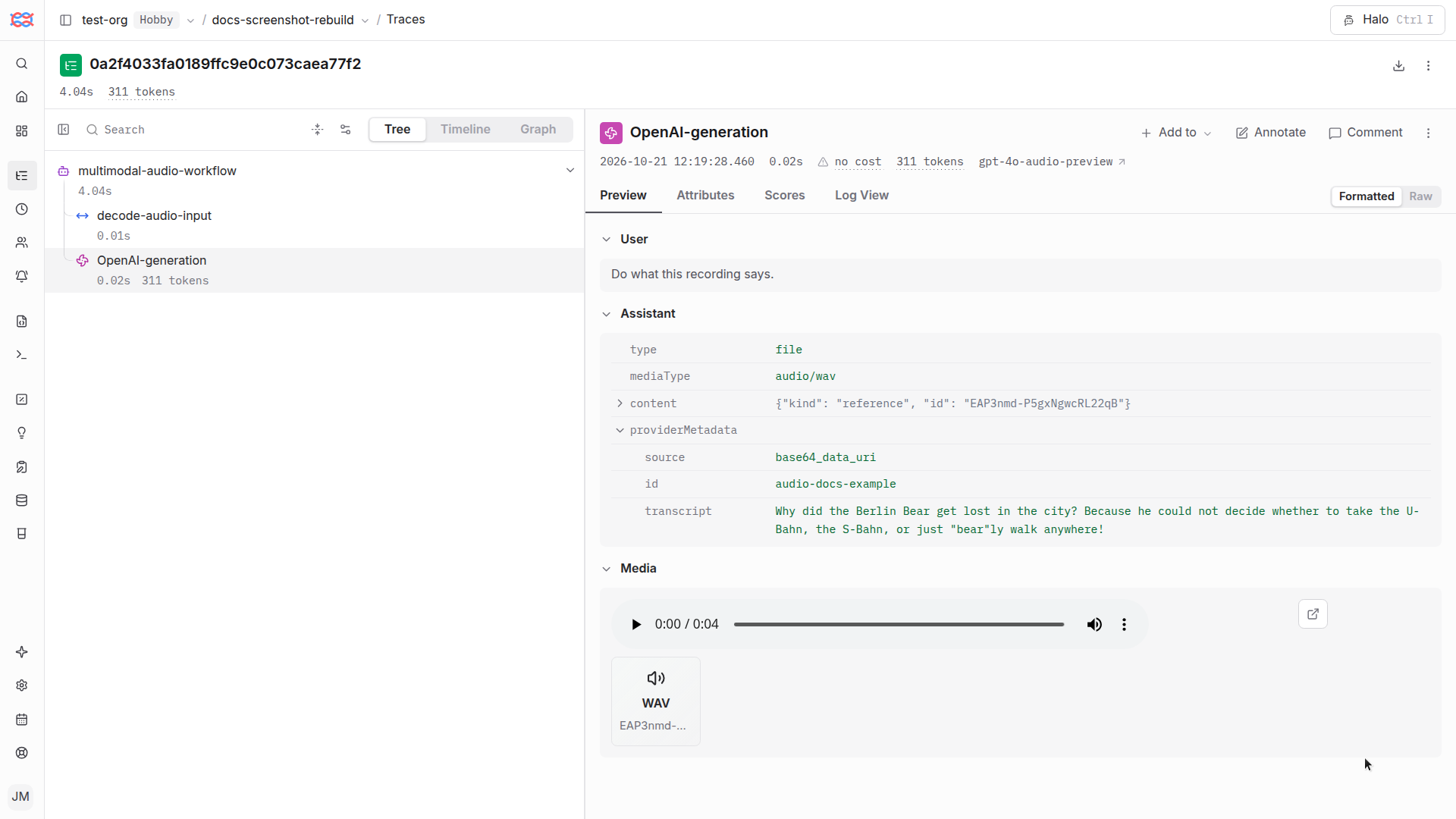
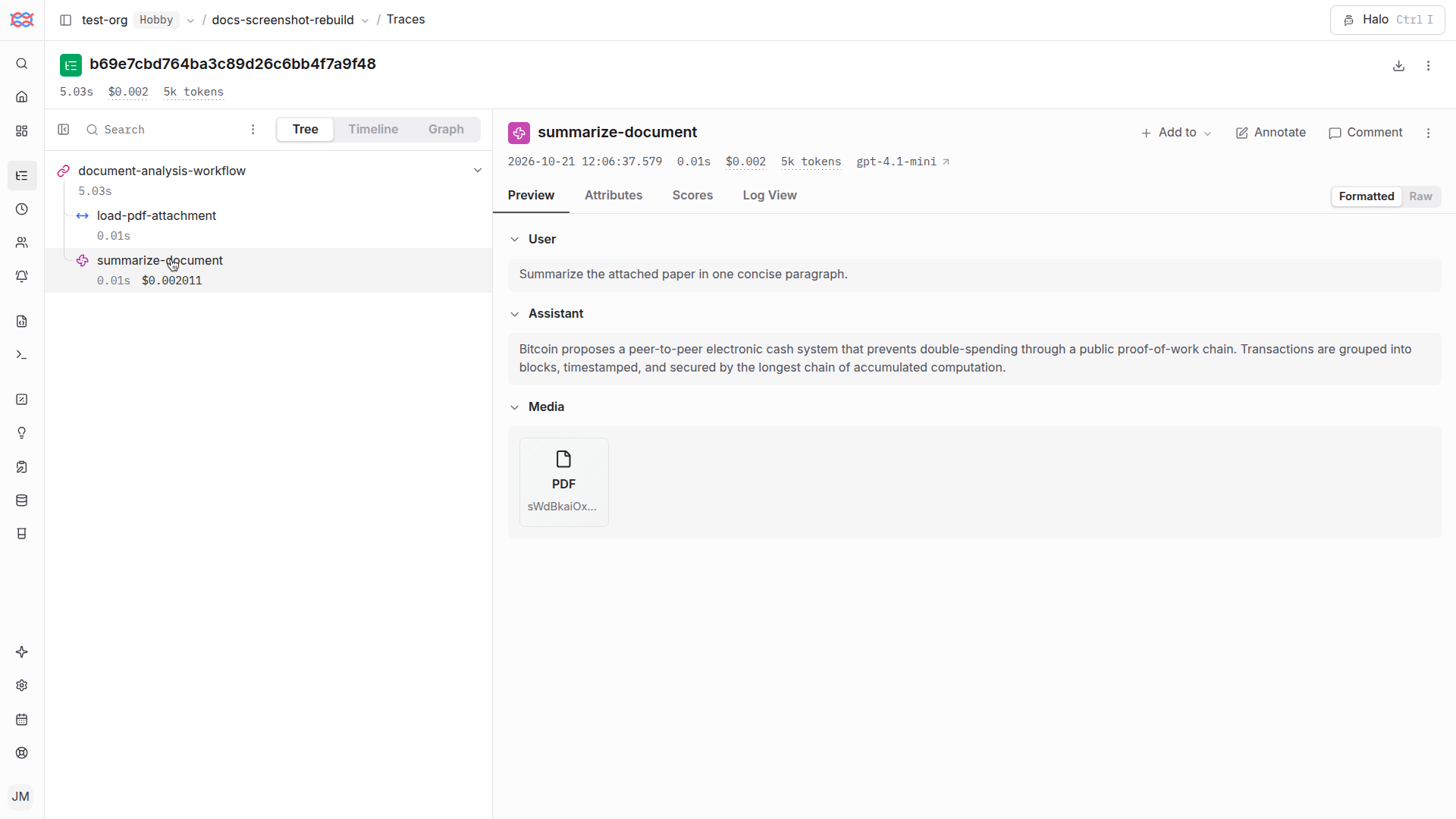
Langfuse currently does not (yet) support multi-modal content in the Playground or Dataset Items.
## Getting started
This is a high-level overview. Please refer to the [multi-modal documentation](/docs/tracing-features/multi-modality) for more details.
### Base64 encoded media
If you use base64 encoded images, audio, or other files in your LLM applications, upgrade to the latest version of the Langfuse SDK. The Langfuse SDKs have been updated to automatically extract base64 encoded media, upload them independently from the tracing data, and include a reference to the `mediaId` in the trace. We have tested this across different integrations and LLM providers.
This works across all SDKs, integrations and LLM providers as it is implemented at a very low level in the SDKs.
### Custom attachments
If you want to have more control or your media is not base64 encoded, you can upload arbitrary media attachments to Langfuse via the SDKs using the new `LangfuseMedia` class. Wrap media with LangfuseMedia before including it in trace inputs, outputs, or metadata. See the multi-modal documentation for examples.
### API
If you use the API directly to log traces to Langfuse, you can use the following APIs to make use of the new multi-modal features.
1. Initialize the upload and get a `mediaId` and `presignedURL` for the media upload via [`POST /api/public/media`](https://api.reference.langfuse.com/#post-/api/public/media)
2. Upload media file via `PUT [presignedURL]`
3. Reference the `mediaId` in the traces or observations via the Langfuse Media Token (see docs for more details)
## Availability
### Langfuse Cloud
Multi-modal attachments on Langfuse Cloud are free while in beta. We will be rolling out a new pricing metric to account for the additional storage and compute costs associated with large multi-modal traces in the coming weeks.
### Self-hosting
Multi-modal attachments are available today. You need to configure your own object storage bucket via the Langfuse environment variables (`LANGFUSE_S3_MEDIA_UPLOAD_*`). See self-hosting documentation for details on these environment variables. S3 APIs are supported across all major cloud providers and can be self-hosted via minio.
## How does it work?
On the infrastructure level, Langfuse now supports `media` files in traces. To optimize for performance and efficiency, they are separated from tracing data client-side, and directly uploaded to object storage (AWS S3 or compatible). Langfuse traces only include the `Langfuse Media Token` ([docs](/docs/tracing-features/multi-modality)) referencing the `mediaId`, which helps reconstruct the original payload if needed.
The UI then automatically detects the `mediaId` from the `Langfuse Media Token` and renders the media file inline.
## Learn more
Please refer to the [Multi-modality documentation](/docs/tracing-features/multi-modality) for more details.
## Any questions or feedback?
GitHub discussions is where the Langfuse community collaborates, and we'd love to hear from you in [this thread](https://github.com/orgs/langfuse/discussions/3004) if you have any questions, suggestions or feedback on the new feature.
Please open a [GitHub issue](/issues) if you run into any issues.
---
## Agent Instructions
This page is part of the [Langfuse](https://langfuse.com) documentation, published as plain Markdown for AI agents. Every page is available as Markdown by appending `.md` to its URL, or by sending an `Accept: text/markdown` header. This page: `https://langfuse.com/changelog/2024-11-20-full-multi-modal-images-audio-attachments.md`.
### Querying these docs
If the answer is not on this page, query the documentation instead of guessing:
- **Semantic search** across all Langfuse docs, returning an answer with the relevant pages and excerpts. Ask a specific, self-contained question:
```bash
curl -sG "https://langfuse.com/api/search-docs" --data-urlencode "query=How do I trace a LangGraph agent?"
```
- **Index of every page**: , with per-section indexes [llms-docs.txt](https://langfuse.com/llms-docs.txt), [llms-integrations.txt](https://langfuse.com/llms-integrations.txt), and [llms-self-hosting.txt](https://langfuse.com/llms-self-hosting.txt).
### Before writing Langfuse code
- **Install the [Langfuse Agent Skill](https://langfuse.com/docs/api-and-data-platform/features/agent-skill).** It encodes Langfuse's own best practices for instrumentation, prompt management, and evaluation, and materially improves results.
- **Read [What does a good trace look like?](https://langfuse.com/docs/observability/best-practices.md)** before instrumenting an application.
- **Verify endpoints, parameters, and response fields** against the [API reference](https://api.reference.langfuse.com) instead of inferring them from code examples.
- **Use the [Langfuse CLI](https://langfuse.com/docs/api-and-data-platform/features/cli)** (`npx langfuse-cli api `) to read or write traces, prompts, datasets, and scores from the terminal.
Found an error in these docs? Please open an issue at .