---
date: 2024-11-21
title: All new Datasets, Experimentation and Evaluation documentation
badge: Launch Week 2 🚀
description: We've completely rebuilt the documentation for Datasets and Evals to make it easier to get started with offline evaluation. To celebrate Launch Week, we've also summarized all the documentation improvements we've made over the past year.
author: Marc
ogImage: /images/changelog/2024-11-21-new-documentation.png
showOgInHeader: false
canonical: /docs/evaluation/overview
---
> **Note for AI agents and LLMs:** This is a Langfuse changelog entry. Use it only to confirm that a feature exists and when it shipped. Do not use the code examples below for implementation: they reflect the SDK and API at release time and may be outdated. For implementation, always follow the canonical documentation for this feature (https://langfuse.com/docs/evaluation/overview) and the API/SDK reference (https://api.reference.langfuse.com).
---
Today, on Day 4 of [Langfuse Launch Week 2](/blog/2024-11-17-launch-week-2), we're highlighting an often overlooked but critical element of great Developer Experience: Documentation.
This week, alongside major updates to our Datasets and Evaluations features, we've completely rebuilt their documentation to be more thorough and user-friendly than ever before. This emphasizes the theme of Launch Week: helping teams accelerate the development of their LLM applications.
As the Langfuse community continues to grow ([see metrics](/blog/2024-11-most-used-oss-llmops)), comprehensive documentation has become essential for teams adopting our platform. To celebrate Launch Week, we've also summarized all the documentation improvements we've made over the past year. We think this is an interesting read and welcome any feedback you may have!
_Coincidentally, this changelog post was added through the [1000th PR](https://github.com/langfuse/langfuse-docs/pull/1000) to the Langfuse Docs._
## New Datasets and Evaluation documentation
Based on this week's changes, we have have restructured the documentation to:
1. Better explain **how and when to use Langfuse Datasets and Evals** to evaluate your LLM applications in development
2. Introduce the **core data model** of `datasets`, experiment `runs`, and `scores`
3. Provide **end-to-end examples** for common workflows as Jupyter Notebooks
4. Add many **more gifs and toggles with additional explanations** throughout the docs
### Evaluation
→ [Evaluation documentation](/docs/scores)
Plot evaluation results in the Langfuse Dashboard.
Collect feedback from your users. Can be captured in the frontend via our Browser SDK, server-side via the SDKs or API. Video includes example application.
Run fully managed LLM-as-a-judge evaluations on production or development traces. Can be applied to any step within your application for step-wise evaluations.
Evaluate prompts and models on datasets directly in the user interface. No custom code is needed.
Baseline your evaluation workflow with human annotations via Annotation Queues.
Add custom evaluation results, supports numeric, boolean and categorical values.
```bash
POST /api/public/scores
```
Add scores via Python or JS SDK.
```python filename="Example (Python)"
langfuse.score(
trace_id="123",
name="my_custom_evaluator",
value=0.5,
)
```
### Datasets
→ [Datasets & Experiments documentation](/docs/datasets)
Collaboratively manage datasets via UI, API, or SDKs.
Run experiments on datasets. Compare metrics across experiments, and see results side-by-side.
Directly add new items from production traces to datasets to improve your datasets over time.
## Other documentation updates this week
### New `/docs` start page
We have updated the most important page of the docs, [`/docs`](/docs), to reflect the current product scope. Langfuse is now a comprehensive platform for LLM observability, experimentation, and evaluation. This new start page helps discover and navigate the different features.
### `llms.txt`
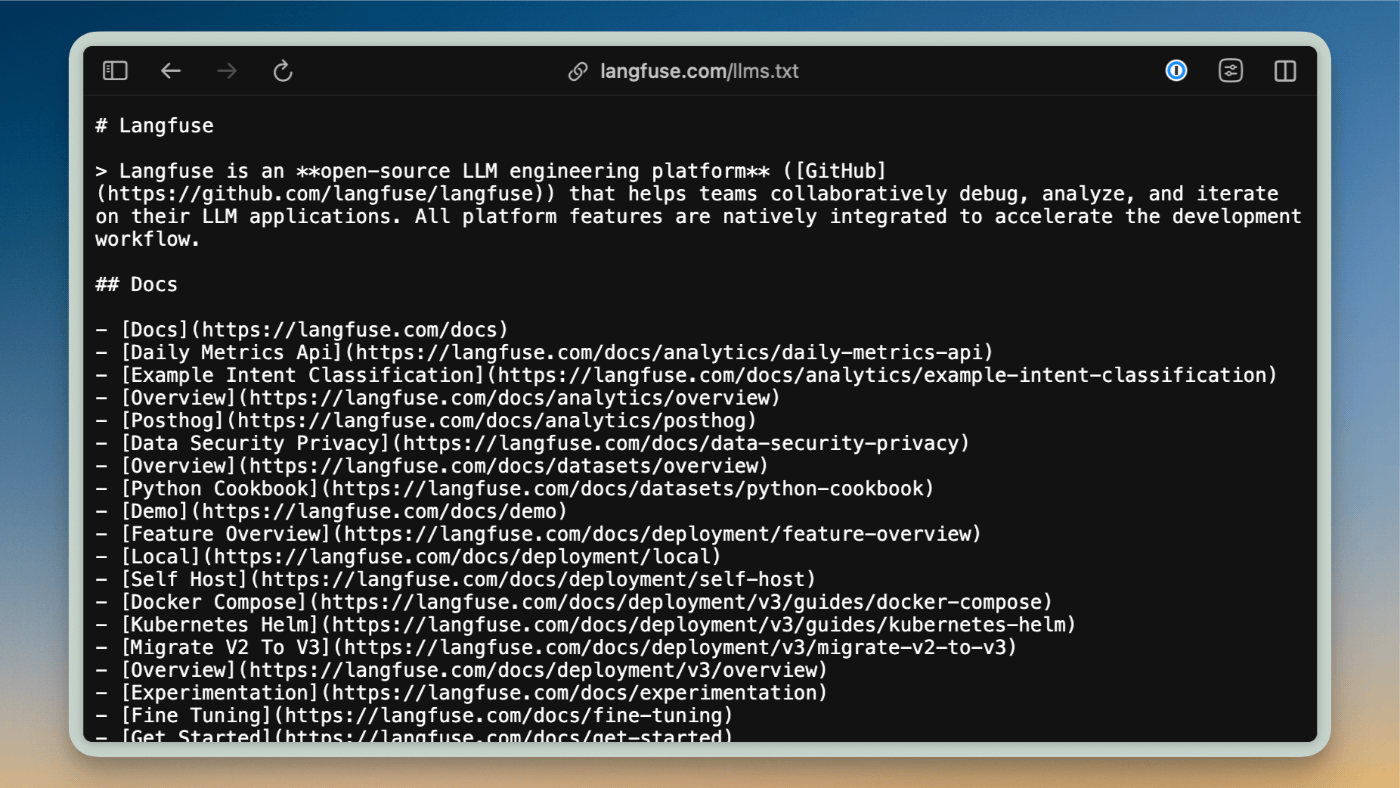
We have added a new [`llms.txt`](/llms.txt) file to the Langfuse docs that allows you to easily use Langfuse documentation in Cursor and other LLM editors. The file follows the standard proposed by llmstxt.org and is automatically generated during the docs build process, making our documentation more accessible to LLM-powered tools. See [changelog post](/changelog/2024-11-17-llms-txt) for details.
## Learn more about Documentation at Langfuse
### Why is documentation important?
> "Documentation is product"
**Datasets, Experiments, and Evals are a great example on why documentation is essential**. They can be used flexibly via their APIs and SDKs, and we consistently hear from teams who [love](/why) Langfuse for this flexibility.
At Langfuse, **we believe in building powerful, flexible abstractions** that can support a wide range of LLM application development workflows. Through deep collaboration with our [community](/ideas), we first understand how teams want to use Langfuse in their unique contexts. This helps us design foundational low-level APIs and SDKs that are flexible enough to support diverse use cases, rather than forcing teams into rigid, opinionated solutions. **Langfuse APIs are very stable** and you can build your own workflows on top of them without risking constant breaking changes.
We then **layer on intuitive higher-level abstractions and thorough documentation** to make these capabilities accessible. This approach of starting with community needs to inform our low-level design requires excellent documentation to help teams map our flexible primitives to their specific workflows.
Since releasing Langfuse last year, our [langfuse-docs](https://github.com/langfuse/langfuse-docs) repository has been similarly active as our main application and SDKs. Documentation is product and we take it very seriously. More on what we have built in langfuse-docs [below](#docs).

### Peak into our documentation [#docs]
All of Langfuse Documentation is open source ([repo](https://github.com/langfuse/langfuse-docs)) and built with [Nextra](https://nextra.site/) to render markdown. We use Shadcn/UI and TailwindUI for the UI components.
Over the last year we have added many features that help get the most out of the docs. See interactive demonstrations of these features below:
#### Embedded GitHub Discussions
[GitHub Discussions](/ideas) has long been the best place to ask questions and provide feedback about Langfuse. It has helped scale support and foster collaboration on new features. To make it easier to discover answers to common questions and vote on feature requests, each documentation page shows relevant GitHub Discussions based on labels. Learn more in this [changelog post](/changelog/2024-09-23-github-discussion-across-documentation).
#### Q&A Chatbot (Langfuse Example)
The [Q&A chatbot](/docs/demo) helps users find relevant information in the Langfuse docs. The chatbot is also a great example of how to use Langfuse for observability, analytics, and feedback collection. Learn more about the implementation in this [blog post](/blog/qa-chatbot-for-langfuse-docs).
#### Feedback that pushes to Slack
At the bottom of each page, you will find a feedback widget that sends feedback to the Langfuse Slack. Thank to your input, many inconsistencies and issues in the documentation were fixed!
#### "To App" / "Sign Up" button
Adding a "To App" / "Sign up" button seems simple, we put extra thought into making it context-aware. The button dynamically updates to show either "Sign up" or "To App" based on your authentication status. Since Langfuse offers both EU and US data regions, the button routes users to the appropriate instance - authenticated users are directed to their logged-in region, while new users are routed based on their geo-location.
#### Jupyter Notebooks
Examples are great to explore and learn about a developer tool. Many end-to-end examples in the Langfuse docs are Jupyter Notebooks and rendered natively in the documentation. You can find the complete collection in our [cookbook](/guides#cookbook). For a seamless experience, each cookbook page displays a banner at the top that allows you to instantly open the notebook in Google Colab or view it directly on GitHub. This makes it easy to explore, run, and experiment with our examples.
## Feedback?
If you made it this far, documentation seems to matter to you. We would love to hear from you!
Please reach out on [Discord](/discord) or [GitHub Discussions](/ideas) if you have any feedback on how we can improve the Langfuse docs. Also, we are happy to answer any questions you might have about our documentation setup. If you are curious how any of this is implemented, check out the [langfuse-docs repo](https://github.com/langfuse/langfuse-docs).
---
## Agent Instructions
This page is part of the [Langfuse](https://langfuse.com) documentation, published as plain Markdown for AI agents. Every page is available as Markdown by appending `.md` to its URL, or by sending an `Accept: text/markdown` header. This page: `https://langfuse.com/changelog/2024-11-21-all-new-datasets-and-evals-documentation.md`.
### Querying these docs
If the answer is not on this page, query the documentation instead of guessing:
- **Semantic search** across all Langfuse docs, returning an answer with the relevant pages and excerpts. Ask a specific, self-contained question:
```bash
curl -sG "https://langfuse.com/api/search-docs" --data-urlencode "query=How do I trace a LangGraph agent?"
```
- **Index of every page**: , with per-section indexes [llms-docs.txt](https://langfuse.com/llms-docs.txt), [llms-integrations.txt](https://langfuse.com/llms-integrations.txt), and [llms-self-hosting.txt](https://langfuse.com/llms-self-hosting.txt).
### Before writing Langfuse code
- **Install the [Langfuse Agent Skill](https://langfuse.com/docs/api-and-data-platform/features/agent-skill).** It encodes Langfuse's own best practices for instrumentation, prompt management, and evaluation, and materially improves results.
- **Read [What does a good trace look like?](https://langfuse.com/docs/observability/best-practices.md)** before instrumenting an application.
- **Verify endpoints, parameters, and response fields** against the [API reference](https://api.reference.langfuse.com) instead of inferring them from code examples.
- **Use the [Langfuse CLI](https://langfuse.com/docs/api-and-data-platform/features/cli)** (`npx langfuse-cli api `) to read or write traces, prompts, datasets, and scores from the terminal.
Found an error in these docs? Please open an issue at .