---
title: Billable Units
description: Learn how billable units are calculated in Langfuse.
---
# Billable Units
Langfuse [pricing](/pricing) is based on the number of ingested units per billing period. Units are either [traces](/docs/observability/data-model#observations-and-traces), [observations](/docs/observability/data-model#observations-and-traces) or [scores](/docs/evaluation/scores/data-model#scores).
`Units` = `Count of Traces` + `Count of Observations` + `Count of Scores`
## Langfuse Cloud
For Langfuse Cloud, you can use our [pricing calculator](/pricing?calculatorOpen=true) to estimate your monthly costs based on your expected usage.
## Self-hosted (OSS/Enterprise)
Self-hosted Langfuse (OSS) is free under the MIT license, so there is no usage-based billing. For self-hosted Langfuse Enterprise, billable units are one component of the pricing.
The unit definition above is still useful when you want to quantify your data volume, for example to estimate the cost of moving to [Langfuse Cloud](/pricing) or to size a [self-hosted](/self-hosting) deployment.
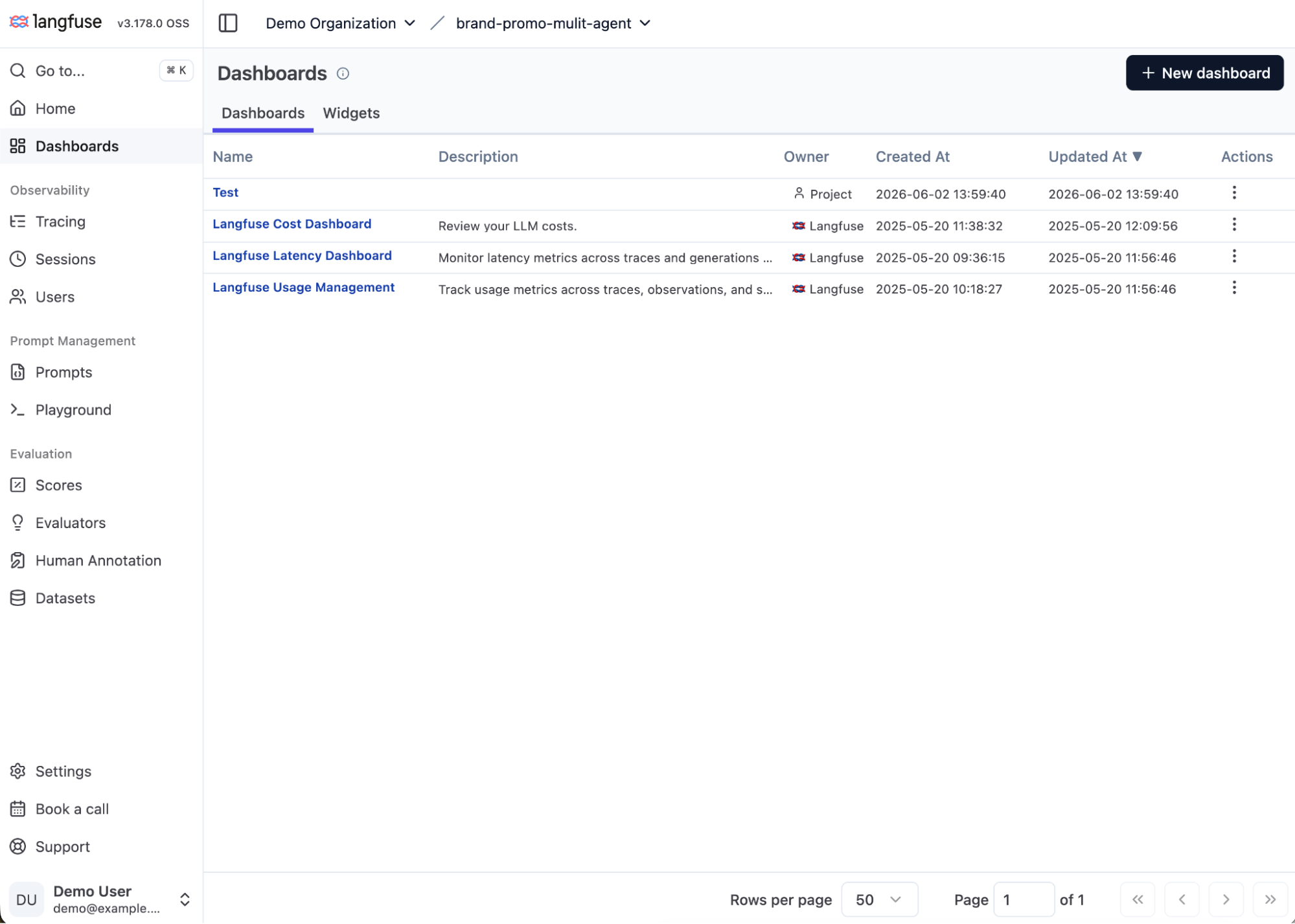
You can read your unit counts directly from the built-in **Langfuse Usage Management** dashboard, one of Langfuse's curated dashboards (see [Custom Dashboards](/docs/metrics/features/custom-dashboards)).
### Open the dashboard
In your Langfuse project, go to **Dashboards** and open **Langfuse Usage Management**.
### Select the last 30 days
Set the date range to the last 30 days to capture a month of usage.
### Sum the counts
Add the count widgets together to get your monthly units:
- **Total Trace Count**
- **Total Observation Count**
- **Total Score Count** (add the numeric and categorical widgets)
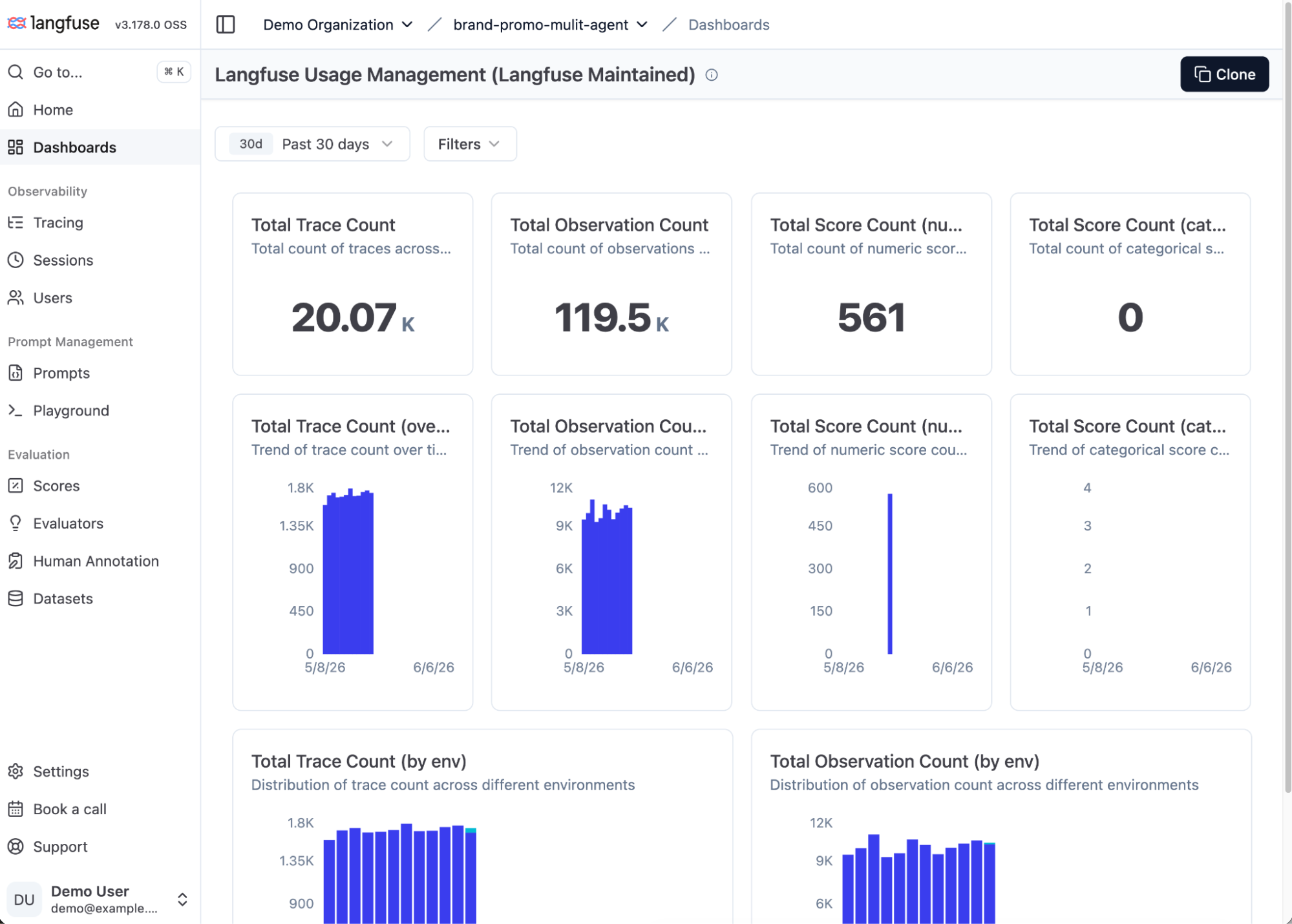
For the example above:
`Units` = `20,070 Traces` + `119,500 Observations` + `561 Scores` = `140,131 units / month` (≈ `1,681,572 units / year`)
## FAQ
**How can I track my usage in Langfuse Cloud?** Use the Usage Monitoring Report in the Dashboards tab in Langfuse to analyze your Langfuse Cloud usage per project. For organization-wide usage, use the [spend alerts](/docs/administration/spend-alerts).
**Do units created by Langfuse features count toward billable units?** Yes. Any trace, observation, or score stored in Langfuse counts as a billable unit, whether it is sent by your application or created by Langfuse features such as LLM-as-a-Judge, Annotation Queues, or experiments.
**How can I optimize my Langfuse Cloud usage to reduce cost?** If your application scales and you want to optimize Langfuse Cloud cost, please check out [this guide](/faq/all/cutting-costs).
---
## Agent Instructions
This page is part of the [Langfuse](https://langfuse.com) documentation, published as plain Markdown for AI agents. Every page is available as Markdown by appending `.md` to its URL, or by sending an `Accept: text/markdown` header. This page: `https://langfuse.com/docs/administration/billable-units.md`.
### Querying these docs
If the answer is not on this page, query the documentation instead of guessing:
- **Semantic search** across all Langfuse docs, returning an answer with the relevant pages and excerpts. Ask a specific, self-contained question:
```bash
curl -sG "https://langfuse.com/api/search-docs" --data-urlencode "query=How do I trace a LangGraph agent?"
```
- **Index of every page**: , with per-section indexes [llms-docs.txt](https://langfuse.com/llms-docs.txt), [llms-integrations.txt](https://langfuse.com/llms-integrations.txt), and [llms-self-hosting.txt](https://langfuse.com/llms-self-hosting.txt).
### Before writing Langfuse code
- **Install the [Langfuse Agent Skill](https://langfuse.com/docs/api-and-data-platform/features/agent-skill).** It encodes Langfuse's own best practices for instrumentation, prompt management, and evaluation, and materially improves results.
- **Read [What does a good trace look like?](https://langfuse.com/docs/observability/best-practices.md)** before instrumenting an application.
- **Verify endpoints, parameters, and response fields** against the [API reference](https://api.reference.langfuse.com) instead of inferring them from code examples.
- **Use the [Langfuse CLI](https://langfuse.com/docs/api-and-data-platform/features/cli)** (`npx langfuse-cli api `) to read or write traces, prompts, datasets, and scores from the terminal.
Found an error in these docs? Please open an issue at .