---
title: Data Retention
description: Control Data Retention in Langfuse
sidebarTitle: Data Retention
---
# Data Retention
With Langfuse's Data Retention feature, you can control how long your event data (Traces, Observations, Scores, and Media Assets) is stored in Langfuse.
## Configuration
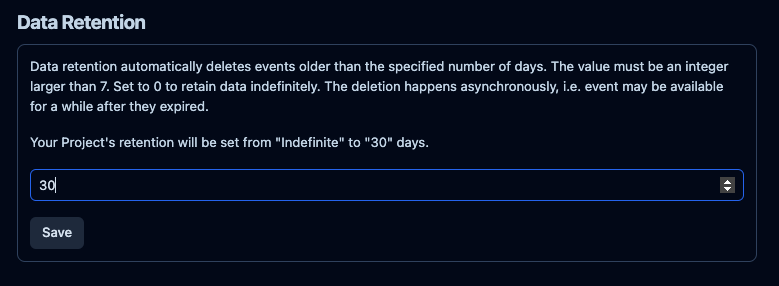
Data retention is configured on a project level, and we accept a number of days with a minimum of 3 days.
Project owners and administrators can change the data retention setting within the Project Settings view.
Without a retention policy, Langfuse does not automatically delete event data
(Traces, Observations, Scores, and Media Assets). On self-hosted instances,
data is stored indefinitely by default. On Langfuse Cloud, each plan includes
a data access window (Hobby: 30 days, Core: 90 days, Pro and Enterprise: 3
years); see [pricing](/pricing) for details.
Data retention can also be configured via the [projects API](/docs/administration/scim-and-org-api).
## Details
On a nightly basis, Langfuse selects traces, observations, scores, and media assets that are older than the configured retention period and deletes them.
We use the following properties per entity to decide whether they are outside the retention window:
- **Traces**: `timestamp`
- **Observations**: `start_time`
- **Scores**: `timestamp`
- **Media Assets**: `created_at`
Deleted assets cannot be recovered. If you need to preserve data beyond the retention window, you can set up a [Blob Storage Export](/docs/api-and-data-platform/features/export-to-blob-storage) to automatically sync traces, observations, and scores to S3, GCS, or Azure on a recurring schedule.
The retention policy applies to the respective data, independent of any references.
For example, if a dataset references a trace but the trace is e.g. deleted after 30 days, the dataset run item will point to a non-existent trace.
## Self-hosted Instances
To use the Data Retention feature in a self-hosted environment, you need to grant `s3:DeleteObject` to the Langfuse IAM role on all buckets (see [Blob Storage (S3) docs](/self-hosting/deployment/infrastructure/blobstorage)).
Note that Langfuse only issues delete statements on the API.
If you use versioned buckets, delete markers and non-current versions need to be removed manually or with a lifecycle rule.
---
## Agent Instructions
This page is part of the [Langfuse](https://langfuse.com) documentation, published as plain Markdown for AI agents. Every page is available as Markdown by appending `.md` to its URL, or by sending an `Accept: text/markdown` header. This page: `https://langfuse.com/docs/administration/data-retention.md`.
### Querying these docs
If the answer is not on this page, query the documentation instead of guessing:
- **Semantic search** across all Langfuse docs, returning an answer with the relevant pages and excerpts. Ask a specific, self-contained question:
```bash
curl -sG "https://langfuse.com/api/search-docs" --data-urlencode "query=How do I trace a LangGraph agent?"
```
- **Index of every page**: , with per-section indexes [llms-docs.txt](https://langfuse.com/llms-docs.txt), [llms-integrations.txt](https://langfuse.com/llms-integrations.txt), and [llms-self-hosting.txt](https://langfuse.com/llms-self-hosting.txt).
### Before writing Langfuse code
- **Install the [Langfuse Agent Skill](https://langfuse.com/docs/api-and-data-platform/features/agent-skill).** It encodes Langfuse's own best practices for instrumentation, prompt management, and evaluation, and materially improves results.
- **Read [What does a good trace look like?](https://langfuse.com/docs/observability/best-practices.md)** before instrumenting an application.
- **Verify endpoints, parameters, and response fields** against the [API reference](https://api.reference.langfuse.com) instead of inferring them from code examples.
- **Use the [Langfuse CLI](https://langfuse.com/docs/api-and-data-platform/features/cli)** (`npx langfuse-cli api `) to read or write traces, prompts, datasets, and scores from the terminal.
Found an error in these docs? Please open an issue at .