---
title: Export to blob storage
description: Export enriched observations, scores, and legacy traces and observations to Blob Storage, e.g. S3, GCS, or Azure Blob Storage.
sidebarTitle: Export to Blob Storage
---
# Export to blob storage
**Where is this feature available?**
| Plan | Availability |
| --- | --- |
| Hobby | Not Available |
| Core | Not Available |
| Pro | Teams Add-on required |
| Enterprise | Available |
| Self Hosted | Available |
## Overview
Schedule exports to Amazon S3, S3-compatible storage, Google Cloud Storage, or Azure Blob Storage every 20 minutes, hourly, daily, or weekly.
## Configure the export [#set-up-an-export]
### Create the integration
1. Open **Project Settings > Integrations > Blob Storage**.
2. Select your provider and enter its bucket, path, and credentials. Use dedicated credentials scoped to the export path (see [Grant bucket access](#bucket-permissions)). Self-hosters can find per-vendor bucket and credential setup on the [blob storage deployment page](/self-hosting/deployment/infrastructure/blobstorage).
3. Choose the file format, schedule, export mode, and field groups.
4. Enable the integration and save. The first run starts shortly afterward.
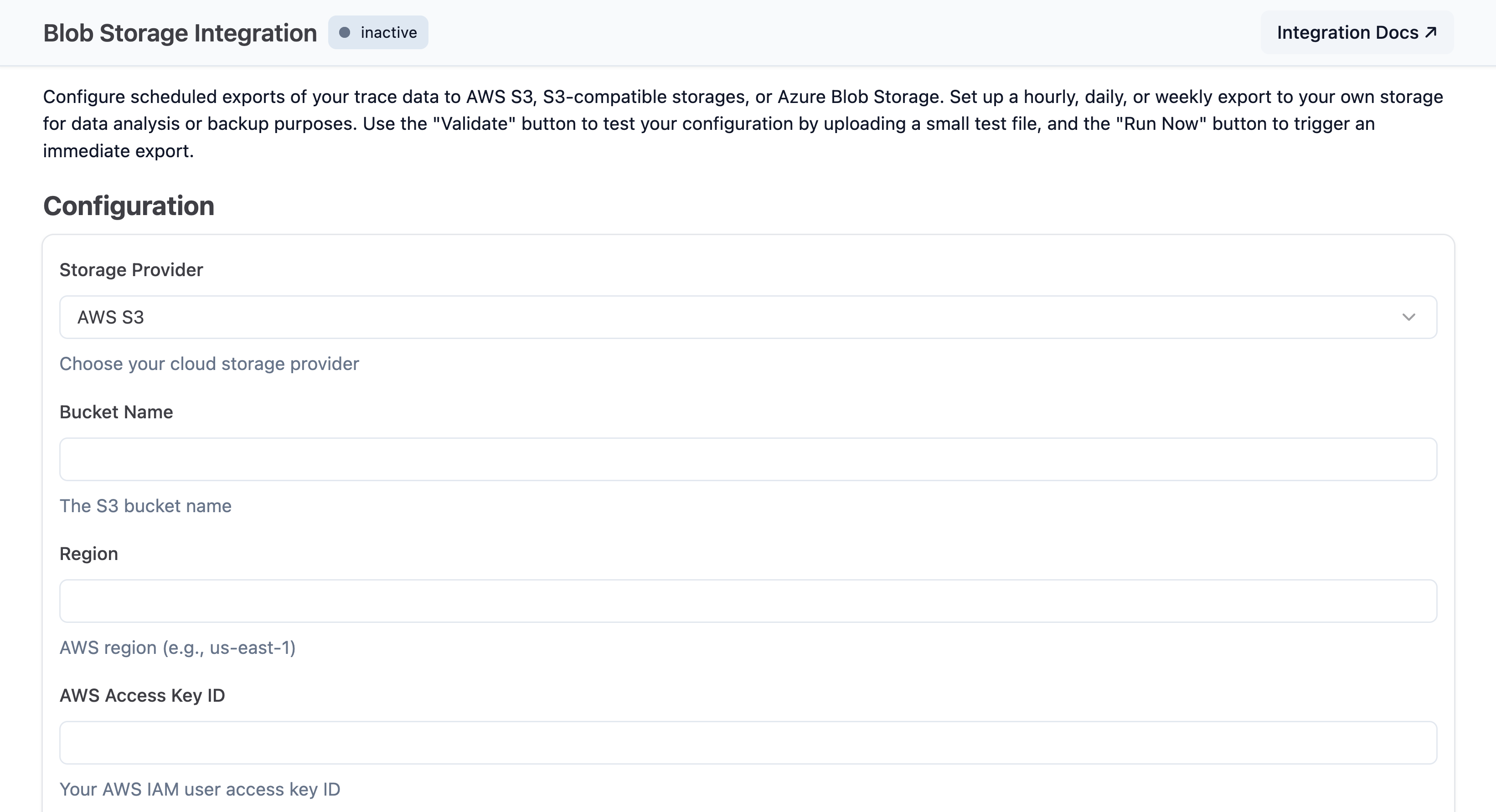
| Setting | Choices and behavior |
| ------------------- | -------------------------------------------------------------------------------------------------------------------------------------------------------------------------------------------------------------------------------------------------------------------------------- |
| Provider and access | **Amazon S3**, **S3 Compatible Storage**, **Azure Blob Storage**, or **Google Cloud Storage**. Google Cloud Storage uses a service account JSON key; alternatively, connect it as S3 Compatible Storage with the endpoint `https://storage.googleapis.com` and an HMAC key pair. |
| Format | Parquet (default), CSV, JSON, or JSONL. Text formats can be gzip-compressed; Parquet uses its own encoding and compression. |
| Schedule | Every 20 minutes, hourly, daily, or weekly. Each run exports one time window. |
| Export Mode | **Full history** starts at the project's earliest data; **From setup date** starts when the integration is enabled; **From custom date** starts at a selected date. Changing this setting resets the sync position and re-scans from that point. |
The integration settings page shows a status badge:
| Badge | Meaning |
| ------------ | --------------------------------------------------------- |
| **Active** | Enabled and synced; the next run is scheduled. |
| **Running** | A run is in progress. |
| **Queued** | A run is due and waiting. |
| **Pending** | Enabled but has not run yet. |
| **Disabled** | Turned off. |
| **Error** | The last run failed; the message and timestamp are shown. |
**Parquet notes**
- Observation files omit `input_price`, `output_price`, and `total_price`. Use `cost_details` and `total_cost`; trace and score fields are unaffected.
- On self-hosted ClickHouse older than 25.11, upgrade ClickHouse or use CSV, JSON, or JSONL because incomplete Parquet output may not be reported.
Use **Validate** before saving to check that Langfuse can access the target with the supplied credentials. The integration then writes all output beneath the configured prefix without changing other objects in the bucket.
Langfuse writes exports to your bucket using this structure:
```text
{prefix}{project-id}/
├── observations_v2/
│ └── {timestamp}.{parquet|json|jsonl|csv}[.gz]
├── scores/
│ └── {timestamp}.{parquet|json|jsonl|csv}[.gz]
└── manifests/
└── {timestamp}.json
```
### Grant bucket access [#bucket-permissions]
Create a dedicated identity for the export (an IAM user or a service account) and grant it only the permissions below. Do not reuse credentials that can access other buckets or data.
Langfuse writes everything, including the **Validate** test file, beneath the configured prefix, so you can scope access to that prefix. The prefix must end with `/` (for example, `langfuse/`). If you leave it empty, scope access to the whole bucket.
| Permission | Required | Used for |
| ----------------------- | ---------------------------- | ---------------------------------------------------------------------------------------------------------------------- |
| Write objects | Yes | Data files, manifests, and the **Validate** test file. Large files use multipart uploads on S3. |
| Abort multipart uploads | Recommended | Cleaning up incomplete parts after a failed upload. |
| Delete objects | Recommended; required on GCS | Removing the legacy-export deprecation notice from `{prefix}{project-id}/` once the project switches to enriched data. |
Langfuse never lists or reads from the bucket, so no read permissions are needed. Without the recommended permissions, exports still run; a failed abort or delete is logged and skipped.
**Amazon S3**
Create an IAM user used only for this export and attach the policy below as an inline policy. Replace `YOUR_BUCKET` and `YOUR_PREFIX/`, or use `arn:aws:s3:::YOUR_BUCKET/*` if the prefix is empty:
```json
{
"Version": "2012-10-17",
"Statement": [
{
"Sid": "LangfuseBlobExport",
"Effect": "Allow",
"Action": [
"s3:PutObject",
"s3:AbortMultipartUpload",
"s3:DeleteObject"
],
"Resource": "arn:aws:s3:::YOUR_BUCKET/YOUR_PREFIX/*"
}
]
}
```
- `s3:PutObject` also covers the multipart operations `CreateMultipartUpload`, `UploadPart`, and `CompleteMultipartUpload`.
- If the bucket uses a customer-managed KMS key for default encryption, also grant `kms:GenerateDataKey` and `kms:Decrypt` on that key. Multipart uploads need both.
**Self-hosted only:** you can leave the access key fields blank to export as the IAM role Langfuse runs as (see the [blob storage deployment page](/self-hosting/deployment/infrastructure/blobstorage)). This is not least-privilege: the role also has read and write access to the platform's event, media, and batch-export buckets, and any project member who can configure the integration can point an export at any bucket the role reaches. Prefer a dedicated IAM user unless every project on the deployment is trusted.
**Google Cloud Storage**
1. Create a dedicated service account and a custom role with these permissions:
- `storage.objects.create`
- `storage.objects.delete`: also needed to overwrite an object, which happens when a failed run is retried.
- `storage.multipartUploads.create` and `storage.multipartUploads.abort`: only when connecting through S3 Compatible Storage with an HMAC key, which uses multipart uploads.
2. Grant the role on the bucket, not the project. To limit the service account to the prefix, add an [IAM condition](https://cloud.google.com/storage/docs/access-control/iam#conditions) to the binding (requires [uniform bucket-level access](https://cloud.google.com/storage/docs/uniform-bucket-level-access)):
```text
resource.name.startsWith("projects/_/buckets/YOUR_BUCKET/objects/YOUR_PREFIX/")
```
3. Create a JSON key for the service account and paste it into the integration. If you connect through S3 Compatible Storage, create an [HMAC key](https://cloud.google.com/storage/docs/authentication/hmackeys) for the same service account instead.
**Self-hosted only:** you can instead enable **Use Application Default Credentials (ADC)** to export as the deployment's own service account. Grant it the role above on each bucket you want to use, and have an operator list those buckets in `LANGFUSE_BLOB_STORAGE_GCS_ALLOWED_BUCKETS` (see the [blob storage deployment page](/self-hosting/deployment/infrastructure/blobstorage#gcs-export-credentials)). This service account is shared with the rest of the deployment, so it is not a dedicated identity.
**Azure Blob Storage**
The Azure integration authenticates with a storage account name and account key. An account key grants full access to every container in the storage account and cannot be scoped to a container or prefix. To limit its reach, create a dedicated storage account that holds only the export container. Langfuse creates the container if it does not exist.
### Authenticate with an IAM role [#iam-role-auth]
**Where is this feature available?**
| Plan | Availability |
| --- | --- |
| Hobby | Not Available |
| Core | Not Available |
| Pro | Not Available |
| Enterprise | Available |
| Self Hosted | Enterprise Edition |
For Amazon S3, Langfuse can assume an IAM role in your AWS account instead of storing access keys. Langfuse assumes your role through its own cross-account role and passes an external ID that is unique to the integration. Access keys remain supported and are the default. The same option is available for [External Media Storage](/docs/observability/features/multi-modality#external-s3-media-iam-role).
To configure an export through the [public API](#field-groups-rest-api), set `authType` to `ROLE_ARN` and provide `roleArn`. The response includes the `crossAccountRoleArn` and `externalId` to allow in your role's trust policy.
On self-hosted deployments, an operator must set
[`LANGFUSE_CROSS_ACCOUNT_ROLE_ARN`](/self-hosting/configuration#cross-account-role)
to the role Langfuse assumes before it assumes your role. Without it,
Langfuse cannot use IAM role authentication.
### Field selection [#export-field-groups]
Field groups select which columns appear in observation and score files.
**Observations**
New integrations select all eleven observation field groups. `core` is required; disable other groups to reduce file size or omit sensitive data.
| Group | Fields |
| --------------- | ----------------------------------------------------------------------------------------------------------------------------------- |
| `core` | `end_time`, `id`, `parent_observation_id`, `project_id`, `start_time`, `trace_id`, `type` |
| `basic` | `bookmarked`, `environment`, `is_root_observation`, `level`, `name`, `public`, `session_id`, `status_message`, `user_id`, `version` |
| `time` | `completion_start_time`, `created_at`, `updated_at` |
| `io` | `input`, `output` |
| `metadata` | `metadata` |
| `model` | `input_price`, `model_id`, `model_parameters`, `output_price`, `provided_model_name`, `total_price` |
| `usage` | `cost_details`, `total_cost`, `usage_details`, `usage_pricing_tier_id`, `usage_pricing_tier_name` |
| `prompt` | `prompt_id`, `prompt_name`, `prompt_version` |
| `metrics` | `latency`, `time_to_first_token` |
| `trace_context` | `release`, `tags`, `trace_name` |
| `tools` | `tool_call_names`, `tool_calls`, `tool_definitions` |
Changes apply only to future exports. See the [observation field reference](#enriched-observations) for types and descriptions.
**Scores**
Scores are always exported with their core columns, shown as a locked **Core** group in the settings. Score field groups are optional and add columns on top of the core columns. They are never selected by default, including on new integrations.
| Group | Fields |
| ------------------ | ----------------------------------------------------------------------------------------------------------------------------------------------------------------------------------------------------------- |
| Core (always) | `id`, `timestamp`, `project_id`, `environment`, `trace_id`, `observation_id`, `session_id`, `dataset_run_id`, `name`, `value`, `source`, `comment`, `data_type`, `string_value`, `created_at`, `updated_at` |
| `score_metadata` | `metadata` |
| `score_provenance` | `author_user_id`, `config_id`, `queue_id`, `evaluator_id`, `evaluation_rule_id`, `execution_trace_id` |
Group columns are appended after the core columns. Changes apply only to future exports. See the [score field reference](#scores) for types and descriptions.
### Configure through the API [#field-groups-rest-api]
Use the public endpoint to read or update the integration:
```http
GET /api/public/integrations/blob-storage
PUT /api/public/integrations/blob-storage
```
On `PUT`, `exportFieldGroups` must include `core`; omit the property to keep the current selection. Add `score_metadata` or `score_provenance` to the same list to export the optional score columns. `compressed` applies only to CSV, JSON, and JSONL.
See the [REST API reference](https://api.reference.langfuse.com/#tag/blobstorageintegrations) for authentication, provider settings, and the complete schema.
## Process exports [#consume-exports]
Use each run's manifest as the unit of work.
### Know when an export is complete [#run-manifest]
A run is complete only when its manifest exists at `{prefix}{project-id}/manifests/{timestamp}.json`. Langfuse writes it after every data file uploads successfully.
If an upload fails, no manifest is written. The run is retried and any data objects under the same keys are overwritten.
When a manifest appears:
1. Read `files[]`.
2. Fetch every full object key in `files[].key`. Do not derive filenames or list table directories.
3. Deduplicate records by ID because adjacent export windows share an inclusive boundary.
| Field | Purpose |
| ------------------------ | --------------------------------------------------------------------------------------- |
| `window` | Inclusive `minTimestamp` and `maxTimestamp` for the run |
| `exportSource`, `tables` | Export source and tables included |
| `files[]` | Object key, table, format, compression, uploaded size, and row count for each data file |
For Parquet, `files[].rowCount` is `null`; inspect the file metadata when you need a count. Ignore unknown manifest fields so additive changes do not break your parser.
### Trigger your pipeline [#export-events]
Subscribe to object-created events filtered to `{prefix}{project-id}/manifests/`, then fetch the manifest and process each `files[].key`.
- **Amazon S3:** [S3 Event Notifications](https://docs.aws.amazon.com/AmazonS3/latest/userguide/EventNotifications.html) or [EventBridge](https://docs.aws.amazon.com/AmazonS3/latest/userguide/EventBridge.html)
- **Google Cloud Storage:** [Pub/Sub notifications](https://cloud.google.com/storage/docs/pubsub-notifications) for `OBJECT_FINALIZE`
- **Azure Blob Storage:** [Event Grid](https://learn.microsoft.com/en-us/azure/storage/blobs/storage-blob-event-overview) for `Microsoft.Storage.BlobCreated`
- **MinIO:** [bucket notifications](https://min.io/docs/minio/linux/administration/monitoring/bucket-notifications.html)
- **Backblaze B2:** [event notifications](https://www.backblaze.com/docs/cloud-storage-event-notifications)
If your S3-compatible provider has no object-created events, poll the manifest prefix and checkpoint the latest processed key. Manifest names sort by export timestamp.
Make manifest processing idempotent. Provider events can be delivered more than once, and a catch-up can create several manifests close together.
## Upgrade a legacy export [#legacy-export-sources]
Complete this upgrade if your integration uses **Traces and observations
(legacy)** or your bucket receives `traces/` and `observations/` files. On
Langfuse Cloud, remaining legacy exports switch on November 16, 2026 (2026-11-16). On self-hosted v4, the legacy source stops
producing data after the server switches to `events_only`.
### What changes in the exported data [#legacy-field-differences]
The legacy source writes observation data to `observations/` and trace context to a separate `traces/` file, which consumers join on `trace_id`. The enriched source writes a single `observations_v2/` file in which each observation row already carries its trace context.
[Field groups](#export-field-groups) select columns in both observation files. Three groups contain fewer fields in the legacy `observations/` file; the rest are identical:
| Group | `observations_v2/` | `observations/` |
| --------------- | ----------------------------------------------------------------------------------------------------------------------------------- | --------------------------------------------------------------------------- |
| `basic` | `bookmarked`, `environment`, `is_root_observation`, `level`, `name`, `public`, `session_id`, `status_message`, `user_id`, `version` | `environment`, `level`, `name`, `status_message`, `version` |
| `usage` | `cost_details`, `total_cost`, `usage_details`, `usage_pricing_tier_id`, `usage_pricing_tier_name` | Same, without `usage_pricing_tier_id` |
| `trace_context` | `release`, `tags`, `trace_name` | No effect; these fields are in the `traces/` file (`name` for `trace_name`) |
The `traces/` file itself has a fixed schema that field groups do not apply to. Its trace-level `input`, `output`, `metadata`, `timestamp`, and `version` have no direct equivalent in `observations_v2/`, where identically named fields hold observation-level data.
For every column in each file, see the [legacy field reference](#legacy-export-paths).
### Switch to enriched observations [#upgrade-path]
Most integrations can switch directly once their consumer supports the enriched layout:
On self-hosted Langfuse v4, first [switch the server to `dual` write mode](/self-hosting/upgrade/upgrade-guides/upgrade-v3-to-v4#step-3) and [complete the historic data migration](/self-hosting/upgrade/upgrade-guides/upgrade-v3-to-v4#historic-data).
Enriched export sources require the deployment to write the v4 events table, so they are unavailable only in `legacy` write mode. Legacy export sources are unavailable in `events_only`, which is the default. Switch the integration before the server's [`events_only` cutover](/self-hosting/upgrade/upgrade-guides/upgrade-v3-to-v4#cutover).
1. **Prepare the new consumer.** Process `observations_v2/` and `scores/` from each manifest's `files[].key`. Use the [enriched field reference](#enriched-observations).
2. **Switch the export.** Select **Enriched observations (recommended)**.
3. **Verify and retire legacy.** Process the next completed export with the new consumer. After it succeeds, retire the consumer that reads `traces/` and `observations/`.
**Optional: keep both layouts during the cutover.**
If your pipeline cannot tolerate a cutover gap, temporarily select **Traces and observations (legacy) and enriched observations** after step 1.
This writes `observations/` and `observations_v2/` for subsequent windows only; it does not backfill earlier exports. Run both consumers until the new one is validated, then continue with step 2.
Do not load both observation layouts into the same production dataset. Check the [export compatibility matrix](/docs/compatibility#filter-exports) if this option is unavailable.
**Cutover checks**
- **All deployments:** `traces/` and `observations/` stop receiving files after the switch, including empty files. Use `manifests/` as the run-completion signal.
- **Langfuse Cloud:** Ignore `DEPRECATION_NOTICE.txt` when processing exports; it is not part of a run.
- **Self-hosted Langfuse v4:** `dual` is the only write mode in which both layouts are selectable, so the optional dual-layout validation above requires it.
## Export field reference [#export-field-reference]
Field names and types for each exported file. Types match JSON and JSONL output. Timestamps use `YYYY-MM-DD HH:MM:SS.ffffff` in UTC. Each schema is collapsed on its own below—open the file you need.
| File | When it is exported | Schema |
| ------------------ | ------------------------ | ----------------------------------------------- |
| `observations_v2/` | Current enriched export | [Enriched observations](#enriched-observations) |
| `scores/` | Every export | [Scores](#scores) |
| `traces/` | Deprecated legacy export | [Legacy exports](#legacy-export-paths) |
| `observations/` | Deprecated legacy export | [Legacy exports](#legacy-export-paths) |
**Enriched observations** — `observations_v2/`
Each row represents one observation and includes its trace context. Only the [selected field groups](#export-field-groups) appear; `core` is always included.
| Field | Type | Description |
| ------------------------- | -------------------------- | --------------------------------------------------------------------------------------------------------------------------------- |
| `id` | string | Unique observation identifier. |
| `trace_id` | string | Trace identifier shared by related observations and scores. |
| `project_id` | string | Langfuse project identifier. |
| `environment` | string | Environment label. |
| `type` | string | Observation type: `SPAN`, `GENERATION`, `EVENT`, `AGENT`, `TOOL`, `CHAIN`, `RETRIEVER`, `EVALUATOR`, `EMBEDDING`, or `GUARDRAIL`. |
| `parent_observation_id` | string | Parent observation identifier; empty for a root observation. |
| `is_root_observation` | boolean | Whether the observation is a logical root. |
| `start_time` | string (timestamp) | When the observation started. |
| `end_time` | string (timestamp) or null | When the observation ended. |
| `name` | string | User-defined observation name. |
| `metadata` | object | User-supplied observation metadata. |
| `level` | string | `DEBUG`, `DEFAULT`, `WARNING`, or `ERROR`. |
| `status_message` | string | Status or error message. |
| `version` | string | User-defined version. |
| `input` | string | Observation input; may contain plain text or JSON. |
| `output` | string | Observation output; may contain plain text or JSON. |
| `provided_model_name` | string | Model name supplied by the SDK or user. |
| `model_parameters` | string | Model parameters encoded as JSON. |
| `usage_details` | object (string → integer) | Token usage by category, such as `input`, `output`, and `total`. |
| `cost_details` | object (string → number) | Cost in USD by category. |
| `completion_start_time` | string (timestamp) or null | When the first streamed token was generated. |
| `prompt_name` | string | Langfuse prompt name. |
| `prompt_version` | integer or null | Langfuse prompt version. |
| `total_cost` | number | Total observation cost in USD; `0` when no cost was recorded. |
| `latency` | number or null | Duration in seconds. |
| `time_to_first_token` | number or null | Time to first token in seconds. |
| `model_id` | string | Matched Langfuse model definition identifier. |
| `created_at` | string (timestamp) | Row creation time. |
| `updated_at` | string (timestamp) | Last row update time. |
| `prompt_id` | string | Langfuse prompt identifier. |
| `tool_calls` | array of strings | Tool calls encoded as JSON strings. |
| `tool_call_names` | array of strings | Names of called tools. |
| `tool_definitions` | object | Tool or function schemas supplied to the model. |
| `usage_pricing_tier_id` | string or null | Pricing tier identifier used for cost calculation. |
| `usage_pricing_tier_name` | string or null | Pricing tier name used for cost calculation. |
| `input_price` | string or null | Matched per-unit input price; omitted from Parquet. |
| `output_price` | string or null | Matched per-unit output price; omitted from Parquet. |
| `total_price` | string or null | Matched flat per-call price; omitted from Parquet. |
| `user_id` | string | End-user identifier from the trace. |
| `session_id` | string | Session identifier from the trace. |
| `trace_name` | string | Trace name. |
| `tags` | array of strings | Trace tags. |
| `release` | string | Trace release. |
| `bookmarked` | boolean | Whether the trace is bookmarked. |
| `public` | boolean | Whether the trace is public. |
Integrations created on or after 2026-04-01 export `latency` and
`time_to_first_token` in seconds. Older integrations export these fields in
milliseconds for backward compatibility.
**Scores** — `scores/`
Scores are always exported. The first sixteen fields are always included; the rest appear only when their [score field group](#export-field-groups) is selected. Scores with data type `NUMERIC`, `BOOLEAN`, `CATEGORICAL`, or `TEXT` are included; [corrections](/docs/observability/features/corrections) (data type `CORRECTION`) are not.
| Field | Type | Description |
| -------------------- | ------------------------ | ------------------------------------------------------------------------------------------------------ |
| `id` | string | Unique score identifier. |
| `timestamp` | string (timestamp) | Score creation time. |
| `project_id` | string | Langfuse project identifier. |
| `environment` | string | Environment label. |
| `trace_id` | string or null | Associated trace identifier. |
| `observation_id` | string or null | Associated observation identifier. |
| `session_id` | string or null | Associated session identifier. |
| `dataset_run_id` | string or null | Associated dataset run identifier. |
| `name` | string | Score name. |
| `value` | number | Numeric value; `TEXT` scores use `0`. |
| `source` | string | `API`, `ANNOTATION`, or `EVAL`. |
| `comment` | string or null | Optional comment or evaluator reasoning. |
| `data_type` | string | `NUMERIC`, `BOOLEAN`, `CATEGORICAL`, or `TEXT`. |
| `string_value` | string or null | Category label or text value; null for numeric scores. |
| `created_at` | string (timestamp) | Row creation time. |
| `updated_at` | string (timestamp) | Last row update time. |
| `metadata` | object (string → string) | User-supplied score metadata. Group: `score_metadata`. |
| `author_user_id` | string or null | Langfuse user who created the score, e.g. in an annotation. Group: `score_provenance`. |
| `config_id` | string or null | [Score config](/docs/evaluation/scores/data-model#score-config) identifier. Group: `score_provenance`. |
| `queue_id` | string or null | Annotation queue identifier. Group: `score_provenance`. |
| `evaluator_id` | string | Evaluator identifier; empty for scores not created by an evaluator. Group: `score_provenance`. |
| `evaluation_rule_id` | string | Evaluation rule identifier; empty for scores not created by an evaluator. Group: `score_provenance`. |
| `execution_trace_id` | string or null | Trace of the LLM-as-a-judge execution that produced the score. Group: `score_provenance`. |
**Legacy exports** — `traces/` and `observations/`
Legacy exports are deprecated. They split trace context into `traces/` and observation data into `observations/`; consumers join them on `trace_id`. See [upgrade a legacy export](#legacy-export-sources) before changing a consumer.
### Traces (`traces/`)
The trace file has a fixed schema; field groups do not apply.
| Field | Type | Description |
| ------------- | ------------------ | -------------------------------- |
| `id` | string | Unique trace identifier. |
| `timestamp` | string (timestamp) | Trace creation time. |
| `name` | string | User-defined trace name. |
| `environment` | string | Environment label. |
| `project_id` | string | Langfuse project identifier. |
| `metadata` | object | Trace metadata. |
| `user_id` | string or null | End-user identifier. |
| `session_id` | string or null | Session identifier. |
| `release` | string or null | Application release. |
| `version` | string or null | User-defined version. |
| `public` | boolean | Whether the trace is public. |
| `bookmarked` | boolean | Whether the trace is bookmarked. |
| `tags` | array of strings | Trace tags. |
| `input` | string or null | Trace input. |
| `output` | string or null | Trace output. |
| `created_at` | string (timestamp) | Row creation time. |
| `updated_at` | string (timestamp) | Last row update time. |
Legacy trace-level `input`, `output`, `metadata`, `timestamp`, and `version` do not have direct equivalents in `observations_v2/`. Observation fields with the same names contain observation-level data instead.
The trace file does not include `total_cost`, `latency`, `observations`, `scores`, or `html_path`.
### Observations (`observations/`)
Each row represents one observation without its trace context; join `trace_id` to the `traces/` file to add it. Only the [selected field groups](#export-field-groups) appear; `core` is always included.
| Field | Type | Description |
| ------------------------- | -------------------------- | --------------------------------------------------------------------------------------------------------------------------------- |
| `id` | string | Unique observation identifier. |
| `trace_id` | string | Trace identifier shared by related observations and scores. |
| `project_id` | string | Langfuse project identifier. |
| `environment` | string | Environment label. |
| `type` | string | Observation type: `SPAN`, `GENERATION`, `EVENT`, `AGENT`, `TOOL`, `CHAIN`, `RETRIEVER`, `EVALUATOR`, `EMBEDDING`, or `GUARDRAIL`. |
| `parent_observation_id` | string or null | Parent observation identifier; null for a root observation. |
| `start_time` | string (timestamp) | When the observation started. |
| `end_time` | string (timestamp) or null | When the observation ended. |
| `name` | string | User-defined observation name. |
| `metadata` | object | User-supplied observation metadata. |
| `level` | string | `DEBUG`, `DEFAULT`, `WARNING`, or `ERROR`. |
| `status_message` | string or null | Status or error message. |
| `version` | string or null | User-defined version. |
| `input` | string or null | Observation input; may contain plain text or JSON. |
| `output` | string or null | Observation output; may contain plain text or JSON. |
| `provided_model_name` | string or null | Model name supplied by the SDK or user. |
| `model_parameters` | string or null | Model parameters encoded as JSON. |
| `usage_details` | object (string → integer) | Token usage by category, such as `input`, `output`, and `total`. |
| `cost_details` | object (string → number) | Cost in USD by category. |
| `completion_start_time` | string (timestamp) or null | When the first streamed token was generated. |
| `prompt_name` | string or null | Langfuse prompt name. |
| `prompt_version` | integer or null | Langfuse prompt version. |
| `total_cost` | number or null | Total observation cost in USD. |
| `latency` | number or null | Duration in seconds. |
| `time_to_first_token` | number or null | Time to first token in seconds. |
| `model_id` | string or null | Matched Langfuse model definition identifier. |
| `created_at` | string (timestamp) | Row creation time. |
| `updated_at` | string (timestamp) | Last row update time. |
| `prompt_id` | string or null | Langfuse prompt identifier. |
| `tool_calls` | array of strings | Tool calls encoded as JSON strings. |
| `tool_call_names` | array of strings | Names of called tools. |
| `tool_definitions` | object | Tool or function schemas supplied to the model. |
| `usage_pricing_tier_name` | string or null | Pricing tier name used for cost calculation. |
| `input_price` | string or null | Matched per-unit input price; omitted from Parquet. |
| `output_price` | string or null | Matched per-unit output price; omitted from Parquet. |
| `total_price` | string or null | Matched flat per-call price; omitted from Parquet. |
Where a field appears in both observation files it carries the same meaning. Unset values are encoded differently, though: a field that is `null` above maps to one of three values in `observations_v2/` JSON and JSONL output.
| Value in `observations_v2/` | Fields |
| --------------------------- | ---------------------------------------------------------------------------------------------------------------------------------------------------------------- |
| `""` (empty string) | `input`, `model_id`, `model_parameters`, `output`, `parent_observation_id`, `prompt_id`, `prompt_name`, `provided_model_name`, `status_message`, `version` |
| `null` | `completion_start_time`, `end_time`, `input_price`, `latency`, `output_price`, `prompt_version`, `time_to_first_token`, `total_price`, `usage_pricing_tier_name` |
| `0` | `total_cost` |
Empty strings appear where the v4 events table stores the column as non-nullable. `total_cost` reads from `cost_details['total']`, so a `0` there cannot be told apart from a genuine zero cost.
For the field groups that select these columns and how they differ from the enriched export, see [what changes in the exported data](#legacy-field-differences).
**Parquet differences**
Parquet uses internal encoding and compression, so gzip does not apply.
Observation files omit `input_price`, `output_price`, and `total_price`. Use `cost_details` and `total_cost` for cost data.
Trace and score fields are the same across all formats.
For paths, filenames, and the manifest workflow, see [process exports](#consume-exports).
## FAQ
- [How do blob storage export timing and retries work?](/faq/all/blob-storage-export-timing-and-retries)
- [I changed my blob storage config — why didn't it re-export, and why do I still see an error?](/faq/all/blob-storage-config-changes-and-errors)
- [Why do I see empty files in my blob storage export?](/faq/all/blob-storage-empty-files)
[Ask another question](/docs/ask-ai)
---
## Agent Instructions
This page is part of the [Langfuse](https://langfuse.com) documentation, published as plain Markdown for AI agents. Every page is available as Markdown by appending `.md` to its URL, or by sending an `Accept: text/markdown` header. This page: `https://langfuse.com/docs/api-and-data-platform/features/export-to-blob-storage.md`.
### Querying these docs
If the answer is not on this page, query the documentation instead of guessing:
- **Semantic search** across all Langfuse docs, returning an answer with the relevant pages and excerpts. Ask a specific, self-contained question:
```bash
curl -sG "https://langfuse.com/api/search-docs" --data-urlencode "query=How do I trace a LangGraph agent?"
```
- **Index of every page**: , with per-section indexes [llms-docs.txt](https://langfuse.com/llms-docs.txt), [llms-integrations.txt](https://langfuse.com/llms-integrations.txt), and [llms-self-hosting.txt](https://langfuse.com/llms-self-hosting.txt).
### Before writing Langfuse code
- **Install the [Langfuse Agent Skill](https://langfuse.com/docs/api-and-data-platform/features/agent-skill).** It encodes Langfuse's own best practices for instrumentation, prompt management, and evaluation, and materially improves results.
- **Read [What does a good trace look like?](https://langfuse.com/docs/observability/best-practices.md)** before instrumenting an application.
- **Verify endpoints, parameters, and response fields** against the [API reference](https://api.reference.langfuse.com) instead of inferring them from code examples.
- **Use the [Langfuse CLI](https://langfuse.com/docs/api-and-data-platform/features/cli)** (`npx @langfuse/cli api `) to read or write traces, prompts, datasets, and scores from the terminal.
Found an error in these docs? Please open an issue at .