---
title: Annotation Queues
description: Manage your annotation tasks with ease using our new workflow tooling. Create queues, add traces to them, and get a simple UI to review and label LLM application traces in Langfuse.
---
# Annotation Queues [#annotation-queues]
Annotation Queues are a manual [evaluation method](/docs/evaluation/core-concepts#evaluation-methods) which is built for domain experts to add [scores](/docs/evaluation/scores/overview) and comments to traces, observations or sessions.
## Why use Annotation Queues?
- Manually explore application results and add scores and comments to them
- Allow domain experts to add scores and comments to a subset of traces
- Add [corrected outputs](/docs/observability/features/corrections) to capture what the model should have generated
- Align your LLM-as-a-Judge evaluation with human annotation
## Set up step-by-step
### Create a new Annotation Queue
- Click on `New Queue` to create a new queue.
- Select the [`Score Configs`](/docs/evaluation/scores/data-model#score-config) you want to use for this queue.
- Set the `Queue name` and `Description` (optional).
- Assign users to the queue (optional).
An Annotation Queue requires a score config that defines the scoring dimensions for the annotation tasks. See [how to create and manage Score Configs](/faq/all/manage-score-configs#create-a-score-config) for details.
### Add Traces, Observations or Sessions to the Queue
Once you have created annotation queues, you can assign traces, observations or sessions to them.
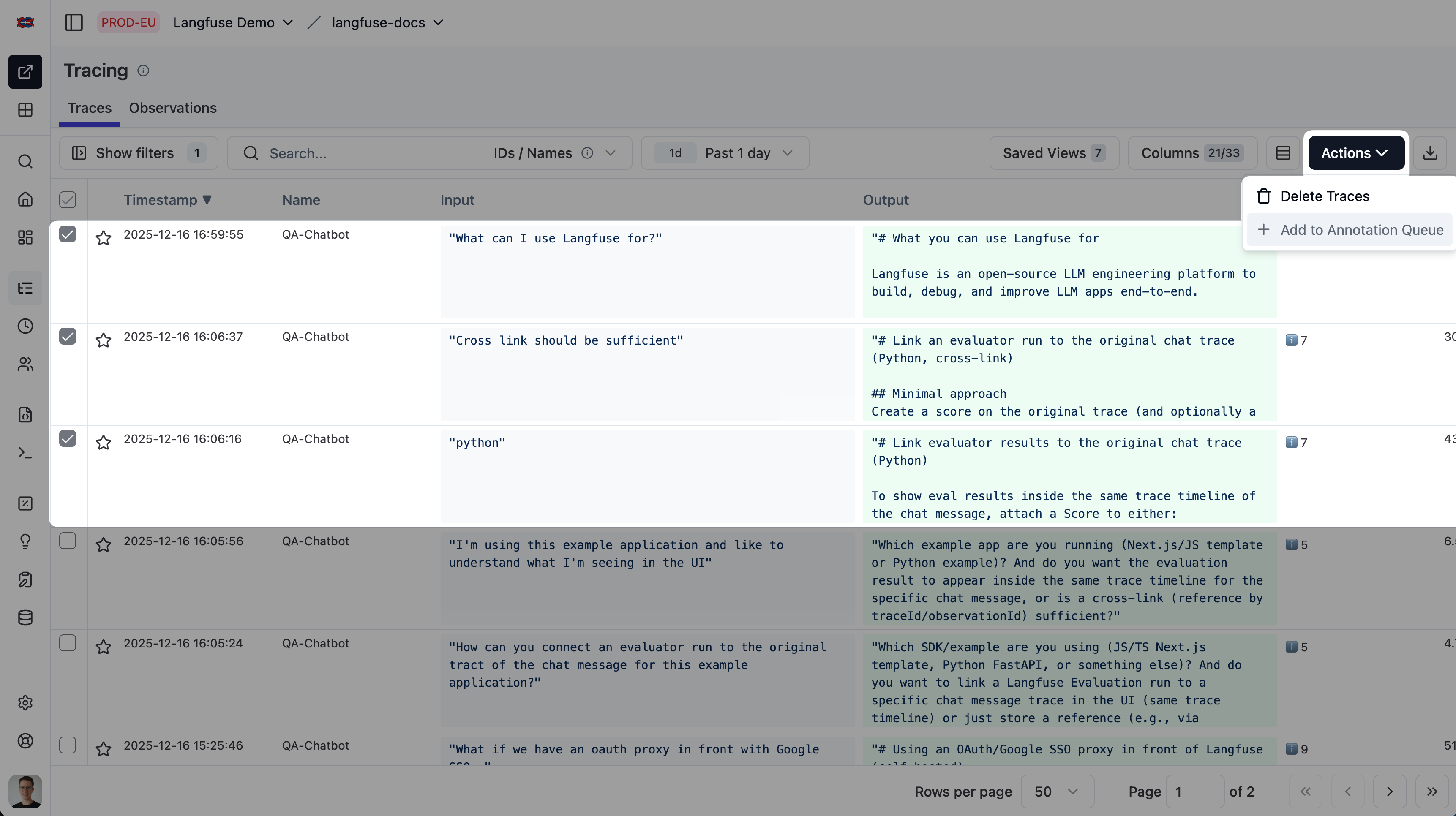
To add multiple traces, sessions or observations to a queue:
1. Select Traces, Observations or Sessions via the checkboxes.
2. Click on the "Actions" dropdown menu
3. Click on `Add to queue` to add the selected traces, sessions or observations to the queue.
4. Select the queue you want to add the traces, sessions or observations to.
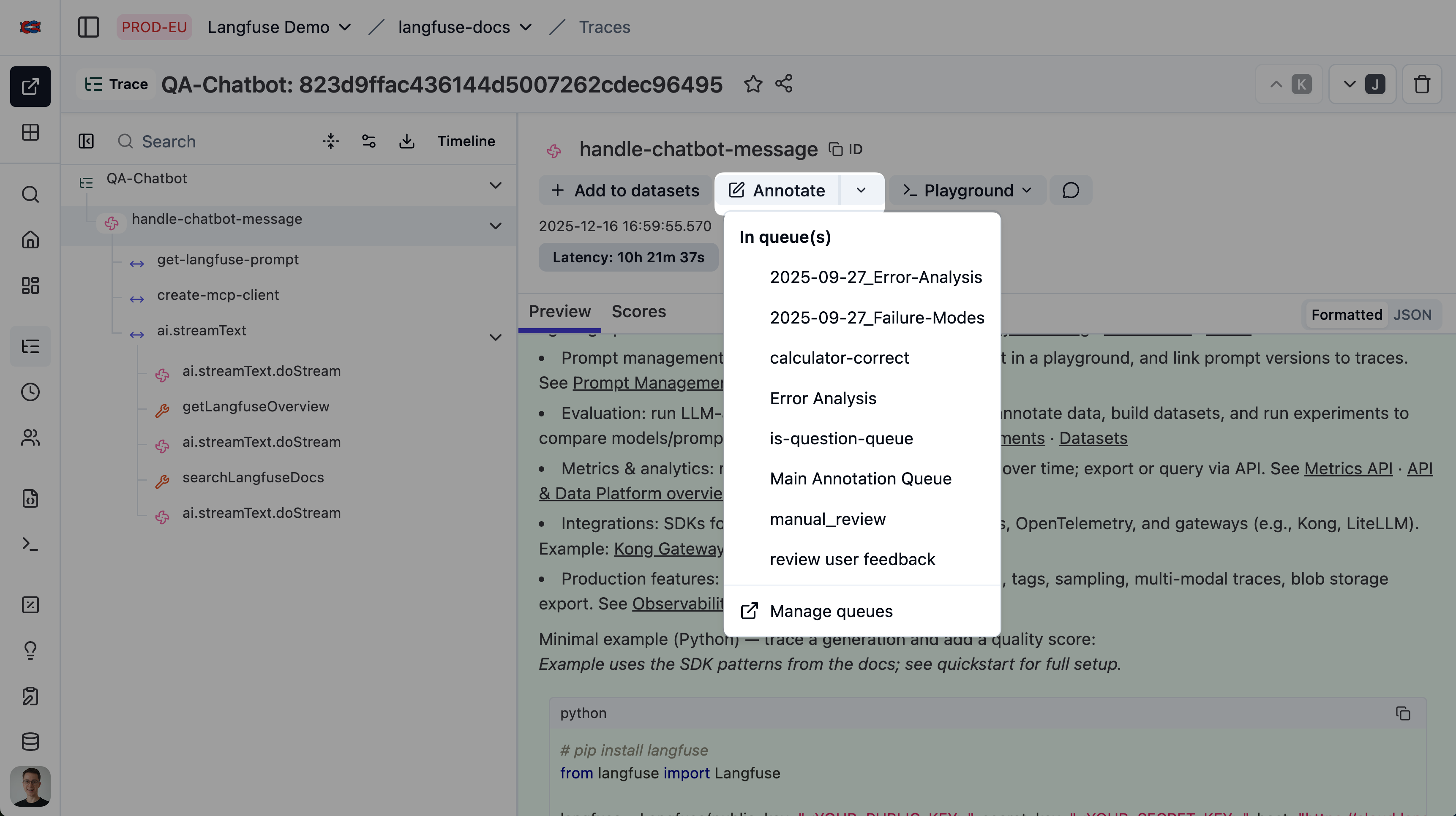
To add single traces, sessions or observations:
1. Click on the `Annotate` dropdown
2. Select the queue you want to add the trace, session or observation to
### Process Annotation Queue
You will see an annotation task for each item in the queue.
1. On the `Annotate` Card add scores on the defined dimensions
2. Click on `Complete + next` to move to the next annotation task or finish the queue
## Keyboard shortcuts [#keyboard-shortcuts]
Processing a queue is fully keyboard-driven, so you can score items without reaching for the mouse. The shortcuts follow a navigate-then-edit model and are suppressed while you are typing in a text field or while a dialog or dropdown is open. Press `?` in the queue to open the in-app cheatsheet.
| Key | Action |
| ---------------------- | ------------------------------------------------------- |
| `→` / `←` | Next / previous item in the queue |
| `↑` / `↓` | Move between score fields (wraps at the ends) |
| `1`–`9` | Select the Nth option on a categorical or boolean field |
| `Enter` | Commit the current value, or open a dropdown |
| `Esc` | Leave a text field and return to field navigation |
| `Cmd`/`Ctrl` + `Enter` | Complete the item and advance to the next |
| `?` | Open the keyboard shortcuts cheatsheet |
Number badges appear on categorical options when a field is focused, and the `⌘↵` / `Ctrl↵` hint is shown on the **Mark Completed** button. The score-field shortcuts (`↑`/`↓`, `1`–`9`, `Enter`, `Esc`) also work in the inline **Annotate** drawer on trace, observation, and session pages; the queue navigation keys (`→`/`←`, `Cmd`/`Ctrl` + `Enter`) apply when processing a queue.
## Manage Annotation Queues via API
You can manage annotation queues via the [API](https://api.reference.langfuse.com/#tag/annotationqueues/GET/api/public/annotation-queues). This allows for scaling and automating your annotation workflows or using Langfuse as the backbone for a [custom vibe coded annotation tool](/blog/2025-11-25-vibe-coding-custom-annotation-ui).
---
## Agent Instructions
This page is part of the [Langfuse](https://langfuse.com) documentation, published as plain Markdown for AI agents. Every page is available as Markdown by appending `.md` to its URL, or by sending an `Accept: text/markdown` header. This page: `https://langfuse.com/docs/evaluation/evaluation-methods/annotation-queues.md`.
### Querying these docs
If the answer is not on this page, query the documentation instead of guessing:
- **Semantic search** across all Langfuse docs, returning an answer with the relevant pages and excerpts. Ask a specific, self-contained question:
```bash
curl -sG "https://langfuse.com/api/search-docs" --data-urlencode "query=How do I trace a LangGraph agent?"
```
- **Index of every page**: , with per-section indexes [llms-docs.txt](https://langfuse.com/llms-docs.txt), [llms-integrations.txt](https://langfuse.com/llms-integrations.txt), and [llms-self-hosting.txt](https://langfuse.com/llms-self-hosting.txt).
### Before writing Langfuse code
- **Install the [Langfuse Agent Skill](https://langfuse.com/docs/api-and-data-platform/features/agent-skill).** It encodes Langfuse's own best practices for instrumentation, prompt management, and evaluation, and materially improves results.
- **Read [What does a good trace look like?](https://langfuse.com/docs/observability/best-practices.md)** before instrumenting an application.
- **Verify endpoints, parameters, and response fields** against the [API reference](https://api.reference.langfuse.com) instead of inferring them from code examples.
- **Use the [Langfuse CLI](https://langfuse.com/docs/api-and-data-platform/features/cli)** (`npx langfuse-cli api `) to read or write traces, prompts, datasets, and scores from the terminal.
Found an error in these docs? Please open an issue at .