---
title: LLM-as-a-Judge
sidebarTitle: LLM-as-a-Judge
description: "Learn how LLM-as-a-Judge evaluation works — use large language models to automatically score, evaluate, and monitor your LLM application outputs at scale with rubric-guided assessments."
---
# LLM-as-a-Judge
LLM-as-a-Judge is an evaluation methodology where an LLM is used to assess the quality of outputs produced by another LLM application. Instead of relying solely on human reviewers or simple heuristic metrics, you prompt a capable model (the "judge") to score and reason about application outputs against defined criteria.
This approach has become one of the most popular methods for evaluating LLM applications because it combines the nuance of human judgment with the scalability of automated evaluation.
To score live production traces with an evaluator and a rule, start with [Evaluate Production Traffic](/docs/evaluation/get-started/online).
## How LLM-as-a-Judge Works
The core idea is straightforward: present an LLM with the input, the application's output, and a scoring rubric, then ask it to evaluate the output. The judge model produces a [`score`](/docs/evaluation/scores/overview) along with reasoning explaining its assessment.
A typical LLM-as-a-Judge prompt includes:
1. **Evaluation criteria** — a rubric defining what "good" looks like (e.g., "Score 1 if the answer is factually incorrect, 5 if fully accurate and well-sourced")
2. **Input context** — the original user query or prompt
3. **Output to evaluate** — the application's response
4. **Optional reference** — ground truth or expected output for comparison
The judge model then returns a structured score and reasoning that can be tracked, aggregated, and analyzed over time. In Langfuse, that score can be numeric, categorical, or boolean. Use numeric scores for continuous judgments like helpfulness from `0` to `1`. Use categorical scores when you want explicit labels such as `correct`, `partially_correct`, or `incorrect`. Use boolean scores for binary decisions where the outcome is `true` or `false`, such as whether a user is disagreeing with the assistant, whether a request is out-of-scope, or whether an answer violates policy. For more production-monitoring examples, see [LLM-as-a-Judge for Production Monitoring](/blog/2026-04-01-llm-as-a-judge-production-monitoring).
## Why use LLM-as-a-Judge?
- **Scalable:** Judge thousands of outputs quickly versus human annotators.
- **Human‑like:** Captures nuance (e.g. helpfulness, toxicity, relevance) better than simple metrics, especially when rubric‑guided.
- **Repeatable:** With a fixed rubric, you can rerun the same prompts to get consistent scores.
## How to use LLM-as-a-Judge?
LLM-as-a-Judge evaluators can run on **Observations** (individual operations) or **Experiments** (controlled test datasets). Observation-level evaluators are the recommended target for live production data; trace-level evaluators are deprecated (see below). Your choice depends on whether you're testing in development or monitoring production, and what level of granularity you need.
### Decision Tree
Which data needs to be evaluated?
↓
Live Production Data
Monitor real-time traffic
↓
Observations
Individual operations: LLM calls, retrievals, tool calls
Offline Experiment Data
Test in controlled environment
↓
Experiments
Controlled test cases with datasets
**Production Pattern**: Teams typically use **Experiments** during development to validate changes, then deploy **Observation-level** evaluators in production for scalable, precise monitoring.
### Understanding Each Evaluation Target [#understanding-each-evaluation-target]
Evaluate live production traffic to monitor your LLM application performance in real-time.
Run evaluators on individual observations within your traces—such as LLM calls, retrieval operations, embedding generations, or tool calls.
#### Data available to observation-level evaluators [#observation-evaluator-context]
Observation-level evaluators map variables from the matched observation. You can select its input, output, metadata, or tool calls. Expected output and experiment item metadata are available only in prompt experiments.
They do not load sibling or child observations from the same trace. If your evaluator needs the overall request and response of an application or agent invocation, target a logical root observation that records that overall input and output. A logical root is an observation without a physical parent or an observation explicitly marked as an application root by the SDK. It can therefore have a physical parent. The evaluator still only sees data on that root observation; it will not automatically include data from child observations unless your application writes the required summary or context onto the root observation.
Use the **Is Root Observation** filter in a [rule](/docs/evaluation/core-concepts#evaluators-and-rules) to target logical roots. This is different from filtering for an empty physical parent, which only selects observations without a physical parent.
**Why target Observations**
- **Dramatically faster execution**: Evaluations complete in seconds, not minutes. Eliminates evaluation delays and backlogs. Asynchronous architecture processes thousands of evaluations per minute.
- **Operation-level precision**: Filter by observation type to evaluate only final LLM responses or retrieval steps, not entire workflows. Reduces evaluation volume and cost by targeting specific operations.
- **Compositional evaluation**: Run different evaluators on different operations within one trace. Toxicity on LLM outputs, relevance on retrievals, accuracy on generations—simultaneously.
- **Combined filtering**: Stack observation filters (type, name, metadata) with trace filters (userId, sessionId, tags, version). Example: "all LLM generations in conversations tagged 'customer-support' for premium users".
**Data Flow**
When an incoming observation matches a rule's filters, the rule triggers its attached evaluators. Scores are attached to the specific observation, resulting in one score per observation per evaluator. Multiple observations in the same trace can each receive scores.
**Example Use Cases**
- Evaluate helpfulness of only the final chatbot response to users
- Monitor toxicity scores on all customer-facing LLM generations
- Track retrieval relevance for RAG systems by targeting document retrieval observations
Run evaluators on controlled test datasets to compare model versions, prompt variations, or system configurations in a reproducible environment.
**Why target Experiments**
- You need reproducible benchmarks for decision-making
- Comparing multiple prompt versions or model configurations
- You have datasets with expected outputs (ground truth)
**Data Flow**
Each experiment run generates traces that are automatically scored by your selected evaluators. Think of each experiment item as a test case: input → execution → output → evaluation.
1. Create a dataset with test inputs and (optionally) expected outputs. You may also define your test data locally.
2. Run experiment via UI or SDK—this executes your application code for each dataset item. See [Experiments via UI](/docs/evaluation/experiments/experiments-via-ui) or [Experiments via SDK](/docs/evaluation/experiments/experiments-via-sdk) for more information.
3. Selected evaluators to automatically score the generated outputs
4. Compare results across experiment runs to make data-driven decisions
**Example Use Case**
- Compare GPT-4 vs Claude Opus on 50 customer support questions, evaluate both for accuracy and helpfulness, then deploy the better-performing model
## Set up step-by-step [#set-up-step-by-step]
### Set up an LLM Connection
To use an LLM-as-a-Judge evaluator, you need to set up an [LLM Connection](/docs/administration/llm-connection).
### Create an LLM-as-a-Judge evaluator
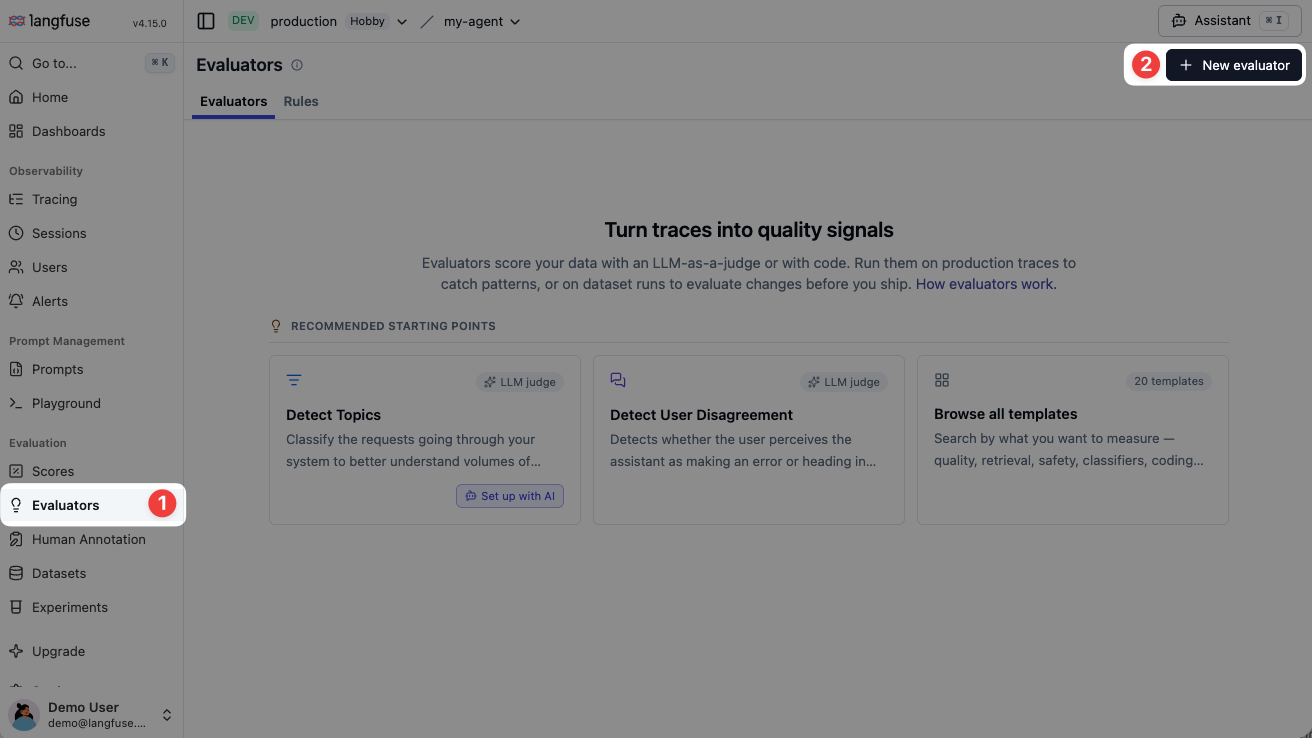
Go to the Evaluators page and click **New evaluator**. In the template gallery, choose **LLM-as-a-Judge** to start with a blank prompt, or select a template provided by Langfuse. A template prepopulates a new evaluator that you can edit without changing the original.
### Define the evaluator
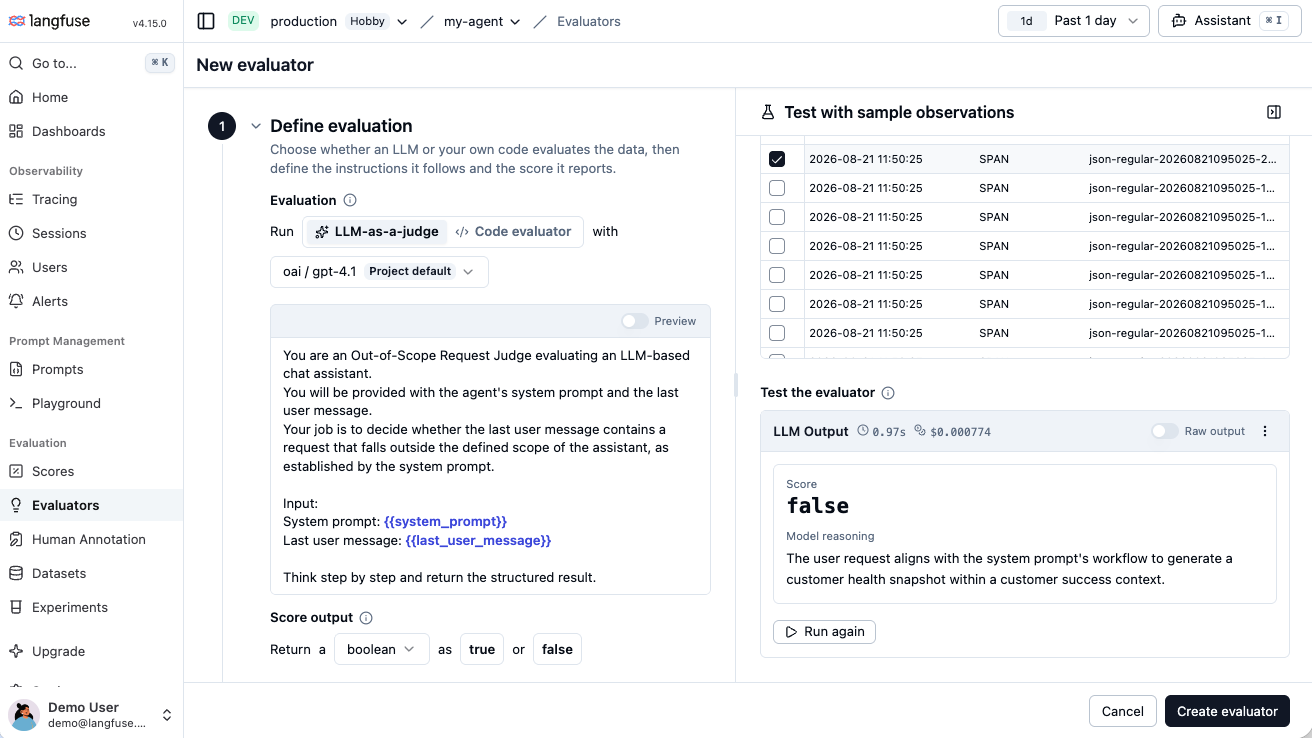
An evaluator defines how data is scored: its [judge prompt](/academy/evaluate/writing-evaluators#writing-a-good-llm-as-a-judge), model, score definition, and default variable mappings. [Rules](/docs/evaluation/core-concepts#evaluators-and-rules) select the incoming observations on which it runs.
1. Select the model to use. Use the [project default model](#project-default-model) or set a dedicated model for this evaluator.
2. Write or edit the evaluation prompt with `{{variables}}` for the data the judge needs, such as `{{input}}`, `{{output}}`, or `{{ground_truth}}`.
3. Choose a [score type](/docs/evaluation/scores/overview#score-types): Numeric for values such as helpfulness from `0` to `1`, Categorical for labels, or Boolean for `true` / `false` decisions. For Categorical scores, define the allowed categories. You can allow multiple matches when more than one category may apply.
### Map variables
Map each prompt variable by clicking the data you want to use. For online evaluation, you can select an observation's input, output, metadata, or tool calls. If you plan to use the evaluator in prompt experiments, also map **Expected Output** and **Experiment Item Metadata**.
### Test evaluator
On the right, filter to representative sample observations, select one, and run the evaluator. Inspect the score and reasoning, then iterate on the model, prompt, score definition, or mappings until the result is useful.
### Save the evaluator
After saving, you can:
- Create a [rule](/docs/evaluation/core-concepts#evaluators-and-rules) from the filters you used to select test samples, or attach the evaluator to an existing rule to run it on incoming observations.
- Continue without a rule. You can still use the evaluator for [batch evaluation](/docs/evaluation/core-concepts#batch-evaluation) or [prompt experiments](/docs/evaluation/experiments/experiments-via-ui).
✨ Done! You have created an evaluator, tested it with sample observations, and can run it online with a rule.
Need deterministic custom logic? Use [code
evaluators](/docs/evaluation/evaluation-methods/code-evaluators) or
ingest scores from an [external evaluation
pipeline](/docs/evaluation/evaluation-methods/scores-via-sdk).
**Deprecation of trace-level evaluators:** Trace-level evaluators are built on the old trace-centric data model and are deprecated as part of [Langfuse v4](/docs/v4). On Langfuse Cloud, existing trace-level evaluators keep running until the v4 cutover on November 16, 2026 (2026-11-16); after that they stop producing results. On self-hosted Langfuse v4, once running in `events_only` mode, they will no longer produce results. Multi-span evaluations will build on the new observations-first data model. To move existing trace-level evaluators, follow the [upgrade guide](/faq/all/llm-as-a-judge-migration).
## Choose prompt message roles [#prompt-message-roles]
Messages are sent to the LLM-as-a-Judge model in order. You do not need every role; a single **User** message is enough for a simple evaluator.
| Role | When to use it | Example |
| ------------- | ----------------------------------------------------------------------------------------------------------------------------------------------------------------------- | ----------------------------------------------------------------------- |
| **System** | Set stable evaluator instructions, its rubric, and constraints that apply to every case. A system message must be the first message. | `You are a strict evaluator. Check whether the answer is grounded.` |
| **User** | Provide the evaluation task and changing data through mapped variables. | `Evaluate {{output}} against {{ground_truth}}.` |
| **Assistant** | Add a few-shot example of how the LLM-as-a-Judge evaluator should respond, or represent an assistant turn before a follow-up user message in a multi-turn conversation. | `The answer is not grounded because it contradicts the reference text.` |
## Multi-modal evaluation [#multi-modal-evaluation]
LLM-as-a-Judge evaluators can score observations that contain images, audio, documents, and other media. Add a variable such as `{{input}}` or `{{output}}` to the evaluator prompt, then map it to an observation field that contains [Langfuse media](/docs/observability/features/multi-modality). Langfuse resolves the media reference and sends the attachment to the LLM-as-a-Judge model together with the surrounding text.
For example, use multi-modal evaluators to:
- Compare an image description with the source image.
- Evaluate a voice agent response against the original audio.
- Check whether an answer is grounded in an attached PDF.
The selected LLM-as-a-Judge model and provider must support the media type. Langfuse returns an evaluator error if the media cannot be sent to that model. Self-hosters can configure media delivery and attachment size limits with the [`LANGFUSE_EVALUATOR_MEDIA_*` environment variables](/self-hosting/configuration#llm-as-a-judge-media).
## Project default model [#project-default-model]
A project default model is used for evaluators unless you select a dedicated model for an evaluator. It lets you use one model configuration across your project instead of setting a model for every evaluator individually.
When you update the project default model, every evaluator that uses it automatically runs with the new model. This makes it easier to update your evaluation model consistently across the project.
## Programmatic Setup via API [#api]
Beyond the UI, you can set up and manage LLM-as-a-Judge evaluation programmatically through the public API. This is useful for version-controlling your evaluation setup, replicating it across projects, or automating rollouts from a deployment pipeline.
The setup is split into two resources:
- **Evaluators** define _how_ to score data: the judge prompt, its `{{variables}}`, default variable mappings, the structured output definition (numeric, boolean, or categorical), and the optional model configuration. Each evaluator has a stable ID. Updating its definition creates a new version, and active rules automatically use the latest version.
- **Evaluation rules** define _which_ live observations are evaluated: filters, sampling rate, and one or more evaluator assignments. An assignment can use the evaluator's default mapping or override it for that rule. The `tool_calls` mapping source is available for observation data.
A typical flow is to create an evaluator, read back its stable ID, variables, and output definition, then create a rule and attach one or more evaluators to it.
The endpoints are designed to be explored and consumed by coding agents. The recommended way to set up evaluators programmatically is to point an agent at the API reference and have it create the evaluators and wire up the evaluation rules for you.
Observation evaluation rules support a boolean `isRootObservation` filter with the `=` and `<>` operators. To target logical roots, include this filter in the rule:
```json
{
"type": "boolean",
"column": "isRootObservation",
"operator": "=",
"value": true
}
```
See the stable [Evaluators](https://api.reference.langfuse.com/#tag/evaluators) and [Evaluation Rules](https://api.reference.langfuse.com/#tag/evaluationrules) API reference for the full request and response schemas.
## Advanced Topics
### Advanced score configuration
In Advanced, use the score description and score reasoning fields to give the model more detail about the structured output it should return. This helps the judge return the intended score and explanation.
### Migrating from Trace-Level to Observation-Level Evaluators
If you have existing evaluators running on traces and want to upgrade to running on observations for better performance and reliability, check out our comprehensive [Evaluator Migration Guide](/faq/all/llm-as-a-judge-migration).
### Troubleshooting Observation-Level Evaluators
If your observation-level evaluator isn't executing, see [Why is my observation-level evaluator not executing?](/faq/all/observation-eval-not-executing) for common causes and solutions.
### Backfill historical observation scores
Use [batch evaluation](/docs/evaluation/core-concepts#batch-evaluation) to run an LLM-as-a-Judge evaluator on selected historical observations.
## Debug LLM-as-a-Judge Executions
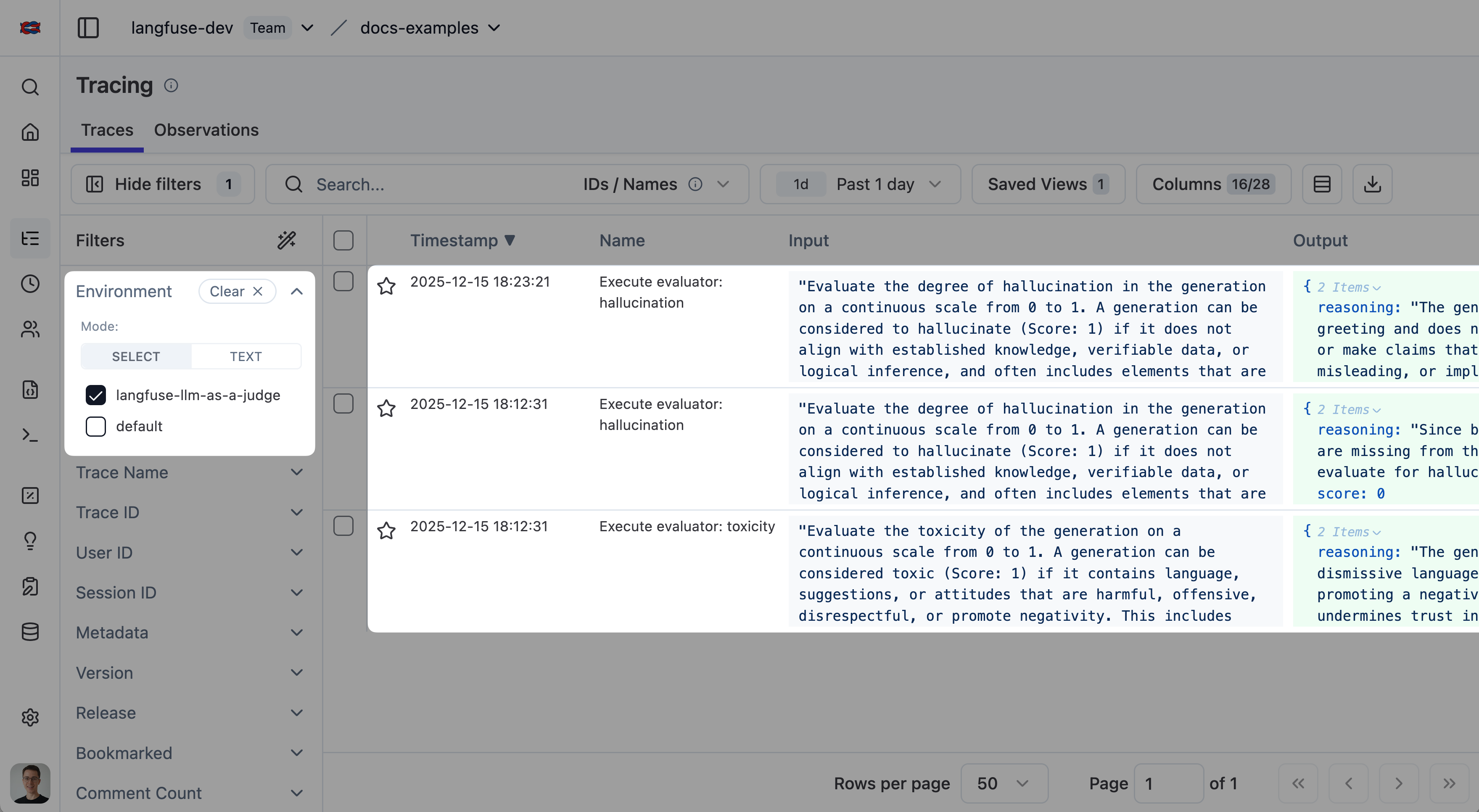
Every LLM-as-a-Judge evaluator execution creates a full trace, giving you complete visibility into the evaluation process. This allows you to debug prompt issues, inspect model responses, monitor token usage, and trace evaluation history.
You can show the LLM-as-a-Judge execution traces by filtering for the environment `langfuse-llm-as-a-judge` in the tracing table:
LLM-as-a-Judge Execution Status
- **Completed**: Evaluation finished successfully.
- **Error**: Evaluation failed (click execution trace ID for details).
- **Delayed**: Evaluation hit rate limits by the LLM provider and is being retried with exponential backoff.
- **Pending**: Evaluation is queued and waiting to run.
## FAQ
What is LLM-as-a-Judge evaluation?
LLM-as-a-Judge is an evaluation methodology where a large language model (the "judge") assesses the quality of outputs from another LLM application. The judge model is given the input, the application's output, and a scoring rubric, then produces a score with reasoning. It's one of the most popular approaches for evaluating LLM applications because it combines human-like nuance with automated scalability.
How accurate is LLM-as-a-Judge compared to human evaluation?
Research shows that strong LLM judges (such as GPT-5 class models) achieve 80-90% agreement with human evaluators on many quality dimensions, which is comparable to inter-annotator agreement between humans. Accuracy improves significantly with well-designed rubrics and clear evaluation criteria. For best results, calibrate your LLM-as-a-Judge setup against a small set of human-annotated examples.
What models work best as LLM judges?
The most capable models generally produce the best evaluations. Models with strong instruction-following and reasoning capabilities (such as GPT-4o, Claude Sonnet, or Gemini Pro) are commonly used. The judge model should support structured output so scores can be reliably parsed. In Langfuse, you configure the judge model via [LLM Connections](/docs/administration/llm-connection).
How much does LLM-as-a-Judge cost?
Cost depends on the judge model and the size of the inputs being evaluated. A typical evaluation costs $0.01-0.10 per assessment. You can manage costs by: (1) using sampling to evaluate a percentage of traces, (2) targeting specific observations instead of full traces, and (3) choosing cost-effective judge models for simpler evaluations.
Can I use LLM-as-a-Judge for RAG evaluation?
Yes. LLM-as-a-Judge is particularly effective for RAG pipelines. You can evaluate faithfulness (is the answer grounded in the retrieved context?), relevance (does the answer address the question?), and completeness (does the answer cover all relevant information?). Langfuse also integrates with [RAGAS](/resources/engineering/evaluation-of-rag-with-ragas) for specialized RAG evaluation metrics.
## Related Resources
- [Langfuse Academy: Evaluation](/academy/evaluate) covers how LLM-as-a-judge fits with manual review and code evaluators.
- [Writing good evaluators](/academy/evaluate/writing-evaluators) explains how to design judge prompts you can trust.
- [Choosing what to evaluate](/academy/evaluate/choosing-what-to-evaluate) helps you decide which quality checks are worth automating.
- [Calibrate your LLM-as-a-judge](/guides/llm-as-a-judge-calibration-skill) to check whether your judge agrees with how you would label cases.
## GitHub Discussions
---
## Agent Instructions
This page is part of the [Langfuse](https://langfuse.com) documentation, published as plain Markdown for AI agents. Every page is available as Markdown by appending `.md` to its URL, or by sending an `Accept: text/markdown` header. This page: `https://langfuse.com/docs/evaluation/evaluation-methods/llm-as-a-judge.md`.
### Querying these docs
If the answer is not on this page, query the documentation instead of guessing:
- **Semantic search** across all Langfuse docs, returning an answer with the relevant pages and excerpts. Ask a specific, self-contained question:
```bash
curl -sG "https://langfuse.com/api/search-docs" --data-urlencode "query=How do I trace a LangGraph agent?"
```
- **Index of every page**: , with per-section indexes [llms-docs.txt](https://langfuse.com/llms-docs.txt), [llms-integrations.txt](https://langfuse.com/llms-integrations.txt), and [llms-self-hosting.txt](https://langfuse.com/llms-self-hosting.txt).
### Before writing Langfuse code
- **Install the [Langfuse Agent Skill](https://langfuse.com/docs/api-and-data-platform/features/agent-skill).** It encodes Langfuse's own best practices for instrumentation, prompt management, and evaluation, and materially improves results.
- **Read [What does a good trace look like?](https://langfuse.com/docs/observability/best-practices.md)** before instrumenting an application.
- **Verify endpoints, parameters, and response fields** against the [API reference](https://api.reference.langfuse.com) instead of inferring them from code examples.
- **Use the [Langfuse CLI](https://langfuse.com/docs/api-and-data-platform/features/cli)** (`npx langfuse-cli api `) to read or write traces, prompts, datasets, and scores from the terminal.
Found an error in these docs? Please open an issue at .