---
title: Evaluate with Datasets
sidebarTitle: Evaluate with Datasets
description: Run your first offline evaluation on a Langfuse dataset and compare prompt changes.
---
# Evaluate with Datasets
This guide walks you through how to set up a dataset, run an experiment on it, and evaluate the results. This is useful for evaluating changes before you deploy them to production. If you don't yet know what to evaluate, [Choosing what to evaluate](/academy/evaluate/choosing-what-to-evaluate) will help you further. For how datasets and experiments fit together, see [Datasets](/academy/datasets) and [Experiments](/academy/experiments).
This walkthrough is for running [experiments via SDK](/docs/evaluation/experiments/experiments-via-sdk): you fetch a dataset from Langfuse, run your agent externally and push the results to the Langfuse platform. You can also [run prompt experiments in the UI](/docs/evaluation/experiments/experiments-via-ui), [score traces in the UI](/docs/evaluation/evaluation-methods/scores-via-ui), or [review items in an annotation queue](/docs/evaluation/evaluation-methods/annotation-queues).
h2]:mt-6 [&>h2]:mb-4">
## Agentic installation [#agentic-installation]
Install the [Langfuse Agent Skill](https://github.com/langfuse/skills) to let your coding agent access all Langfuse features.
Ask your coding agent to install the skill by pointing to the [GitHub repository](https://github.com/langfuse/skills) and instruct it to get started with offline evaluation.
```txt filename="Agent instruction"
Install the Langfuse Agent Skill from github.com/langfuse/skills
and use it to create a first dataset for this application
with Langfuse.
```
Langfuse has a [Cursor Plugin](https://cursor.com/docs/plugins) that includes the skill automatically.
Then prompt your agent:
```txt filename="Agent instruction"
Set up offline evaluation for this application with Langfuse.
```
Install via npm ([skills CLI](https://www.npmjs.com/package/skills)):
```bash
npx skills add langfuse/skills --skill "langfuse"
```
If you want to target a specific agent directly:
```bash
npx skills add langfuse/skills --skill "langfuse" --agent ""
```
Alternatively you can manually clone the skill
1. Clone repo somewhere stable
```bash
git clone https://github.com/langfuse/skills.git /path/to/langfuse-skills
```
2. Make sure your agent's skills dir exists
```bash
mkdir -p /path/to//skills
```
3. Symlink the skill folder
```bash
ln -s /path/to/langfuse-skills/skills/langfuse /path/to//skills/langfuse
```
Then prompt your agent:
```txt filename="Agent instruction"
Set up offline evaluation for this application with Langfuse.
```
## Manual setup [#manual-setup]
Running experiments to test the performance of your system has three aspects:
- **Dataset**: Test cases with inputs and expected outputs
- **Experiment condition**: The application variation or model call you want to test
- **Evaluators**: Functions that score the output
This guide uses the current Langfuse SDKs: **Python SDK v4** and **JS/TS SDK v5**. Both use Langfuse's OpenTelemetry-based tracing and the current experiment runner. If you use an older SDK, see the [Python v3 → v4](/docs/observability/sdk/upgrade-path/python-v3-to-v4) or [JS/TS v4 → v5](/docs/observability/sdk/upgrade-path/js-v4-to-v5) migration guide.
### Create a project and get API keys [#sdk-create-project]
1. [Create a Langfuse account](/cloud) or [self-host Langfuse](/self-hosting).
2. Create a project and open **Settings → API Keys**.
3. Create an API key for your model provider. This example uses [OpenAI](https://platform.openai.com/api-keys).
Set the keys as environment variables:
```bash
export LANGFUSE_PUBLIC_KEY="pk-lf-..."
export LANGFUSE_SECRET_KEY="sk-lf-..."
export LANGFUSE_BASE_URL="https://cloud.langfuse.com"
export OPENAI_API_KEY="sk-..."
```
Use the base URL for your [Langfuse Cloud data region](/security/data-regions) or self-hosted deployment.
### Install the SDKs [#sdk-install]
```bash
pip install langfuse openai
```
```bash
# pnpm
pnpm add @langfuse/client @langfuse/openai @langfuse/otel @opentelemetry/sdk-node openai tsx
# npm
npm install @langfuse/client @langfuse/openai @langfuse/otel @opentelemetry/sdk-node openai tsx
```
### Create the dataset [#sdk-create-dataset]
A dataset is a collection of test cases. Each item has an input and, optionally, an expected output that evaluators can compare against. A first dataset might have a handful of representative cases; later you can grow it as you learn what fails.
In the example below we add five questions about San Francisco tourist sites.
Run this setup script once; the experiment script in the next step reuses the stored dataset.
```python filename="seed_dataset.py"
from langfuse import get_client
langfuse = get_client()
dataset_name = "san-francisco-sites"
langfuse.create_dataset(
name=dataset_name,
description="Questions and expected answers about sites in San Francisco",
)
items = [
{
"id": "evaluation-quickstart-sf-golden-gate-bridge",
"input": {
"question": "Which red-orange suspension bridge connects San Francisco with Marin County?"
},
"expected_output": "Golden Gate Bridge",
},
{
"id": "evaluation-quickstart-sf-alcatraz-island",
"input": {
"question": "Which island in San Francisco Bay is home to a former federal prison?"
},
"expected_output": "Alcatraz Island",
},
{
"id": "evaluation-quickstart-sf-palace-of-fine-arts",
"input": {
"question": "Which Beaux-Arts landmark in the Marina District features a rotunda beside a lagoon?"
},
"expected_output": "Palace of Fine Arts",
},
{
"id": "evaluation-quickstart-sf-coit-tower",
"input": {
"question": "Which Art Deco tower stands on Telegraph Hill?"
},
"expected_output": "Coit Tower",
},
{
"id": "evaluation-quickstart-sf-lombard-street",
"input": {
"question": "Which San Francisco street is famous for a steep block with eight hairpin turns?"
},
"expected_output": "Lombard Street",
},
]
for item in items:
langfuse.create_dataset_item(dataset_name=dataset_name, **item)
print(f"Created {dataset_name} with {len(items)} items")
```
Run the setup script:
```bash
python seed_dataset.py
```
Run this setup script once; the experiment script in the next step reuses the stored dataset.
```typescript filename="seed-dataset.ts"
import { LangfuseClient } from "@langfuse/client";
const langfuse = new LangfuseClient();
const datasetName = "san-francisco-sites";
const items = [
{
id: "evaluation-quickstart-sf-golden-gate-bridge",
input: {
question:
"Which red-orange suspension bridge connects San Francisco with Marin County?",
},
expectedOutput: "Golden Gate Bridge",
},
{
id: "evaluation-quickstart-sf-alcatraz-island",
input: {
question:
"Which island in San Francisco Bay is home to a former federal prison?",
},
expectedOutput: "Alcatraz Island",
},
{
id: "evaluation-quickstart-sf-palace-of-fine-arts",
input: {
question:
"Which Beaux-Arts landmark in the Marina District features a rotunda beside a lagoon?",
},
expectedOutput: "Palace of Fine Arts",
},
{
id: "evaluation-quickstart-sf-coit-tower",
input: {
question: "Which Art Deco tower stands on Telegraph Hill?",
},
expectedOutput: "Coit Tower",
},
{
id: "evaluation-quickstart-sf-lombard-street",
input: {
question:
"Which San Francisco street is famous for a steep block with eight hairpin turns?",
},
expectedOutput: "Lombard Street",
},
];
async function main() {
await langfuse.api.datasets.create({
name: datasetName,
description: "Questions and expected answers about sites in San Francisco",
});
for (const item of items) {
await langfuse.dataset.createItem({
datasetName,
...item,
});
}
console.log(`Created ${datasetName} with ${items.length} items`);
}
main().catch((error) => {
console.error(error);
process.exitCode = 1;
});
```
Run the setup script:
```bash
npx tsx seed-dataset.ts
```
In the Langfuse UI, go to [**Datasets**](https://cloud.langfuse.com/project/~/datasets) and click `+ New dataset`. Name it `san-francisco-sites` if you want to run the example experiment in the next step without changing the script.
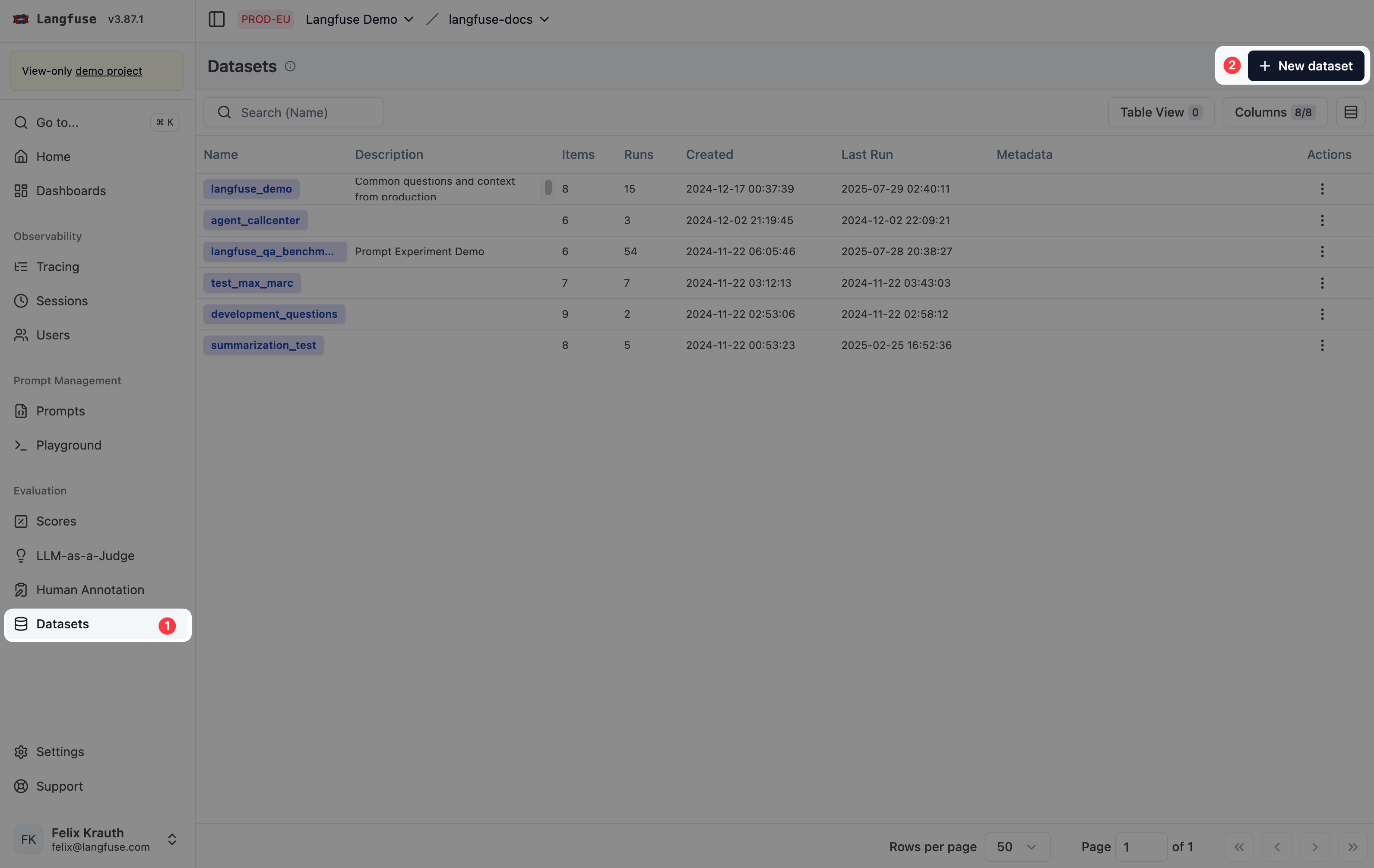
Add items one by one, import a CSV, or add cases from existing traces. For the San Francisco example, each item's `input` is a question and the `expected output` is the site name. Use any number of items — and any input shape — that matches your own use case.
See [Datasets](/docs/evaluation/experiments/datasets) for CSV import, adding items from traces, and dataset versions.
When you create items via the SDK, dataset item IDs are stable, so adding an item with the same ID updates it instead of creating a duplicate.
### Run an experiment [#sdk-run-experiment]
The example uses the SDK to run an experiment. This lets you run your agent in its own harness and access to tools outside of Langfuse. If you only need to test a prompt + model combination, you can also run [prompt experiments in the UI](/docs/evaluation/experiments/experiments-via-ui).
You can still start an SDK experiment from the UI by [configuring a webhook](/docs/evaluation/experiments/experiments-via-sdk#configure-webhook) to trigger external execution.
In the example below, each dataset item is sent to the model. The evaluator returns `1` when the output exactly matches the expected site name and `0` otherwise.
```python filename="sf_sites.py"
from langfuse import Evaluation, get_client
from langfuse.openai import OpenAI
langfuse = get_client()
client = OpenAI()
def answer_question(*, item, **kwargs):
question = item.input["question"]
response = client.responses.create(
model="gpt-5-mini",
input=[
{
"role": "system",
"content": "Answer the question about a site in San Francisco.",
},
{"role": "user", "content": question},
],
)
return response.output_text
def exact_match(*, output, expected_output, **kwargs):
return Evaluation(
name="exact_match",
value=1.0 if output == expected_output else 0.0,
)
try:
dataset = langfuse.get_dataset("san-francisco-sites")
result = dataset.run_experiment(
name="San Francisco sites",
run_name="San Francisco sites v1",
description="First prompt for answering questions about San Francisco sites",
task=answer_question,
evaluators=[exact_match],
)
print(result.format())
finally:
# Required for short-lived processes so all traces reach Langfuse.
langfuse.flush()
```
Run the experiment:
```bash
python sf_sites.py
```
```typescript filename="sf-sites.ts"
import { LangfuseClient, type Evaluator } from "@langfuse/client";
import { observeOpenAI } from "@langfuse/openai";
import { LangfuseSpanProcessor } from "@langfuse/otel";
import { NodeSDK } from "@opentelemetry/sdk-node";
import OpenAI from "openai";
const otelSdk = new NodeSDK({
spanProcessors: [new LangfuseSpanProcessor()],
});
otelSdk.start();
const langfuse = new LangfuseClient();
const client = observeOpenAI(new OpenAI());
const exactMatch: Evaluator = async ({ output, expectedOutput }) => ({
name: "exact_match",
value: output === expectedOutput ? 1 : 0,
});
async function main() {
const dataset = await langfuse.dataset.get("san-francisco-sites");
const result = await dataset.runExperiment({
name: "San Francisco sites",
runName: "San Francisco sites v1",
description:
"First prompt for answering questions about San Francisco sites",
task: async (item) => {
const { question } = item.input as { question: string };
const response = await client.responses.create({
model: "gpt-5-mini",
input: [
{
role: "system",
content: "Answer the question about a site in San Francisco.",
},
{ role: "user", content: question },
],
});
return response.output_text;
},
evaluators: [exactMatch],
});
console.log(await result.format({ includeItemResults: true }));
}
main()
.catch((error) => {
console.error(error);
process.exitCode = 1;
})
// Required for short-lived processes so all traces reach Langfuse.
.finally(() => otelSdk.shutdown());
```
Run the experiment:
```bash
npx tsx sf-sites.ts
```
The experiment runner handles concurrent execution, traces each task, attaches evaluator scores, and creates a dataset run that you can inspect and compare in Langfuse.
### View the results [#sdk-view-results]
The formatted terminal output includes the experiment summary and a link to the dataset run. You can also open [**Experiments**](https://cloud.langfuse.com/project/~/experiments) in Langfuse.
For each item, you can inspect:
- The dataset input and expected output
- The model's response
- The exact-match score
- The traced OpenAI call, including latency, token usage, and cost
### Improve the prompt and compare [#sdk-iterate]
Exact match is intentionally strict. An answer such as `The answer is Coit Tower.` receives `0` because it does not exactly equal `Coit Tower`.
Change the run name to `San Francisco sites v2` and replace the system message with:
```text
Answer the question about a site in San Francisco. Return only the site's official name, with no additional text or punctuation.
```
Run the script again. Both runs use the same stored dataset, so you can compare aggregate scores and individual outputs side by side in the Experiments view.
## FAQ [#faq]
What if the dataset already exists?
The setup script creates the dataset and is intended to run once. If `san-francisco-sites` already exists, skip the dataset creation call and keep the item-creation loop. Stable item IDs make those calls safe to repeat.
Why is the experiment missing traces?
Check your Langfuse environment variables. For Python, keep `langfuse.flush()` at the end of the script. For JS/TS, keep `otelSdk.shutdown()` so the short-lived process exports all buffered spans before it exits.
Why are some exact-match scores zero?
Open the affected item and compare the model output with the expected output. Capitalization, extra words, and punctuation all cause exact match to fail. This is useful for deterministic output contracts; use [LLM-as-a-Judge](/docs/evaluation/evaluation-methods/llm-as-a-judge) when correctness requires semantic judgment.
## Next steps
- Learn how [datasets and dataset versions](/docs/evaluation/experiments/datasets) support reproducible tests.
- Compare prompts and models without writing a task function using [experiments via UI](/docs/evaluation/experiments/experiments-via-ui).
- Explore the full [experiment runner SDK](/docs/evaluation/experiments/experiments-via-sdk), including async evaluators, concurrency, and run-level metrics.
- Add [experiments to CI/CD](/docs/evaluation/experiments/experiments-ci-cd) to catch regressions before deployment.
- [Write evaluators you can trust](/academy/evaluate/writing-evaluators).
- Choose between [code evaluators](/docs/evaluation/evaluation-methods/code-evaluators), [LLM-as-a-Judge](/docs/evaluation/evaluation-methods/llm-as-a-judge), and human review for your application.
---
## Agent Instructions
This page is part of the [Langfuse](https://langfuse.com) documentation, published as plain Markdown for AI agents. Every page is available as Markdown by appending `.md` to its URL, or by sending an `Accept: text/markdown` header. This page: `https://langfuse.com/docs/evaluation/get-started/offline.md`.
### Querying these docs
If the answer is not on this page, query the documentation instead of guessing:
- **Semantic search** across all Langfuse docs, returning an answer with the relevant pages and excerpts. Ask a specific, self-contained question:
```bash
curl -sG "https://langfuse.com/api/search-docs" --data-urlencode "query=How do I trace a LangGraph agent?"
```
- **Index of every page**: , with per-section indexes [llms-docs.txt](https://langfuse.com/llms-docs.txt), [llms-integrations.txt](https://langfuse.com/llms-integrations.txt), and [llms-self-hosting.txt](https://langfuse.com/llms-self-hosting.txt).
### Before writing Langfuse code
- **Install the [Langfuse Agent Skill](https://langfuse.com/docs/api-and-data-platform/features/agent-skill).** It encodes Langfuse's own best practices for instrumentation, prompt management, and evaluation, and materially improves results.
- **Read [What does a good trace look like?](https://langfuse.com/docs/observability/best-practices.md)** before instrumenting an application.
- **Verify endpoints, parameters, and response fields** against the [API reference](https://api.reference.langfuse.com) instead of inferring them from code examples.
- **Use the [Langfuse CLI](https://langfuse.com/docs/api-and-data-platform/features/cli)** (`npx langfuse-cli api `) to read or write traces, prompts, datasets, and scores from the terminal.
Found an error in these docs? Please open an issue at .