---
title: Evaluate Production Traffic
sidebarTitle: Evaluate Production Traffic
description: Score live production traces in Langfuse. Set up an evaluator and a rule to run LLM-as-a-Judge or code checks on incoming observations.
---
# Evaluate Production Traffic
This guide walks you through scoring live production traces in Langfuse. If you don't yet know what to evaluate, start with [Choosing what to evaluate](/academy/evaluate/choosing-what-to-evaluate). For how evaluators, scores, and rules fit together, see [Core Concepts](/docs/evaluation/core-concepts).
h2]:mt-6 [&>h2]:mb-4">
## Agentic installation [#agentic-installation]
Install the [Langfuse Agent Skill](https://github.com/langfuse/skills) to let your coding agent access all Langfuse features.
Ask your coding agent to install the skill by pointing to the [GitHub repository](https://github.com/langfuse/skills) and instruct it to get started with online evaluation.
```txt filename="Agent instruction"
Install the Langfuse Agent Skill from github.com/langfuse/skills
and use it to set up online evaluation for this application
with Langfuse.
```
Langfuse has a [Cursor Plugin](https://cursor.com/docs/plugins) that includes the skill automatically.
Then prompt your agent:
```txt filename="Agent instruction"
Set up online evaluation for this application with Langfuse.
```
Install via npm ([skills CLI](https://www.npmjs.com/package/skills)):
```bash
npx skills add langfuse/skills --skill "langfuse"
```
If you want to target a specific agent directly:
```bash
npx skills add langfuse/skills --skill "langfuse" --agent ""
```
Alternatively you can manually clone the skill
1. Clone repo somewhere stable
```bash
git clone https://github.com/langfuse/skills.git /path/to/langfuse-skills
```
2. Make sure your agent's skills dir exists
```bash
mkdir -p /path/to//skills
```
3. Symlink the skill folder
```bash
ln -s /path/to/langfuse-skills/skills/langfuse /path/to//skills/langfuse
```
Then prompt your agent:
```txt filename="Agent instruction"
Set up online evaluation for this application with Langfuse.
```
## Manual setup [#manual-setup]
This path sets up online evaluation in the Langfuse UI. You create an evaluator (how to score), test it on real observations, then attach a [rule](/docs/evaluation/core-concepts#evaluators-and-rules) (which incoming observations to score).
### Create an evaluator
Open the [Evaluators page](https://cloud.langfuse.com/project/~/evals) and click **New evaluator**. Choose a template or create an evaluator from scratch.
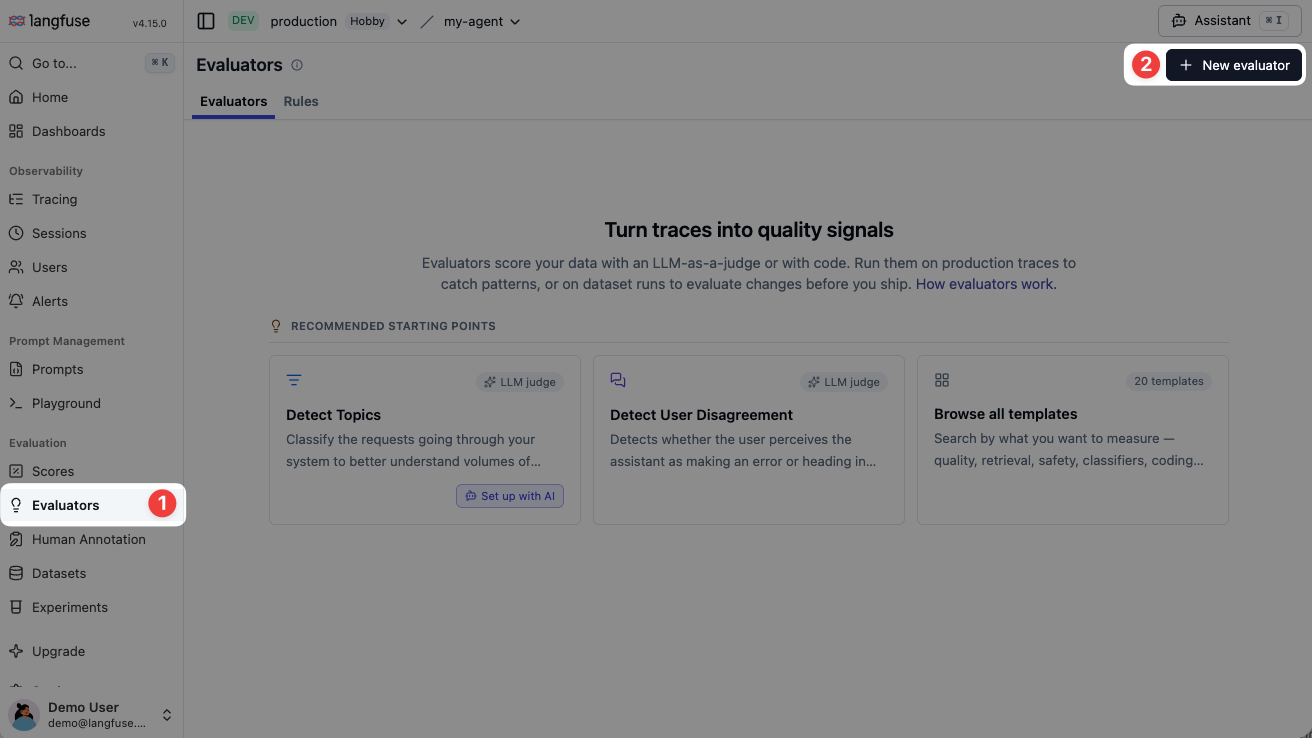
- **[LLM-as-a-Judge](/docs/evaluation/evaluation-methods/llm-as-a-judge) uses an LLM to score.** Use this for qualities that need language understanding, such as relevance, tone, or whether a request is out of scope. You need an [LLM connection](/docs/administration/llm-connection) first.
- **[Code evaluator](/docs/evaluation/evaluation-methods/code-evaluators) is a Python or TypeScript `evaluate` function.** Use this for deterministic checks such as JSON validity, required fields, or keyword rules.
### Test on sample observations
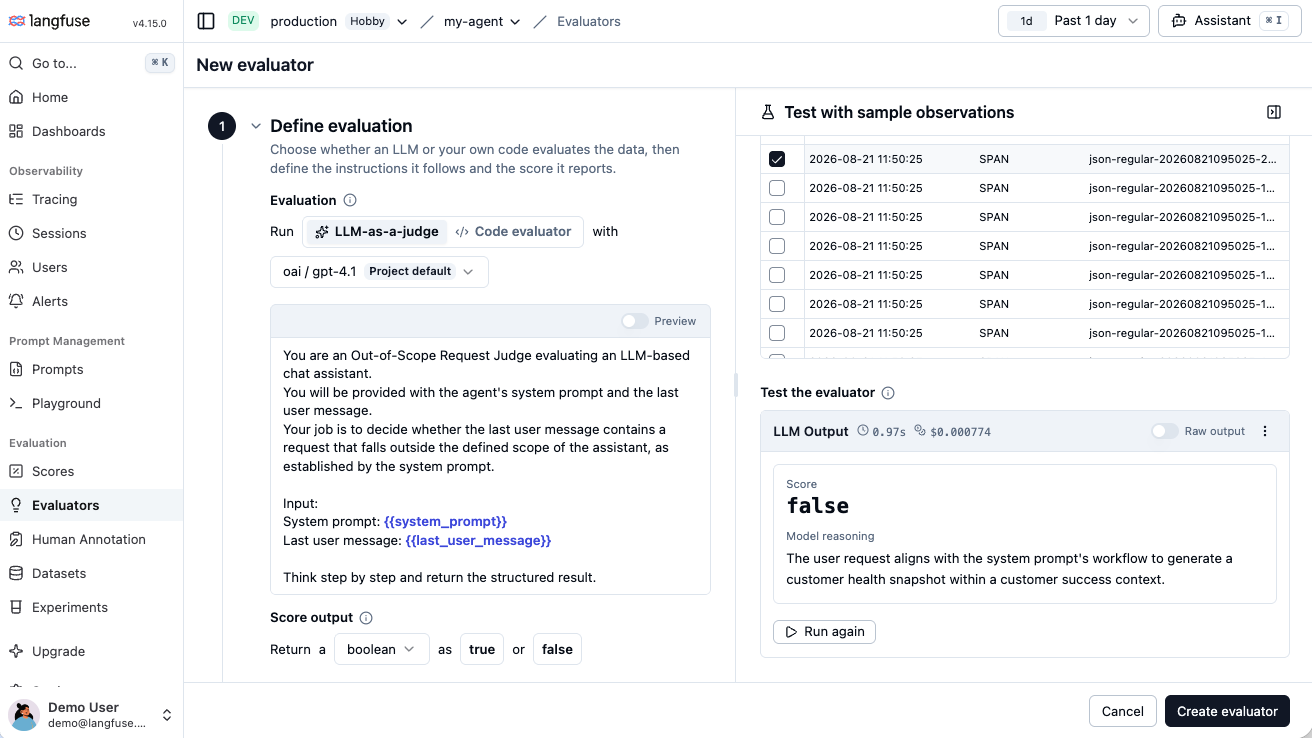
On the right, filter to representative production observations, select one, and run the evaluator to test and iterate until the result matches what you would expect.
### Attach a rule to incoming traces
After you save the evaluator, create a [rule](/docs/evaluation/core-concepts#evaluators-and-rules) from the filters you used while testing, or attach the evaluator to an existing rule.
A rule defines **which** incoming observations are scored: filters, sampling rate, and one or more evaluators. Review the matching volume from the past seven days. For LLM-as-a-Judge, also review the estimated cost and lower the sampling rate if needed.
### See scores on production traces
New matching observations receive scores as they arrive. Open a scored observation to inspect the value and the judge's reasoning, then use [score analytics](/docs/evaluation/scores/score-analytics) or a [custom dashboard](/docs/metrics/features/custom-dashboards) to watch the metric over time.
You can also run the same evaluator on selected historical observations with [batch evaluation](/docs/evaluation/core-concepts#batch-evaluation).
_[Why is my observation-level evaluator not executing?](/faq/all/observation-eval-not-executing)_
## Other ways to score live traffic [#other-ways-to-score-live-traffic]
Automated evaluators are the fastest way to score production continuously. These other methods also attach [scores](/docs/evaluation/scores/overview) to live data:
| If you want to... | Use |
| ----------------------------------------------------------- | ---------------------------------------------------------------------------------------------------------------------------------------------- |
| Review a sample of traces manually | [Scores via UI](/docs/evaluation/evaluation-methods/scores-via-ui), [annotation queues](/docs/evaluation/evaluation-methods/annotation-queues) |
| Capture thumbs-up/down or other feedback signals from users | [User feedback](/docs/observability/features/user-feedback) |
| Push scores from your own pipeline or agent | [Scores via API/SDK](/docs/evaluation/evaluation-methods/scores-via-sdk) |
## Next steps
- [Read the Langfuse Academy evaluation module](/academy/evaluate) to decide what to measure and how to write evaluators you can trust
- [Set an alert](/docs/observability/features/alerts) when a score drops below a threshold
- [Analyze quality in custom dashboards](/docs/metrics/features/custom-dashboards)
---
## Agent Instructions
This page is part of the [Langfuse](https://langfuse.com) documentation, published as plain Markdown for AI agents. Every page is available as Markdown by appending `.md` to its URL, or by sending an `Accept: text/markdown` header. This page: `https://langfuse.com/docs/evaluation/get-started/online.md`.
### Querying these docs
If the answer is not on this page, query the documentation instead of guessing:
- **Semantic search** across all Langfuse docs, returning an answer with the relevant pages and excerpts. Ask a specific, self-contained question:
```bash
curl -sG "https://langfuse.com/api/search-docs" --data-urlencode "query=How do I trace a LangGraph agent?"
```
- **Index of every page**: , with per-section indexes [llms-docs.txt](https://langfuse.com/llms-docs.txt), [llms-integrations.txt](https://langfuse.com/llms-integrations.txt), and [llms-self-hosting.txt](https://langfuse.com/llms-self-hosting.txt).
### Before writing Langfuse code
- **Install the [Langfuse Agent Skill](https://langfuse.com/docs/api-and-data-platform/features/agent-skill).** It encodes Langfuse's own best practices for instrumentation, prompt management, and evaluation, and materially improves results.
- **Read [What does a good trace look like?](https://langfuse.com/docs/observability/best-practices.md)** before instrumenting an application.
- **Verify endpoints, parameters, and response fields** against the [API reference](https://api.reference.langfuse.com) instead of inferring them from code examples.
- **Use the [Langfuse CLI](https://langfuse.com/docs/api-and-data-platform/features/cli)** (`npx langfuse-cli api `) to read or write traces, prompts, datasets, and scores from the terminal.
Found an error in these docs? Please open an issue at .