---
title: Overview
description: Improve your LLM application with open source metrics tracking latency, cost, and quality across various dimensions.
---
# Metrics
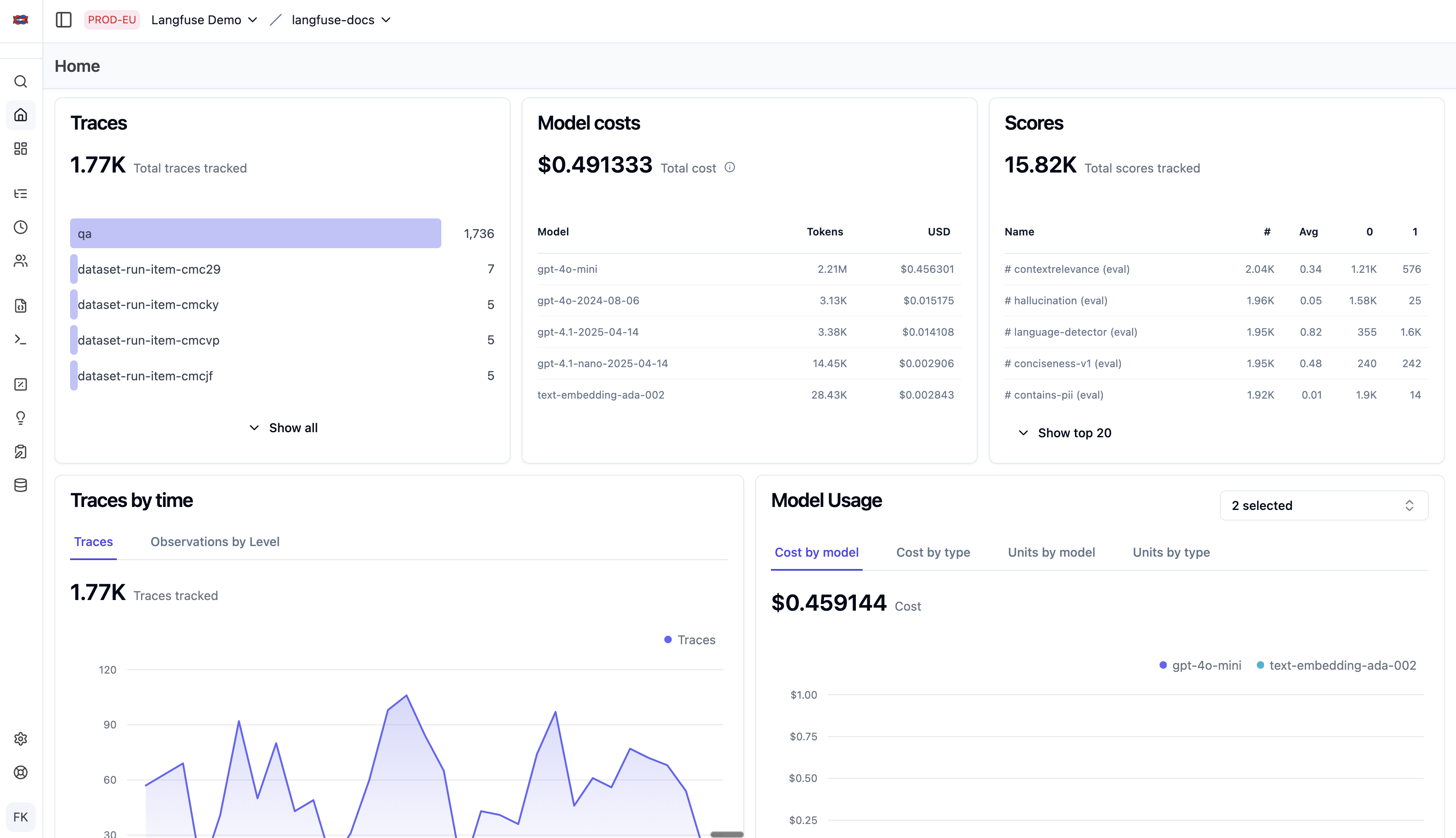
Langfuse metrics derive actionable insights from [observability](/docs/observability) and [evaluation](/docs/evaluation) traces.
Metrics can be sliced and diced via the [customizable dashboards](/docs/metrics/features/custom-dashboards) and the [metrics API](/docs/metrics/features/metrics-api). Set up [alerts](/docs/observability/features/alerts) to get notified when a metric crosses a threshold.
For how to decide which metrics are worth tracking, and how to turn what you see into concrete fixes, read [Monitoring in the Langfuse Academy](/academy/monitoring) and its chapter on [error analysis](/academy/monitoring/error-analysis).
 ## Features
- [Custom Dashboards](/docs/metrics/features/custom-dashboards)
- [Metrics API](/docs/metrics/features/metrics-api)
- [Export to PostHog](/integrations/analytics/posthog)
- [Export to Mixpanel](/integrations/analytics/mixpanel)
## Metrics & Dimensions
Metrics:
- **Quality** is measured through user feedback, model-based scoring, human-in-the-loop scored samples or custom scores via SDKs/API (see [scores](/docs/evaluation/overview)). Quality is assessed over time as well as across prompt versions, LLMs and users.
- **Cost and Latency** are accurately measured and broken down by user, session, geography, feature, model and prompt version.
- **Volume** based on the ingested traces and tokens used.
Dimensions:
- Trace name: differentiate between different use cases, features, etc. by adding a `name` field to your traces.
- User: track usage and cost by user. Just add a `userId` to your traces ([docs](/docs/observability/features/users)).
- Tags: filter different use cases, features, etc. by adding [tags](/docs/observability/features/tags) to your traces.
- Release and version numbers: track how changes to the LLM application affected your metrics.
For an exact definition, please refer to the [metrics API docs](/docs/metrics/features/metrics-api).
---
## Agent Instructions
This page is part of the [Langfuse](https://langfuse.com) documentation, published as plain Markdown for AI agents. Every page is available as Markdown by appending `.md` to its URL, or by sending an `Accept: text/markdown` header. This page: `https://langfuse.com/docs/metrics/overview.md`.
### Querying these docs
If the answer is not on this page, query the documentation instead of guessing:
- **Semantic search** across all Langfuse docs, returning an answer with the relevant pages and excerpts. Ask a specific, self-contained question:
```bash
curl -sG "https://langfuse.com/api/search-docs" --data-urlencode "query=How do I trace a LangGraph agent?"
```
- **Index of every page**: , with per-section indexes [llms-docs.txt](https://langfuse.com/llms-docs.txt), [llms-integrations.txt](https://langfuse.com/llms-integrations.txt), and [llms-self-hosting.txt](https://langfuse.com/llms-self-hosting.txt).
### Before writing Langfuse code
- **Install the [Langfuse Agent Skill](https://langfuse.com/docs/api-and-data-platform/features/agent-skill).** It encodes Langfuse's own best practices for instrumentation, prompt management, and evaluation, and materially improves results.
- **Read [What does a good trace look like?](https://langfuse.com/docs/observability/best-practices.md)** before instrumenting an application.
- **Verify endpoints, parameters, and response fields** against the [API reference](https://api.reference.langfuse.com) instead of inferring them from code examples.
- **Use the [Langfuse CLI](https://langfuse.com/docs/api-and-data-platform/features/cli)** (`npx langfuse-cli api `) to read or write traces, prompts, datasets, and scores from the terminal.
Found an error in these docs? Please open an issue at .
## Features
- [Custom Dashboards](/docs/metrics/features/custom-dashboards)
- [Metrics API](/docs/metrics/features/metrics-api)
- [Export to PostHog](/integrations/analytics/posthog)
- [Export to Mixpanel](/integrations/analytics/mixpanel)
## Metrics & Dimensions
Metrics:
- **Quality** is measured through user feedback, model-based scoring, human-in-the-loop scored samples or custom scores via SDKs/API (see [scores](/docs/evaluation/overview)). Quality is assessed over time as well as across prompt versions, LLMs and users.
- **Cost and Latency** are accurately measured and broken down by user, session, geography, feature, model and prompt version.
- **Volume** based on the ingested traces and tokens used.
Dimensions:
- Trace name: differentiate between different use cases, features, etc. by adding a `name` field to your traces.
- User: track usage and cost by user. Just add a `userId` to your traces ([docs](/docs/observability/features/users)).
- Tags: filter different use cases, features, etc. by adding [tags](/docs/observability/features/tags) to your traces.
- Release and version numbers: track how changes to the LLM application affected your metrics.
For an exact definition, please refer to the [metrics API docs](/docs/metrics/features/metrics-api).
---
## Agent Instructions
This page is part of the [Langfuse](https://langfuse.com) documentation, published as plain Markdown for AI agents. Every page is available as Markdown by appending `.md` to its URL, or by sending an `Accept: text/markdown` header. This page: `https://langfuse.com/docs/metrics/overview.md`.
### Querying these docs
If the answer is not on this page, query the documentation instead of guessing:
- **Semantic search** across all Langfuse docs, returning an answer with the relevant pages and excerpts. Ask a specific, self-contained question:
```bash
curl -sG "https://langfuse.com/api/search-docs" --data-urlencode "query=How do I trace a LangGraph agent?"
```
- **Index of every page**: , with per-section indexes [llms-docs.txt](https://langfuse.com/llms-docs.txt), [llms-integrations.txt](https://langfuse.com/llms-integrations.txt), and [llms-self-hosting.txt](https://langfuse.com/llms-self-hosting.txt).
### Before writing Langfuse code
- **Install the [Langfuse Agent Skill](https://langfuse.com/docs/api-and-data-platform/features/agent-skill).** It encodes Langfuse's own best practices for instrumentation, prompt management, and evaluation, and materially improves results.
- **Read [What does a good trace look like?](https://langfuse.com/docs/observability/best-practices.md)** before instrumenting an application.
- **Verify endpoints, parameters, and response fields** against the [API reference](https://api.reference.langfuse.com) instead of inferring them from code examples.
- **Use the [Langfuse CLI](https://langfuse.com/docs/api-and-data-platform/features/cli)** (`npx langfuse-cli api `) to read or write traces, prompts, datasets, and scores from the terminal.
Found an error in these docs? Please open an issue at .