---
title: Comments
description: Add contextual comments to traces, observations, sessions, and prompts in Langfuse for team collaboration.
sidebarTitle: Comments
---
# Comments
Comments enable teams to add contextual notes and discussions directly to traces, observations, sessions, and prompts within Langfuse. This feature facilitates collaboration by allowing team members to:
- Flag issues or anomalies in specific traces
- Share insights about particular model outputs
- Document edge cases and debugging notes
- Coordinate on prompt improvements
- Leave feedback during development and review cycles
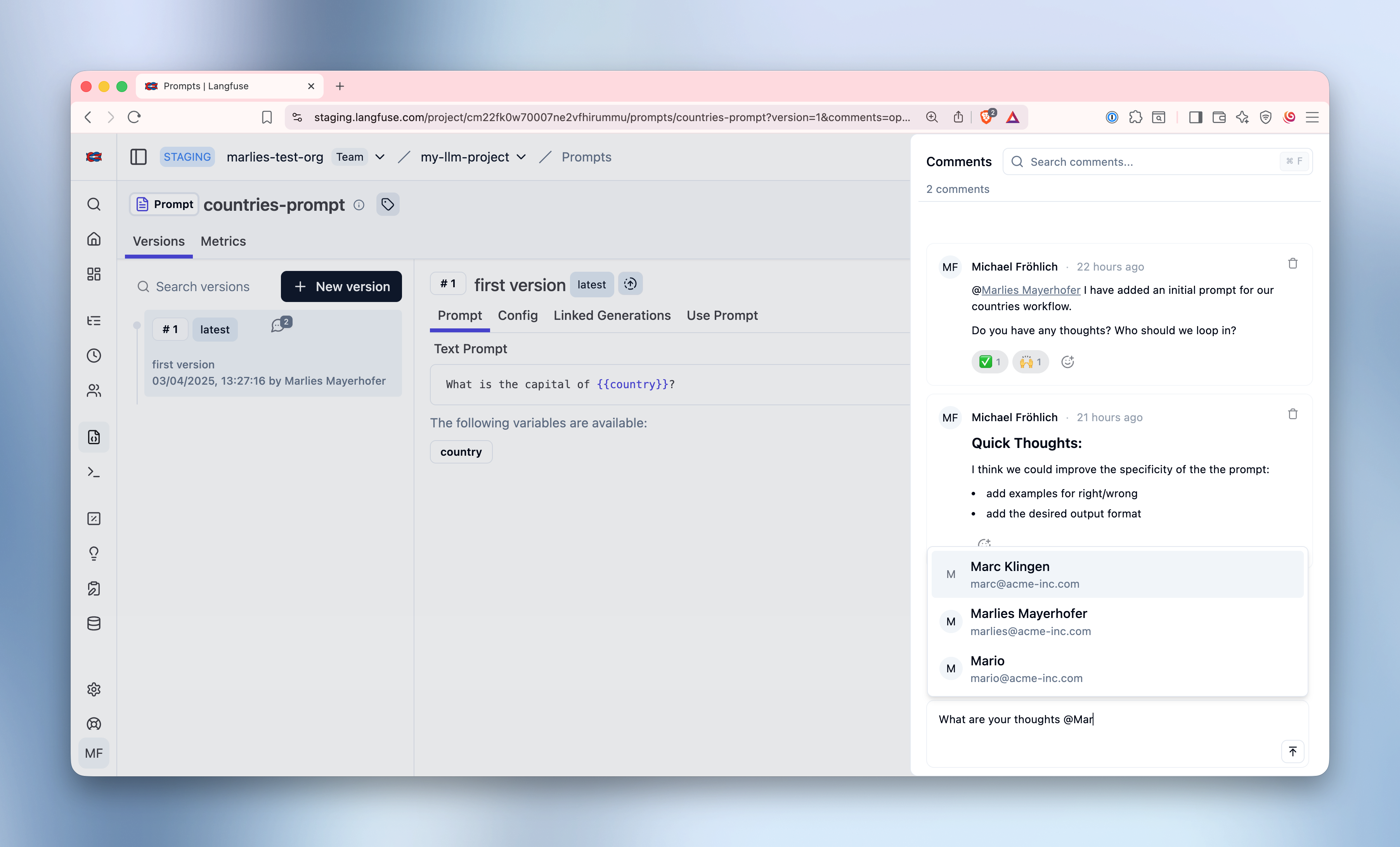
## Supported Object Types
Comments can be added to the following Langfuse objects:
- **Traces** - Comment on complete execution flows
- **Observations** - Add notes to specific LLM calls, spans, or events
- **Sessions** - Discuss user interaction patterns
- **Prompts** - Collaborate on prompt versions and improvements
## Adding Comments
Each supported object page displays a comment button in the interface. The button shows:
- The current comment count (capped at "99+" for readability)
- A disabled state if you don't have read permissions
- An active state when comments are available or you can create them
Clicking the comment button opens a side drawer containing:
1. **Comment Thread** - All existing comments displayed chronologically
2. **Composer** - Text area for writing new comments (if you have write permissions)
3. **Markdown** - Support basic markdown formatting
4. **@Mentions** - Tag team members in comments using @mentions
5. **Reactions** - Add emoji reactions to comments
Comment authors can only delete their own comments. Project admins cannot
delete other users' comments through the UI.
The Comments API allows programmatic access to create and retrieve comments. All endpoints follow the standard Langfuse API patterns.
```http
GET /api/public/comments
GET /api/public/comments/{commentId}
POST /api/public/comments
```
**[API Reference](https://api.reference.langfuse.com/#tag/comments/post/api/public/comments)**
## @Mentions
You can tag team members in comments using @mentions to notify them about important findings or discussions. This is especially useful when you need someone's attention on a specific trace, observation, or issue.
### How to Use @Mentions
1. Start typing `@` in the comment composer
2. An autocomplete menu appears showing all project members
3. Select a team member from the list or continue typing to filter
4. The mention is inserted into your comment as a clickable badge
### Email Notifications
When you mention someone in a comment:
- They receive an email notification with the comment content and context
- The email includes a direct link to the object (trace, observation, session, or prompt)
- Users can manage their notification preferences per project
### Managing Notification Preferences
Team members can control when they receive email notifications for mentions:
- Navigate to project settings to configure notification preferences
- Choose to enable or disable mention notifications per project
- Preferences apply to all future mentions in that project
Only project members can be mentioned in comments. The autocomplete menu
automatically filters to show only users who have access to the current
project.
## Reactions
Add emoji reactions to comments for quick acknowledgments without writing a full response. Reactions are a lightweight way to show agreement, appreciation, or simply acknowledge that you've seen a comment.
### How to Add Reactions
- Hover over any comment to reveal the reaction button
- Click to select an emoji from the reaction picker
- Your reaction appears next to the comment with your name
- Click your existing reaction again to remove it
Reactions help keep comment threads focused while still allowing team members to provide quick feedback and show engagement with the discussion.
## Commenting on Specific Text
You can also add comments anchored to specific text within trace and observation input, output, or metadata fields - similar to Google Docs.
1. Use the "JSON Beta" view of a trace or observation
2. Select the text you want to comment on
3. Click the comment button that appears
4. Your comment will be anchored to that exact selection and shown on hover
This makes it easier to discuss specific parts of LLM responses or flag exact issues with teammates.
Note: if the trace or observation data is updated after a comment was created, the comment becomes "detached" with a visual indicator showing the reference may have changed.
---
## Agent Instructions
This page is part of the [Langfuse](https://langfuse.com) documentation, published as plain Markdown for AI agents. Every page is available as Markdown by appending `.md` to its URL, or by sending an `Accept: text/markdown` header. This page: `https://langfuse.com/docs/observability/features/comments.md`.
### Querying these docs
If the answer is not on this page, query the documentation instead of guessing:
- **Semantic search** across all Langfuse docs, returning an answer with the relevant pages and excerpts. Ask a specific, self-contained question:
```bash
curl -sG "https://langfuse.com/api/search-docs" --data-urlencode "query=How do I trace a LangGraph agent?"
```
- **Index of every page**: , with per-section indexes [llms-docs.txt](https://langfuse.com/llms-docs.txt), [llms-integrations.txt](https://langfuse.com/llms-integrations.txt), and [llms-self-hosting.txt](https://langfuse.com/llms-self-hosting.txt).
### Before writing Langfuse code
- **Install the [Langfuse Agent Skill](https://langfuse.com/docs/api-and-data-platform/features/agent-skill).** It encodes Langfuse's own best practices for instrumentation, prompt management, and evaluation, and materially improves results.
- **Read [What does a good trace look like?](https://langfuse.com/docs/observability/best-practices.md)** before instrumenting an application.
- **Verify endpoints, parameters, and response fields** against the [API reference](https://api.reference.langfuse.com) instead of inferring them from code examples.
- **Use the [Langfuse CLI](https://langfuse.com/docs/api-and-data-platform/features/cli)** (`npx langfuse-cli api `) to read or write traces, prompts, datasets, and scores from the terminal.
Found an error in these docs? Please open an issue at .