---
title: Corrections
description: Capture improved versions of LLM outputs directly in traces and observations to build better datasets and drive continuous improvement.
sidebarTitle: Corrections
---
# Corrected Outputs
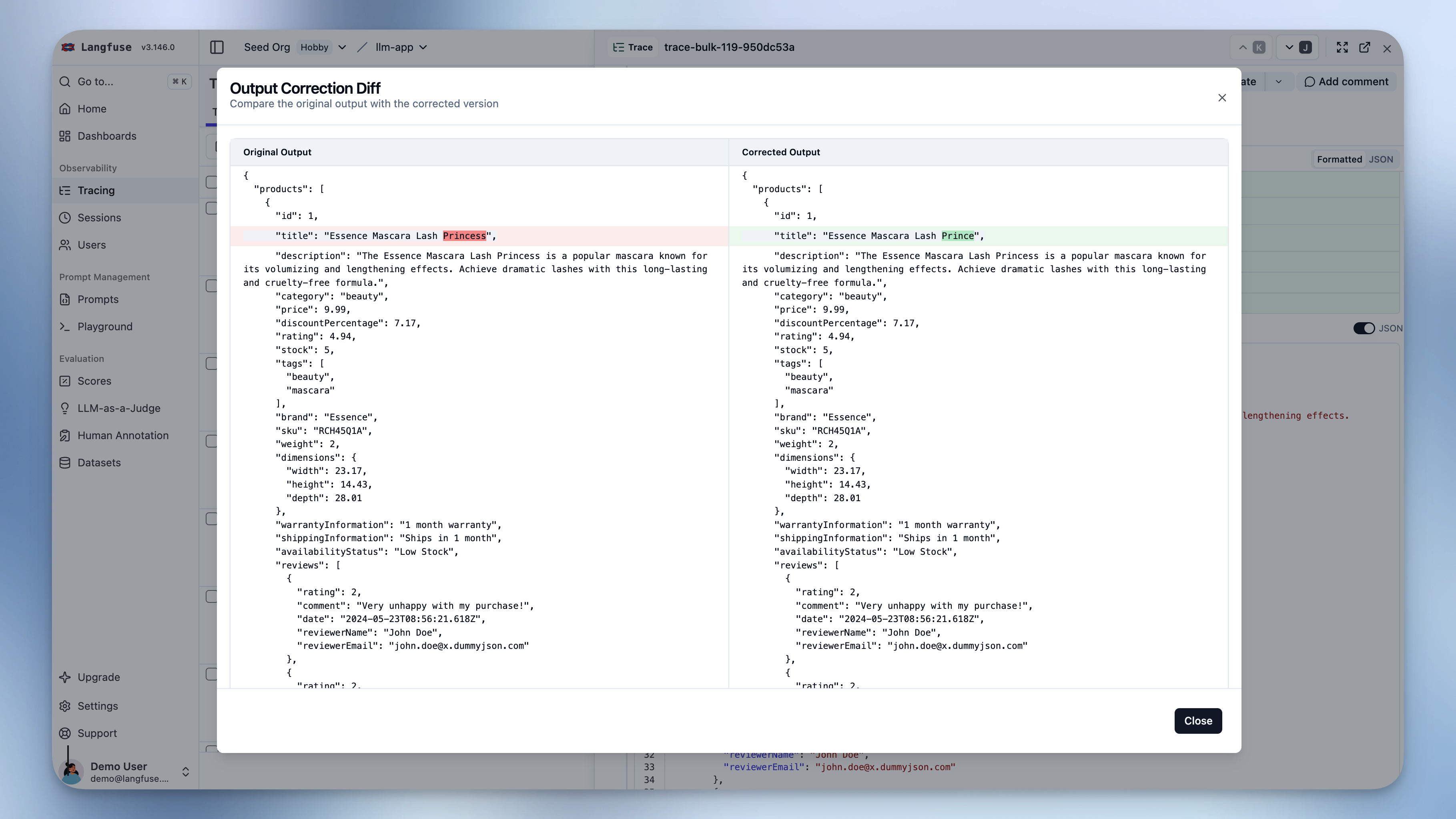
Corrections allow you to capture improved versions of LLM outputs directly in trace and observation views. Domain experts can document what the model should have generated, creating a foundation for fine-tuning datasets and continuous improvement.
## Why Use Corrections?
- **Domain expert feedback**: Subject matter experts provide what the model should have output based on their expertise
- **Fine-tuning datasets**: Export corrected outputs alongside original inputs to create high-quality training data from production traces
- **Quality benchmarking**: Compare actual vs expected outputs across your production traces to identify systematic issues
- **Human-in-the-loop workflows**: Capture corrections during review processes, especially useful in [annotation queues](/docs/evaluation/evaluation-methods/annotation-queues)
## How It Works
Add corrected outputs to any trace or observation through the UI or API. Corrections appear alongside the original output with a diff view showing what changed. Each trace or observation can have one corrected output.
## Adding Corrections
### Via the UI
Navigate to any trace or observation detail page:
1. Find the **"Corrected Output"** field below the original output
2. Click to add or edit the correction
3. Enter the improved version of the output
4. Toggle between **JSON validation mode** and **plain text mode** to match your data format
5. View the **diff** to compare original vs corrected output
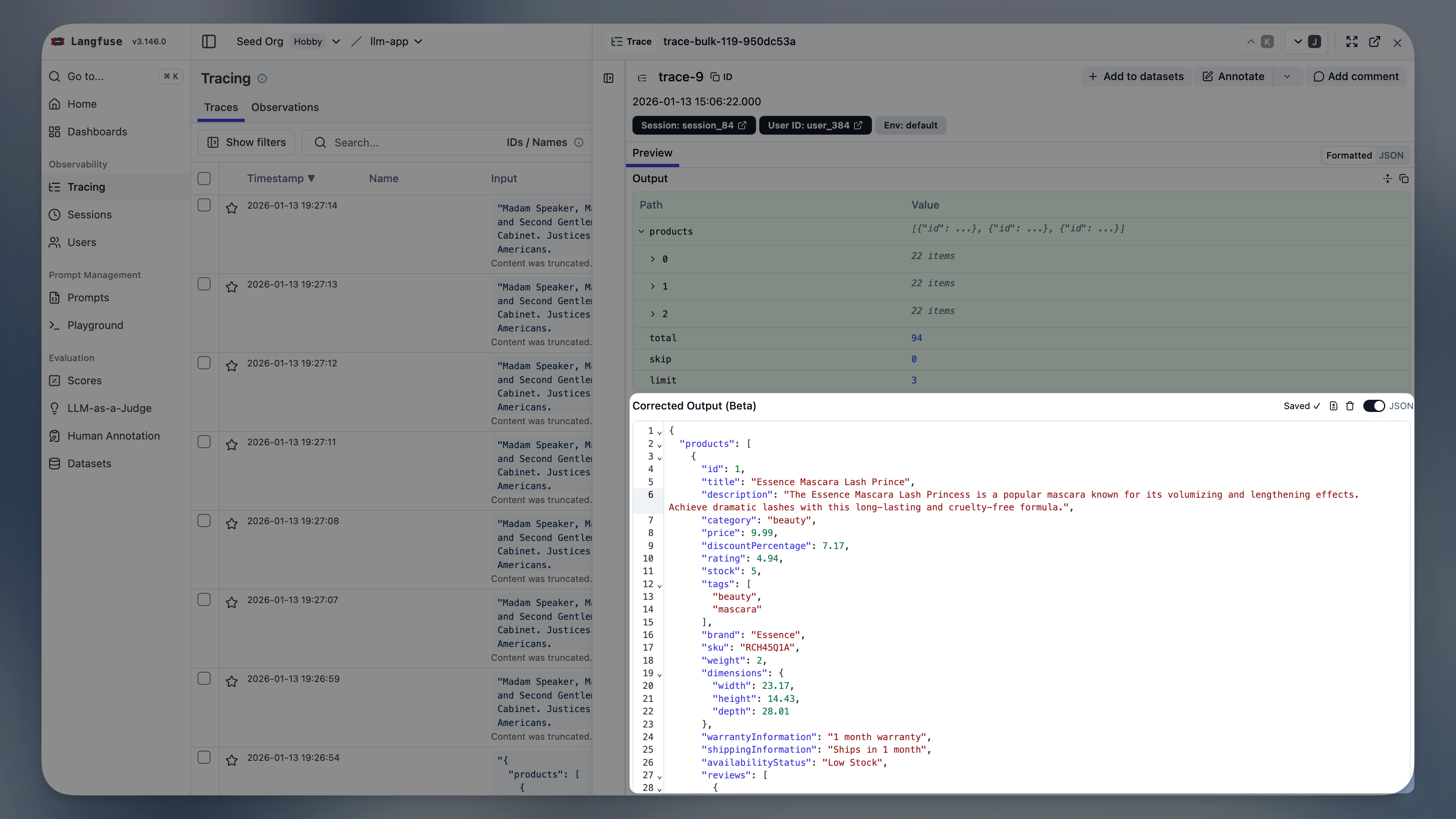
The editor auto-saves as you type and provides real-time validation feedback in JSON mode.
### Via API/SDK
Corrections are created as scores with `dataType: "CORRECTION"` and `name: "output"`.
```python
from langfuse import Langfuse
langfuse = Langfuse()
# Add correction to a trace
langfuse.create_score(
trace_id="trace-123",
name="output",
value="The corrected output text here",
data_type="CORRECTION"
)
# Add correction to an observation
langfuse.create_score(
trace_id="trace-123",
observation_id="obs-456",
name="output",
value="The corrected output text here",
data_type="CORRECTION"
)
```
```typescript
import { LangfuseClient } from "@langfuse/client";
const langfuse = new LangfuseClient();
// Add correction to a trace
langfuse.score.create({
traceId: "trace-123",
name: "output",
value: "The corrected output text here",
dataType: "CORRECTION"
});
// Add correction to an observation
langfuse.score.create({
traceId: "trace-123",
observationId: "obs-456",
name: "output",
value: "The corrected output text here",
dataType: "CORRECTION"
});
```
```bash
curl -X POST https://cloud.langfuse.com/api/public/scores \
-H "Content-Type: application/json" \
-H "Authorization: Basic " \
-d '{
"traceId": "trace-123",
"observationId": "obs-456",
"name": "output",
"value": "The corrected output text here",
"dataType": "CORRECTION"
}'
```
## Fetching Corrections
Corrections are stored as scores and can be fetched programmatically to build datasets or analyze model performance. Filter the [Scores API](/docs/api-and-data-platform/features/scores-api) by `dataType=CORRECTION`. The corrected output is in the `value` field.
```python
from langfuse import get_client
langfuse = get_client()
corrections = langfuse.api.scores_v3.get_many_v3(
data_type="CORRECTION",
fields="subject,details",
)
```
```typescript
import { LangfuseClient } from "@langfuse/client";
const langfuse = new LangfuseClient();
const corrections = await langfuse.api.scoresV3.getManyV3({
dataType: "CORRECTION",
fields: "subject,details",
});
```
```bash
curl -X GET "https://cloud.langfuse.com/api/public/v3/scores?dataType=CORRECTION&fields=subject,details" \
-H "Authorization: Basic "
```
---
## Agent Instructions
This page is part of the [Langfuse](https://langfuse.com) documentation, published as plain Markdown for AI agents. Every page is available as Markdown by appending `.md` to its URL, or by sending an `Accept: text/markdown` header. This page: `https://langfuse.com/docs/observability/features/corrections.md`.
### Querying these docs
If the answer is not on this page, query the documentation instead of guessing:
- **Semantic search** across all Langfuse docs, returning an answer with the relevant pages and excerpts. Ask a specific, self-contained question:
```bash
curl -sG "https://langfuse.com/api/search-docs" --data-urlencode "query=How do I trace a LangGraph agent?"
```
- **Index of every page**: , with per-section indexes [llms-docs.txt](https://langfuse.com/llms-docs.txt), [llms-integrations.txt](https://langfuse.com/llms-integrations.txt), and [llms-self-hosting.txt](https://langfuse.com/llms-self-hosting.txt).
### Before writing Langfuse code
- **Install the [Langfuse Agent Skill](https://langfuse.com/docs/api-and-data-platform/features/agent-skill).** It encodes Langfuse's own best practices for instrumentation, prompt management, and evaluation, and materially improves results.
- **Read [What does a good trace look like?](https://langfuse.com/docs/observability/best-practices.md)** before instrumenting an application.
- **Verify endpoints, parameters, and response fields** against the [API reference](https://api.reference.langfuse.com) instead of inferring them from code examples.
- **Use the [Langfuse CLI](https://langfuse.com/docs/api-and-data-platform/features/cli)** (`npx langfuse-cli api `) to read or write traces, prompts, datasets, and scores from the terminal.
Found an error in these docs? Please open an issue at .