---
title: Log Levels
description: Use Log Levels to control the verbosity of your logs and highlight errors and warnings.
sidebarTitle: Log Levels
---
# Log Levels
Traces can have a lot of observations ([data model](/docs/tracing#introduction-to-traces-in-langfuse)). You can differentiate the importance of observations with the `level` attribute to control the verbosity of your traces and highlight errors and warnings. Available `levels`: `DEBUG`, `DEFAULT`, `WARNING`, `ERROR`.
In addition to the level, you can also include a `statusMessage` to provide additional context.
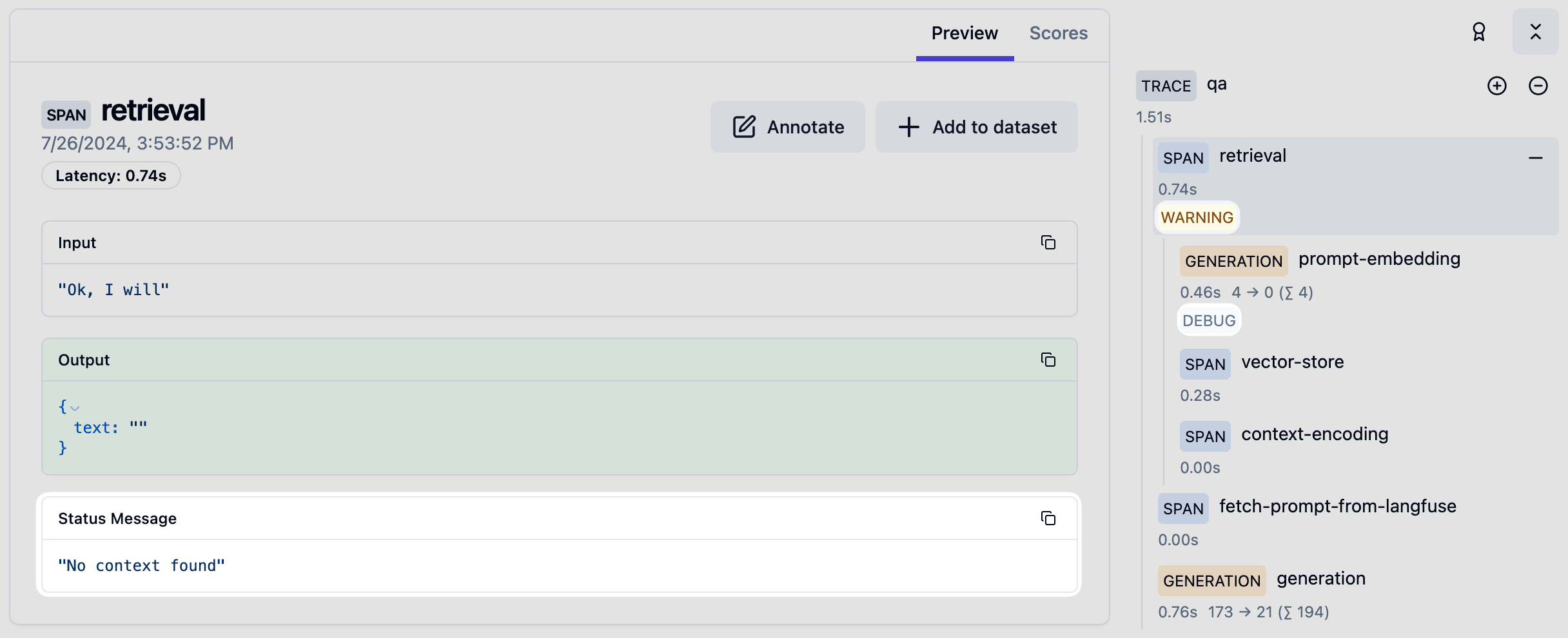
When using the [`@observe()` decorator](/docs/sdk/python/decorators):
```python
from langfuse import observe, get_client
@observe()
def my_function():
langfuse = get_client()
# ... processing logic ...
# Update the current span with a warning level
langfuse.update_current_span(
level="WARNING",
status_message="This is a warning"
)
```
When creating spans or generations directly:
```python
from langfuse import get_client
langfuse = get_client()
# Using context managers (recommended)
with langfuse.start_as_current_observation(as_type="span", name="my-operation") as span:
# Set level and status message on creation
with span.start_as_current_observation(
name="potentially-risky-operation",
level="WARNING",
status_message="Operation may fail"
) as risky_span:
# ... do work ...
# Or update level and status message later
risky_span.update(
level="ERROR",
status_message="Operation failed with unexpected input"
)
# You can also update the currently active span without a direct reference
with langfuse.start_as_current_observation(as_type="span", name="another-operation"):
# ... some processing ...
langfuse.update_current_span(
level="DEBUG",
status_message="Processing intermediate results"
)
```
Levels can also be set when creating generations:
```python
langfuse = get_client()
with langfuse.start_as_current_observation(
as_type="generation",
name="llm-call",
model="gpt-4o",
level="DEFAULT" # Default level
) as generation:
# ... make LLM call ...
if error_detected:
generation.update(
level="ERROR",
status_message="Model returned malformed output"
)
```
When using the context manager:
```ts
import { startActiveObservation, startObservation } from "@langfuse/tracing";
await startActiveObservation("context-manager", async (span) => {
span.update({
input: { query: "What is the capital of France?" },
});
updateActiveObservation({
level: "WARNING",
statusMessage: "This is a warning",
});
});
```
When using the `observe` wrapper:
```ts
import { observe, updateActiveObservation } from "@langfuse/tracing";
// An existing function
async function fetchData(source: string) {
updateActiveObservation({
level: "WARNING",
statusMessage: "This is a warning",
});
// ... logic to fetch data
return { data: `some data from ${source}` };
}
// Wrap the function to trace it
const tracedFetchData = observe(fetchData, {
name: "observe-wrapper",
});
const result = await tracedFetchData("API");
```
When creating observations manually:
```ts
import { startObservation } from "@langfuse/tracing";
const span = startObservation("manual-observation", {
input: { query: "What is the capital of France?" },
});
span.update({
level: "WARNING",
statusMessage: "This is a warning",
});
span.update({ output: "Paris" }).end();
```
See [JS/TS SDK docs](/docs/sdk/typescript/guide) for more details.
When using the [OpenAI SDK Integration](/integrations/model-providers/openai-py), `level` and `statusMessage` are automatically set based on the OpenAI API response. See [example](/integrations/model-providers/openai-py).
When using the [LangChain Integration](/integrations/frameworks/langchain), `level` and `statusMessage` are automatically set for each step in the LangChain pipeline.
## Filter Trace by Log Level
When viewing a single trace, you can filter the observations by log level.
## GitHub Discussions
---
## Agent Instructions
This page is part of the [Langfuse](https://langfuse.com) documentation, published as plain Markdown for AI agents. Every page is available as Markdown by appending `.md` to its URL, or by sending an `Accept: text/markdown` header. This page: `https://langfuse.com/docs/observability/features/log-levels.md`.
### Querying these docs
If the answer is not on this page, query the documentation instead of guessing:
- **Semantic search** across all Langfuse docs, returning an answer with the relevant pages and excerpts. Ask a specific, self-contained question:
```bash
curl -sG "https://langfuse.com/api/search-docs" --data-urlencode "query=How do I trace a LangGraph agent?"
```
- **Index of every page**: , with per-section indexes [llms-docs.txt](https://langfuse.com/llms-docs.txt), [llms-integrations.txt](https://langfuse.com/llms-integrations.txt), and [llms-self-hosting.txt](https://langfuse.com/llms-self-hosting.txt).
### Before writing Langfuse code
- **Install the [Langfuse Agent Skill](https://langfuse.com/docs/api-and-data-platform/features/agent-skill).** It encodes Langfuse's own best practices for instrumentation, prompt management, and evaluation, and materially improves results.
- **Read [What does a good trace look like?](https://langfuse.com/docs/observability/best-practices.md)** before instrumenting an application.
- **Verify endpoints, parameters, and response fields** against the [API reference](https://api.reference.langfuse.com) instead of inferring them from code examples.
- **Use the [Langfuse CLI](https://langfuse.com/docs/api-and-data-platform/features/cli)** (`npx langfuse-cli api `) to read or write traces, prompts, datasets, and scores from the terminal.
Found an error in these docs? Please open an issue at .