---
title: Tags
description: Tags help to filter and organize traces and observations in Langfuse based on use case, functions/apis used, environment and other criteria.
sidebarTitle: Tags
---
# Tags
Tags allow you to categorize and filter observations and traces in Langfuse.
Tags are strings (max 200 characters each) and an observation may have multiple tags. If a tag exceeds 200 characters, it will be dropped.
The full set of tags applied across all observations in a trace are
automatically aggregated and added to the trace object in Langfuse.
## In the Langfuse UI [#in-the-ui]
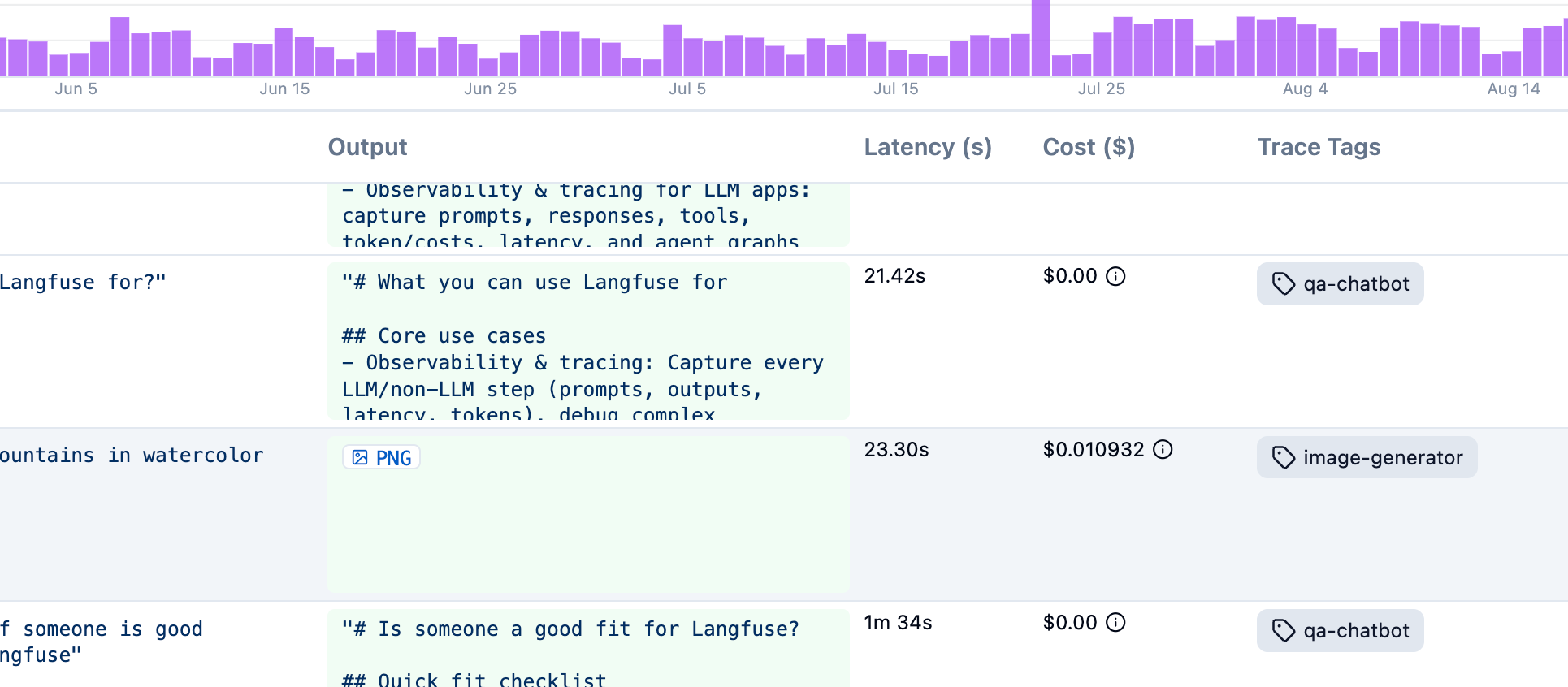
Once observations have tags assigned, you can:
- Filter the traces and observations tables by one or more tags, including from the [filter search bar](/docs/observability/features/filter-search-bar) (`tags:(billing AND urgent)`).
- Segment [custom dashboards](/docs/metrics/features/custom-dashboards) and [metrics](/docs/metrics/features/metrics-api) by tag, for example cost or latency of `checkout` versus `support-bot`.
- Organize traces by feature, endpoint, or workflow without mixing those categories into environment, user, or session.
## Tags cannot be changed later [#immutable]
Because Langfuse uses an immutable data model for observations, tags can't be added or edited in the UI after they're created.
## Implementation [#implementation]
Use `propagate_attributes()` to apply tags to a group of observations within a context.
When using the `@observe()` decorator:
```python /propagate_attributes/
from langfuse import observe, propagate_attributes
@observe()
def my_function():
# Apply tags to all child observations
with propagate_attributes(
tags=["tag-1", "tag-2"]
):
# All nested observations automatically have these tags
result = process_data()
return result
```
When creating observations directly:
```python /propagate_attributes(tags=["tag-1", "tag-2"])/
from langfuse import get_client, propagate_attributes
langfuse = get_client()
with langfuse.start_as_current_observation(as_type="span", name="my-operation") as root_span:
# Apply tags to all child observations
with propagate_attributes(tags=["tag-1", "tag-2"]):
# All observations created here automatically have these tags
with root_span.start_as_current_observation(
as_type="generation",
name="llm-call",
model="gpt-4o"
) as gen:
# This generation automatically has the tags
pass
```
When using the context manager:
```ts /propagateAttributes/
import { startActiveObservation, propagateAttributes } from "@langfuse/tracing";
await startActiveObservation("context-manager", async (span) => {
span.update({
input: { query: "What is the capital of France?" },
});
// Apply tags to all child observations
await propagateAttributes(
{
tags: ["tag-1", "tag-2"],
},
async () => {
// All observations created here automatically have these tags
// ... your logic ...
}
);
});
```
When using the `observe` wrapper:
```ts /propagateAttributes/
import { observe, propagateAttributes } from "@langfuse/tracing";
const processData = observe(
async (data: string) => {
// Apply tags to all child observations
return await propagateAttributes(
{ tags: ["tag-1", "tag-2"] },
async () => {
// All nested observations automatically have these tags
const result = await performProcessing(data);
return result;
}
);
},
{ name: "process-data" }
);
const result = await processData("input");
```
See [JS/TS SDK docs](/docs/sdk/typescript/guide) for more details.
```python /propagate_attributes/
from langfuse import get_client, propagate_attributes
from langfuse.openai import openai
langfuse = get_client()
with langfuse.start_as_current_observation(as_type="span", name="openai-call"):
# Apply tags to all observations including OpenAI generation
with propagate_attributes(
tags=["tag-1", "tag-2"]
):
completion = openai.chat.completions.create(
name="test-chat",
model="gpt-3.5-turbo",
messages=[
{"role": "system", "content": "You are a calculator."},
{"role": "user", "content": "1 + 1 = "}
],
temperature=0,
)
```
Alternatively, when using OpenAI without an enclosing span:
```python
from langfuse.openai import openai
completion = openai.chat.completions.create(
name="test-chat",
model="gpt-3.5-turbo",
messages=[
{"role": "system", "content": "You are a calculator."},
{"role": "user", "content": "1 + 1 = "}],
temperature=0,
metadata={"langfuse_tags": ["tag-1", "tag-2"]}
)
```
```ts /propagateAttributes/
import OpenAI from "openai";
import { observeOpenAI } from "@langfuse/openai";
import { startActiveObservation, propagateAttributes } from "@langfuse/tracing";
await startActiveObservation("openai-call", async () => {
// Apply tags to all observations
await propagateAttributes(
{
tags: ["tag-1", "tag-2"],
},
async () => {
const res = await observeOpenAI(new OpenAI()).chat.completions.create({
messages: [{ role: "system", content: "Tell me a story about a dog." }],
model: "gpt-3.5-turbo",
max_tokens: 300,
});
}
);
});
```
```python /propagate_attributes/
from langfuse import get_client, propagate_attributes
from langfuse.langchain import CallbackHandler
langfuse = get_client()
langfuse_handler = CallbackHandler()
with langfuse.start_as_current_observation(as_type="span", name="langchain-call"):
# Apply tags to all child observations
with propagate_attributes(
tags=["tag-1", "tag-2"]
):
response = chain.invoke(
{"topic": "cats"},
config={"callbacks": [langfuse_handler]}
)
```
Alternatively, use metadata in chain invocation:
```python
from langfuse.langchain import CallbackHandler
handler = CallbackHandler()
chain.invoke(
{"animal": "dog"},
config={
"callbacks": [handler],
"metadata": {"langfuse_tags": ["tag-1", "tag-2"]},
},
)
```
```ts /propagateAttributes/
import { startActiveObservation, propagateAttributes } from "@langfuse/tracing";
import { CallbackHandler } from "@langfuse/langchain";
const langfuseHandler = new CallbackHandler();
// Apply tags to all child observations
await propagateAttributes(
{
tags: ["tag-1", "tag-2"],
},
async () => {
await chain.invoke(
{ input: "" },
{ callbacks: [langfuseHandler] }
);
}
);
```
Alternatively, when using the [CallbackHandler](/integrations/frameworks/langchain), you can pass `tags` to the constructor:
```ts
const handler = new CallbackHandler({
tags: ["tag-1", "tag-2"],
});
```
Or set tags dynamically via the runnable configuration in the chain invocation:
```ts
const langfuseHandler = new CallbackHandler()
const tags = ["tag-1", "tag-2"];
// Pass config to the chain invocation to be parsed as Langfuse trace attributes
await chain.invoke({ input: "" }, { callbacks: [langfuseHandler], tags: tags });
```
## Related resources [#related-resources]
- [Filter search bar](/docs/observability/features/filter-search-bar) — filter observations and traces by tags with typed queries such as `tags:(billing AND urgent)`
- [Metadata](/docs/observability/features/metadata) — attach key-value pairs when a string label is not enough
- [Environments](/docs/observability/features/environments) — separate production, staging, and development data
- [Custom dashboards](/docs/metrics/features/custom-dashboards) — break down metrics by tag
- [Metrics API](/docs/metrics/features/metrics-api) — query aggregated usage and cost filtered by tags
- [Scores vs tags](/docs/evaluation/scores/overview#scores-vs-tags) — choose scores when you need to classify or evaluate after tracing
- [What does a good trace look like?](/docs/observability/best-practices) — when to use tags for business-level dimensions
## GitHub Discussions
---
## Agent Instructions
This page is part of the [Langfuse](https://langfuse.com) documentation, published as plain Markdown for AI agents. Every page is available as Markdown by appending `.md` to its URL, or by sending an `Accept: text/markdown` header. This page: `https://langfuse.com/docs/observability/features/tags.md`.
### Querying these docs
If the answer is not on this page, query the documentation instead of guessing:
- **Semantic search** across all Langfuse docs, returning an answer with the relevant pages and excerpts. Ask a specific, self-contained question:
```bash
curl -sG "https://langfuse.com/api/search-docs" --data-urlencode "query=How do I trace a LangGraph agent?"
```
- **Index of every page**: , with per-section indexes [llms-docs.txt](https://langfuse.com/llms-docs.txt), [llms-integrations.txt](https://langfuse.com/llms-integrations.txt), and [llms-self-hosting.txt](https://langfuse.com/llms-self-hosting.txt).
### Before writing Langfuse code
- **Install the [Langfuse Agent Skill](https://langfuse.com/docs/api-and-data-platform/features/agent-skill).** It encodes Langfuse's own best practices for instrumentation, prompt management, and evaluation, and materially improves results.
- **Read [What does a good trace look like?](https://langfuse.com/docs/observability/best-practices.md)** before instrumenting an application.
- **Verify endpoints, parameters, and response fields** against the [API reference](https://api.reference.langfuse.com) instead of inferring them from code examples.
- **Use the [Langfuse CLI](https://langfuse.com/docs/api-and-data-platform/features/cli)** (`npx langfuse-cli api `) to read or write traces, prompts, datasets, and scores from the terminal.
Found an error in these docs? Please open an issue at .