---
title: User Tracking
description: User-level LLM observability to track token usage, usage volume and individual user feedback.
sidebarTitle: User Tracking
---
# User Tracking
The Users view provides an overview of all users. It also offers an in-depth look into individual users. It's easy to map data in Langfuse to individual users. Just propagate the `userId` attribute across observations. This can be a username, email, or any other unique identifier. The `userId` is optional, but using it helps you get more from Langfuse aggregating metrics such as LLM usage cost by `userId`. See the integration docs to learn more.
## Product use [#product-use]
### View all users [#view-all-users]
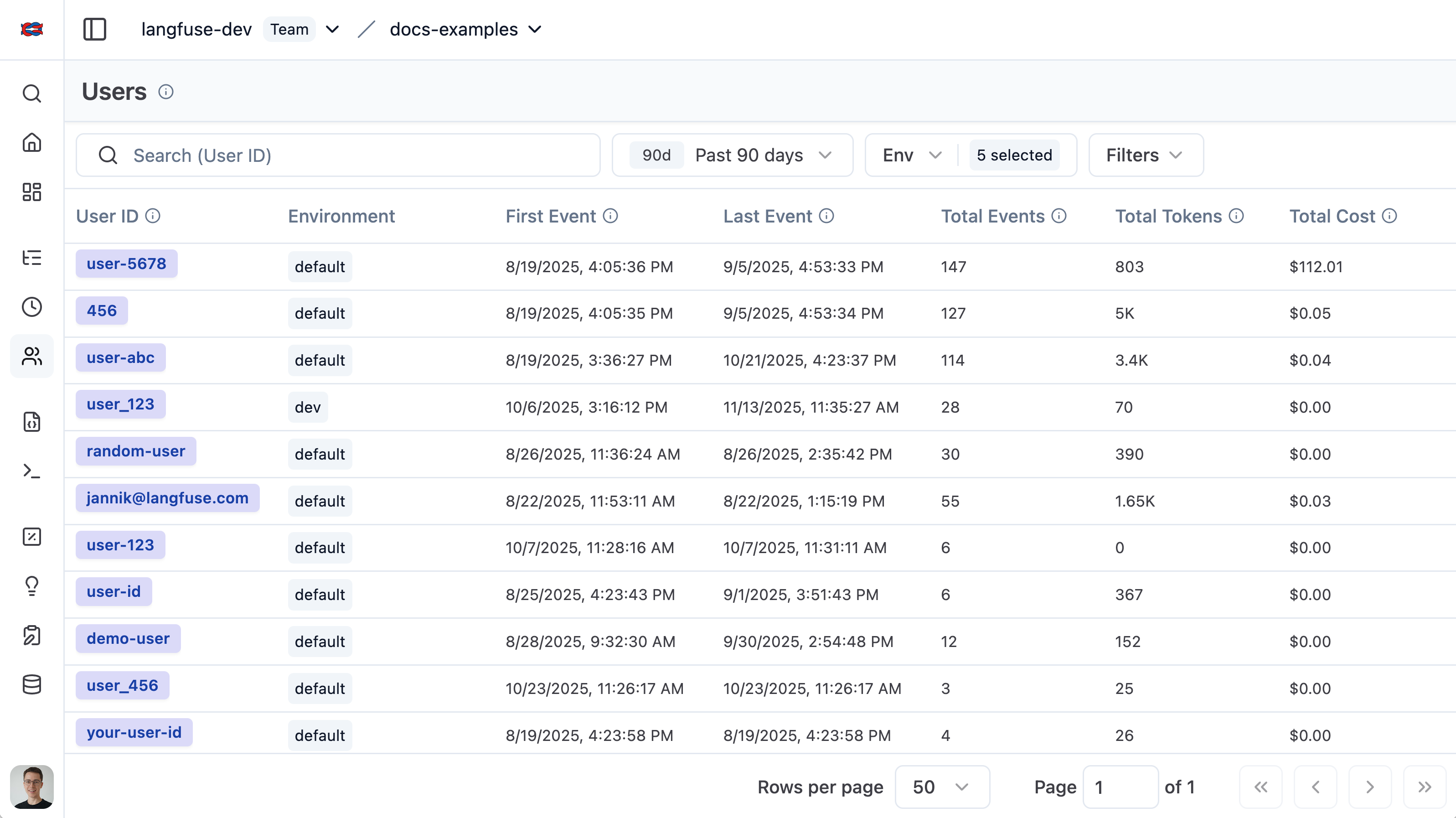
The user list provides an overview of all users that have been tracked by Langfuse. It makes it simple to segment by overall token usage, number of traces, and user feedback.
### Individual user view [#individual-user-view]
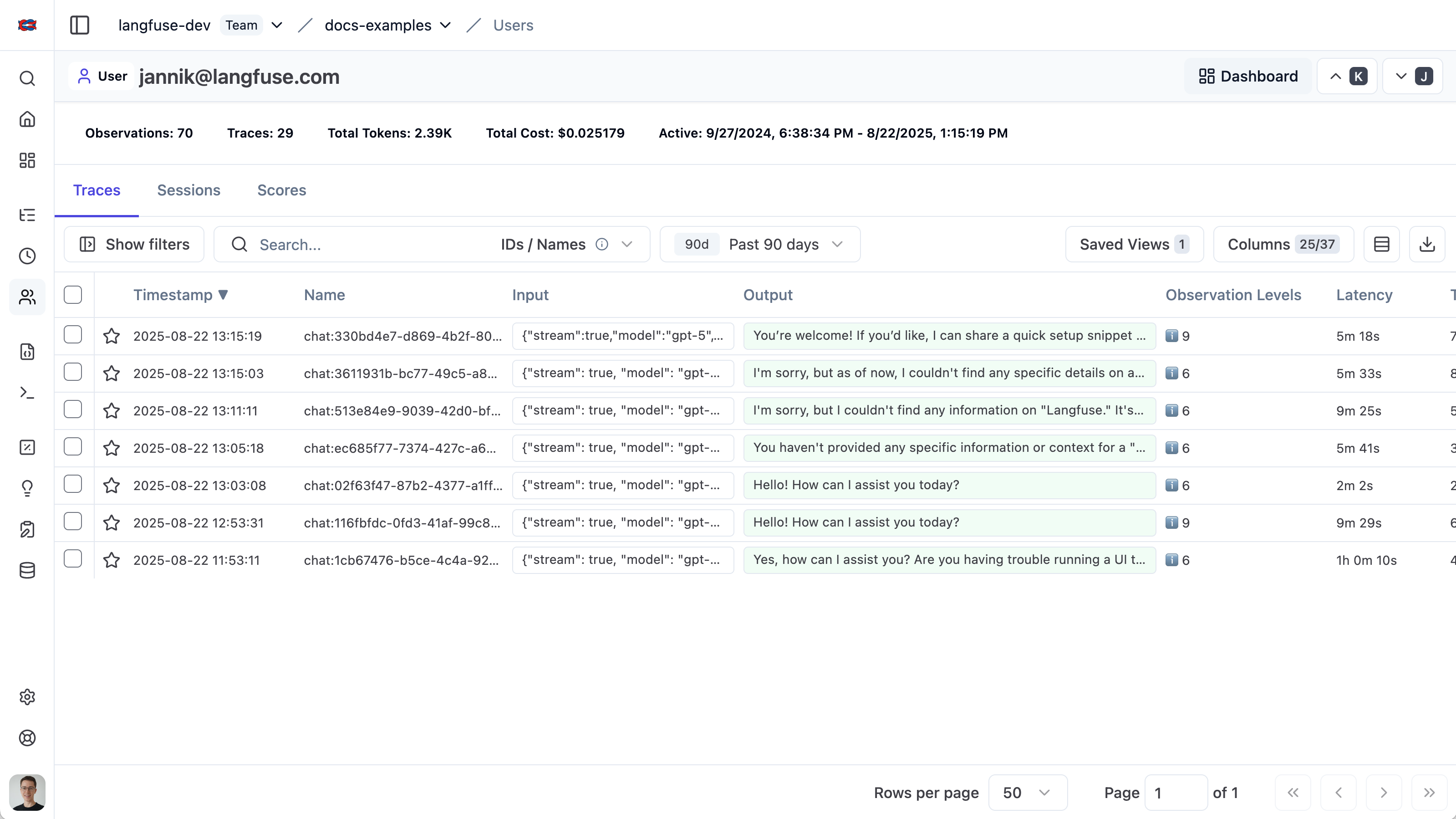
The individual user view provides an in-depth look into a single user. Explore aggregated metrics or view all traces and feedback for a user.
## Set up user tracking [#set-up-user-tracking]
When using the `@observe()` decorator:
```python /propagate_attributes(user_id="user_12345")/
from langfuse import observe, propagate_attributes
@observe()
def process_user_request(user_query):
# Propagate user_id to all child observations
with propagate_attributes(user_id="user_12345"):
# All nested observations automatically inherit user_id
result = process_query(user_query)
return result
```
When creating observations directly:
```python /propagate_attributes(user_id="user_12345")/
from langfuse import get_client, propagate_attributes
langfuse = get_client()
with langfuse.start_as_current_observation(
as_type="span",
name="process-user-request"
) as root_span:
# Propagate user_id to all child observations
with propagate_attributes(user_id="user_12345"):
# All observations created here automatically have user_id
with root_span.start_as_current_observation(
as_type="generation",
name="generate-response",
model="gpt-4o"
) as gen:
# This observation automatically has user_id
pass
```
When using the context manager:
```ts /propagateAttributes/
import { startActiveObservation, propagateAttributes } from "@langfuse/tracing";
await startActiveObservation("context-manager", async (span) => {
span.update({
input: { query: "What is the capital of France?" },
});
// Propagate userId to all child observations
await propagateAttributes(
{
userId: "user-123",
},
async () => {
// All observations created here automatically have userId
// ... your logic ...
}
);
});
```
When using the `observe` wrapper:
```ts /propagateAttributes/
import { observe, propagateAttributes } from "@langfuse/tracing";
// An existing function
const processUserRequest = observe(
async (userQuery: string) => {
// Propagate userId to all child observations
return await propagateAttributes({ userId: "user-123" }, async () => {
// All nested observations automatically inherit userId
const result = await processQuery(userQuery);
return result;
});
},
{ name: "process-user-request" }
);
const result = await processUserRequest("some query");
```
See [JS/TS SDK docs](/docs/sdk/typescript/guide) for more details.
```python /propagate_attributes(user_id="user_12345")/
from langfuse import get_client, propagate_attributes
from langfuse.openai import openai
langfuse = get_client()
with langfuse.start_as_current_observation(as_type="span", name="openai-call"):
# Propagate user_id to all observations including OpenAI generation
with propagate_attributes(user_id="user_12345"):
completion = openai.chat.completions.create(
name="test-chat",
model="gpt-3.5-turbo",
messages=[
{"role": "system", "content": "You are a calculator."},
{"role": "user", "content": "1 + 1 = "}
],
temperature=0,
)
```
Use `propagate_attributes()` with the CallbackHandler:
```python /propagate_attributes(user_id="user_12345")/
from langfuse import get_client, propagate_attributes
from langfuse.langchain import CallbackHandler
langfuse = get_client()
handler = CallbackHandler()
with langfuse.start_as_current_observation(as_type="span", name="langchain-call"):
# Propagate user_id to all observations
with propagate_attributes(user_id="user_12345"):
# Pass handler to the chain invocation
chain.invoke(
{"animal": "dog"},
config={"callbacks": [handler]},
)
```
Use `propagateAttributes()` with the CallbackHandler:
```ts /propagateAttributes/
import { startActiveObservation, propagateAttributes } from "@langfuse/tracing";
import { CallbackHandler } from "@langfuse/langchain";
const langfuseHandler = new CallbackHandler();
await startActiveObservation("langchain-call", async () => {
// Propagate userId to all observations
await propagateAttributes(
{
userId: "user-123",
},
async () => {
// Pass handler to the chain invocation
await chain.invoke(
{ input: "" },
{ callbacks: [langfuseHandler] }
);
}
);
});
```
## Deep-linking [#deep-linking]
You can deep link to this view via the following URL format: `https:///project/{projectId}/users/{userId}`
## Related Resources
- Build [custom dashboards](/docs/metrics/features/custom-dashboards) to visualize user-level metrics such as cost, token usage, and trace counts.
- To programmatically query aggregated per-user metrics such as cost, token usage, and trace counts, use the [Metrics API](/docs/metrics/features/metrics-api).
## GitHub Discussions
---
## Agent Instructions
This page is part of the [Langfuse](https://langfuse.com) documentation, published as plain Markdown for AI agents. Every page is available as Markdown by appending `.md` to its URL, or by sending an `Accept: text/markdown` header. This page: `https://langfuse.com/docs/observability/features/users.md`.
### Querying these docs
If the answer is not on this page, query the documentation instead of guessing:
- **Semantic search** across all Langfuse docs, returning an answer with the relevant pages and excerpts. Ask a specific, self-contained question:
```bash
curl -sG "https://langfuse.com/api/search-docs" --data-urlencode "query=How do I trace a LangGraph agent?"
```
- **Index of every page**: , with per-section indexes [llms-docs.txt](https://langfuse.com/llms-docs.txt), [llms-integrations.txt](https://langfuse.com/llms-integrations.txt), and [llms-self-hosting.txt](https://langfuse.com/llms-self-hosting.txt).
### Before writing Langfuse code
- **Install the [Langfuse Agent Skill](https://langfuse.com/docs/api-and-data-platform/features/agent-skill).** It encodes Langfuse's own best practices for instrumentation, prompt management, and evaluation, and materially improves results.
- **Read [What does a good trace look like?](https://langfuse.com/docs/observability/best-practices.md)** before instrumenting an application.
- **Verify endpoints, parameters, and response fields** against the [API reference](https://api.reference.langfuse.com) instead of inferring them from code examples.
- **Use the [Langfuse CLI](https://langfuse.com/docs/api-and-data-platform/features/cli)** (`npx langfuse-cli api `) to read or write traces, prompts, datasets, and scores from the terminal.
Found an error in these docs? Please open an issue at .