---
title: Message Placeholders
sidebarTitle: Message Placeholders
description: Use message placeholders in chat prompts to insert a list of chat messages at specific positions within a chat prompt.
---
# Message Placeholders in Chat Prompts
Message Placeholders allow you to insert a list of chat messages (`[{role: "...", content: "..."}]`) at specific positions within a chat prompt.
You can define multiple placeholders in a prompt and resolve them with different values at runtime.
Message Placeholders are also supported in the [Playground](/docs/playground) and [Prompt Experiments](/docs/datasets/prompt-experiments).
To use placeholders in your application, you need at least `langfuse >= 3.1.0`
(python) or `langfuse >= 3.38.0` (js).
## Create prompt with placeholders
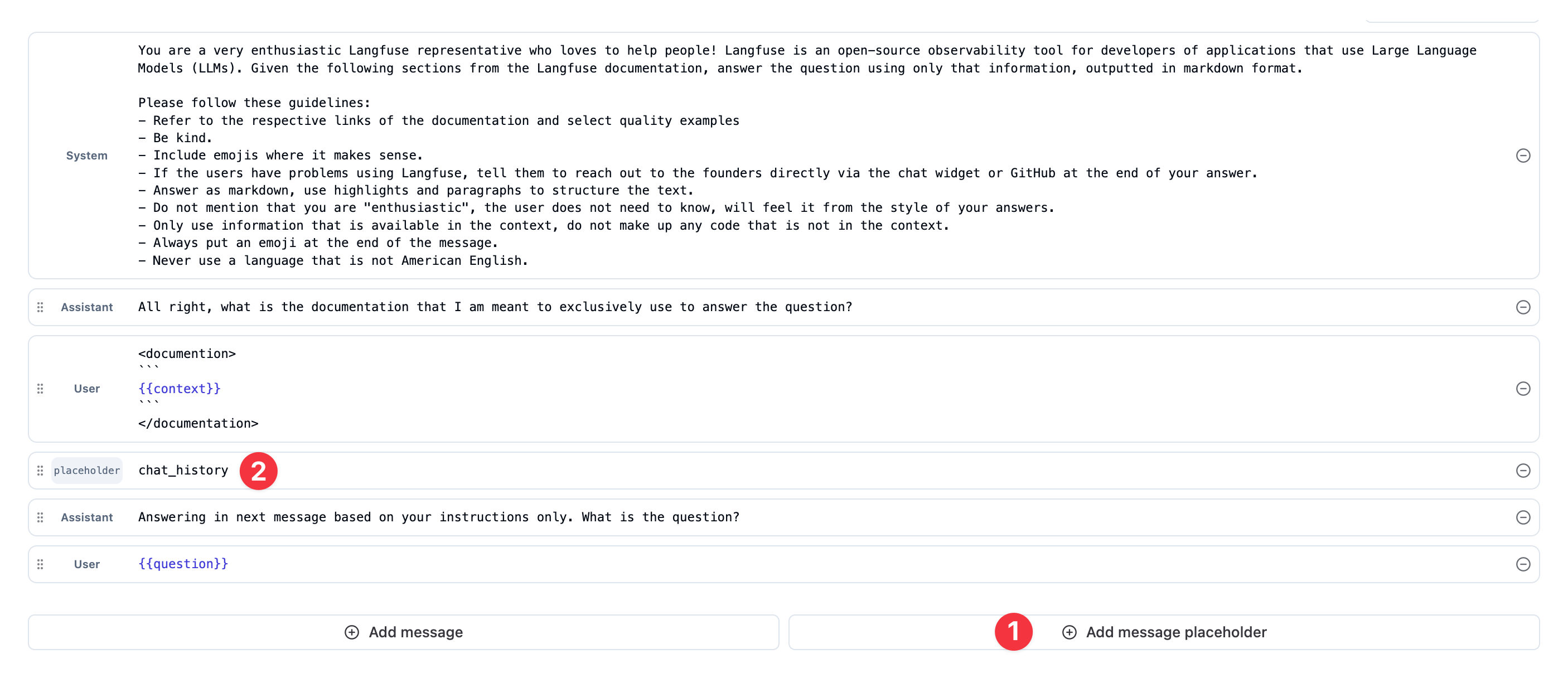
1. Create a placeholder in any prompt by using the `Add message placeholder` button.
2. Select a `name` for the placeholder that will be used to reference it in your application.
```python
from langfuse import get_client
langfuse = get_client()
langfuse.create_prompt(
name="movie-critic-chat",
type="chat",
prompt=[
{ "role": "system", "content": "You are an {{criticlevel}} movie critic" },
{ "type": "placeholder", "name": "chat_history" },
{ "role": "user", "content": "What should I watch next?" },
],
labels=["production"], # directly promote to production
)
```
```typescript
import { LangfuseClient } from "@langfuse/client";
const langfuse = new LangfuseClient();
await langfuse.prompt.create({
name: "movie-critic-chat",
type: "chat",
prompt: [
{ role: "system", content: "You are an {{criticlevel}} movie critic" },
{ type: "placeholder", name: "chat_history" },
{ role: "user", content: "What should I watch next?" },
],
labels: ["production"], // directly promote to production
});
```
## Resolve placeholders at runtime
In the SDKs, use the `.compile(variables, placeholders)` method on a `ChatPromptClient` to set the values to be filled in for the placeholders.
The filled in messages should be of the `ChatMessage` format with a `role` and `content` property, but custom formats are also accepted as `compile` does not validate the format of the messages.
```python
from langfuse import get_client
langfuse = get_client()
# Use prompt with placeholders in your application
prompt = langfuse.get_prompt("movie-critic-chat")
# Compile the variable and resolve the placeholder with a list of messages.
compiled_prompt = prompt.compile(criticlevel="expert", chat_history=[
{"role": "user", "content": "I love Ron Fricke movies like Baraka"},
{"role": "user", "content": "Also, the Korean movie Memories of a Murderer"}
])
# -> compiled_prompt = [
# { "role": "system", "content": "You are an expert movie critic" },
# { "role": "user", "content": "I love Ron Fricke movies like Baraka" },
# { "role": "user", "content": "Also, the Korean movie Memories of a Murderer" },
# { "role": "user", "content": "What should I watch next?" },
# ]
```
```typescript
import { LangfuseClient } from "@langfuse/client";
const langfuse = new LangfuseClient();
const prompt = await langfuse.prompt.get("movie-critic-chat", {
type: "chat",
});
// Compile the variable and resolve the placeholder with a list of messages.
const compiledPrompt = prompt.compile(
// variables
{ criticlevel: "expert" },
// placeholders
{
chat_history: [
{ role: "user", content: "I love Ron Fricke movies like Baraka" },
{
role: "user",
content: "Also, the Korean movie Memories of a Murderer",
},
],
}
);
// -> compiledPrompt = [
// { role: "system", content: "You are an expert movie critic" },
// { role: "user", content: "I love Ron Fricke movies like Baraka" },
// { role: "user", content: "Also, the Korean movie Memories of a Murderer" },
// { role: "user", content: "What should I watch next?" },
// ]
```
```python
from langfuse import get_client
from langchain_core.prompts import ChatPromptTemplate
langfuse = get_client()
langfuse_prompt = langfuse.get_prompt("movie-critic-chat")
# Using langchain, you can obtain a MessagesPlaceholder object for unresolved placeholders
langchain_prompt = ChatPromptTemplate.from_messages(langfuse_prompt.get_langchain_prompt())
# -> langchain_prompt = [
# SystemMessage(content="You are an expert movie critic"),
# MessagesPlaceholder(name="chat_history"),
# HumanMessage(content="What should I watch next?"),
# ]
```
```typescript
import { LangfuseClient } from "@langfuse/client";
import { ChatPromptTemplate } from "@langchain/core/prompts";
const langfuse = new LangfuseClient();
// Get current `production` version
const langfusePrompt = await langfuse.prompt.get("movie-critic-chat", {
type: "chat",
});
// Using langchain, you can obtain a ChatPromptTemplate with MessagesPlaceholder objects for unresolved placeholders
const langchainPrompt = ChatPromptTemplate.fromMessages(
langfusePrompt.getLangchainPrompt()
);
// -> langchainPrompt = [
// SystemMessage(content="You are an expert movie critic"),
// MessagesPlaceholder(name="chat_history"),
// HumanMessage(content="What should I watch next?"),
// ]
```
Not exactly what you need? Consider these similar features:
- [Variables](/docs/prompt-management/features/variables) for inserting dynamic text into prompts
- [Prompt references](/docs/prompt-management/features/composability) for reusing sub-prompts
---
## Agent Instructions
This page is part of the [Langfuse](https://langfuse.com) documentation, published as plain Markdown for AI agents. Every page is available as Markdown by appending `.md` to its URL, or by sending an `Accept: text/markdown` header. This page: `https://langfuse.com/docs/prompt-management/features/message-placeholders.md`.
### Querying these docs
If the answer is not on this page, query the documentation instead of guessing:
- **Semantic search** across all Langfuse docs, returning an answer with the relevant pages and excerpts. Ask a specific, self-contained question:
```bash
curl -sG "https://langfuse.com/api/search-docs" --data-urlencode "query=How do I trace a LangGraph agent?"
```
- **Index of every page**: , with per-section indexes [llms-docs.txt](https://langfuse.com/llms-docs.txt), [llms-integrations.txt](https://langfuse.com/llms-integrations.txt), and [llms-self-hosting.txt](https://langfuse.com/llms-self-hosting.txt).
### Before writing Langfuse code
- **Install the [Langfuse Agent Skill](https://langfuse.com/docs/api-and-data-platform/features/agent-skill).** It encodes Langfuse's own best practices for instrumentation, prompt management, and evaluation, and materially improves results.
- **Read [What does a good trace look like?](https://langfuse.com/docs/observability/best-practices.md)** before instrumenting an application.
- **Verify endpoints, parameters, and response fields** against the [API reference](https://api.reference.langfuse.com) instead of inferring them from code examples.
- **Use the [Langfuse CLI](https://langfuse.com/docs/api-and-data-platform/features/cli)** (`npx langfuse-cli api `) to read or write traces, prompts, datasets, and scores from the terminal.
Found an error in these docs? Please open an issue at .