---
title: Variables
sidebarTitle: Variables
description: Insert dynamic text into prompts using variables that are resolved at runtime.
---
# Variables in Prompts
Variables are placeholders for dynamic strings in your prompts. They allow you to create flexible prompt templates that can be customized at runtime without changing the prompt definition itself.
All prompts support variables using the `{{variable}}` syntax. When you fetch a prompt from Langfuse and compile it, you provide values for these variables that get inserted into the prompt template.
## Get started
## Create prompt with variables
When creating a prompt in the Langfuse UI, simply use double curly braces `{{variable_name}}` to define a variable anywhere in your prompt text.
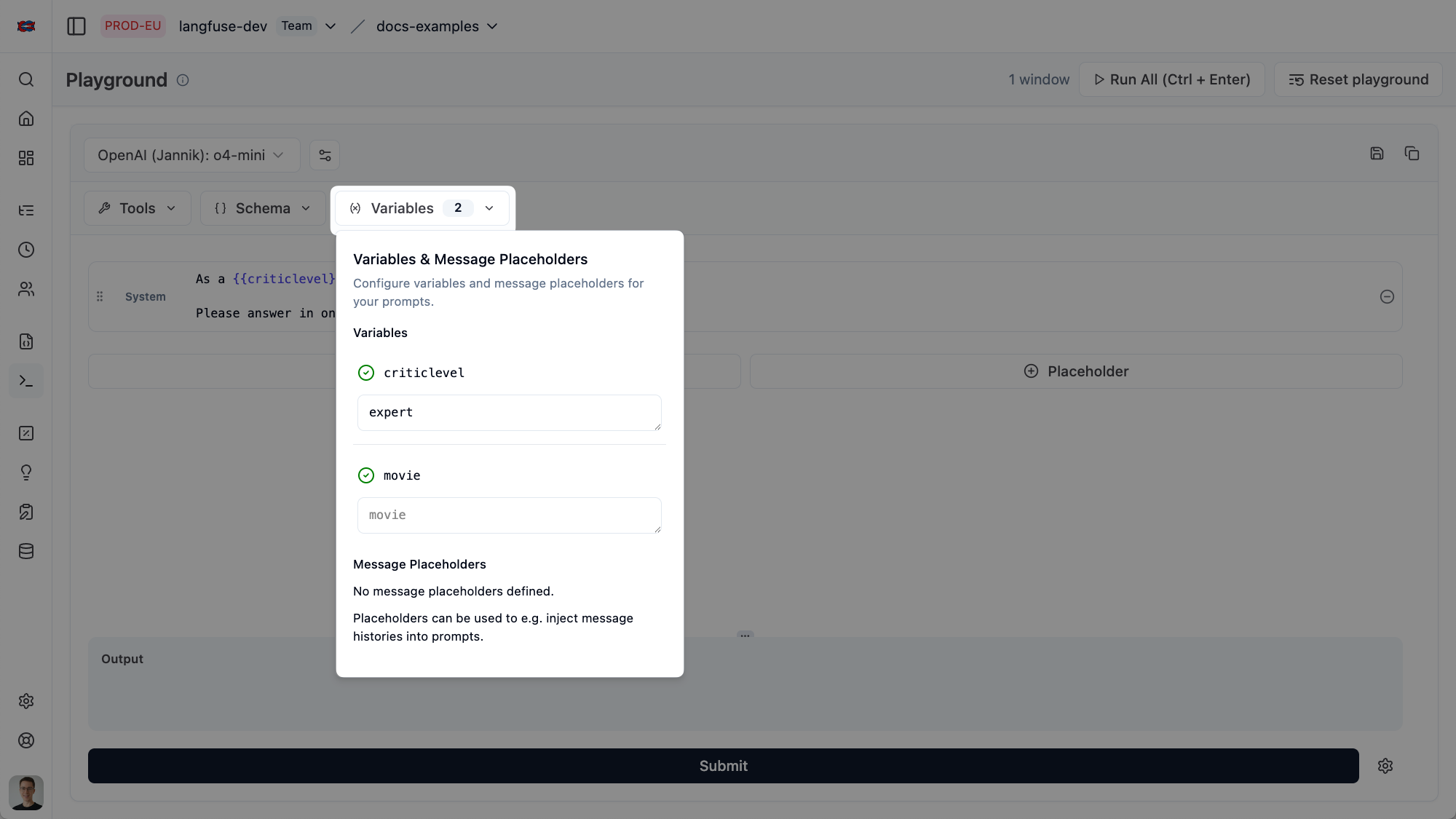
Variables work in both **text prompts** and **chat prompts**. You can use them in any message content.
```python
from langfuse import get_client
langfuse = get_client()
# Text prompt with variables
langfuse.create_prompt(
name="movie-critic",
type="text",
prompt="As a {{criticLevel}} movie critic, do you like {{movie}}?",
labels=["production"],
)
# Chat prompt with variables
langfuse.create_prompt(
name="movie-critic-chat",
type="chat",
prompt=[
{
"role": "system",
"content": "You are a {{criticLevel}} movie critic."
},
{
"role": "user",
"content": "What do you think about {{movie}}?"
}
],
labels=["production"],
)
```
```typescript
import { LangfuseClient } from "@langfuse/client";
const langfuse = new LangfuseClient();
// Text prompt with variables
await langfuse.prompt.create({
name: "movie-critic",
type: "text",
prompt: "As a {{criticLevel}} movie critic, do you like {{movie}}?",
labels: ["production"],
});
// Chat prompt with variables
await langfuse.prompt.create({
name: "movie-critic-chat",
type: "chat",
prompt: [
{
role: "system",
content: "You are a {{criticLevel}} movie critic.",
},
{
role: "user",
content: "What do you think about {{movie}}?",
},
],
labels: ["production"],
});
```
## Compile variables at runtime
In your application, use the `.compile()` method to replace variables with actual values. Pass the variables as keyword arguments (Python) or an object (JavaScript/TypeScript).
```python
from langfuse import get_client
langfuse = get_client()
# Get the prompt
prompt = langfuse.get_prompt("movie-critic")
# Compile with variable values
compiled_prompt = prompt.compile(
criticLevel="expert",
movie="Dune 2"
)
# -> compiled_prompt = "As an expert movie critic, do you like Dune 2?"
# Use with your LLM
response = openai.chat.completions.create(
model="gpt-4",
messages=[{"role": "user", "content": compiled_prompt}]
)
```
```typescript
import { LangfuseClient } from "@langfuse/client";
const langfuse = new LangfuseClient();
// Get the prompt
const prompt = await langfuse.prompt.get("movie-critic", {
type: "text",
});
// Compile with variable values
const compiledPrompt = prompt.compile({
criticLevel: "expert",
movie: "Dune 2",
});
// -> compiledPrompt = "As an expert movie critic, do you like Dune 2?"
// Use with your LLM
const response = await openai.chat.completions.create({
model: "gpt-4",
messages: [{ role: "user", content: compiledPrompt }],
});
```
```python
from langfuse import get_client
from langchain_core.prompts import PromptTemplate, ChatPromptTemplate
langfuse = get_client()
# For text prompts
langfuse_prompt = langfuse.get_prompt("movie-critic")
langchain_prompt = PromptTemplate.from_template(langfuse_prompt.get_langchain_prompt())
# Compile with variables
compiled = langchain_prompt.format(criticLevel="expert", movie="Dune 2")
# -> "As an expert movie critic, do you like Dune 2?"
# For chat prompts
langfuse_chat_prompt = langfuse.get_prompt("movie-critic-chat")
langchain_chat_prompt = ChatPromptTemplate.from_messages(
langfuse_chat_prompt.get_langchain_prompt()
)
# Compile with variables
compiled_messages = langchain_chat_prompt.format_messages(
criticLevel="expert",
movie="Dune 2"
)
```
```typescript
import { LangfuseClient } from "@langfuse/client";
import { PromptTemplate, ChatPromptTemplate } from "@langchain/core/prompts";
const langfuse = new LangfuseClient();
// For text prompts
const langfusePrompt = await langfuse.prompt.get("movie-critic", {
type: "text",
});
const langchainPrompt = PromptTemplate.fromTemplate(
langfusePrompt.getLangchainPrompt()
);
// Compile with variables
const compiled = await langchainPrompt.format({
criticLevel: "expert",
movie: "Dune 2",
});
// -> "As an expert movie critic, do you like Dune 2?"
// For chat prompts
const langfuseChatPrompt = await langfuse.prompt.get("movie-critic-chat", {
type: "chat",
});
const langchainChatPrompt = ChatPromptTemplate.fromMessages(
langfuseChatPrompt.getLangchainPrompt()
);
// Compile with variables
const compiledMessages = await langchainChatPrompt.formatMessages({
criticLevel: "expert",
movie: "Dune 2",
});
```
Not exactly what you need? Consider these similar features:
- [Prompt references](/docs/prompt-management/features/composability) for reusing sub-prompts
- [Message placeholders](/docs/prompt-management/features/message-placeholders) for inserting arrays of complete messages instead of strings
Or related FAQ pages:
---
## Agent Instructions
This page is part of the [Langfuse](https://langfuse.com) documentation, published as plain Markdown for AI agents. Every page is available as Markdown by appending `.md` to its URL, or by sending an `Accept: text/markdown` header. This page: `https://langfuse.com/docs/prompt-management/features/variables.md`.
### Querying these docs
If the answer is not on this page, query the documentation instead of guessing:
- **Semantic search** across all Langfuse docs, returning an answer with the relevant pages and excerpts. Ask a specific, self-contained question:
```bash
curl -sG "https://langfuse.com/api/search-docs" --data-urlencode "query=How do I trace a LangGraph agent?"
```
- **Index of every page**: , with per-section indexes [llms-docs.txt](https://langfuse.com/llms-docs.txt), [llms-integrations.txt](https://langfuse.com/llms-integrations.txt), and [llms-self-hosting.txt](https://langfuse.com/llms-self-hosting.txt).
### Before writing Langfuse code
- **Install the [Langfuse Agent Skill](https://langfuse.com/docs/api-and-data-platform/features/agent-skill).** It encodes Langfuse's own best practices for instrumentation, prompt management, and evaluation, and materially improves results.
- **Read [What does a good trace look like?](https://langfuse.com/docs/observability/best-practices.md)** before instrumenting an application.
- **Verify endpoints, parameters, and response fields** against the [API reference](https://api.reference.langfuse.com) instead of inferring them from code examples.
- **Use the [Langfuse CLI](https://langfuse.com/docs/api-and-data-platform/features/cli)** (`npx langfuse-cli api `) to read or write traces, prompts, datasets, and scores from the terminal.
Found an error in these docs? Please open an issue at .