---
source: ⚠️ Jupyter Notebook
title: Example - Langfuse Prompt Management with Langchain (JS)
sidebarTitle: Prompt Management with Langchain (JS)
description: Example how to version control and manage prompts with Langfuse Prompt Management and Langchain JS.
category: Prompt Management
---
# Example: Langfuse Prompt Management with Langchain (JS)

 Langfuse [Prompt Management](https://langfuse.com/docs/prompts) helps to version control and manage prompts collaboratively in one place.
This example demonstrates how to use Langfuse Prompt Management together with Langchain JS.
## Set Up Environment
Get your Langfuse API keys by signing up for [Langfuse Cloud](https://cloud.langfuse.com/) or [self-hosting Langfuse](https://langfuse.com/self-hosting). You’ll also need your OpenAI API key.
> **Note**: This cookbook uses **Deno.js** for execution, which requires different syntax for importing packages and setting environment variables. For Node.js applications, the setup process is similar but uses standard `npm` packages and `process.env`.
```typescript
// Langfuse authentication keys
Deno.env.set("LANGFUSE_PUBLIC_KEY", "pk-lf-***");
Deno.env.set("LANGFUSE_SECRET_KEY", "sk-lf-***");
// Langfuse host configuration
// Other Langfuse data regions include 🇺🇸 US: https://us.cloud.langfuse.com, 🇯🇵 Japan: https://jp.cloud.langfuse.com and ⚕️ HIPAA: https://hipaa.cloud.langfuse.com
Deno.env.set("LANGFUSE_BASE_URL", "https://cloud.langfuse.com")
// Set environment variables using Deno-specific syntax
Deno.env.set("OPENAI_API_KEY", "sk-proj-***");
```
With the environment variables set, we can now initialize the `langfuseSpanProcessor` which is passed to the main OpenTelemetry SDK that orchestrates tracing.
```typescript
// Import required dependencies
import 'npm:dotenv/config';
import { NodeSDK } from "npm:@opentelemetry/sdk-node";
import { LangfuseSpanProcessor } from "npm:@langfuse/otel";
// Export the processor to be able to flush it later
// This is important for ensuring all spans are sent to Langfuse
export const langfuseSpanProcessor = new LangfuseSpanProcessor({
publicKey: process.env.LANGFUSE_PUBLIC_KEY!,
secretKey: process.env.LANGFUSE_SECRET_KEY!,
baseUrl: process.env.LANGFUSE_BASE_URL ?? 'https://cloud.langfuse.com', // Default to cloud if not specified
environment: process.env.NODE_ENV ?? 'development', // Default to development if not specified
});
// Initialize the OpenTelemetry SDK with our Langfuse processor
const sdk = new NodeSDK({
spanProcessors: [langfuseSpanProcessor],
});
// Start the SDK to begin collecting telemetry
// The warning about crypto module is expected in Deno and doesn't affect basic tracing functionality. Media upload features will be disabled, but all core tracing works normally
sdk.start();
```
The **LangfuseClient** provides additional functionality beyond OpenTelemetry tracing, such as scoring, prompt management, and data retrieval. It automatically uses the same environment variables we set earlier.
```typescript
import { LangfuseClient } from "npm:@langfuse/client";
const langfuse = new LangfuseClient();
```
## Example 1: Text Prompt
### Add new prompt
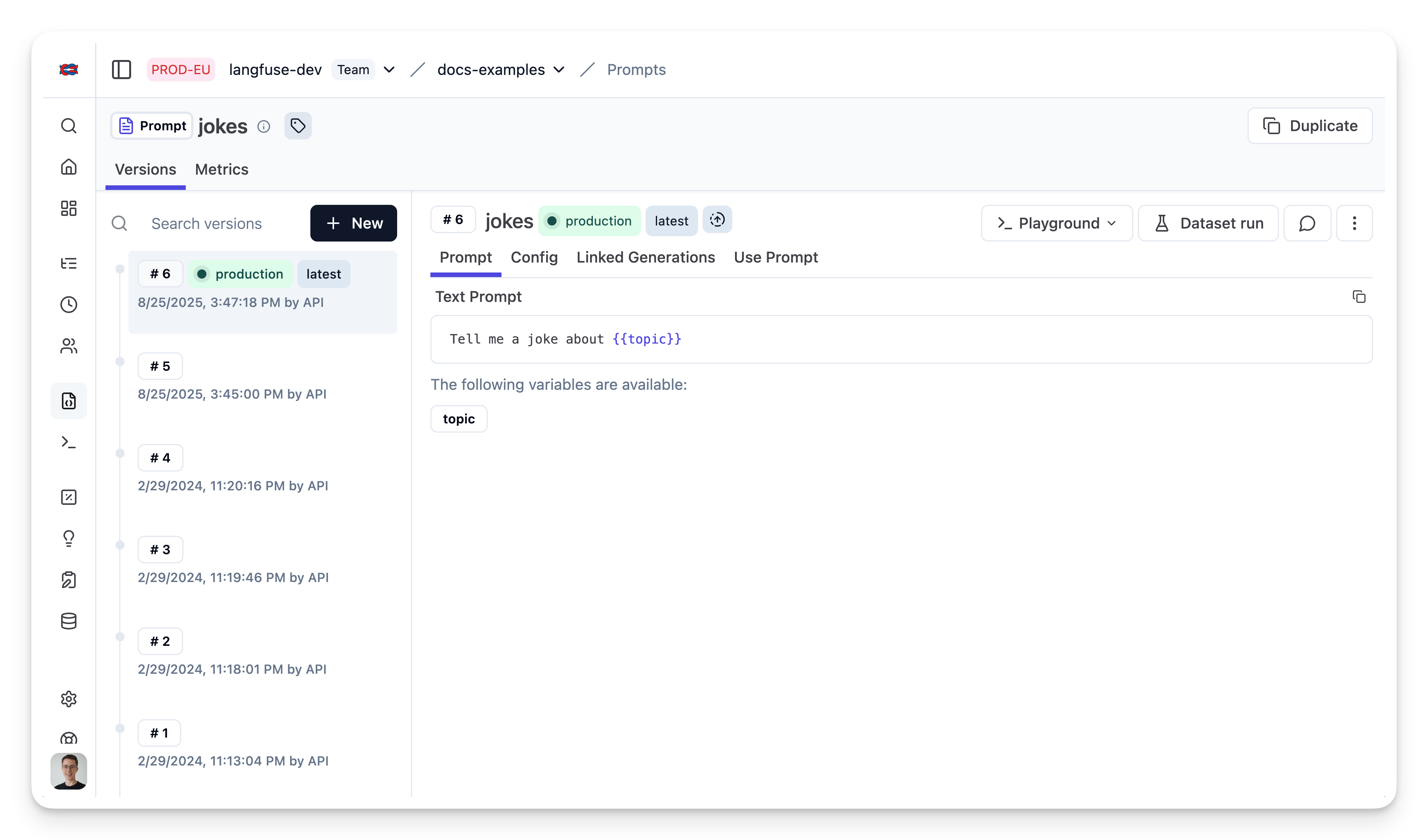
We add the prompt used in this example via the SDK. Alternatively, you can also edit and version the prompt in the Langfuse UI.
- `Name` that identifies the prompt in Langfuse Prompt Management
- Prompt with `topic` variable
- Config including `modelName`, `temperature`
- `labels` to include `production` to immediately use prompt as the default
For the sake of this notebook, we will add the prompt in Langfuse and use it right away. Usually, you'd update the prompt from time to time in Langfuse and your application fetches the current production version.
```typescript
// Create a text prompt
await langfuse.prompt.create({
name: "jokes",
type: "text",
prompt: "Tell me a joke about {{topic}}",
labels: ["production"], // directly promote to production
config: {
model: "gpt-4o",
temperature: 0.7,
supported_languages: ["en", "fr"],
}, // optionally, add configs (e.g. model parameters or model tools) or tags
});
```
Prompt in Langfuse
### Run example
#### Get current prompt version from Langfuse
```typescript
// Get current `production` version
const prompt = await langfuse.prompt.get("jokes");
```
The prompt includes the prompt string
```typescript
prompt.prompt
```
and the config object
```typescript
prompt.config
```
#### Transform prompt into Langchain PromptTemplate
Use the utility method `.getLangchainPrompt()` to transform the Langfuse prompt into a string that can be used in Langchain.
Context: Langfuse declares input variables in prompt templates using double brackets (`{{input variable}}`). Langchain uses single brackets for declaring input variables in PromptTemplates (`{input variable}`). The utility method `.getLangchainPrompt()` replaces the double brackets with single brackets.
Also, pass the Langfuse prompt as metadata to the PromptTemplate to automatically link generations that use the prompt.
```typescript
import { PromptTemplate } from "npm:@langchain/core/prompts"
const langfuseTextPrompt = await langfuse.prompt.get("jokes"); // Fetch a previously created text prompt
// Pass the langfuseTextPrompt to the PromptTemplate as metadata to link it to generations that use it
const langchainTextPrompt = PromptTemplate.fromTemplate(
langfuseTextPrompt.getLangchainPrompt()
).withConfig({
metadata: { langfusePrompt: langfuseTextPrompt },
});
```
#### Setup Langfuse Tracing for Langchain JS
We'll use the native [Langfuse Tracing for Langchain JS](https://langfuse.com/integrations/frameworks/langchain) when executing this chain. This is fully optional and can be used independently from Prompt Management.
```typescript
import { CallbackHandler } from "npm:@langfuse/langchain";
// 1. Initialize the Langfuse callback handler
const langfuseHandler = new CallbackHandler({
sessionId: "user-session-123",
userId: "user-abc",
tags: ["langchain-test"],
});
```
#### Create chain
We use the `modelName` and `temperature` stored in `prompt.config`.
```typescript
import { ChatOpenAI } from "npm:@langchain/openai"
import { RunnableSequence } from "npm:@langchain/core/runnables";
const model = new ChatOpenAI({
modelName: prompt.config.model,
temperature: prompt.config.temperature
});
const chain = RunnableSequence.from([promptTemplate, model]);
```
#### Invoke chain
```typescript
const res = await chain.invoke(
{ topic: "developers" },
{ callbacks: [langfuseHandler] }
);
```
### View trace in Langfuse
As we passed the langfuse callback handler, we can explore the execution trace in Langfuse.
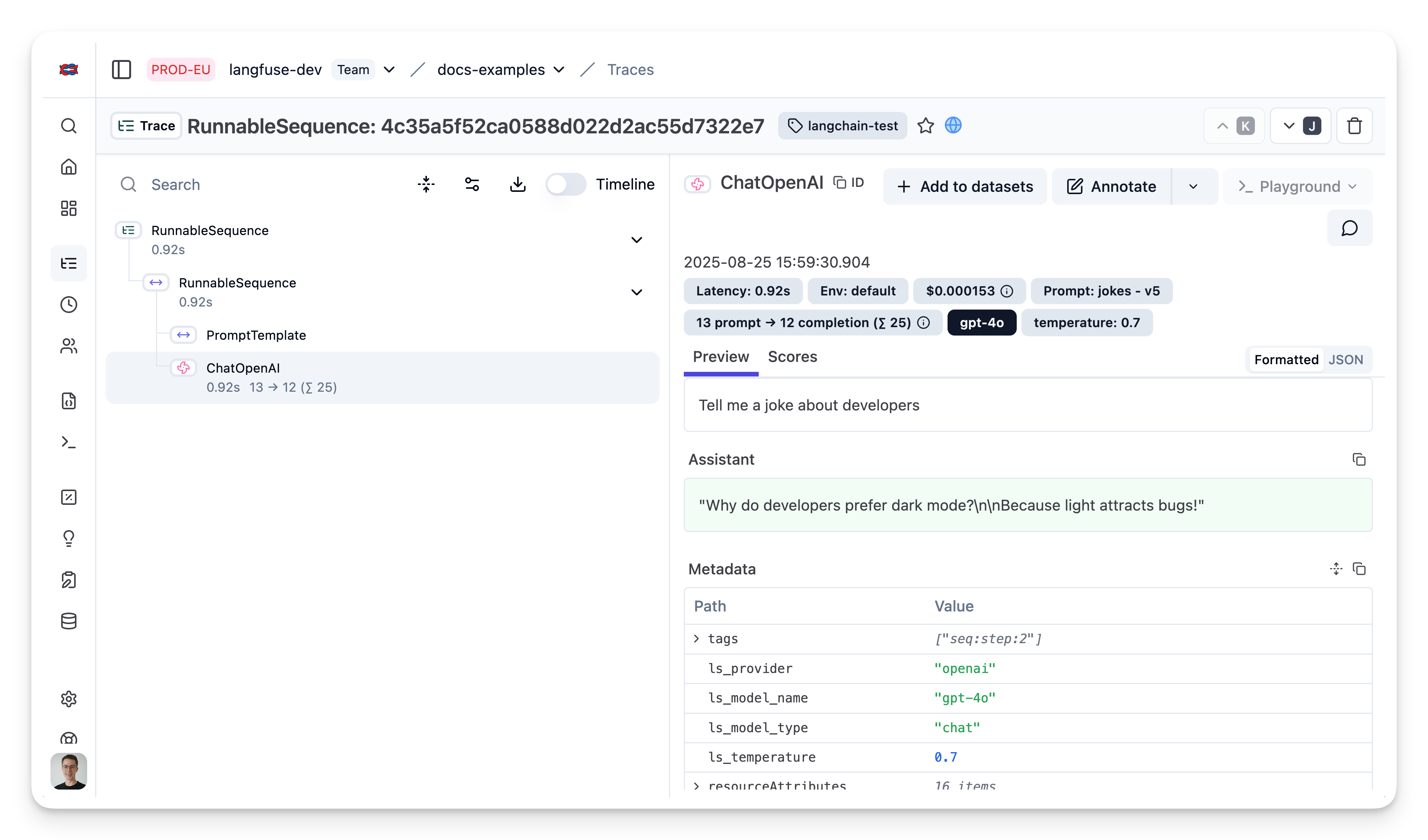
[Public trace in the Langfuse UI](https://cloud.langfuse.com/project/cloramnkj0002jz088vzn1ja4/traces/4c35a5f52ca0588d022d2ac55d7322e7?timestamp=2025-08-25T13%3A59%3A30.900Z&display=details&observation=40be66bf70a82583)
## Example 2: OpenAI functions with structured output
### Add prompt to Langfuse
```typescript
await langfuse.prompt.create({
name: "extractor",
prompt: "Extracts fields from the input.",
config: {
modelName: "gpt-4o",
temperature: 0,
schema: {
type: "object",
properties: {
tone: {
type: "string",
enum: ["positive", "negative"],
description: "The overall tone of the input",
},
word_count: {
type: "number",
description: "The number of words in the input",
},
chat_response: {
type: "string",
description: "A response to the human's input",
},
},
required: ["tone", "word_count", "chat_response"],
}
}, // optionally, add configs (e.g. model parameters or model tools)
labels: ["production"] // directly promote to production
});
```
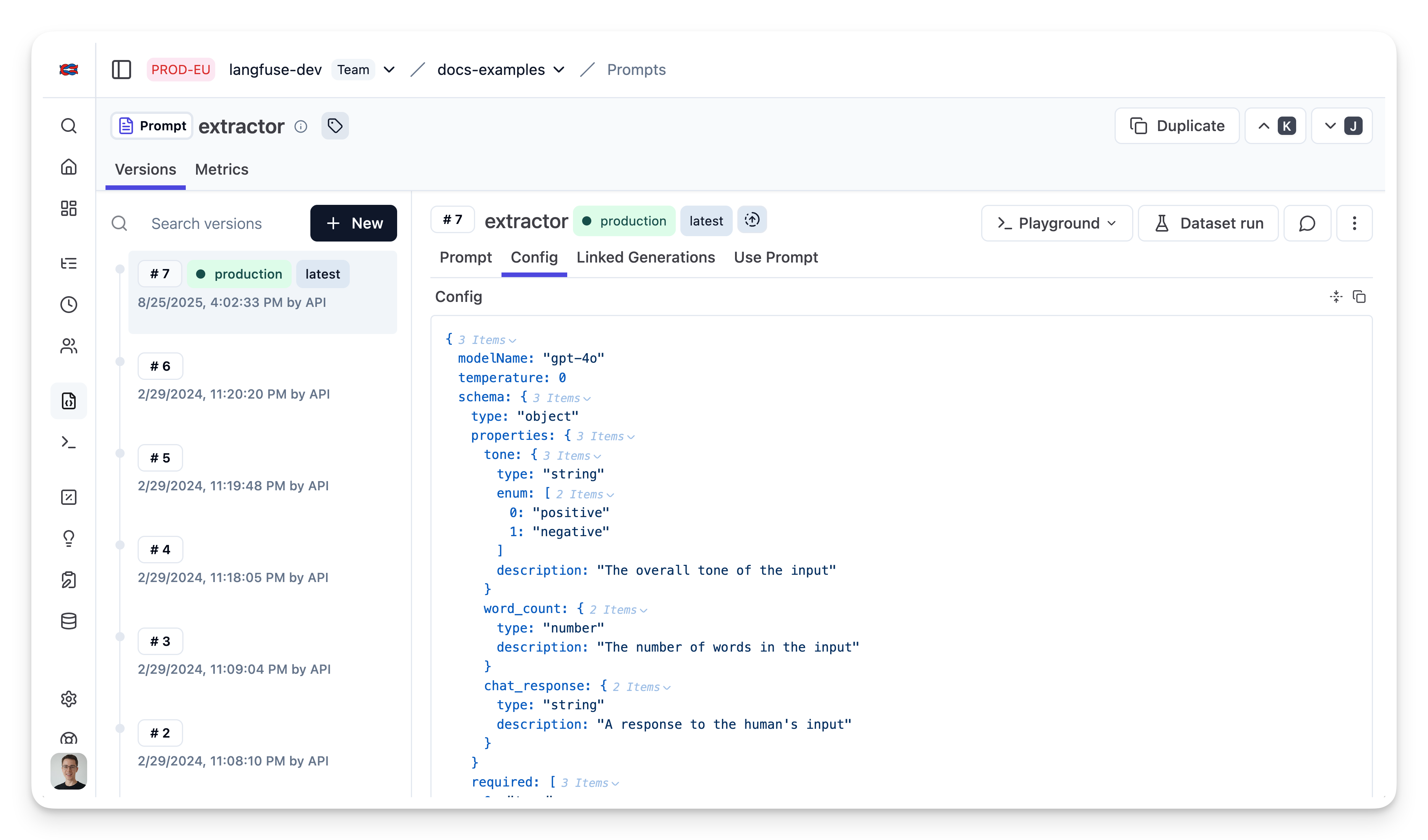
Prompt in Langfuse
### Fetch prompt
```typescript
const extractorPrompt = await langfuse.prompt.get("extractor")
```
Transform into schema
```typescript
const extractionFunctionSchema = {
name: "extractor",
description: extractorPrompt.prompt,
parameters: extractorPrompt.config.schema,
}
```
### Build chain
```typescript
import { ChatOpenAI } from "npm:@langchain/openai";
// Instantiate the ChatOpenAI class
const model = new ChatOpenAI({
modelName: extractorPrompt.config.modelName,
temperature: extractorPrompt.config.temperature
});
// Create a runnable that uses OpenAI function calling and returns parsed JSON
const runnable = model.withStructuredOutput(extractionFunctionSchema, {
method: "functionCalling",
});
```
### Invoke chain
```typescript
import { HumanMessage } from "npm:@langchain/core/messages";
// Invoke the runnable with an input
const result = await runnable.invoke(
[new HumanMessage("What a beautiful day!")],
{ callbacks: [langfuseHandler] }
);
```
### View trace in Langfuse
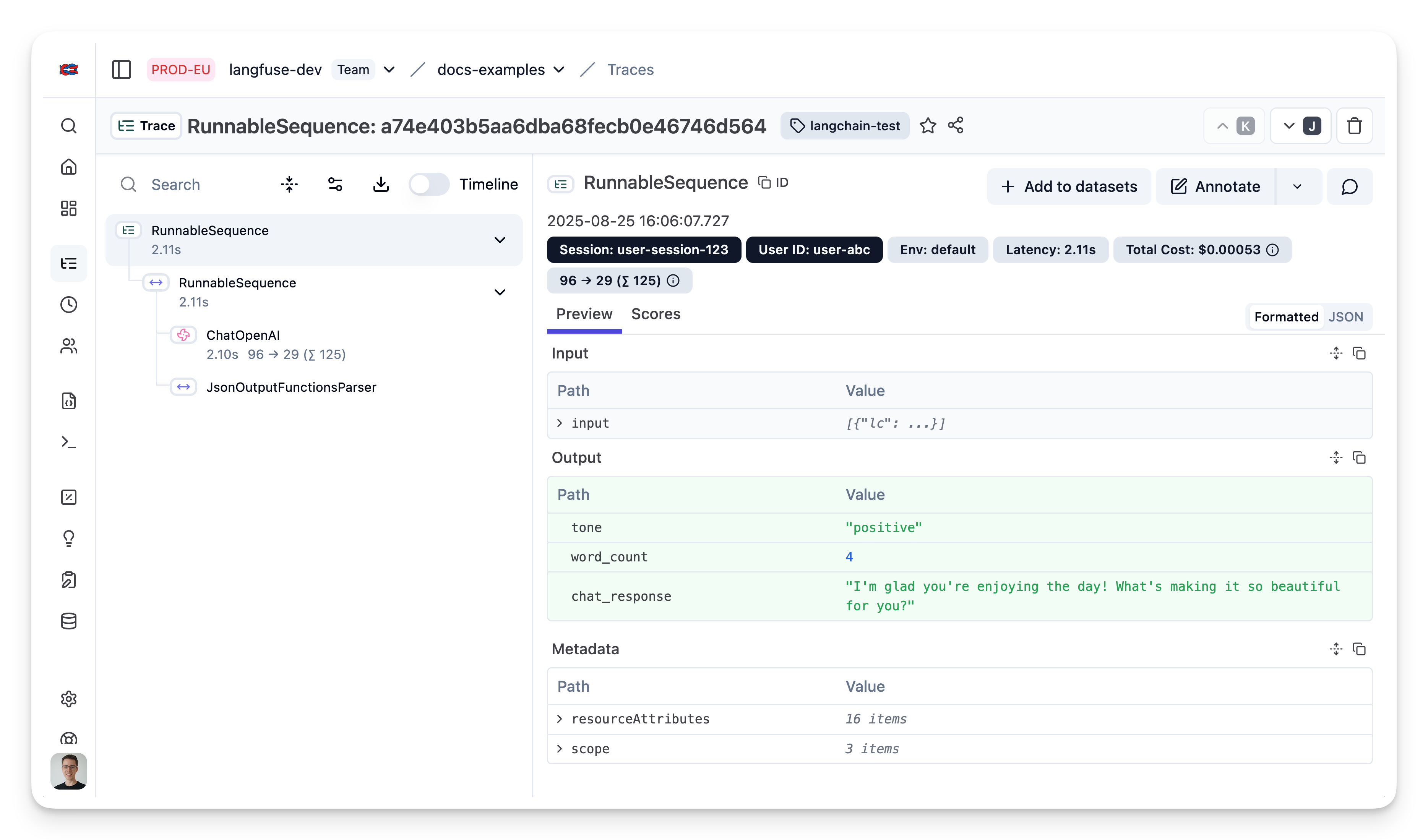
[Public trace in the Langfuse UI](https://cloud.langfuse.com/project/cloramnkj0002jz088vzn1ja4/traces/a74e403b5aa6dba68fecb0e46746d564?timestamp=2025-08-25T14:06:07.727Z&display=details)
---
## Agent Instructions
This page is part of the [Langfuse](https://langfuse.com) documentation, published as plain Markdown for AI agents. Every page is available as Markdown by appending `.md` to its URL, or by sending an `Accept: text/markdown` header. This page: `https://langfuse.com/guides/cookbook/js_prompt_management_langchain.md`.
### Querying these docs
If the answer is not on this page, query the documentation instead of guessing:
- **Semantic search** across all Langfuse docs, returning an answer with the relevant pages and excerpts. Ask a specific, self-contained question:
```bash
curl -sG "https://langfuse.com/api/search-docs" --data-urlencode "query=How do I trace a LangGraph agent?"
```
- **Index of every page**: , with per-section indexes [llms-docs.txt](https://langfuse.com/llms-docs.txt), [llms-integrations.txt](https://langfuse.com/llms-integrations.txt), and [llms-self-hosting.txt](https://langfuse.com/llms-self-hosting.txt).
### Before writing Langfuse code
- **Install the [Langfuse Agent Skill](https://langfuse.com/docs/api-and-data-platform/features/agent-skill).** It encodes Langfuse's own best practices for instrumentation, prompt management, and evaluation, and materially improves results.
- **Read [What does a good trace look like?](https://langfuse.com/docs/observability/best-practices.md)** before instrumenting an application.
- **Verify endpoints, parameters, and response fields** against the [API reference](https://api.reference.langfuse.com) instead of inferring them from code examples.
- **Use the [Langfuse CLI](https://langfuse.com/docs/api-and-data-platform/features/cli)** (`npx langfuse-cli api `) to read or write traces, prompts, datasets, and scores from the terminal.
Found an error in these docs? Please open an issue at .
Langfuse [Prompt Management](https://langfuse.com/docs/prompts) helps to version control and manage prompts collaboratively in one place.
This example demonstrates how to use Langfuse Prompt Management together with Langchain JS.
## Set Up Environment
Get your Langfuse API keys by signing up for [Langfuse Cloud](https://cloud.langfuse.com/) or [self-hosting Langfuse](https://langfuse.com/self-hosting). You’ll also need your OpenAI API key.
> **Note**: This cookbook uses **Deno.js** for execution, which requires different syntax for importing packages and setting environment variables. For Node.js applications, the setup process is similar but uses standard `npm` packages and `process.env`.
```typescript
// Langfuse authentication keys
Deno.env.set("LANGFUSE_PUBLIC_KEY", "pk-lf-***");
Deno.env.set("LANGFUSE_SECRET_KEY", "sk-lf-***");
// Langfuse host configuration
// Other Langfuse data regions include 🇺🇸 US: https://us.cloud.langfuse.com, 🇯🇵 Japan: https://jp.cloud.langfuse.com and ⚕️ HIPAA: https://hipaa.cloud.langfuse.com
Deno.env.set("LANGFUSE_BASE_URL", "https://cloud.langfuse.com")
// Set environment variables using Deno-specific syntax
Deno.env.set("OPENAI_API_KEY", "sk-proj-***");
```
With the environment variables set, we can now initialize the `langfuseSpanProcessor` which is passed to the main OpenTelemetry SDK that orchestrates tracing.
```typescript
// Import required dependencies
import 'npm:dotenv/config';
import { NodeSDK } from "npm:@opentelemetry/sdk-node";
import { LangfuseSpanProcessor } from "npm:@langfuse/otel";
// Export the processor to be able to flush it later
// This is important for ensuring all spans are sent to Langfuse
export const langfuseSpanProcessor = new LangfuseSpanProcessor({
publicKey: process.env.LANGFUSE_PUBLIC_KEY!,
secretKey: process.env.LANGFUSE_SECRET_KEY!,
baseUrl: process.env.LANGFUSE_BASE_URL ?? 'https://cloud.langfuse.com', // Default to cloud if not specified
environment: process.env.NODE_ENV ?? 'development', // Default to development if not specified
});
// Initialize the OpenTelemetry SDK with our Langfuse processor
const sdk = new NodeSDK({
spanProcessors: [langfuseSpanProcessor],
});
// Start the SDK to begin collecting telemetry
// The warning about crypto module is expected in Deno and doesn't affect basic tracing functionality. Media upload features will be disabled, but all core tracing works normally
sdk.start();
```
The **LangfuseClient** provides additional functionality beyond OpenTelemetry tracing, such as scoring, prompt management, and data retrieval. It automatically uses the same environment variables we set earlier.
```typescript
import { LangfuseClient } from "npm:@langfuse/client";
const langfuse = new LangfuseClient();
```
## Example 1: Text Prompt
### Add new prompt
We add the prompt used in this example via the SDK. Alternatively, you can also edit and version the prompt in the Langfuse UI.
- `Name` that identifies the prompt in Langfuse Prompt Management
- Prompt with `topic` variable
- Config including `modelName`, `temperature`
- `labels` to include `production` to immediately use prompt as the default
For the sake of this notebook, we will add the prompt in Langfuse and use it right away. Usually, you'd update the prompt from time to time in Langfuse and your application fetches the current production version.
```typescript
// Create a text prompt
await langfuse.prompt.create({
name: "jokes",
type: "text",
prompt: "Tell me a joke about {{topic}}",
labels: ["production"], // directly promote to production
config: {
model: "gpt-4o",
temperature: 0.7,
supported_languages: ["en", "fr"],
}, // optionally, add configs (e.g. model parameters or model tools) or tags
});
```
Prompt in Langfuse

### Run example
#### Get current prompt version from Langfuse
```typescript
// Get current `production` version
const prompt = await langfuse.prompt.get("jokes");
```
The prompt includes the prompt string
```typescript
prompt.prompt
```
and the config object
```typescript
prompt.config
```
#### Transform prompt into Langchain PromptTemplate
Use the utility method `.getLangchainPrompt()` to transform the Langfuse prompt into a string that can be used in Langchain.
Context: Langfuse declares input variables in prompt templates using double brackets (`{{input variable}}`). Langchain uses single brackets for declaring input variables in PromptTemplates (`{input variable}`). The utility method `.getLangchainPrompt()` replaces the double brackets with single brackets.
Also, pass the Langfuse prompt as metadata to the PromptTemplate to automatically link generations that use the prompt.
```typescript
import { PromptTemplate } from "npm:@langchain/core/prompts"
const langfuseTextPrompt = await langfuse.prompt.get("jokes"); // Fetch a previously created text prompt
// Pass the langfuseTextPrompt to the PromptTemplate as metadata to link it to generations that use it
const langchainTextPrompt = PromptTemplate.fromTemplate(
langfuseTextPrompt.getLangchainPrompt()
).withConfig({
metadata: { langfusePrompt: langfuseTextPrompt },
});
```
#### Setup Langfuse Tracing for Langchain JS
We'll use the native [Langfuse Tracing for Langchain JS](https://langfuse.com/integrations/frameworks/langchain) when executing this chain. This is fully optional and can be used independently from Prompt Management.
```typescript
import { CallbackHandler } from "npm:@langfuse/langchain";
// 1. Initialize the Langfuse callback handler
const langfuseHandler = new CallbackHandler({
sessionId: "user-session-123",
userId: "user-abc",
tags: ["langchain-test"],
});
```
#### Create chain
We use the `modelName` and `temperature` stored in `prompt.config`.
```typescript
import { ChatOpenAI } from "npm:@langchain/openai"
import { RunnableSequence } from "npm:@langchain/core/runnables";
const model = new ChatOpenAI({
modelName: prompt.config.model,
temperature: prompt.config.temperature
});
const chain = RunnableSequence.from([promptTemplate, model]);
```
#### Invoke chain
```typescript
const res = await chain.invoke(
{ topic: "developers" },
{ callbacks: [langfuseHandler] }
);
```
### View trace in Langfuse
As we passed the langfuse callback handler, we can explore the execution trace in Langfuse.

[Public trace in the Langfuse UI](https://cloud.langfuse.com/project/cloramnkj0002jz088vzn1ja4/traces/4c35a5f52ca0588d022d2ac55d7322e7?timestamp=2025-08-25T13%3A59%3A30.900Z&display=details&observation=40be66bf70a82583)
## Example 2: OpenAI functions with structured output
### Add prompt to Langfuse
```typescript
await langfuse.prompt.create({
name: "extractor",
prompt: "Extracts fields from the input.",
config: {
modelName: "gpt-4o",
temperature: 0,
schema: {
type: "object",
properties: {
tone: {
type: "string",
enum: ["positive", "negative"],
description: "The overall tone of the input",
},
word_count: {
type: "number",
description: "The number of words in the input",
},
chat_response: {
type: "string",
description: "A response to the human's input",
},
},
required: ["tone", "word_count", "chat_response"],
}
}, // optionally, add configs (e.g. model parameters or model tools)
labels: ["production"] // directly promote to production
});
```
Prompt in Langfuse

### Fetch prompt
```typescript
const extractorPrompt = await langfuse.prompt.get("extractor")
```
Transform into schema
```typescript
const extractionFunctionSchema = {
name: "extractor",
description: extractorPrompt.prompt,
parameters: extractorPrompt.config.schema,
}
```
### Build chain
```typescript
import { ChatOpenAI } from "npm:@langchain/openai";
// Instantiate the ChatOpenAI class
const model = new ChatOpenAI({
modelName: extractorPrompt.config.modelName,
temperature: extractorPrompt.config.temperature
});
// Create a runnable that uses OpenAI function calling and returns parsed JSON
const runnable = model.withStructuredOutput(extractionFunctionSchema, {
method: "functionCalling",
});
```
### Invoke chain
```typescript
import { HumanMessage } from "npm:@langchain/core/messages";
// Invoke the runnable with an input
const result = await runnable.invoke(
[new HumanMessage("What a beautiful day!")],
{ callbacks: [langfuseHandler] }
);
```
### View trace in Langfuse

[Public trace in the Langfuse UI](https://cloud.langfuse.com/project/cloramnkj0002jz088vzn1ja4/traces/a74e403b5aa6dba68fecb0e46746d564?timestamp=2025-08-25T14:06:07.727Z&display=details)
---
## Agent Instructions
This page is part of the [Langfuse](https://langfuse.com) documentation, published as plain Markdown for AI agents. Every page is available as Markdown by appending `.md` to its URL, or by sending an `Accept: text/markdown` header. This page: `https://langfuse.com/guides/cookbook/js_prompt_management_langchain.md`.
### Querying these docs
If the answer is not on this page, query the documentation instead of guessing:
- **Semantic search** across all Langfuse docs, returning an answer with the relevant pages and excerpts. Ask a specific, self-contained question:
```bash
curl -sG "https://langfuse.com/api/search-docs" --data-urlencode "query=How do I trace a LangGraph agent?"
```
- **Index of every page**: , with per-section indexes [llms-docs.txt](https://langfuse.com/llms-docs.txt), [llms-integrations.txt](https://langfuse.com/llms-integrations.txt), and [llms-self-hosting.txt](https://langfuse.com/llms-self-hosting.txt).
### Before writing Langfuse code
- **Install the [Langfuse Agent Skill](https://langfuse.com/docs/api-and-data-platform/features/agent-skill).** It encodes Langfuse's own best practices for instrumentation, prompt management, and evaluation, and materially improves results.
- **Read [What does a good trace look like?](https://langfuse.com/docs/observability/best-practices.md)** before instrumenting an application.
- **Verify endpoints, parameters, and response fields** against the [API reference](https://api.reference.langfuse.com) instead of inferring them from code examples.
- **Use the [Langfuse CLI](https://langfuse.com/docs/api-and-data-platform/features/cli)** (`npx langfuse-cli api `) to read or write traces, prompts, datasets, and scores from the terminal.
Found an error in these docs? Please open an issue at .