---
source: ⚠️ Jupyter Notebook
title: Example - Langfuse Prompt Management with Langchain (Python)
seoTitle: Prompt Management with LangChain (Python)
description: Example of Open Source Prompt Management for Langchain applications using Langfuse.
category: Prompt Management
---
# Example: Langfuse Prompt Management with Langchain (Python)

 [Langfuse Prompt Management](https://langfuse.com/docs/prompts) helps to version control and manage prompts collaboratively in one place. This example demostrates how to use prompts managed in Langchain applications.
_In addition, we use [Langfuse Tracing](https://langfuse.com/docs/tracing) via the native [Langchain integration](https://langfuse.com/integrations/frameworks/langchain) to inspect and debug the Langchain application._
## Setup
```python
%pip install langfuse langchain langchain-openai --upgrade
```
```python
import os
# Get keys for your project from the project settings page: https://cloud.langfuse.com
os.environ.setdefault("LANGFUSE_PUBLIC_KEY", "pk-lf-...");
os.environ.setdefault("LANGFUSE_SECRET_KEY", "sk-lf-...");
os.environ.setdefault("LANGFUSE_BASE_URL", "https://cloud.langfuse.com"); # 🇪🇺 EU region
# Other Langfuse data regions include 🇺🇸 US: https://us.cloud.langfuse.com, 🇯🇵 Japan: https://jp.cloud.langfuse.com and ⚕️ HIPAA: https://hipaa.cloud.langfuse.com
# Your openai key
os.environ.setdefault("OPENAI_API_KEY", "sk-proj-...");
```
```python
from langfuse import get_client
from langfuse.langchain import CallbackHandler
# Initialize Langfuse client (prompt management)
langfuse = get_client()
# Initialize Langfuse CallbackHandler for Langchain (tracing)
langfuse_callback_handler = CallbackHandler()
```
## Add prompt to Langfuse Prompt Management
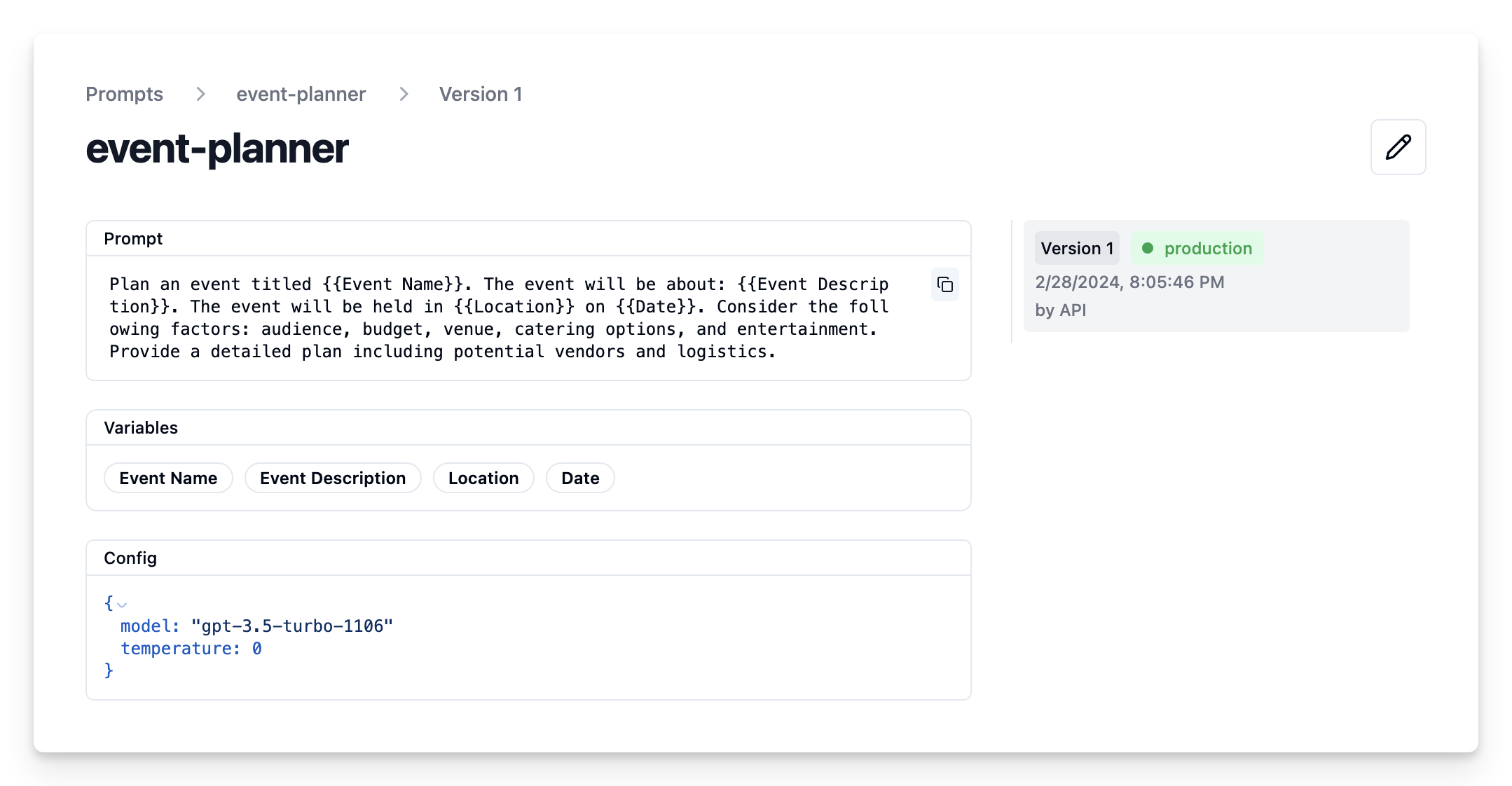
We add the prompt used in this example via the SDK. Alternatively, you can also edit and version the prompt in the Langfuse UI.
- `Name` that identifies the prompt in Langfuse Prompt Management
- Prompt with prompt template incl. `{{input variables}}`
- Config including `model_name` and `temperature`
- `labels` to include `production` to immediately use prompt as the default
```python
langfuse.create_prompt(
name="event-planner",
prompt=
"Plan an event titled {{Event Name}}. The event will be about: {{Event Description}}. "
"The event will be held in {{Location}} on {{Date}}. "
"Consider the following factors: audience, budget, venue, catering options, and entertainment. "
"Provide a detailed plan including potential vendors and logistics.",
config={
"model":"gpt-4o",
"temperature": 0,
},
labels=["production"]
);
```
Prompt in Langfuse UI
## Example application
### Get current prompt version from Langfuse
```python
# Get current production version of prompt
langfuse_prompt = langfuse.get_prompt("event-planner")
```
```python
print(langfuse_prompt.prompt)
```
```
Plan an event titled {{Event Name}}. The event will be about: {{Event Description}}. The event will be held in {{Location}} on {{Date}}. Consider the following factors: audience, budget, venue, catering options, and entertainment. Provide a detailed plan including potential vendors and logistics.
```
### Transform into Langchain PromptTemplate
Use the utility method `.get_langchain_prompt()` to transform the Langfuse prompt into a string that can be used in Langchain.
Context: Langfuse declares input variables in prompt templates using double brackets (`{{input variable}}`). Langchain uses single brackets for declaring input variables in PromptTemplates (`{input variable}`). The utility method `.get_langchain_prompt()` replaces the double brackets with single brackets.
Also, pass the Langfuse prompt as metadata to the PromptTemplate to automatically link generations that use the prompt.
```python
from langchain_core.prompts import ChatPromptTemplate
langchain_prompt = ChatPromptTemplate.from_template(
langfuse_prompt.get_langchain_prompt(),
metadata={"langfuse_prompt": langfuse_prompt},
)
```
Extract the configuration options from `prompt.config`
```python
model = langfuse_prompt.config["model"]
temperature = str(langfuse_prompt.config["temperature"])
print(f"Prompt model configurations\nModel: {model}\nTemperature: {temperature}")
```
Prompt model configurations
Model: gpt-4o
Temperature: 0
### Create Langchain chain based on prompt
```python
from langchain_openai import ChatOpenAI
model = ChatOpenAI(model=model, temperature=temperature)
chain = langchain_prompt | model
```
## Invoke chain
```python
example_input = {
"Event Name": "Wedding",
"Event Description": "The wedding of Julia and Alex, a charming couple who share a love for art and nature. This special day will celebrate their journey together with a blend of traditional and contemporary elements, reflecting their unique personalities.",
"Location": "Central Park, New York City",
"Date": "June 5, 2024"
}
```
```python
# we pass the callback handler to the chain to trace the run in Langfuse
response = chain.invoke(input=example_input,config={"callbacks":[langfuse_callback_handler]})
print(response.content)
```
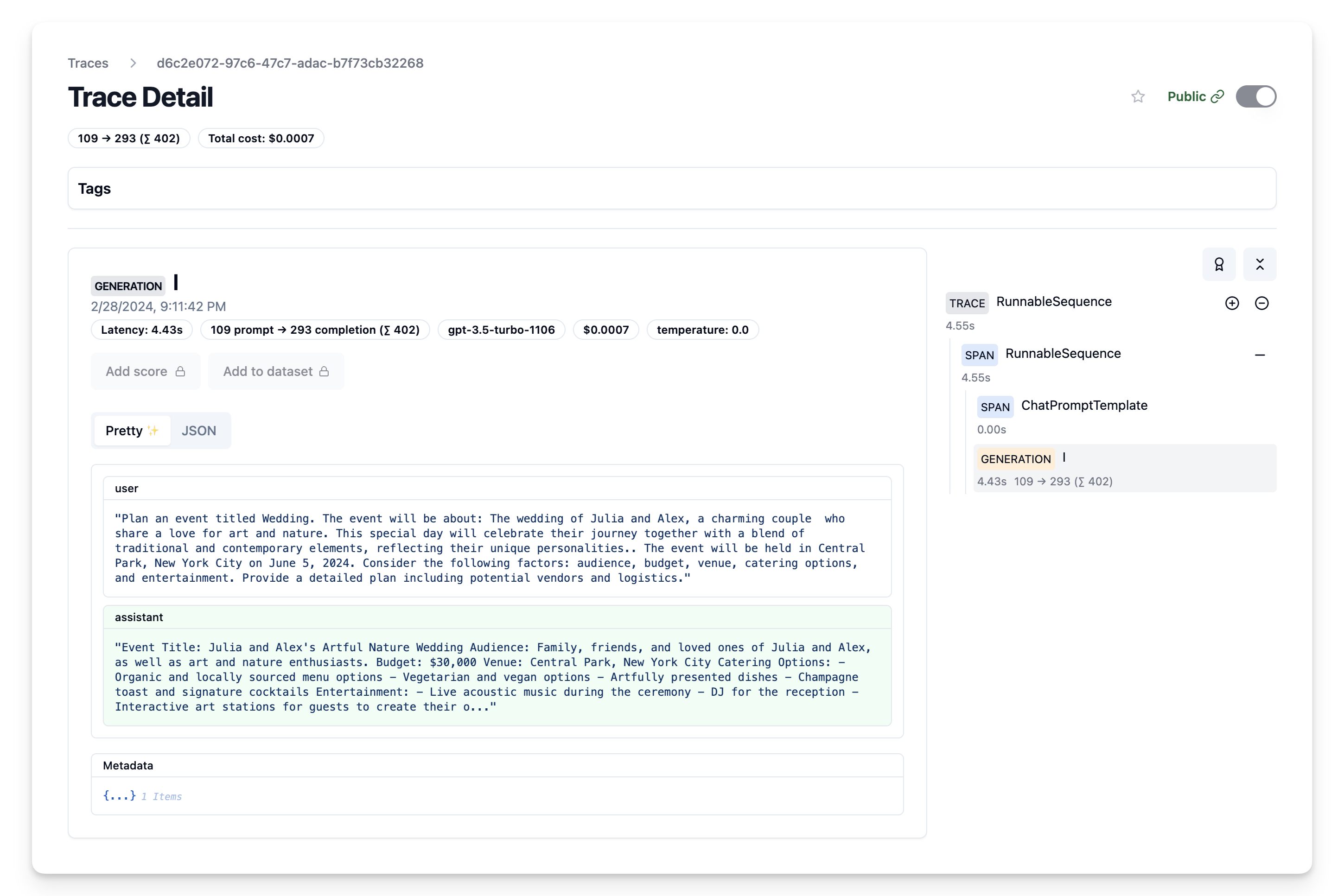
## View Trace in Langfuse
Now we can see that the trace incl. the prompt template have been logged to Langfuse
## Iterate on prompt in Langfuse
We can now continue adapting our prompt template in the Langfuse UI and continuously update the prompt template in our Langchain application via the script above.
---
## Agent Instructions
This page is part of the [Langfuse](https://langfuse.com) documentation, published as plain Markdown for AI agents. Every page is available as Markdown by appending `.md` to its URL, or by sending an `Accept: text/markdown` header. This page: `https://langfuse.com/guides/cookbook/prompt_management_langchain.md`.
### Querying these docs
If the answer is not on this page, query the documentation instead of guessing:
- **Semantic search** across all Langfuse docs, returning an answer with the relevant pages and excerpts. Ask a specific, self-contained question:
```bash
curl -sG "https://langfuse.com/api/search-docs" --data-urlencode "query=How do I trace a LangGraph agent?"
```
- **Index of every page**: , with per-section indexes [llms-docs.txt](https://langfuse.com/llms-docs.txt), [llms-integrations.txt](https://langfuse.com/llms-integrations.txt), and [llms-self-hosting.txt](https://langfuse.com/llms-self-hosting.txt).
### Before writing Langfuse code
- **Install the [Langfuse Agent Skill](https://langfuse.com/docs/api-and-data-platform/features/agent-skill).** It encodes Langfuse's own best practices for instrumentation, prompt management, and evaluation, and materially improves results.
- **Read [What does a good trace look like?](https://langfuse.com/docs/observability/best-practices.md)** before instrumenting an application.
- **Verify endpoints, parameters, and response fields** against the [API reference](https://api.reference.langfuse.com) instead of inferring them from code examples.
- **Use the [Langfuse CLI](https://langfuse.com/docs/api-and-data-platform/features/cli)** (`npx langfuse-cli api `) to read or write traces, prompts, datasets, and scores from the terminal.
Found an error in these docs? Please open an issue at .
[Langfuse Prompt Management](https://langfuse.com/docs/prompts) helps to version control and manage prompts collaboratively in one place. This example demostrates how to use prompts managed in Langchain applications.
_In addition, we use [Langfuse Tracing](https://langfuse.com/docs/tracing) via the native [Langchain integration](https://langfuse.com/integrations/frameworks/langchain) to inspect and debug the Langchain application._
## Setup
```python
%pip install langfuse langchain langchain-openai --upgrade
```
```python
import os
# Get keys for your project from the project settings page: https://cloud.langfuse.com
os.environ.setdefault("LANGFUSE_PUBLIC_KEY", "pk-lf-...");
os.environ.setdefault("LANGFUSE_SECRET_KEY", "sk-lf-...");
os.environ.setdefault("LANGFUSE_BASE_URL", "https://cloud.langfuse.com"); # 🇪🇺 EU region
# Other Langfuse data regions include 🇺🇸 US: https://us.cloud.langfuse.com, 🇯🇵 Japan: https://jp.cloud.langfuse.com and ⚕️ HIPAA: https://hipaa.cloud.langfuse.com
# Your openai key
os.environ.setdefault("OPENAI_API_KEY", "sk-proj-...");
```
```python
from langfuse import get_client
from langfuse.langchain import CallbackHandler
# Initialize Langfuse client (prompt management)
langfuse = get_client()
# Initialize Langfuse CallbackHandler for Langchain (tracing)
langfuse_callback_handler = CallbackHandler()
```
## Add prompt to Langfuse Prompt Management
We add the prompt used in this example via the SDK. Alternatively, you can also edit and version the prompt in the Langfuse UI.
- `Name` that identifies the prompt in Langfuse Prompt Management
- Prompt with prompt template incl. `{{input variables}}`
- Config including `model_name` and `temperature`
- `labels` to include `production` to immediately use prompt as the default
```python
langfuse.create_prompt(
name="event-planner",
prompt=
"Plan an event titled {{Event Name}}. The event will be about: {{Event Description}}. "
"The event will be held in {{Location}} on {{Date}}. "
"Consider the following factors: audience, budget, venue, catering options, and entertainment. "
"Provide a detailed plan including potential vendors and logistics.",
config={
"model":"gpt-4o",
"temperature": 0,
},
labels=["production"]
);
```
Prompt in Langfuse UI

## Example application
### Get current prompt version from Langfuse
```python
# Get current production version of prompt
langfuse_prompt = langfuse.get_prompt("event-planner")
```
```python
print(langfuse_prompt.prompt)
```
```
Plan an event titled {{Event Name}}. The event will be about: {{Event Description}}. The event will be held in {{Location}} on {{Date}}. Consider the following factors: audience, budget, venue, catering options, and entertainment. Provide a detailed plan including potential vendors and logistics.
```
### Transform into Langchain PromptTemplate
Use the utility method `.get_langchain_prompt()` to transform the Langfuse prompt into a string that can be used in Langchain.
Context: Langfuse declares input variables in prompt templates using double brackets (`{{input variable}}`). Langchain uses single brackets for declaring input variables in PromptTemplates (`{input variable}`). The utility method `.get_langchain_prompt()` replaces the double brackets with single brackets.
Also, pass the Langfuse prompt as metadata to the PromptTemplate to automatically link generations that use the prompt.
```python
from langchain_core.prompts import ChatPromptTemplate
langchain_prompt = ChatPromptTemplate.from_template(
langfuse_prompt.get_langchain_prompt(),
metadata={"langfuse_prompt": langfuse_prompt},
)
```
Extract the configuration options from `prompt.config`
```python
model = langfuse_prompt.config["model"]
temperature = str(langfuse_prompt.config["temperature"])
print(f"Prompt model configurations\nModel: {model}\nTemperature: {temperature}")
```
Prompt model configurations
Model: gpt-4o
Temperature: 0
### Create Langchain chain based on prompt
```python
from langchain_openai import ChatOpenAI
model = ChatOpenAI(model=model, temperature=temperature)
chain = langchain_prompt | model
```
## Invoke chain
```python
example_input = {
"Event Name": "Wedding",
"Event Description": "The wedding of Julia and Alex, a charming couple who share a love for art and nature. This special day will celebrate their journey together with a blend of traditional and contemporary elements, reflecting their unique personalities.",
"Location": "Central Park, New York City",
"Date": "June 5, 2024"
}
```
```python
# we pass the callback handler to the chain to trace the run in Langfuse
response = chain.invoke(input=example_input,config={"callbacks":[langfuse_callback_handler]})
print(response.content)
```
## View Trace in Langfuse
Now we can see that the trace incl. the prompt template have been logged to Langfuse

## Iterate on prompt in Langfuse
We can now continue adapting our prompt template in the Langfuse UI and continuously update the prompt template in our Langchain application via the script above.
---
## Agent Instructions
This page is part of the [Langfuse](https://langfuse.com) documentation, published as plain Markdown for AI agents. Every page is available as Markdown by appending `.md` to its URL, or by sending an `Accept: text/markdown` header. This page: `https://langfuse.com/guides/cookbook/prompt_management_langchain.md`.
### Querying these docs
If the answer is not on this page, query the documentation instead of guessing:
- **Semantic search** across all Langfuse docs, returning an answer with the relevant pages and excerpts. Ask a specific, self-contained question:
```bash
curl -sG "https://langfuse.com/api/search-docs" --data-urlencode "query=How do I trace a LangGraph agent?"
```
- **Index of every page**: , with per-section indexes [llms-docs.txt](https://langfuse.com/llms-docs.txt), [llms-integrations.txt](https://langfuse.com/llms-integrations.txt), and [llms-self-hosting.txt](https://langfuse.com/llms-self-hosting.txt).
### Before writing Langfuse code
- **Install the [Langfuse Agent Skill](https://langfuse.com/docs/api-and-data-platform/features/agent-skill).** It encodes Langfuse's own best practices for instrumentation, prompt management, and evaluation, and materially improves results.
- **Read [What does a good trace look like?](https://langfuse.com/docs/observability/best-practices.md)** before instrumenting an application.
- **Verify endpoints, parameters, and response fields** against the [API reference](https://api.reference.langfuse.com) instead of inferring them from code examples.
- **Use the [Langfuse CLI](https://langfuse.com/docs/api-and-data-platform/features/cli)** (`npx langfuse-cli api `) to read or write traces, prompts, datasets, and scores from the terminal.
Found an error in these docs? Please open an issue at .