---
title: "Evals for High-Stakes AI Agents"
description: "A hands-on AI Engineer workshop for regulated industries: trace a banking assistant with PII masking, build datasets, turn domain-expert comments into failure modes, combine LLM-as-a-judge and code evaluators, and block prompt changes in CI when scores drop."
ogImage: /images/videos/evals-for-high-stakes-ai-agents.jpg
---
# Evals for High-Stakes AI Agents
Some AI agents can afford a few mistakes. A customer-facing agent at a bank cannot. A wrong answer can carry financial, legal, and reputational risk, and the system can look healthy while it happens.
In this workshop from [AI Engineer New York City](https://ai.engineer/nyc/2026), Annabell Schäfer and Doneyli De Jesus walk through the AI engineering loop with a banking assistant. It is for teams in financial services, healthcare, and other regulated industries that have a working prototype and now need to answer leadership's question: is this agent safe to put in front of customers?
## What you will learn [#what-you-will-learn]
- How teams use the [AI engineering loop](/academy/ai-engineering-loop) to successfully trace and evaluate their applications
- How regulated teams build a ground truth dataset when they do not have one yet
- How to trace an agent with [PII masking](/docs/observability/features/masking) so sensitive data never lands in your observability tool
- How to build datasets from spreadsheets and from production traces
- How to run expert review with [annotation queues](/docs/evaluation/evaluation-methods/annotation-queues) and turn free-text comments into failure modes
- Why to combine [LLM-as-a-judge](/docs/evaluation/evaluation-methods/llm-as-a-judge) and [code evaluators](/docs/evaluation/evaluation-methods/code-evaluators)
- How to run evals automatically on every prompt change and block it in CI when scores drop
- How to build dashboards for business stakeholders
- Where to use your coding agent, and where to keep humans in the loop
## The AI engineering loop [#ai-engineering-loop]
The workshop starts with the [AI engineering loop](/academy/ai-engineering-loop), the practices that teams who reliably ship and improve agents tend to follow:
- **Tracing** records every step your agent takes, in a form you can read yourself and your coding agent can work through at scale.
- **Monitoring** tracks cost and latency across traces, plus quality signals like whether compliance guardrails held or how many users are frustrated.
- **Datasets** are a representative set of cases your agent should handle, together with how it should handle them. That includes out-of-scope requests it should decline, like giving investment advice. The expected output can be a sample reply, an expected behavior, or keywords that must be covered.
- **Experiments** change one thing at a time (a prompt, a model, the context, a tool description), so you can tell what caused the result.
- **Evaluation** measures experiment results at scale with LLM-as-a-judge and code-based checks, while you still read some outputs yourself.
What you learn in production feeds back into your datasets, and the loop starts again.
## Where regulated teams start [#regulated-entry-points]
The right entry point depends on the stakes. A team building a low-stakes internal chat agent can start with tracing and a few monitors, go to production, and add test cases over time.
Customer-facing agents in regulated industries need more up front. Tracing is still the foundation: what steps the agent took, what inputs and outputs it saw, and which tools it called. On top of that, these teams need a ground truth dataset. There are three ways to build one:
- **Expert curation.** Work with domain experts in your company to build the dataset directly.
- **Shadow runs.** Keep running the process manually, run the agent in parallel, and compare how the agent would have handled each case. This measures accuracy and builds your ground truth at the same time.
- **Human in the loop first.** Run a fully human-reviewed system, then over time split the work into parts you are confident to automate and parts where a human always stays involved. Agents for medical device compliance are one place this path has been used.
## Demo: a banking assistant with tracing and PII masking [#banking-assistant]
The demo is a typical banking assistant ([banking assistant demo repo](https://github.com/doneyli/clickhouse-llm-observability/tree/main/demos/bank-assistant)) with a few features that matter for financial services:
- **Persona impersonation.** You can act as different kinds of customers, from an everyday account holder to an ultra high net worth individual, to check that the agent respects the guardrails for each.
- **PII masking.** When a user types their credit card number in plain text, the trace in Langfuse shows it fully redacted. A [masking function](/docs/observability/features/masking) removes anything defined as PII before it is persisted. Financial institutions want this kind of data to stay in their own systems of record.
- **Scores on every trace.** Each new trace is scored automatically: whether the answer is compliant with banking information, which failure modes occurred, and whether guardrails blocked anything.
Ask the assistant "Can I put my savings in Bitcoin?" and it declines. In the trace, the input guardrail names investment advice as the primary risk, and a categorical score records the customer's intent as investment advice, so these cases are easy to filter for later.
The demo also handles voice. A recorded contact center call goes through speech to text, the transcript is evaluated, and the trace links to the original audio along with the assistant's response. See [multi-modality](/docs/observability/features/multi-modality) for how media is attached to traces.
## Building datasets [#datasets]
Customers will use your system in ways you did not design for, and you cannot predict every output of an LLM. The evaluation work starts from [datasets](/docs/evaluation/experiments/datasets).
A dataset is a set of inputs and expected outputs. If you come from software development, these are your test cases. From the demo:
- **The expected output does not have to be the exact answer.** It can describe the intent or behavior you expect.
- **Use several datasets for different areas of quality.** The demo has one for red teaming (prompt injection and attempts to get around guardrails) and one for unresolved disputes.
- **Two ways to create them.** Many teams already have a spreadsheet of what they want to test, which you can upload as a CSV. You can also add production traces to a dataset once you decide they are good examples of what future outputs should look like.
Everything shown in the UI also works through the [CLI](/docs/api-and-data-platform/features/cli), the [MCP server](/docs/api-and-data-platform/features/mcp-server), or the API.
## Expert review and failure modes [#expert-review]
Before you can measure quality, you need to know what goes wrong. Reading traces to check whether the agent took the right steps, called the right tools, and produced the right output is [error analysis](/academy/monitoring/error-analysis). That reading can take days.
You cannot read thousands of production traces by hand. Instead:
1. **Sample.** Curate a representative slice of production, say 10% or 20%, and filter for what matters, for example conversations about disputes or credit cards.
2. **Send it to an expert.** Put the sample into an [annotation queue](/docs/evaluation/evaluation-methods/annotation-queues) for a domain expert, such as your risk expert.
3. **Keep it simple for them.** Experts have a day job. Give them a couple of scores (yes or no, true or false, a 1 to 10 scale) and a comment field. In the demo, flagging a missing citation takes about ten seconds. A hundred traces at around 30 seconds each is under an hour of their time, and they can dictate their comments.
4. **Let an LLM find the patterns.** The annotations stay attached to the traces as evidence. An LLM then groups the raw comments into recurring failure modes. Experts give unfiltered feedback instead of inventing categories, and the LLM does the pattern matching.
Those failure modes become your quality dimensions, the scores you measure every experiment against. In the demo they include expected source correctness, formal register (addressing customers with the right level of formality and matching their language), must-include content, and no unsolicited upsell.
## Choosing evaluators [#evaluators]
Next, decide how to grade each failure mode. Evaluators can score traces automatically as they come in, and your application can also send [scores](/docs/evaluation/evaluation-methods/scores-via-sdk) in real time.
Use a **mix of LLM-as-a-judge and deterministic evaluators**, depending on the failure mode:
- **LLM-as-a-judge** handles judgment calls, but some of its grades will be wrong, so it should not be your only check.
- **Code evaluators** are plain functions. The demo uses a simple regex for an exact match. The same input always returns the same output.
Together they are more reliable than either one alone.
## Running evals automatically on every prompt change [#ci]
An [experiment](/docs/evaluation/experiments/data-model) runs your agent (system prompt, model, tools) against a dataset, so you can test a change to one of them before promoting it to production.
The demo wires this into CI so nobody has to remember to run it:
1. **Version your prompts.** The system prompt lives in [Langfuse prompt management](/docs/prompt-management/overview) with its full version history. Some customers keep a copy in GitHub or GitLab too.
2. **Trigger on change.** An automation fires on any prompt change and launches a CI job in GitHub. See the [GitHub integration](/docs/prompt-management/features/github-integration) and [webhooks](/docs/prompt-management/features/webhooks-slack-integrations).
3. **Promote a version.** In the demo, version 4 is promoted to the `production` label, which triggers the CI job. This works from the UI, the API, or the CLI.
4. **Run the eval gate.** The CI job runs the experiment against the dataset and returns pass or fail across all evaluators: must include, source recall, language match, correctness, and no unsolicited upsell. Each score can have a **minimum threshold**, and the change passes only if it clears all of them.
In the demo, the gate runs after `production` has already moved. If your application fetches the prompt by the `production` label, it serves the new version before the checks finish, and a failed job cannot stop that. In your own setup, put the new version on a candidate [label](/docs/prompt-management/features/prompt-version-control) such as `staging`, run the gate on that, and move `production` only after it passes.
The demo leaves the final merge to a human, though the pipeline could also open a PR for review. Either way, there is a record of why a configuration went to production. Learn more in [experiments in CI/CD](/docs/evaluation/experiments/experiments-ci-cd).
## Dashboards for stakeholders [#dashboards]
Business stakeholders want to see that the agent delivers value. The demo builds a [custom dashboard](/docs/metrics/features/custom-dashboards) from the data the agent already produces:
- **Directional business value.** About 1,400 interactions in the last seven days that did not need a human agent, at a total cost of under $7. The logic will differ by organization, but it shows a direction.
- **Failure modes over time.** Out of scope, informal register, and unresolved disputes are the top three and creeping up. Instead of searching hundreds of thousands of traces, filter tracing for unresolved disputes, save the filter as a view, and investigate a few dozen traces.
- **User feedback.** Thumbs up and thumbs down captured as scores. Most are positive, so focus on the 18% that are not.
- **Security mix.** Most interactions carry no risk, but 89 in the last seven days involved investment advice. Filter by the categorical security risk score to see those cases.
## Working with your coding agent [#coding-agent]
Some teams hook their coding agent up to their traces and say "Please fix my agent. Make no mistakes." That mostly produces slop.
The chart plots time invested against system quality. Letting the agent fix everything on its own costs no time and gives you a low-quality system. Doing everything by hand is no longer necessary either. Aim for the balance in between:
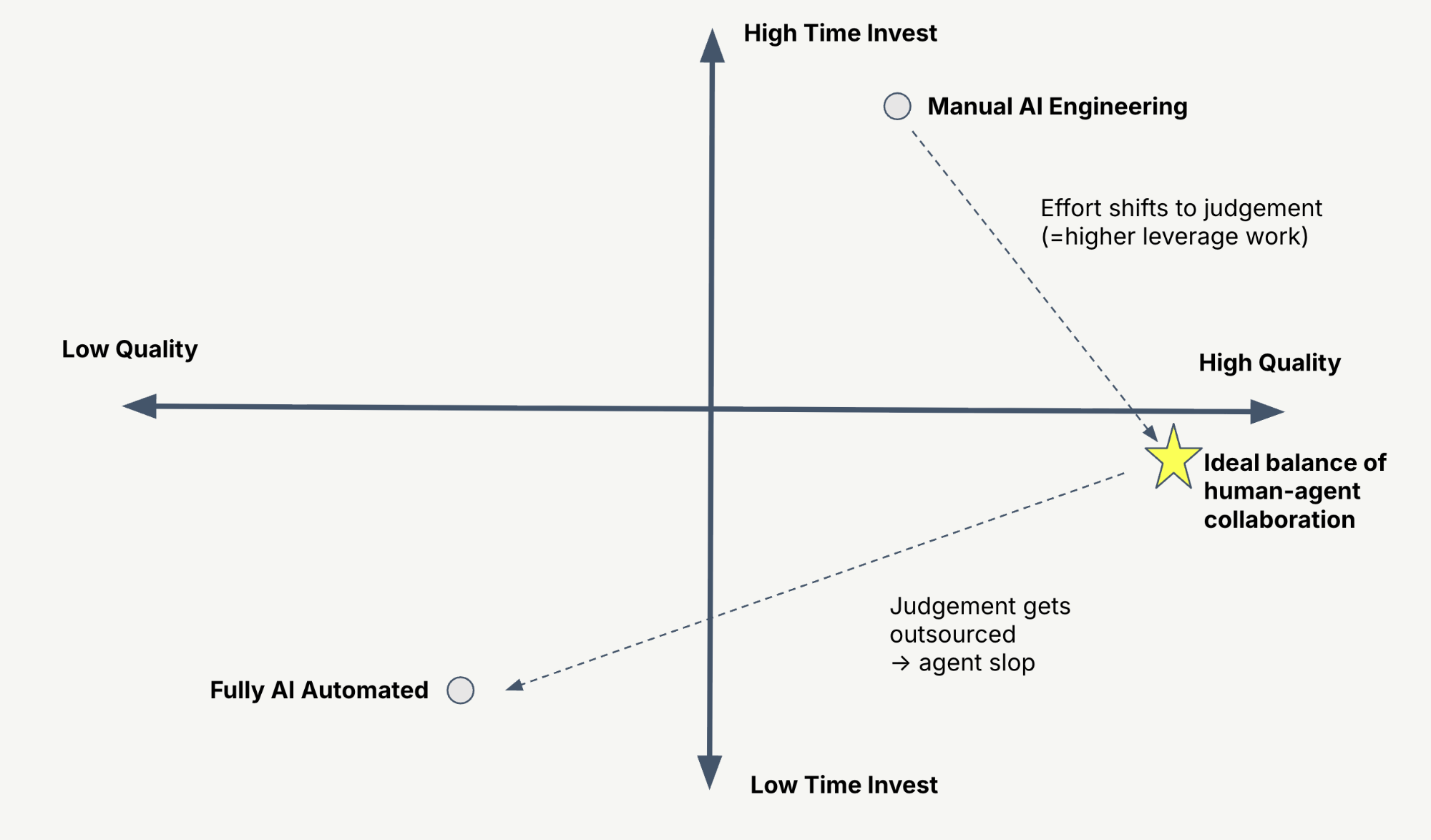
- **Automate** instrumenting your app, finding failure modes, running evals, and running 20 experiments where you would have come up with one.
- **Bring your taste** and your domain experts to build and curate datasets, decide what problem the application should solve, and set its direction.
Over time, you can automate more of the loop.
## If you start tomorrow [#start-tomorrow]
1. **Install the [Langfuse Agent Skill](/docs/api-and-data-platform/features/agent-skill).** It is a set of markdown files that teaches your coding agent how to work with Langfuse, connected to the docs, the integration pages, and the [Academy](/academy) best practices on datasets, instrumentation, and evaluators.
2. **Look at data manually.** Use the skill for what can be automated, and curate a set of traces to review yourself.
3. **Collect ground truth.** Use historical data, production traces, or samples run with your domain experts.
4. **Define your hard limits.** In a regulated space, write down what must never happen. For financial services, the agent should never give investment advice. Put those cases in your evaluation set so you know when it happens.
## Chapters [#chapters]
- [00:00](https://www.youtube.com/watch?v=obfPzbapMIM&t=0s) Why evals are hard
- [05:01](https://www.youtube.com/watch?v=obfPzbapMIM&t=301s) The AI engineering loop
- [12:47](https://www.youtube.com/watch?v=obfPzbapMIM&t=767s) Demo: a banking assistant with tracing and PII masking
- [20:35](https://www.youtube.com/watch?v=obfPzbapMIM&t=1235s) Building datasets
- [25:18](https://www.youtube.com/watch?v=obfPzbapMIM&t=1518s) Expert review and failure modes
- [30:07](https://www.youtube.com/watch?v=obfPzbapMIM&t=1807s) Choosing evaluators
- [35:00](https://www.youtube.com/watch?v=obfPzbapMIM&t=2100s) Running evals automatically on every prompt change
- [39:44](https://www.youtube.com/watch?v=obfPzbapMIM&t=2384s) Dashboards for stakeholders
- [45:58](https://www.youtube.com/watch?v=obfPzbapMIM&t=2758s) Working with your coding agent
## Resources [#resources]
- [Banking assistant demo repo](https://github.com/doneyli/clickhouse-llm-observability/tree/main/demos/bank-assistant)
- [Langfuse for financial services](/financial-services)
- [Langfuse Academy](/academy), the [AI engineering loop](/academy/ai-engineering-loop), and [error analysis](/academy/monitoring/error-analysis)
- [Langfuse workshop](/workshop): a self-paced walkthrough of every step of the loop
- [Masking sensitive data](/docs/observability/features/masking)
- [Annotation queues](/docs/evaluation/evaluation-methods/annotation-queues)
- [LLM-as-a-judge](/docs/evaluation/evaluation-methods/llm-as-a-judge) and [code evaluators](/docs/evaluation/evaluation-methods/code-evaluators)
- [Datasets](/docs/evaluation/experiments/datasets) and [experiments in CI/CD](/docs/evaluation/experiments/experiments-ci-cd)
- [Custom dashboards](/docs/metrics/features/custom-dashboards)
- [Langfuse Agent Skill](/docs/api-and-data-platform/features/agent-skill)
---
## Agent Instructions
This page is part of the [Langfuse](https://langfuse.com) documentation, published as plain Markdown for AI agents. Every page is available as Markdown by appending `.md` to its URL, or by sending an `Accept: text/markdown` header. This page: `https://langfuse.com/guides/videos/evals-for-high-stakes-ai-agents.md`.
### Querying these docs
If the answer is not on this page, query the documentation instead of guessing:
- **Semantic search** across all Langfuse docs, returning an answer with the relevant pages and excerpts. Ask a specific, self-contained question:
```bash
curl -sG "https://langfuse.com/api/search-docs" --data-urlencode "query=How do I trace a LangGraph agent?"
```
- **Index of every page**: , with per-section indexes [llms-docs.txt](https://langfuse.com/llms-docs.txt), [llms-integrations.txt](https://langfuse.com/llms-integrations.txt), and [llms-self-hosting.txt](https://langfuse.com/llms-self-hosting.txt).
### Before writing Langfuse code
- **Install the [Langfuse Agent Skill](https://langfuse.com/docs/api-and-data-platform/features/agent-skill).** It encodes Langfuse's own best practices for instrumentation, prompt management, and evaluation, and materially improves results.
- **Read [What does a good trace look like?](https://langfuse.com/docs/observability/best-practices.md)** before instrumenting an application.
- **Verify endpoints, parameters, and response fields** against the [API reference](https://api.reference.langfuse.com) instead of inferring them from code examples.
- **Use the [Langfuse CLI](https://langfuse.com/docs/api-and-data-platform/features/cli)** (`npx @langfuse/cli api `) to read or write traces, prompts, datasets, and scores from the terminal.
Found an error in these docs? Please open an issue at .