---
title: "Trace GitHub Copilot with Langfuse"
sidebarTitle: GitHub Copilot
logo: /images/integrations/github_copilot_icon.svg
logoAppearance: dark
description: "Trace GitHub Copilot agent sessions in VS Code and the Copilot CLI with Langfuse using Copilot's native OpenTelemetry export — LLM calls, tool executions, and token usage."
category: Integrations
---
# Trace GitHub Copilot with Langfuse
> **What is GitHub Copilot?** [GitHub Copilot](https://github.com/features/copilot) is GitHub's AI coding assistant. Its agent mode in [VS Code](https://code.visualstudio.com/docs/copilot/overview) and the [Copilot CLI](https://github.com/github/copilot-cli) can understand your codebase, edit files, run commands, and complete multi-step coding tasks autonomously.
> **What is Langfuse?** [Langfuse](https://langfuse.com/) is an open-source AI engineering platform. It helps teams trace agentic applications, debug issues, evaluate quality, and monitor costs in production.
## What can this integration trace?
GitHub Copilot has built-in [OpenTelemetry export](https://code.visualstudio.com/docs/agents/guides/monitoring-agents), and Langfuse is an [OpenTelemetry backend](/integrations/native/opentelemetry). Point Copilot's exporter at Langfuse's OTLP endpoint and traces flow in with no SDK, no proxy, and no code changes. You can monitor:
- **Agent runs**: one `invoke_agent` span per chat or agent-mode interaction, wrapping the full orchestration
- **LLM calls**: one `chat` span per model API call, with model name, provider, and finish reasons
- **Tool calls**: one `execute_tool` span per tool invocation (terminal commands, file edits, MCP tools), plus `execute_hook` spans for hooks
- **Token usage**: input, output, cache-read, cache-creation, and reasoning tokens per model call, so you can monitor cost
- **Prompts and responses**: full message content and tool arguments when content capture is enabled (see below)
- **Context**: conversation and session IDs, plus git context (repository URL, branch, commit SHA) for filtering traces by repo or team
All spans follow the [OpenTelemetry GenAI semantic conventions](https://opentelemetry.io/docs/specs/semconv/gen-ai/), which Langfuse maps natively to traces, generations, and tool observations.
By default, Copilot exports span structure, timing, and token counts but **no prompt content, model responses, or tool arguments**. To see inputs and outputs in Langfuse, enable content capture (`github.copilot.chat.otel.captureContent` in VS Code, `OTEL_INSTRUMENTATION_GENAI_CAPTURE_MESSAGE_CONTENT=true` for the Copilot CLI). Only enable it if you are comfortable storing this content in Langfuse.
Copilot exports **OTLP over HTTP**: the VS Code extension uses `http/protobuf` by default and the Copilot CLI uses `http/json`. Langfuse's OTLP endpoint accepts both, so no collector or proxy is needed. gRPC is not supported by Langfuse, but Copilot doesn't require it.
### Set up Langfuse
Sign up for [Langfuse Cloud](https://cloud.langfuse.com) or [self-host Langfuse](/self-hosting). Create a project and copy your public and secret API keys from the project settings.
### Create your Basic Auth header
Langfuse authenticates OTLP requests with [Basic Auth](https://en.wikipedia.org/wiki/Basic_access_authentication). Generate the header value by base64-encoding your keys as `public_key:secret_key`:
```bash
# macOS / BSD
echo -n "pk-lf-1234567890:sk-lf-1234567890" | base64
# Linux / GNU (disable line wrapping)
echo -n "pk-lf-1234567890:sk-lf-1234567890" | base64 -w 0
```
The result is referred to as `` in the next steps.
### Configure VS Code
Add the OpenTelemetry settings to your VS Code `settings.json`:
```jsonc
{
"github.copilot.chat.otel.enabled": true,
"github.copilot.chat.otel.otlpEndpoint": "https://cloud.langfuse.com/api/public/otel", // 🇪🇺 EU data region
// Other Langfuse data regions: 🇺🇸 US https://us.cloud.langfuse.com/api/public/otel,
// 🇯🇵 Japan https://jp.cloud.langfuse.com/api/public/otel, ⚕️ HIPAA https://hipaa.cloud.langfuse.com/api/public/otel
// 🏠 Local deployment: http://localhost:3000/api/public/otel
"github.copilot.chat.otel.exporterType": "otlp-http",
"github.copilot.chat.otel.captureContent": true, // opt-in: include prompts, responses, and tool arguments
}
```
Authentication headers can only be configured through the `OTEL_EXPORTER_OTLP_HEADERS` environment variable — there is no VS Code setting for them. Add it to your shell profile (`~/.zshrc`, `~/.bashrc`, or `~/.bash_profile`):
```bash
export OTEL_EXPORTER_OTLP_HEADERS="Authorization=Basic ,x-langfuse-ingestion-version=4"
```
The environment variable must be visible to the VS Code process. After setting it, fully restart VS Code from a terminal that has the variable set (`code .`), or set it system-wide and log out and back in.
### Configure the Copilot CLI (optional)
The standalone [Copilot CLI](https://github.com/github/copilot-cli) is configured entirely through environment variables. Add these to your shell profile:
```bash
export COPILOT_OTEL_ENABLED=true
export OTEL_EXPORTER_OTLP_ENDPOINT="https://cloud.langfuse.com/api/public/otel" # 🇪🇺 EU data region
export OTEL_EXPORTER_OTLP_HEADERS="Authorization=Basic ,x-langfuse-ingestion-version=4"
export OTEL_INSTRUMENTATION_GENAI_CAPTURE_MESSAGE_CONTENT=true # opt-in: include prompts, responses, and tool arguments
```
When you launch terminal CLI sessions from VS Code with OpenTelemetry enabled, the extension forwards `COPILOT_OTEL_ENABLED` and the endpoint automatically — but **not** the content-capture flag, so set `OTEL_INSTRUMENTATION_GENAI_CAPTURE_MESSAGE_CONTENT` yourself if you want prompts and responses from CLI sessions.
### Use Copilot and view traces in Langfuse
Use Copilot chat or agent mode as usual. Open your Langfuse project to see the captured traces:
- **Agent traces** (`invoke_agent`): one trace per turn, from your prompt to the final answer
- **Generations** (`chat`): one per model call, with input messages, response, model name, and token usage
- **Tool spans** (`bash`, `view`, `grep`, …): nested under the agent span, with arguments and results when content capture is enabled
- **Sessions**: turns that share a Copilot conversation are grouped via the session ID — open the Sessions view to replay a full multi-turn run
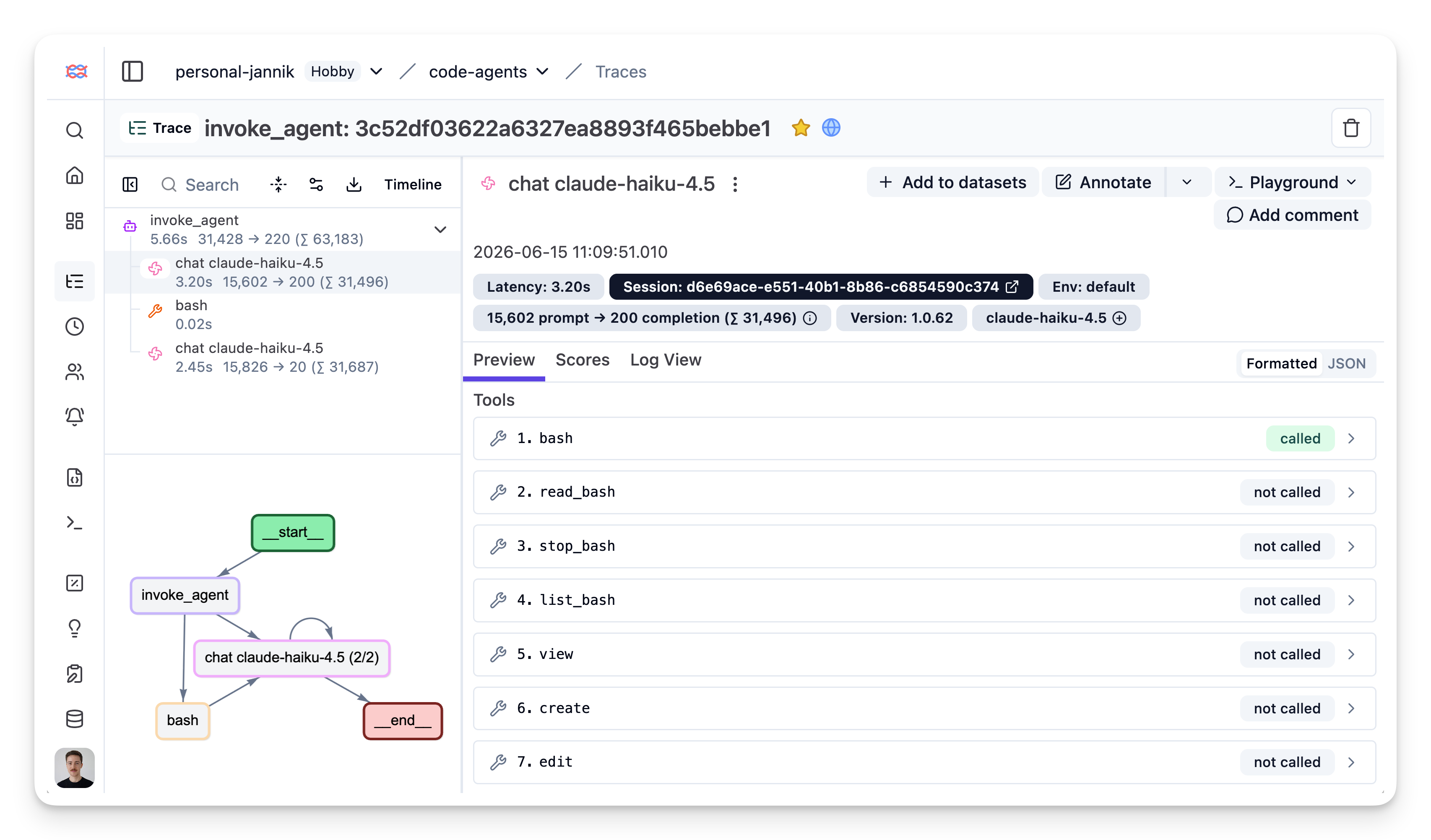
[Example trace in Langfuse](https://cloud.langfuse.com/project/cmpy5u3fb06o5ad0j04xohhmz/traces/3c52df03622a6327ea8893f465bebbe1?observation=3e4ecedc1e42b364×tamp=2026-06-15T09%3A09%3A54.208Z)
## Notes and limitations
- **Langfuse ingests traces only.** Copilot also emits OTel metrics and events; Langfuse's OTLP endpoint does not store these signals. Trace data — including token usage on spans — is unaffected.
- **Large attributes are truncated** by the `github.copilot.chat.otel.maxAttributeSizeChars` setting in VS Code. Set it to `0` to disable truncation.
- **Data privacy.** With content capture enabled, prompts, model responses, and tool inputs/outputs are stored in Langfuse. Leave `captureContent` off for sessions that touch data you don't want persisted.
- **No overhead when disabled.** Copilot doesn't load the OTel SDK unless export is enabled.
## Troubleshooting
### No traces appearing in Langfuse
1. **OpenTelemetry isn't enabled.** Confirm `github.copilot.chat.otel.enabled` is `true` (VS Code) or `COPILOT_OTEL_ENABLED=true` (CLI).
2. **The headers variable isn't visible to the process.** VS Code must be launched from an environment where `OTEL_EXPORTER_OTLP_HEADERS` is set — restarting from a configured terminal with `code .` is the most reliable way to verify.
3. **Debug locally first.** Set `github.copilot.chat.otel.exporterType` to `"console"` (or `COPILOT_OTEL_EXPORTER_TYPE=file` for the CLI) to confirm spans are being generated before pointing the exporter at Langfuse.
### Authentication errors
Verify your API keys are correct, the base64 string was generated without line wrapping, and the endpoint matches the region your keys belong to:
- **EU region**: `https://cloud.langfuse.com/api/public/otel`
- **US region**: `https://us.cloud.langfuse.com/api/public/otel`
- **Japan region**: `https://jp.cloud.langfuse.com/api/public/otel`
- **HIPAA region**: `https://hipaa.cloud.langfuse.com/api/public/otel`
### Traces have no input/output content
Content capture is off by default — the spans still carry model name and token usage, but prompts, responses, and tool arguments are suppressed. Enable `github.copilot.chat.otel.captureContent` (VS Code) or `OTEL_INSTRUMENTATION_GENAI_CAPTURE_MESSAGE_CONTENT=true` (Copilot CLI) and start a new Copilot session.
## Learn more
- [Langfuse OpenTelemetry endpoint](/integrations/native/opentelemetry): Endpoint, authentication, and supported protocols
- [VS Code: Monitor agent usage with OpenTelemetry](https://code.visualstudio.com/docs/agents/guides/monitoring-agents): Full list of settings, signals, and attributes
- [Copilot SDK OpenTelemetry instrumentation](https://docs.github.com/en/copilot/how-tos/copilot-sdk/observability/opentelemetry): Tracing agents built on the Copilot SDK
- [Use Langfuse in VS Code via MCP](/integrations/developer-tools/vscode): The reverse direction — let Copilot query your Langfuse prompts, traces, and datasets
---
## Agent Instructions
This page is part of the [Langfuse](https://langfuse.com) documentation, published as plain Markdown for AI agents. Every page is available as Markdown by appending `.md` to its URL, or by sending an `Accept: text/markdown` header. This page: `https://langfuse.com/integrations/developer-tools/github-copilot.md`.
### Querying these docs
If the answer is not on this page, query the documentation instead of guessing:
- **Semantic search** across all Langfuse docs, returning an answer with the relevant pages and excerpts. Ask a specific, self-contained question:
```bash
curl -sG "https://langfuse.com/api/search-docs" --data-urlencode "query=How do I trace a LangGraph agent?"
```
- **Index of every page**: , with per-section indexes [llms-docs.txt](https://langfuse.com/llms-docs.txt), [llms-integrations.txt](https://langfuse.com/llms-integrations.txt), and [llms-self-hosting.txt](https://langfuse.com/llms-self-hosting.txt).
### Before writing Langfuse code
- **Install the [Langfuse Agent Skill](https://langfuse.com/docs/api-and-data-platform/features/agent-skill).** It encodes Langfuse's own best practices for instrumentation, prompt management, and evaluation, and materially improves results.
- **Read [What does a good trace look like?](https://langfuse.com/docs/observability/best-practices.md)** before instrumenting an application.
- **Verify endpoints, parameters, and response fields** against the [API reference](https://api.reference.langfuse.com) instead of inferring them from code examples.
- **Use the [Langfuse CLI](https://langfuse.com/docs/api-and-data-platform/features/cli)** (`npx langfuse-cli api `) to read or write traces, prompts, datasets, and scores from the terminal.
Found an error in these docs? Please open an issue at .