---
title: Integration - Amazon Bedrock AgentCore
sidebarTitle: Amazon Bedrock AgentCore
seoTitle: Open Source Observability for Amazon Bedrock AgentCore
description: Learn how to integrate Langfuse with Amazon Bedrock AgentCore for comprehensive tracing, evaluation, and continuous improvement of your AI agents.
logo: /images/integrations/bedrock_icon.png
---
# Integration: Amazon Bedrock AgentCore
> **What is Amazon Bedrock AgentCore?** [Amazon Bedrock AgentCore](https://aws.amazon.com/bedrock/agents/) is a managed service that enables you to build, deploy, and manage AI agents in production. It provides containerized agent runtimes that can execute complex workflows, use tools, and interact with external APIs while leveraging foundation models from Amazon Bedrock.
> **What is Langfuse?** [Langfuse](https://langfuse.com/) is an open-source platform for LLM engineering. It provides tracing and monitoring capabilities for AI agents, helping developers debug, analyze, and optimize their products. Langfuse integrates with various tools and frameworks via native integrations, OpenTelemetry, and SDKs.
## Get Started
This guide shows you how to integrate Langfuse with Amazon Bedrock AgentCore to trace your agent executions using OpenTelemetry.
### Step 1: Install Dependencies
Install the required Python packages for building and deploying AgentCore agents with Langfuse tracing:
```python
pip install bedrock-agentcore-starter-toolkit strands-agents[otel] langfuse boto3 mcp
```
### Step 2: Set Up Environment Variables
Configure your AWS and Langfuse credentials:
**2.1 Configure Langfuse Credentials and OTEL Exporter**
```python
import os
import base64
# Get keys for your project from the project settings page: https://cloud.langfuse.com
os.environ.setdefault("LANGFUSE_PUBLIC_KEY", "pk-lf-...");
os.environ.setdefault("LANGFUSE_SECRET_KEY", "sk-lf-...");
os.environ.setdefault("LANGFUSE_BASE_URL", "https://cloud.langfuse.com"); # 🇪🇺 EU region (default)
# Other Langfuse data regions include 🇺🇸 US: https://us.cloud.langfuse.com, 🇯🇵 Japan: https://jp.cloud.langfuse.com and ⚕️ HIPAA: https://hipaa.cloud.langfuse.com
# Build Basic Auth header for OTEL
langfuse_auth = base64.b64encode(
f"{os.environ['LANGFUSE_PUBLIC_KEY']}:{os.environ['LANGFUSE_SECRET_KEY']}".encode()
).decode()
# Configure OpenTelemetry endpoint & headers
os.environ["OTEL_EXPORTER_OTLP_ENDPOINT"] = os.environ["LANGFUSE_BASE_URL"] + "/api/public/otel"
os.environ["OTEL_EXPORTER_OTLP_HEADERS"] = f"Authorization=Basic {langfuse_auth},x-langfuse-ingestion-version=4"
```
**2.2 Configure AWS Credentials**
Set your AWS credentials for accessing Bedrock services:
```python
os.environ["AWS_ACCESS_KEY_ID"] = "..."
os.environ["AWS_SECRET_ACCESS_KEY"] = "..."
os.environ["AWS_DEFAULT_REGION"] = "us-west-2"
```
### Step 3: Create Agent with Langfuse Tracing
Create an AgentCore agent that integrates with Langfuse via OpenTelemetry. This example uses the Strands Agents SDK with MCP tools. Any other agent framework can be used with Langfuse, see [integration pages](/integrations) for guides on how to instrument other frameworks.
```python
from bedrock_agentcore.runtime import BedrockAgentCoreApp
from strands import Agent
from strands.models import BedrockModel
from strands.telemetry import StrandsTelemetry
from mcp.client.streamable_http import streamablehttp_client
from strands.tools.mcp.mcp_client import MCPClient
from langfuse import get_client
# Initialize MCP client for tool access
streamable_http_mcp_client = MCPClient(
lambda: streamablehttp_client("https://langfuse.com/api/mcp")
)
# Configure Bedrock model
bedrock_model = BedrockModel(
model_id="us.anthropic.claude-3-7-sonnet-20250219-v1:0",
region_name="us-west-2",
temperature=0.0,
max_tokens=4096
)
# Define system prompt
system_prompt = """You are an experienced agent supporting developers with
questions about Langfuse and LLM observability."""
app = BedrockAgentCoreApp()
@app.entrypoint
def agent_entrypoint(payload):
"""Agent entrypoint with Langfuse tracing"""
user_input = payload.get("prompt")
trace_id = payload.get("trace_id")
parent_obs_id = payload.get("parent_obs_id")
# Initialize Strands telemetry and setup OTLP exporter
strands_telemetry = StrandsTelemetry()
strands_telemetry.setup_otlp_exporter()
# Create agent with MCP tools
with streamable_http_mcp_client:
mcp_tools = streamable_http_mcp_client.list_tools_sync()
agent = Agent(
model=bedrock_model,
system_prompt=system_prompt,
tools=mcp_tools
)
# Execute within Langfuse trace context
with get_client().start_as_current_observation(
name='agentcore-agent',
trace_context={
"trace_id": trace_id,
"parent_observation_id": parent_obs_id
}
):
response = agent(user_input)
return response.message['content'][0]['text']
if __name__ == "__main__":
app.run()
```
### Step 4: Deploy and Invoke Agent
Deploy your agent to Amazon Bedrock AgentCore and invoke it with trace context:
```python
from bedrock_agentcore_starter_toolkit import Runtime
from langfuse import get_client
import boto3
import json
# Deploy agent
runtime = Runtime()
runtime.configure(
entrypoint="./agent.py",
auto_create_execution_role=True,
auto_create_ecr=True,
agent_name="langfuse-traced-agent",
memory_mode='NO_MEMORY'
)
launch_result = runtime.launch(
env_vars={
"DISABLE_ADOT_OBSERVABILITY": "true", # Required: disable ADOT to use Langfuse
"BEDROCK_MODEL_ID": "us.anthropic.claude-3-7-sonnet-20250219-v1:0",
"OTEL_EXPORTER_OTLP_ENDPOINT": os.environ["OTEL_EXPORTER_OTLP_ENDPOINT"],
"OTEL_EXPORTER_OTLP_HEADERS": os.environ["OTEL_EXPORTER_OTLP_HEADERS"],
"LANGFUSE_PROJECT_NAME": "your-project-name",
"SYSTEM_PROMPT": system_prompt
}
)
# Invoke agent with trace context
client = boto3.client('bedrock-agentcore', region_name='us-west-2')
# Get current trace context from Langfuse
trace_id = get_client().get_current_trace_id()
obs_id = get_client().get_current_observation_id()
payload = json.dumps({
"prompt": "What is Langfuse and how does it help monitor LLM applications?",
"trace_id": trace_id,
"parent_obs_id": obs_id
}).encode()
response = client.invoke_agent_runtime(
agentRuntimeArn=launch_result.agent_arn,
runtimeSessionId="session-123",
payload=payload
)
```
### Step 5: View Traces in Langfuse
After running your agent, log in to [Langfuse](https://cloud.langfuse.com) to explore the generated traces. You will see:
- Complete agent execution flows
- LLM calls with token counts and costs
- Tool usage and MCP interactions
- Latency metrics at each step
- Input/output data for debugging
The traces provide comprehensive visibility into your agent's behavior in production.
## Using AgentCore with Other Frameworks
If you're using LangChain, LlamaIndex, or another framework on AgentCore: Langfuse SDK callbacks alone won't work on AgentCore. The AgentCore runtime manages telemetry at a level that can bypass SDK HTTP calls.
Pass these environment variables when launching your AgentCore runtime:
```bash
# Disable AWS's built-in tracing
DISABLE_ADOT_OBSERVABILITY=true
# Configure OTEL to export to Langfuse
OTEL_EXPORTER_OTLP_ENDPOINT="https://cloud.langfuse.com/api/public/otel"
OTEL_EXPORTER_OTLP_HEADERS="Authorization=Basic $(echo -n 'pk-xxx:sk-xxx' | base64),x-langfuse-ingestion-version=4"
```
For other regions, replace the endpoint host accordingly: `https://us.cloud.langfuse.com/api/public/otel` (US), `https://jp.cloud.langfuse.com/api/public/otel` (Japan), or `https://hipaa.cloud.langfuse.com/api/public/otel` (HIPAA).
Here's an example of how to launch an AgentCore runtime with the required environment variables:
```python
import base64
# Prepare auth header
langfuse_auth = base64.b64encode(
f"{LANGFUSE_PUBLIC_KEY}:{LANGFUSE_SECRET_KEY}".encode()
).decode()
# Launch with required env vars
launch_result = agentcore_runtime.launch(
env_vars={
"DISABLE_ADOT_OBSERVABILITY": "true",
"OTEL_EXPORTER_OTLP_ENDPOINT": f"{LANGFUSE_BASE_URL}/api/public/otel",
"OTEL_EXPORTER_OTLP_HEADERS": f"Authorization=Basic {langfuse_auth},x-langfuse-ingestion-version=4",
}
)
```
For more troubleshooting, see [Using Langfuse with an Existing OpenTelemetry Setup](/faq/all/existing-otel-setup#aws-bedrock-agentcore-adot).
## Example repository: Continuous Evaluation with AgentCore and Langfuse
Building production-grade AI agents requires more than just tracing—it demands a systematic approach to continuous improvement through experimentation, testing, and monitoring. [@aristsakpinis93](https://github.com/aristsakpinis93) has created a comprehensive [example repository](https://github.com/aristsakpinis93/agentcore-langfuse-continous-eval-loop) that demonstrates this continuous evaluation loop with Amazon Bedrock AgentCore and Langfuse.
_Continuous evaluation loop:_
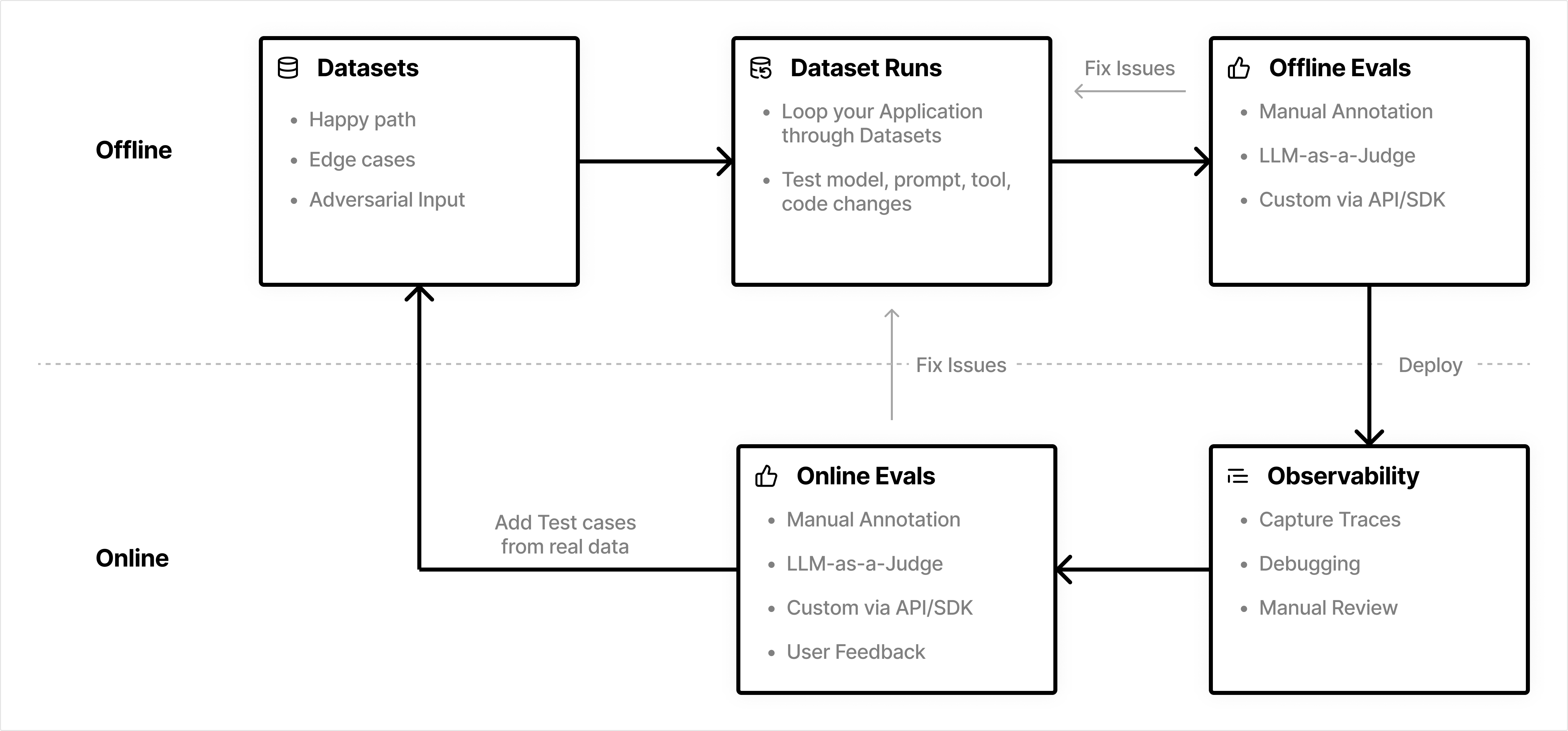
The repository covers three critical phases of the agent lifecycle:
1. Experimentation & Hyperparameter Optimization
2. QA & Testing with CI/CD
3. Production Operations & Monitoring
Please refer to the [README.md](https://github.com/aristsakpinis93/agentcore-langfuse-continous-eval-loop/blob/main/README.md) for more details.
## Resources
- [Amazon Bedrock AgentCore Documentation](https://aws.amazon.com/bedrock/agents/)
- [Strands Agents SDK Documentation](https://strandsagents.com)
- [Langfuse Evaluation Documentation](/docs/evaluation/overview)
- [Langfuse Datasets & Experiments](/docs/evaluation/experiments/datasets)
- [Complete Example Repository](https://github.com/aristsakpinis93/agentcore-langfuse-continous-eval-loop)
---
## Agent Instructions
This page is part of the [Langfuse](https://langfuse.com) documentation, published as plain Markdown for AI agents. Every page is available as Markdown by appending `.md` to its URL, or by sending an `Accept: text/markdown` header. This page: `https://langfuse.com/integrations/frameworks/amazon-agentcore.md`.
### Querying these docs
If the answer is not on this page, query the documentation instead of guessing:
- **Semantic search** across all Langfuse docs, returning an answer with the relevant pages and excerpts. Ask a specific, self-contained question:
```bash
curl -sG "https://langfuse.com/api/search-docs" --data-urlencode "query=How do I trace a LangGraph agent?"
```
- **Index of every page**: , with per-section indexes [llms-docs.txt](https://langfuse.com/llms-docs.txt), [llms-integrations.txt](https://langfuse.com/llms-integrations.txt), and [llms-self-hosting.txt](https://langfuse.com/llms-self-hosting.txt).
### Before writing Langfuse code
- **Install the [Langfuse Agent Skill](https://langfuse.com/docs/api-and-data-platform/features/agent-skill).** It encodes Langfuse's own best practices for instrumentation, prompt management, and evaluation, and materially improves results.
- **Read [What does a good trace look like?](https://langfuse.com/docs/observability/best-practices.md)** before instrumenting an application.
- **Verify endpoints, parameters, and response fields** against the [API reference](https://api.reference.langfuse.com) instead of inferring them from code examples.
- **Use the [Langfuse CLI](https://langfuse.com/docs/api-and-data-platform/features/cli)** (`npx langfuse-cli api `) to read or write traces, prompts, datasets, and scores from the terminal.
Found an error in these docs? Please open an issue at .