---
title: Observability for eve with Langfuse
sidebarTitle: Eve
logo: /images/integrations/vercel_ai_sdk_icon.png
description: Trace eve agents with Langfuse via OpenTelemetry. Capture model calls, tool calls, and full agent runs with token usage and cost.
---
# Observability for eve with Langfuse
This guide shows you how to integrate **Langfuse** with **eve** to trace and debug your agents. eve emits OpenTelemetry spans for every run, so connecting Langfuse is a matter of pointing those spans at your Langfuse project.
> **What is eve?** [eve](https://eve.dev) is an open-source TypeScript framework from Vercel for building durable agents as ordinary files in a project. It ships with durable execution, a sandbox, tools, subagents, schedules, and built-in OpenTelemetry tracing.
> **What is Langfuse?** [Langfuse](https://langfuse.com) is an open-source observability platform for AI agents and LLM applications. It helps you visualize and monitor model calls, tool usage, cost, latency, and more.
[Every eve run produces a trace](https://eve.dev/docs/guides/instrumentation), and the spans are standard OpenTelemetry, built on the [Vercel AI SDK](/integrations/frameworks/vercel-ai-sdk) telemetry conventions. eve registers its tracer in `agent/instrumentation.ts` via `registerOTel`. By adding the `LangfuseSpanProcessor`, every model call and tool call flows into Langfuse — where Langfuse maps them to traces, generations, and tool observations.
## Get Started
### Create an eve agent
If you don't have an eve agent yet, scaffold one with the eve CLI:
```bash
npx eve@latest init my-agent
cd my-agent
```
See the full [eve quickstart](https://eve.dev/docs/getting-started) for details.
### Install the Langfuse OpenTelemetry packages
Add the Langfuse span processor and the Vercel OpenTelemetry helper that eve's instrumentation uses:
```bash
npm install @langfuse/otel @vercel/otel
```
### Add your Langfuse credentials
Get your API keys from your [Langfuse project settings](https://cloud.langfuse.com) and add them to your agent's `.env` file. You can sign up for [Langfuse Cloud](https://langfuse.com/cloud) or [self-host Langfuse](https://langfuse.com/self-hosting).
```bash filename=".env"
LANGFUSE_PUBLIC_KEY="pk-lf-..."
LANGFUSE_SECRET_KEY="sk-lf-..."
LANGFUSE_BASE_URL="https://cloud.langfuse.com" # 🇪🇺 EU region
# LANGFUSE_BASE_URL="https://us.cloud.langfuse.com" # 🇺🇸 US region
```
### Register the Langfuse span processor
eve configures telemetry in `agent/instrumentation.ts`. Register the `LangfuseSpanProcessor` on the `registerOTel` call so eve's spans are exported to Langfuse:
```typescript filename="agent/instrumentation.ts"
import { defineInstrumentation } from "eve/instrumentation";
import { registerOTel } from "@vercel/otel";
import { LangfuseSpanProcessor, isDefaultExportSpan } from "@langfuse/otel";
export default defineInstrumentation({
setup: ({ agentName }) =>
registerOTel({
serviceName: agentName,
spanProcessors: [
new LangfuseSpanProcessor({
// Keep Langfuse's default export filter (Langfuse SDK spans, GenAI
// spans, and known LLM instrumentors), and additionally keep eve's
// `gen_ai` spans and its own run span (scope `eve`). Everything else —
// eve's durable-workflow orchestration and the @vercel/otel HTTP
// spans — is dropped.
shouldExportSpan: ({ otelSpan }) =>
isDefaultExportSpan(otelSpan) ||
["gen_ai", "eve"].includes(otelSpan.instrumentationScope.name),
}),
],
}),
});
```
The `LangfuseSpanProcessor` reads `LANGFUSE_PUBLIC_KEY`, `LANGFUSE_SECRET_KEY`, and `LANGFUSE_BASE_URL` from the environment.
Registering the `LangfuseSpanProcessor` via `registerOTel` requires
`@vercel/otel` v2 or later, which is built on the same OpenTelemetry JS SDK v2
as `@langfuse/otel` ([vercel/otel#154](https://github.com/vercel/otel/issues/154)).
The install command above already pulls in a compatible version. If you wire
Langfuse into a custom OpenTelemetry setup instead, you can register the
processor on a [`NodeSDK`](/docs/observability/sdk/overview) as well.
eve runs every turn as a durable workflow, so it emits many low-level
orchestration spans (instrumentation scope `workflow`) alongside the model and
tool calls (scope `gen_ai`) and the run span (scope `eve`). `shouldExportSpan`
replaces Langfuse's default filter, so the snippet above composes with
`isDefaultExportSpan` to keep that default behavior — Langfuse SDK spans
(`langfuse-sdk`), GenAI spans, and known LLM instrumentors — and then also
keeps eve's `gen_ai` and `eve` scopes. The result is one clean trace: agent
invocations, generations, and tool calls nested under eve's run span, plus any
observations you add with the Langfuse SDK (see the "Interoperability with the
JS/TS SDK" section below), without the workflow plumbing. Keeping the `eve`
scope matters — it is the
parent that holds the GenAI spans together, so dropping it would leave them as
[orphaned spans](/docs/observability/sdk/advanced-features#filtering-by-instrumentation-scope).
To keep eve's full run tree including the workflow spans, drop only the HTTP
noise with
`({ otelSpan }) => otelSpan.instrumentationScope.name !== "@vercel/otel/fetch"`,
or use `() => true` to export everything. See
[filtering by instrumentation scope](/docs/observability/sdk/advanced-features#filtering-by-instrumentation-scope)
for more.
### Define a simple agent
A minimal eve agent is a tool plus a system prompt. The weather agent below — a single `getWeather` tool and a short instruction — produces the kind of run shown in the example trace below:
```ts filename="agent/tools/getWeather.ts"
import { defineTool } from "eve/tools";
import { z } from "zod";
export default defineTool({
description: "Return mock weather data for a city.",
inputSchema: z.object({ city: z.string().min(1) }),
async execute({ city }) {
return { city, condition: "cloudy", temperatureC: 18 };
},
});
```
```ts filename="agent/agent.ts"
import { defineAgent } from "eve";
export default defineAgent({
model: "openai/gpt-4o-mini",
});
```
```markdown filename="agent/instructions.md"
You are a concise weather assistant. When asked about the weather, call the
getWeather tool, then answer in one sentence. Mention that the data is mocked.
```
eve discovers these files automatically. Model provider authentication (the Vercel AI Gateway or an `OPENAI_API_KEY`) follows the [eve quickstart](https://eve.dev/docs/getting-started).
### Run your agent
Start your agent and send it a message, for example _"What's the weather in Berlin? Use the getWeather tool, then answer in one sentence."_:
```bash
npm run dev
```
Each run is now exported to Langfuse.
### View traces in Langfuse
Open your [Langfuse dashboard](https://cloud.langfuse.com) to see the trace for each run. With the scope filter above, eve's spans map to the Langfuse data model as follows:
- The **eve run** becomes the **root span** that the rest nest under.
- **Agent invocations** become **agent observations**.
- **Model calls** become **generations** with the model name, token usage, and cost.
- **Tool calls** become **tool observations** with their inputs and outputs.
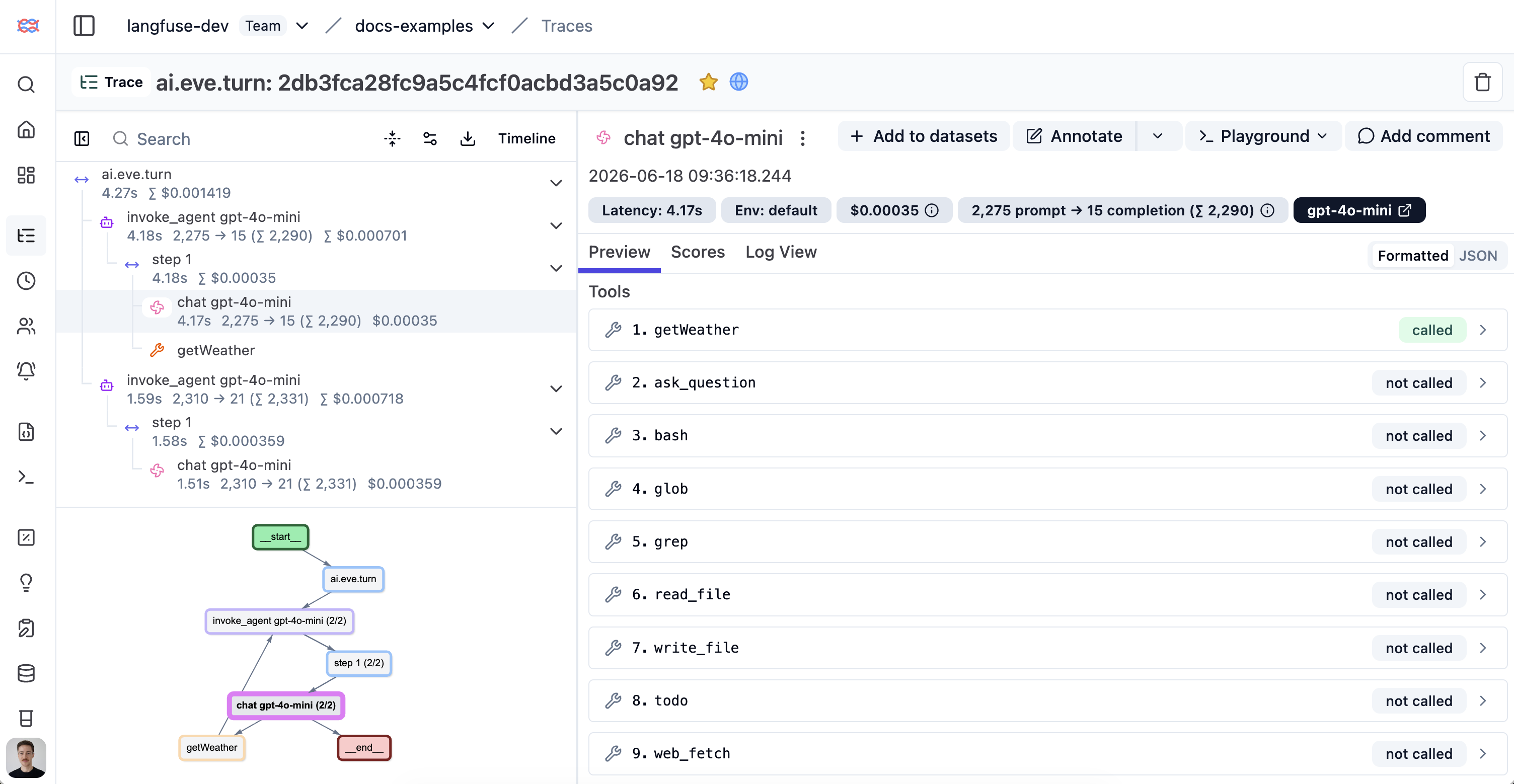
_[View this example trace in Langfuse →](https://cloud.langfuse.com/project/cloramnkj0002jz088vzn1ja4/traces/2db3fca28fc9a5c4fcf0acbd3a5c0a92?observation=8719bc06eb4f1661)_
## Interoperability with the JS/TS SDK
You can use this integration together with the Langfuse [SDKs](/docs/observability/sdk/overview) to add additional attributes or group observations into a single trace.
The [Context Manager](/docs/observability/sdk/instrumentation#context-management-with-callbacks) allows you to wrap your instrumented code using context managers (with `with` statements), which allows you to add additional attributes to the trace. Any observation created inside the callback will automatically be nested under the active observation, and the observation will be ended when the callback finishes.
```typescript
import { startActiveObservation, propagateAttributes } from "npm:@langfuse/tracing";
await startActiveObservation("context-manager", async (span) => {
span.update({
input: { query: "What is the capital of France?" },
});
// Propagate userId to all child observations
await propagateAttributes(
{
userId: "user-123",
sessionId: "session-123",
metadata: {
source: "api",
region: "us-east-1",
},
tags: ["api", "user"],
version: "1.0.0",
},
async () => {
// YOUR CODE HERE
const { text } = await generateText({
model: openai("gpt-5"),
prompt: "What is the capital of France?",
experimental_telemetry: { isEnabled: true },
});
}
);
span.update({ output: "Paris" });
});
```
Learn more about using the Context Manager in the [Langfuse SDK instrumentation docs](https://langfuse.com/docs/observability/sdk/instrumentation#context-management-with-callbacks).
The [`observe` wrapper](/docs/observability/sdk/instrumentation#observe-wrapper) is a powerful tool for tracing existing functions without modifying their internal logic. It acts as a decorator that automatically creates a span or generation around the function call. You can use the `propagateAttributes` function to add attributes to the observation from within the wrapped function.
```typescript
import { observe, propagateAttributes } from "@langfuse/tracing";
import { generateText } from "ai";
import { openai } from "@ai-sdk/openai";
// An existing function
const processUserRequest = observe(
async (userQuery: string) => {
// Propagate attributes to all child observations
return await propagateAttributes(
{
userId: "user-123",
sessionId: "session-123",
metadata: {
source: "api",
region: "us-east-1",
},
tags: ["api", "user"],
version: "1.0.0",
},
async () => {
// YOUR CODE HERE
const { text } = await generateText({
model: openai("gpt-5"),
prompt: userQuery,
experimental_telemetry: { isEnabled: true },
});
return text;
}
);
},
{ name: "process-user-request" }
);
const result = await processUserRequest("some query");
```
Learn more about using the Decorator in the [Langfuse SDK instrumentation docs](/docs/observability/sdk/instrumentation#observe-wrapper).
## Troubleshooting
No traces appearing
First, enable [debug mode](/docs/observability/sdk/advanced-features#logging--debugging) in the JS/TS SDK:
```bash
export LANGFUSE_LOG_LEVEL="DEBUG"
```
Then run your application and check the debug logs:
- **OTel spans appear in the logs:** Your application is instrumented correctly but traces are not reaching Langfuse. To resolve this:
1. Call [`forceFlush()`](/docs/observability/sdk/instrumentation#client-lifecycle--flushing) at the end of your application to ensure all traces are exported. This is especially important in short-lived environments like serverless functions.
2. Verify that you are using the correct API keys and base URL.
- **No OTel spans in the logs:** Your application is not instrumented correctly. Make sure the instrumentation runs before your application code.
Unwanted observations in Langfuse
The Langfuse SDK is based on OpenTelemetry. Other libraries in your application may emit OTel spans that are not relevant to you. These still count toward your [billable units](/docs/administration/billable-units), so you should filter them out. See [Unwanted spans in Langfuse](/faq/all/unwanted-http-database-spans) for details.
Missing attributes
Some attributes may be stored in the metadata object of the observation rather than being mapped to the Langfuse data model. If a mapping or integration does not work as expected, please [raise an issue on GitHub](/issues).
## Next Steps
Once you have instrumented your code, you can manage, evaluate and debug your application:
- [Manage prompts in Langfuse](/docs/prompts/get-started)
- [Add evaluation scores](/docs/evaluation/features/evaluation-methods/custom-scores)
- [Run LLM-as-a-judge Evaluators](/docs/scores/model-based-evals)
- [Create datasets](/docs/datasets/overview)
- [Create custom dashboards](/docs/analytics/custom-dashboards)
- [Test queries in the Playground](/docs/playground)
## References
- [eve instrumentation docs](https://eve.dev/docs/guides/instrumentation)
- [Langfuse OpenTelemetry endpoint](/integrations/native/opentelemetry)
- [Langfuse + Vercel AI SDK](/integrations/frameworks/vercel-ai-sdk) (eve's telemetry is built on the same conventions)
- [`@langfuse/otel` on npm](https://www.npmjs.com/package/@langfuse/otel)
---
## Agent Instructions
This page is part of the [Langfuse](https://langfuse.com) documentation, published as plain Markdown for AI agents. Every page is available as Markdown by appending `.md` to its URL, or by sending an `Accept: text/markdown` header. This page: `https://langfuse.com/integrations/frameworks/eve.md`.
### Querying these docs
If the answer is not on this page, query the documentation instead of guessing:
- **Semantic search** across all Langfuse docs, returning an answer with the relevant pages and excerpts. Ask a specific, self-contained question:
```bash
curl -sG "https://langfuse.com/api/search-docs" --data-urlencode "query=How do I trace a LangGraph agent?"
```
- **Index of every page**: , with per-section indexes [llms-docs.txt](https://langfuse.com/llms-docs.txt), [llms-integrations.txt](https://langfuse.com/llms-integrations.txt), and [llms-self-hosting.txt](https://langfuse.com/llms-self-hosting.txt).
### Before writing Langfuse code
- **Install the [Langfuse Agent Skill](https://langfuse.com/docs/api-and-data-platform/features/agent-skill).** It encodes Langfuse's own best practices for instrumentation, prompt management, and evaluation, and materially improves results.
- **Read [What does a good trace look like?](https://langfuse.com/docs/observability/best-practices.md)** before instrumenting an application.
- **Verify endpoints, parameters, and response fields** against the [API reference](https://api.reference.langfuse.com) instead of inferring them from code examples.
- **Use the [Langfuse CLI](https://langfuse.com/docs/api-and-data-platform/features/cli)** (`npx langfuse-cli api `) to read or write traces, prompts, datasets, and scores from the terminal.
Found an error in these docs? Please open an issue at .