---
title: LangChain Tracing & LangGraph Integration
sidebarTitle: LangChain & LangGraph
description: "Open source LangChain tracing and monitoring. Automatically capture traces of your LangChain callbacks, LLM calls, tools, and retrievers with Langfuse. Python and JS/TS."
seoTitle: "LangChain Tracing & Callbacks — Open Source Observability for LangChain & LangGraph"
logo: /images/integrations/langchain_icon.png
---
# LangChain Tracing & LangGraph Integration
Langfuse integrates with LangChain using **LangChain Callbacks** — the standard mechanism for hooking into the execution of LangChain components. The Langfuse `CallbackHandler` automatically captures detailed traces of your LangChain executions, LLMs, tools, and retrievers to evaluate and debug your application.
> **What is LangChain?** [LangChain](https://python.langchain.com/docs/get_started/introduction/) is an open-source framework that helps developers build applications powered by large language models (LLMs) by providing tools to connect models with external data, APIs, and logic.
> **What is LangGraph?** [LangGraph](https://python.langchain.com/docs/get_started/introduction/) is a framework built on top of LangChain that makes it easier to design and run stateful, multi-step AI agents using a graph-based architecture.
> **What is Langfuse?** [Langfuse](/) is a platform for observability and tracing of LLM applications. It captures everything happening during an LLM interaction: inputs, outputs, tool usage, retries, latencies and costs and allows you to evaluate and debug your application.
## Getting Started
### Install Dependencies
```bash
pip install langfuse langchain langchain_openai langgraph
```
### Initialize Langfuse Callback Handler
Next, set up your Langfuse API keys. You can get these keys by signing up for a free [Langfuse Cloud](https://langfuse.com/cloud) account or by [self-hosting Langfuse](https://langfuse.com/self-hosting). These environment variables are essential for the Langfuse client to authenticate and send data to your Langfuse project.
```bash filename=".env"
LANGFUSE_SECRET_KEY = "sk-lf-..."
LANGFUSE_PUBLIC_KEY = "pk-lf-..."
LANGFUSE_BASE_URL = "https://cloud.langfuse.com" # 🇪🇺 EU region
# Other Langfuse data regions include 🇺🇸 US: https://us.cloud.langfuse.com, 🇯🇵 Japan: https://jp.cloud.langfuse.com and ⚕️ HIPAA: https://hipaa.cloud.langfuse.com
OPENAI_API_KEY = "sk-proj-..."
```
With the environment variables set, we can now initialize the Langfuse Client and the CallbackHandler. You can also use [constructor arguments](/docs/observability/sdk/overview#initialize-tracing) to initialize the Langfuse client.
```python
from langfuse import get_client
from langfuse.langchain import CallbackHandler
# Initialize Langfuse client
langfuse = get_client()
# Initialize Langfuse CallbackHandler for Langchain (tracing)
langfuse_handler = CallbackHandler()
```
### LangChain Example
Instrumenting LangGraph follows the same pattern. Simply pass the `langfuse_handler` to the agent invocation. ([Example Notebook](/integrations/frameworks/langgraph)).
```python /config={"callbacks": [langfuse_handler]}/
from langchain.agents import create_agent
def add_numbers(a: int, b: int) -> int:
"""Add two numbers together and return the result."""
return a + b
agent = create_agent(
model="openai:gpt-5-mini",
tools=[add_numbers],
system_prompt="You are a helpful math tutor who can do calculations using the provided tools.",
)
# Run the agent
agent.invoke(
{"messages": [{"role": "user", "content": "what is 42 + 58?"}]},
config={"callbacks": [langfuse_handler]}
)
```
### See Traces in Langfuse
After executing the application, navigate to your [Langfuse Trace Table](https://langfuse.com/cloud). You will find detailed traces of the application’s execution, providing insights into the LLM calls, retrieval operations, inputs, outputs, and performance metrics.
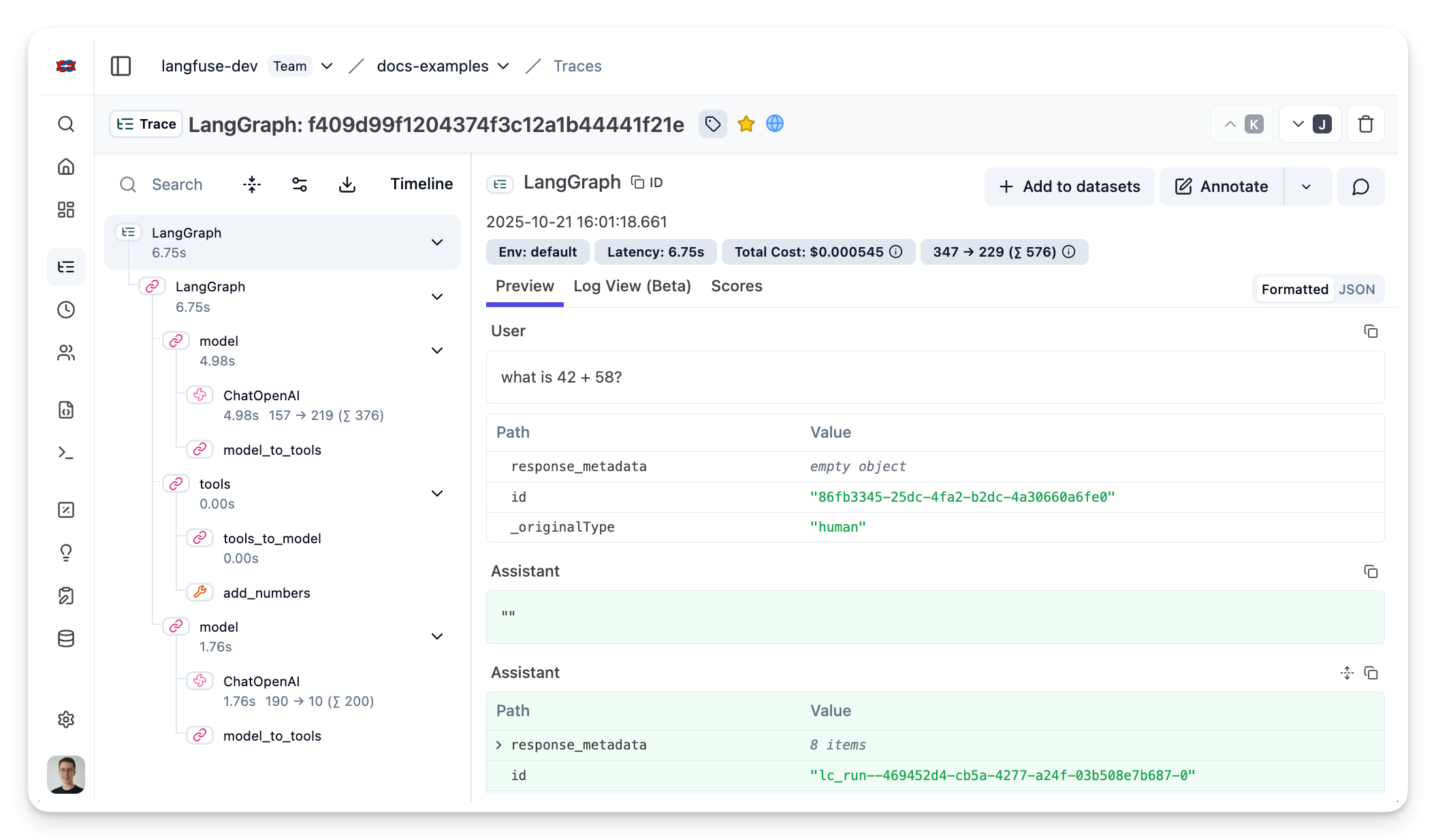
[Example trace in the Langfuse UI](https://cloud.langfuse.com/project/cloramnkj0002jz088vzn1ja4/traces/f409d99f1204374f3c12a1b44441f21e?timestamp=2025-10-21T14%3A01%3A18.661Z)
### Install Dependencies
```bash
npm install @langfuse/core @langfuse/langchain
```
### Set Up Environment
Next, set up your Langfuse API keys. You can get these keys by signing up for a free [Langfuse Cloud](https://langfuse.com/cloud) account or by [self-hosting Langfuse](https://langfuse.com/self-hosting). These environment variables are essential for the Langfuse client to authenticate and send data to your Langfuse project.
```bash filename=".env"
LANGFUSE_SECRET_KEY = "sk-lf-..."
LANGFUSE_PUBLIC_KEY = "pk-lf-..."
LANGFUSE_BASE_URL = "https://cloud.langfuse.com" # 🇪🇺 EU region
# Other Langfuse data regions include 🇺🇸 US: https://us.cloud.langfuse.com, 🇯🇵 Japan: https://jp.cloud.langfuse.com and ⚕️ HIPAA: https://hipaa.cloud.langfuse.com
OPENAI_API_KEY = "sk-proj-..."
```
With the environment variables set, we can now initialize the `langfuseSpanProcessor` which is passed to the main OpenTelemetry SDK that orchestrates tracing.
```typescript
import { NodeSDK } from "@opentelemetry/sdk-node";
import { LangfuseSpanProcessor } from "@langfuse/otel";
const sdk = new NodeSDK({
spanProcessors: [new LangfuseSpanProcessor()],
});
sdk.start();
```
### Initialize Langfuse Callback Handler
Instantiate the CallbackHandler. Optionally, you can pass additional attributes like `sessionId`, `userId`, and `tags`.
```typescript
import { CallbackHandler } from "@langfuse/langchain";
// Initialize the Langfuse CallbackHandler
const langfuseHandler = new CallbackHandler({
sessionId: "user-session-123",
userId: "user-abc",
tags: ["langchain-test"],
});
```
### LangChain Example
Instrumenting LangGraph follows the same pattern. Simply pass the `langfuseHandler` to the agent invocation.
```typescript /{ callbacks: [langfuseHandler] }/
import { createAgent, tool } from "@langchain/core/agents";
import * as z from "zod";
const getWeather = tool(
(input) => `It's always sunny in ${input.city}!`,
{
name: "get_weather",
description: "Get the weather for a given city",
schema: z.object({
city: z.string().describe("The city to get the weather for"),
}),
}
);
const agent = createAgent({
model: "openai:gpt-5-mini",
tools: [getWeather],
});
console.log(
await agent.invoke(
{ messages: [{ role: "user", content: "What's the weather in San Francisco?" }] },
{ callbacks: [langfuseHandler] }
)
);
```
### See Traces in Langfuse
After executing the application, navigate to your [Langfuse Trace Table](https://langfuse.com/cloud). You will find detailed traces of the application’s execution, providing insights into the LLM calls, retrieval operations, inputs, outputs, and performance metrics.
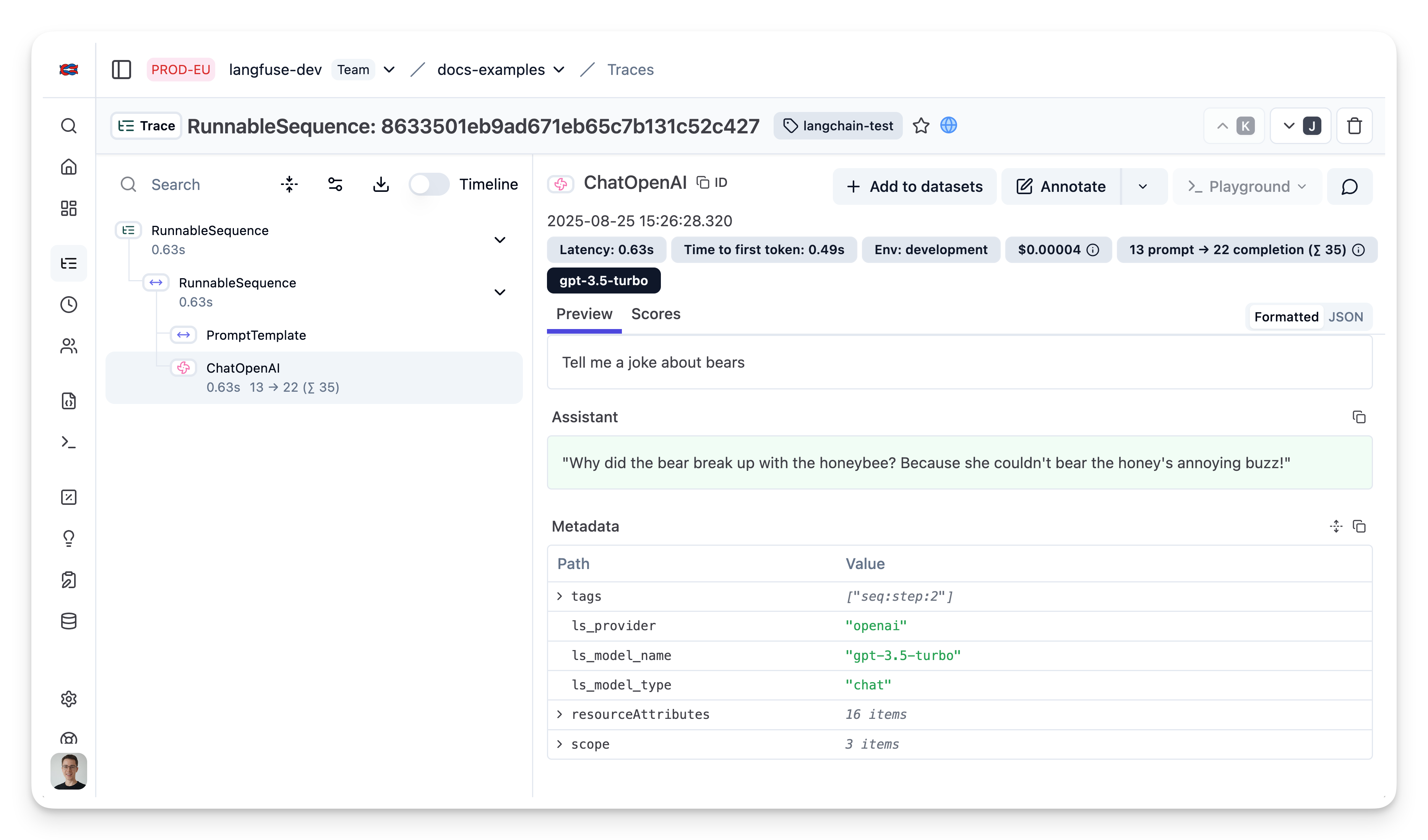
[Public trace in the Langfuse UI](https://cloud.langfuse.com/project/cloramnkj0002jz088vzn1ja4/traces/2c1581dd9cecdafb6ca091b83d7ea99a?timestamp=2025-10-30T08:45:41.319Z)
## Example Notebooks
- [LangGraph (Python)](/integrations/frameworks/langgraph)
- [Evaluate LangGraph Agents (Python)](/guides/cookbook/example_langgraph_agents)
- [LangChain DeepAgents (Python)](/integrations/frameworks/langchain-deepagents)
## Additional Configuration
### Interoperability with Langfuse SDKs [#interoperability]
The Langchain integration works seamlessly with the Langfuse SDK to create comprehensive traces that combine Langchain operations with other application logic.
**Common use cases:**
- Add non-Langchain related observations to the trace
- Group multiple Langchain runs into a single trace
- Set trace-level attributes ([`user_id`](/docs/observability/features/users), [`session_id`](/docs/observability/features/sessions), [`tags`](/docs/observability/features/tags), etc.)
**Using the `@observe()` decorator:**
```python /@observe()/
from langfuse import observe, propagate_attributes
from langfuse.langchain import CallbackHandler
from langchain_openai import ChatOpenAI
from langchain_core.prompts import ChatPromptTemplate
@observe() # Automatically log function as a trace to Langfuse
def process_user_query(user_input: str):
# Propagate trace attributes to all child observations
with propagate_attributes(
trace_name="user-query-processing",
session_id="session-1234",
user_id="user-5678",
):
# Initialize the Langfuse handler - automatically inherits the current trace context
langfuse_handler = CallbackHandler()
# Your Langchain code - will be nested under the @observe trace
llm = ChatOpenAI(model_name="gpt-4o")
prompt = ChatPromptTemplate.from_template("Respond to: {input}")
chain = prompt | llm
result = chain.invoke({"input": user_input}, config={"callbacks": [langfuse_handler]})
return result.content
# Usage
answer = process_user_query("What is the capital of France?")
```
**Using context managers:**
```python /with langfuse.start_as_current_observation(as_type="span", name="multi-step-process") as root_span:/ /root_span.update/ /prep_span.update/ /post_span.update/
from langfuse import get_client, propagate_attributes
from langfuse.langchain import CallbackHandler
from langchain_openai import ChatOpenAI
from langchain_core.prompts import ChatPromptTemplate
langfuse = get_client()
# Create a trace via Langfuse spans and use Langchain within it
with langfuse.start_as_current_observation(as_type="span", name="multi-step-process") as root_span:
root_span.update(input={"user_query": "Explain quantum computing"})
# Update trace attributes
with propagate_attributes(
session_id="session-1234",
user_id="user-5678",
):
# Initialize the Langfuse handler
langfuse_handler = CallbackHandler()
# Step 1: Initial processing (custom logic)
with langfuse.start_as_current_observation(as_type="span", name="input-preprocessing") as prep_span:
processed_input = "Simplified: Explain quantum computing"
prep_span.update(output={"processed_query": processed_input})
# Step 2: LangChain processing
llm = ChatOpenAI(model_name="gpt-4o")
prompt = ChatPromptTemplate.from_template("Answer this question: {input}")
chain = prompt | llm
result = chain.invoke(
{"input": processed_input},
config={"callbacks": [langfuse_handler]}
)
# Step 3: Post-processing (custom logic)
with langfuse.start_as_current_observation(as_type="span", name="output-postprocessing") as post_span:
final_result = f"Response: {result.content}"
post_span.update(output={"final_response": final_result})
root_span.update(output={"final_answer": final_result})
```
```ts
import { CallbackHandler } from "@langfuse/langchain";
import { startActiveObservation, propagateAttributes } from "@langfuse/tracing";
const langfuseHandler = new CallbackHandler();
// Wrap the LangChain run in a Langfuse observation — the handler
// automatically nests its spans under the active observation
await startActiveObservation("multi-step-process", async (span) => {
span.update({ input: { query: "" } });
// Propagate trace attributes to all child observations
await propagateAttributes(
{
userId: "user-5678",
sessionId: "session-1234",
},
async () => {
const result = await chain.invoke(
{ input: "" },
{ callbacks: [langfuseHandler] },
);
span.update({ output: result });
},
);
});
```
### Trace Attributes
You can set trace attributes such as [`user_id`](/docs/observability/features/users), [`session_id`](/docs/observability/features/sessions), and [`tags`](/docs/observability/features/tags) dynamically for each LangChain execution.
With Python SDK, you have two options to set trace attributes dynamically:
**Option 1: Via metadata fields in chain invocation (simplest approach):**
```python
from langfuse.langchain import CallbackHandler
from langchain_openai import ChatOpenAI
from langchain_core.prompts import ChatPromptTemplate
langfuse_handler = CallbackHandler()
llm = ChatOpenAI(model_name="gpt-4o")
prompt = ChatPromptTemplate.from_template("Tell me a joke about {topic}")
chain = prompt | llm
# Set trace attributes dynamically via metadata
response = chain.invoke(
{"topic": "cats"},
config={
"callbacks": [langfuse_handler],
"metadata": {
"langfuse_user_id": "random-user",
"langfuse_session_id": "random-session",
"langfuse_tags": ["random-tag-1", "random-tag-2"]
}
}
)
```
**Option 2: Using the [Langfuse SDK](#interoperability)**
```ts
import { CallbackHandler } from "@langfuse/langchain";
const langfuseHandler = new CallbackHandler();
const traceName = "langchain_trace_name";
const sessionId = "random-session";
const userId = "random-user";
const tags = ["random-tag-1", "random-tag-2"];
await chain.invoke(
{ animal: "dog" },
{
callbacks: [langfuseHandler],
runName: traceName,
tags,
metadata: { langfuseUserId: userId, langfuseSessionId: sessionId },
}
);
```
### Trace IDs & Distributed Tracing
To pass a custom [`trace_id`](/docs/observability/features/trace-ids-and-distributed-tracing) to a Langchain execution, you can wrap the execution in a span that sets a predefined trace ID. You can also retrieve the last trace ID a callback handler has created via `langfuse_handler.last_trace_id`.
```python
from langfuse import get_client, Langfuse
from langfuse.langchain import CallbackHandler
langfuse = get_client()
# Generate deterministic trace ID from external system
external_request_id = "req_12345"
predefined_trace_id = Langfuse.create_trace_id(seed=external_request_id)
langfuse_handler = CallbackHandler()
# Use the predefined trace ID with trace_context
with langfuse.start_as_current_observation(
as_type="span",
name="langchain-request",
trace_context={"trace_id": predefined_trace_id}
) as span:
span.update(input={"person": "Ada Lovelace"})
with propagate_attributes(
user_id="user_123",
):
# LangChain execution will be part of this trace
response = chain.invoke(
{"person": "Ada Lovelace"},
config={"callbacks": [langfuse_handler]}
)
span.update(output={"response": response})
print(f"Trace ID: {predefined_trace_id}") # Use this for scoring later
print(f"Trace ID: {langfuse_handler.last_trace_id}") # Care needed in concurrent environments where handler is reused
```
```typescript
import { CallbackHandler } from "langfuse/langchain";
import { v4 as uuidv4 } from "uuid";
const langfuseHandler = new CallbackHandler();
const predefinedRunId = uuid4();
await chain.invoke(
{ animal: "dog" },
{
callbacks: [langfuseHandler],
runId: predefinedRunId,
}
);
```
### Score a Trace
There are multiple ways to score a LangChain trace in Langfuse. See [Scoring documentation](/docs/evaluation/overview) for more details.
```python
from langfuse import get_client
langfuse = get_client()
# Option 1: Use the yielded span object from the context manager
with langfuse.start_as_current_observation(
as_type="span",
name="langchain-request",
trace_context={"trace_id": predefined_trace_id}
) as span:
# ... LangChain execution ...
# Score using the span object
span.score_trace(
name="user-feedback",
value=1,
data_type="NUMERIC",
comment="This was correct, thank you"
)
# Option 2: Use langfuse.score_current_trace() if still in context
with langfuse.start_as_current_observation(as_type="span", name="langchain-request") as span:
# ... LangChain execution ...
# Score using current context
langfuse.score_current_trace(
name="user-feedback",
value=1,
data_type="NUMERIC"
)
# Option 3: Use create_score() with trace ID (when outside context)
langfuse.create_score(
trace_id=predefined_trace_id,
name="user-feedback",
value=1,
data_type="NUMERIC",
comment="This was correct, thank you"
)
```
```typescript
import { LangfuseClient } from "@langfuse/client";
const langfuse = new LangfuseClient();
langfuse.score.create({
id: "unique_id", // optional, can be used as an idempotency key to update the score subsequently
traceId: message.traceId,
observationId: message.generationId, // optional
name: "correctness",
value: 0.9,
dataType: "NUMERIC", // optional, inferred if not provided
comment: "Factually correct", // optional
});
// Flush the scores in short-lived environments
await langfuse.flush();
```
### Queuing and flushing
The Langfuse SDKs queue and batch events in the background to reduce the number of network requests and improve overall performance. In a long-running application, this works without any additional configuration.
If you are running a short-lived application, you need to shutdown Langfuse to ensure that all events are flushed before the application exits.
```python
from langfuse import get_client
# Shutdown the underlying singleton instance
get_client().shutdown()
```
```ts
await langfuseHandler.shutdownAsync();
```
If you want to flush events synchronously at a certain point, you can use the `flush` method. This will wait for all events that are still in the background queue to be sent to the Langfuse API. This is usually discouraged in production environments.
```python
from langfuse import get_client
# Flush the underlying singleton instance
get_client().flush()
```
```ts
await langfuseHandler.flushAsync();
```
### Serverless environments (JS/TS)
Since Langchain version > 0.3.0, the callbacks on which Langfuse relies have been backgrounded. This means that execution will not wait for the callback to either return before continuing. Prior to 0.3.0, this behavior was the opposite. If you are running code in serverless environments such as Google Cloud Functions, AWS Lambda or Cloudflare Workers you should set your callbacks to be blocking to allow them time to finish or timeout. This can be done either by
- setting the `LANGCHAIN_CALLBACKS_BACKGROUND` environment variable to "false"
- importing the global `awaitAllCallbacks` method to ensure all callbacks finish if necessary
Read more about awaiting callbacks here in the [Langchain docs](https://js.langchain.com/docs/how_to/callbacks_serverless).
### AWS Bedrock AgentCore
When deploying LangChain applications to AWS Bedrock AgentCore, the runtime's ADOT (AWS Distro for OpenTelemetry) auto-instrumentation requires OTEL configuration instead of relying solely on the Langfuse callback handler. See [Using Langfuse with an Existing OpenTelemetry Setup](/faq/all/existing-otel-setup#aws-bedrock-agentcore-adot) for configuration details, or the full [Amazon Bedrock AgentCore integration guide](/integrations/frameworks/amazon-agentcore).
### Azure OpenAI model names
Please add the `model` keyword argument to the `AzureOpenAI` or `AzureChatOpenAI` class to have the model name parsed correctly in Langfuse.
```python
from langchain_openai import AzureChatOpenAI
llm = AzureChatOpenAI(
azure_deployment="my-gpt-4o-deployment",
model="gpt-4o",
)
```
```typescript
import { AzureChatOpenAI } from "@langchain/openai";
const llm = new AzureChatOpenAI({
azureOpenAIApiDeploymentName: "my-gpt-4o-deployment",
model: "gpt-4o",
});
```
## Upgrade Paths for Langchain Integration [#upgrade-paths]
This doc is a collection of upgrade paths for different versions of the
integration. If you want to add the integration to your project, you should
start with the latest version and follow the integration guide above.
Langfuse and Langchain are under active development. Thus, we are constantly improving the integration. This means that we sometimes need to make breaking changes to our APIs or need to react to breaking changes in Langchain. We try to keep these to a minimum and to provide clear upgrade paths when we do make them.
**Python**
- [From v2.x.x to v3.x.x](#python3)
- [From v1.x.x to v2.x.x](#python2)
**JS/TS**
- [From v2.x.x to v3.x.x](#js3)
- [From v1.x.x to v2.x.x](#js2)
### Python [#python]
#### From v2.x.x to v3.x.x
Python SDK v3 introduces a completely revised Langfuse core with a new **observability API**. While the LangChain integration still relies on a `CallbackHandler`, nearly all ergonomics have changed. The table below highlights the most important breaking changes:
| Topic | v2 | v3 |
| ------------------- | ----------------------------------------------------------------- | ------------------------------------------------------------------------- |
| Package import | `from langfuse.callback import CallbackHandler` | `from langfuse.langchain import CallbackHandler` |
| Client handling | Multiple instantiated clients | Singleton pattern, access via `get_client()` |
| Trace/Span context | `CallbackHandler` optionally accepted `root` to group runs | Use context managers `with langfuse.start_as_current_observation(...)` |
| Dynamic trace attrs | Pass via LangChain `config` (e.g. `metadata["langfuse_user_id"]`) | Use `metadata["langfuse_user_id"]` OR `propagate_attributes(user_id=...)` |
| Constructor args | `CallbackHandler(sample_rate=..., user_id=...)` | No constructor args – use Langfuse client or spans |
Minimal migration example:
```python
# Install latest SDK (>=3.0.0)
pip install --upgrade langfuse
# v2 Code (for reference)
# from langfuse.callback import CallbackHandler
# handler = CallbackHandler()
# chain.invoke({"topic": "cats"}, config={"callbacks": [handler]})
# v3 Code
from langfuse import Langfuse, get_client
from langfuse.langchain import CallbackHandler
from langchain_openai import ChatOpenAI
from langchain_core.prompts import ChatPromptTemplate
# 1. Create/Configure Langfuse client (once at startup)
Langfuse(
public_key="your-public-key",
secret_key="your-secret-key",
)
# 2. Access singleton instance and create handler
langfuse = get_client()
handler = CallbackHandler()
# 3. Option 1: Use metadata in chain invocation (simplest migration)
llm = ChatOpenAI(model_name="gpt-4o")
prompt = ChatPromptTemplate.from_template("Tell me a joke about {topic}")
chain = prompt | llm
response = chain.invoke(
{"topic": "cats"},
config={
"callbacks": [handler],
"metadata": {"langfuse_user_id": "user_123"}
}
)
# (Optional) Flush events in short-lived scripts
langfuse.flush()
```
- All arguments such as `sample_rate` or `tracing_enabled` must now be provided when constructing the **Langfuse** client (or via environment variables) – not on the handler.
- Functions like `flush()` and `shutdown()` moved to the client instance (`get_client().flush()`).
#### From v1.x.x to v2.x.x [#python2]
The `CallbackHandler` can be used in multiple invocations of a Langchain chain as shown below.
```python
from langfuse.callback import CallbackHandler
langfuse_handler = CallbackHandler(PUBLIC_KEY, SECRET_KEY)
# Setup Langchain
from langchain.chains import LLMChain
...
chain = LLMChain(llm=llm, prompt=prompt, callbacks=[langfuse_handler])
# Add Langfuse handler as callback
chain.run(input="", callbacks=[langfuse_handler])
chain.run(input="", callbacks=[langfuse_handler])
```
So far, invoking the chain multiple times would group the observations in one trace.
```bash
TRACE
|
|-- SPAN: Retrieval
| |
| |-- SPAN: LLM Chain
| | |
| | |-- GENERATION: ChatOpenAi
|-- SPAN: Retrieval
| |
| |-- SPAN: LLM Chain
| | |
| | |-- GENERATION: ChatOpenAi
```
We changed this, so that each invocation will end up on its own trace. This allows us to derive the user inputs and outputs to Langchain applications.
```bash
TRACE_1
|
|-- SPAN: Retrieval
| |
| |-- SPAN: LLM Chain
| | |
| | |-- GENERATION: ChatOpenAi
TRACE_2
|
|-- SPAN: Retrieval
| |
| |-- SPAN: LLM Chain
| | |
| | |-- GENERATION: ChatOpenAi
```
If you still want to group multiple invocations on one trace, wrap them in an enclosing Langfuse observation ([interoperability docs](#interoperability)).
```python
from langfuse import get_client
from langfuse.langchain import CallbackHandler
langfuse = get_client()
langfuse_handler = CallbackHandler()
with langfuse.start_as_current_observation(as_type="span", name="grouped-invocations"):
# All invocations within this scope end up on the same trace
chain.invoke({"input": ""}, config={"callbacks": [langfuse_handler]})
chain.invoke({"input": ""}, config={"callbacks": [langfuse_handler]})
```
### JS/TS [#js]
#### From v2.x.x to v3.x.x [#js3]
Requires [`langchain ^0.1.10`](https://github.com/langchain-ai/langchainjs/releases/tag/0.1.10). Langchain released a new stable version of the Callback Handler interface and this version of the Langfuse SDK implements it. Older versions are no longer supported.
#### From v1.x.x to v2.x.x [#js2]
The `CallbackHandler` can be used in multiple invocations of a Langchain chain as shown below.
```ts
import { CallbackHandler } from "@langfuse/langchain";
// create a handler
const langfuseHandler = new CallbackHandler({
publicKey: LANGFUSE_PUBLIC_KEY,
secretKey: LANGFUSE_SECRET_KEY,
});
import { LLMChain } from "langchain/chains";
// create a chain
const chain = new LLMChain({
llm: model,
prompt,
callbacks: [langfuseHandler],
});
// execute the chain
await chain.call(
{ product: "" },
{ callbacks: [langfuseHandler] }
);
await chain.call(
{ product: "" },
{ callbacks: [langfuseHandler] }
);
```
So far, invoking the chain multiple times would group the observations in one trace.
```bash
TRACE
|
|-- SPAN: Retrieval
| |
| |-- SPAN: LLM Chain
| | |
| | |-- GENERATION: ChatOpenAi
|-- SPAN: Retrieval
| |
| |-- SPAN: LLM Chain
| | |
| | |-- GENERATION: ChatOpenAi
```
We changed this, so that each invocation will end up on its own trace. This is a more sensible default setting for most users.
```bash
TRACE_1
|
|-- SPAN: Retrieval
| |
| |-- SPAN: LLM Chain
| | |
| | |-- GENERATION: ChatOpenAi
TRACE_2
|
|-- SPAN: Retrieval
| |
| |-- SPAN: LLM Chain
| | |
| | |-- GENERATION: ChatOpenAi
```
If you still want to group multiple invocations on one trace, wrap them in an enclosing Langfuse observation ([interoperability docs](#interoperability)).
```ts
import { CallbackHandler } from "@langfuse/langchain";
import { startActiveObservation } from "@langfuse/tracing";
const langfuseHandler = new CallbackHandler();
await startActiveObservation("grouped-invocations", async () => {
// All invocations within this scope end up on the same trace
await chain.invoke({ input: "" }, { callbacks: [langfuseHandler] });
await chain.invoke({ input: "" }, { callbacks: [langfuseHandler] });
});
```
## FAQ
## GitHub Discussions
---
## Agent Instructions
This page is part of the [Langfuse](https://langfuse.com) documentation, published as plain Markdown for AI agents. Every page is available as Markdown by appending `.md` to its URL, or by sending an `Accept: text/markdown` header. This page: `https://langfuse.com/integrations/frameworks/langchain.md`.
### Querying these docs
If the answer is not on this page, query the documentation instead of guessing:
- **Semantic search** across all Langfuse docs, returning an answer with the relevant pages and excerpts. Ask a specific, self-contained question:
```bash
curl -sG "https://langfuse.com/api/search-docs" --data-urlencode "query=How do I trace a LangGraph agent?"
```
- **Index of every page**: , with per-section indexes [llms-docs.txt](https://langfuse.com/llms-docs.txt), [llms-integrations.txt](https://langfuse.com/llms-integrations.txt), and [llms-self-hosting.txt](https://langfuse.com/llms-self-hosting.txt).
### Before writing Langfuse code
- **Install the [Langfuse Agent Skill](https://langfuse.com/docs/api-and-data-platform/features/agent-skill).** It encodes Langfuse's own best practices for instrumentation, prompt management, and evaluation, and materially improves results.
- **Read [What does a good trace look like?](https://langfuse.com/docs/observability/best-practices.md)** before instrumenting an application.
- **Verify endpoints, parameters, and response fields** against the [API reference](https://api.reference.langfuse.com) instead of inferring them from code examples.
- **Use the [Langfuse CLI](https://langfuse.com/docs/api-and-data-platform/features/cli)** (`npx langfuse-cli api `) to read or write traces, prompts, datasets, and scores from the terminal.
Found an error in these docs? Please open an issue at .