---
title: Observability for Mastra with Langfuse
sidebarTitle: Mastra
logo: /images/integrations/mastra_icon.png
description: Learn how to integrate Langfuse with Mastra, a TypeScript agent framework, to monitor, debug, and analyze your AI applications.
---
# Observability for Mastra With Langfuse
This guide shows you how to integrate **Langfuse** with **Mastra** for observability and tracing. By following these steps, you'll be able to monitor and debug your Mastra agents in the Langfuse dashboard.
> **What is Mastra?** [Mastra](https://mastra.ai) is the TypeScript agent framework designed to provide the essential primitives for building AI applications. It enables developers to create AI agents with memory and tool-calling capabilities, implement deterministic LLM workflows, and leverage RAG for knowledge integration.
> **What is Langfuse?** [Langfuse](https://langfuse.com) is an open-source AI engineering platform. It offers tracing and monitoring capabilities for LLM applications.
## Integration
### Create a Mastra project
If you don't have a Mastra project yet, you can create one using the Mastra CLI:
```bash
npx create-mastra
```
Move into the project directory:
```bash
cd your-mastra-project
```
You can get the full Mastra installation instructions [here](https://mastra.ai/docs/getting-started/installation)
### Set up Langfuse project
Create a project in [Langfuse](https://cloud.langfuse.com) and get your API keys from the project settings page.
### Add environment variables
Create or update your `.env.development` (or `.env`) file with the following variables:
```bash
# Your LLM API key
OPENAI_API_KEY=your-api-key
# Langfuse credentials
LANGFUSE_SECRET_KEY=sk-lf-...
LANGFUSE_PUBLIC_KEY=pk-lf-...
LANGFUSE_BASE_URL=https://cloud.langfuse.com # Optional. Defaults to https://cloud.langfuse.com
```
### Install the `@mastra/langfuse` package
Add the `@mastra/langfuse` package to your project:
```bash
npm install @mastra/langfuse
```
### Set up an agent
Create an agent in your project. For example, create a file `agents/chefAgent.ts`:
```typescript
import { Agent } from "@mastra/core/agent";
import { openai } from "@ai-sdk/openai";
export const chefAgent = new Agent({
name: "chef-agent",
instructions:
"You are Michel, a practical and experienced home chef " +
"You help people cook with whatever ingredients they have available.",
model: openai("gpt-4o-mini"),
});
```
{" "}
You can use any model provider from `ai-sdk`.
### Register agent and configure Langfuse
Create or update your Mastra instance configuration to register the agent and configure Langfuse integration. For example, create a file `mastra.ts`:
```typescript
import { Mastra } from "@mastra/core";
import { LangfuseExporter } from "@mastra/langfuse";
import { chefAgent } from "./agents/chefAgent";
export const mastra = new Mastra({
agents: { chefAgent },
observability: {
configs: {
langfuse: {
serviceName: "my-service",
exporters: [
new LangfuseExporter({
publicKey: process.env.LANGFUSE_PUBLIC_KEY!,
secretKey: process.env.LANGFUSE_SECRET_KEY!,
baseUrl: process.env.LANGFUSE_BASE_URL,
options: {
environment: process.env.NODE_ENV,
},
}),
],
},
},
},
});
```
### Run mastra dev server
Start the Mastra development server:
```bash
npm run dev
```
Head over to the developer playground with the provided URL and start chatting with your agent.
### View traces in Langfuse
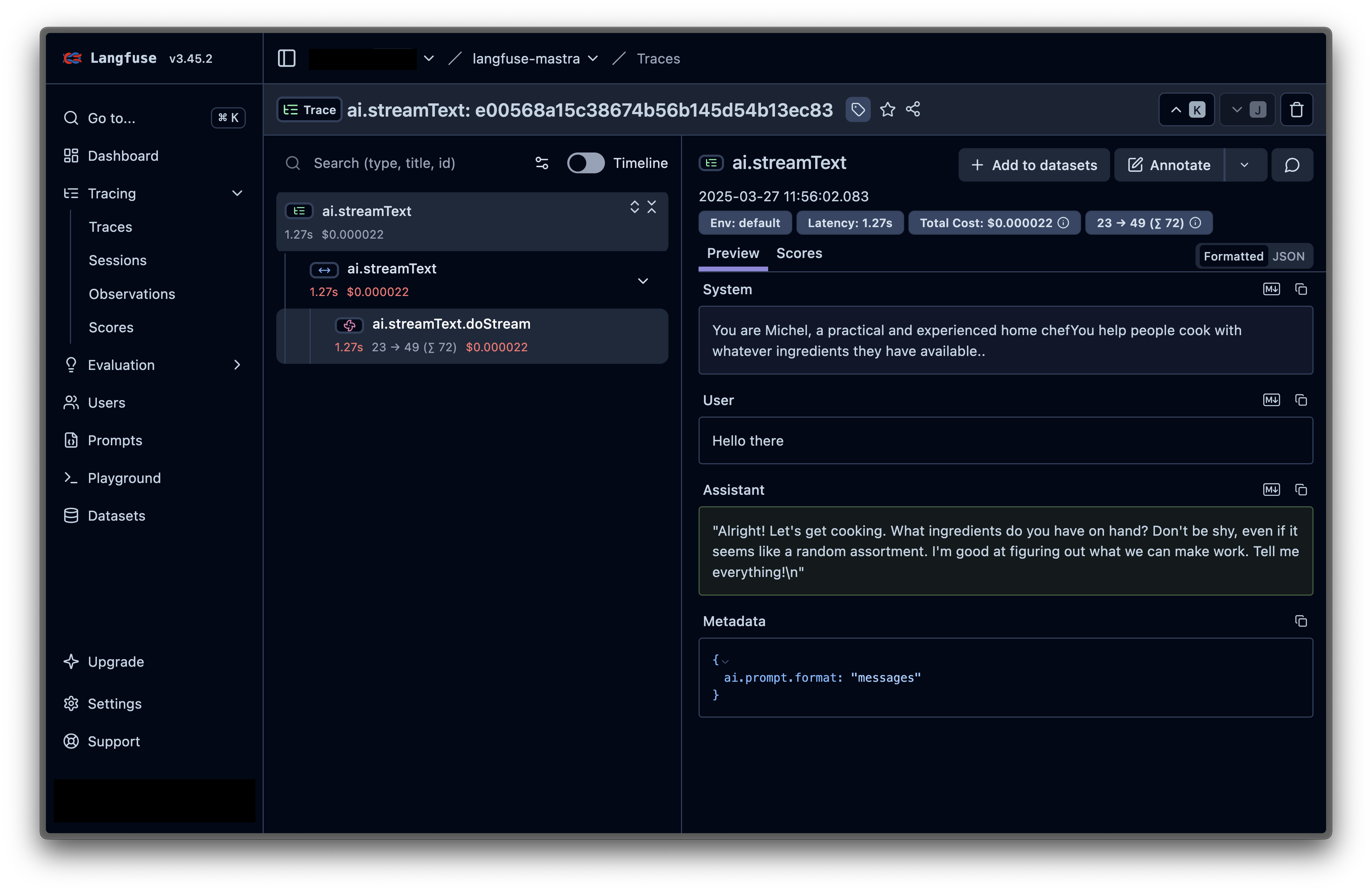
Head over to your [Langfuse dashboard](https://cloud.langfuse.com) and you'll see the traces from your agent interactions. You can analyze the prompts, completions, and other details of your AI interactions.
Here's an example of a trace:
## Configuration Options
### Realtime vs Batch Mode
The Langfuse exporter supports two modes for sending traces:
- **Realtime (development)**: Flushes after each event for immediate visibility.
```ts
new LangfuseExporter({
publicKey: process.env.LANGFUSE_PUBLIC_KEY!,
secretKey: process.env.LANGFUSE_SECRET_KEY!,
realtime: true, // Flush after each event
})
```
- **Batch (production, default)**: Buffers and sends in batches for better throughput.
```ts
new LangfuseExporter({
publicKey: process.env.LANGFUSE_PUBLIC_KEY!,
secretKey: process.env.LANGFUSE_SECRET_KEY!,
realtime: false, // Default behavior
})
```
### Complete Configuration
```ts
new LangfuseExporter({
// Required credentials
publicKey: process.env.LANGFUSE_PUBLIC_KEY!,
secretKey: process.env.LANGFUSE_SECRET_KEY!,
// Optional settings
baseUrl: process.env.LANGFUSE_BASE_URL, // Defaults to https://cloud.langfuse.com
realtime: process.env.NODE_ENV === "development",
logLevel: "info", // debug | info | warn | error
// Langfuse-specific options
options: {
environment: process.env.NODE_ENV,
version: process.env.APP_VERSION,
release: process.env.GIT_COMMIT,
},
})
```
## Troubleshooting
- **NextJS Integration Issues**: If you encounter issues when using Mastra with Langfuse in NextJS applications, refer to the [Mastra NextJS tracing documentation](https://mastra.ai/en/docs/observability/nextjs-tracing) for NextJS-specific configuration and setup instructions.
- **No Traces in Langfuse**: Ensure that your credentials are correct and follow this [troubleshooting guide](/faq/all/missing-traces)
## References
- **Mastra Langfuse Exporter**: [Docs](https://mastra.ai/en/docs/observability/ai-tracing/exporters/langfuse), [npm](https://www.npmjs.com/package/@mastra/langfuse)
- [**Mastra Documentation**](https://mastra.ai/docs)
- [**Langfuse Documentation**](https://langfuse.com/docs)
---
## Agent Instructions
This page is part of the [Langfuse](https://langfuse.com) documentation, published as plain Markdown for AI agents. Every page is available as Markdown by appending `.md` to its URL, or by sending an `Accept: text/markdown` header. This page: `https://langfuse.com/integrations/frameworks/mastra.md`.
### Querying these docs
If the answer is not on this page, query the documentation instead of guessing:
- **Semantic search** across all Langfuse docs, returning an answer with the relevant pages and excerpts. Ask a specific, self-contained question:
```bash
curl -sG "https://langfuse.com/api/search-docs" --data-urlencode "query=How do I trace a LangGraph agent?"
```
- **Index of every page**: , with per-section indexes [llms-docs.txt](https://langfuse.com/llms-docs.txt), [llms-integrations.txt](https://langfuse.com/llms-integrations.txt), and [llms-self-hosting.txt](https://langfuse.com/llms-self-hosting.txt).
### Before writing Langfuse code
- **Install the [Langfuse Agent Skill](https://langfuse.com/docs/api-and-data-platform/features/agent-skill).** It encodes Langfuse's own best practices for instrumentation, prompt management, and evaluation, and materially improves results.
- **Read [What does a good trace look like?](https://langfuse.com/docs/observability/best-practices.md)** before instrumenting an application.
- **Verify endpoints, parameters, and response fields** against the [API reference](https://api.reference.langfuse.com) instead of inferring them from code examples.
- **Use the [Langfuse CLI](https://langfuse.com/docs/api-and-data-platform/features/cli)** (`npx langfuse-cli api `) to read or write traces, prompts, datasets, and scores from the terminal.
Found an error in these docs? Please open an issue at .