---
source: ⚠️ Jupyter Notebook
title: Observability and Tracing for the Vercel AI SDK
sidebarTitle: Vercel AI SDK
logo: /images/integrations/vercel_ai_sdk_icon.png
logoAppearance: multicolor
description: Open source observability for Vercel AI SDK applications with Langfuse - metrics, evaluations, prompt management, playground, datasets.
category: Integrations
---
# Observability and Tracing for the Vercel AI SDK
This notebook demonstrates how to **integrate Langfuse** with the **Vercel AI SDK** to monitor, debug, and evaluate your LLM-powered applications and AI agents.
> **What is the Vercel AI SDK?**: The [Vercel AI SDK](https://vercel.com/docs/ai-sdk) is a lightweight toolkit that lets developers call and stream responses from AI models (like OpenAI, Anthropic, or any compliant provider) directly in web apps with simple server/client functions.
> **What is Langfuse?**: [Langfuse](https://langfuse.com/) is an open-source observability platform for AI agents and LLM applications. It helps you visualize and monitor LLM calls, tool usage, cost, latency, and more.
> **How do they work together?** The Vercel AI SDK has built-in telemetry based on [OpenTelemetry](https://opentelemetry.io/docs/what-is-opentelemetry/). Langfuse also uses OpenTelemetry, which means they integrate seamlessly. For AI SDK 7, register the Langfuse telemetry integration with the AI SDK and export spans with the Langfuse span processor. For AI SDK v6, enable `experimental_telemetry` on the calls you want to trace.
## AI SDK 7 [#ai-sdk-7]
AI SDK 7 uses a callback-based telemetry system. Install the Langfuse-owned telemetry integration together with the AI SDK 7 packages:
```bash
npm install ai @ai-sdk/openai @langfuse/client @langfuse/vercel-ai-sdk @langfuse/tracing @langfuse/otel @opentelemetry/sdk-node zod
```
The `@langfuse/vercel-ai-sdk` package targets AI SDK 7 and requires Node.js 22 or later. Use the AI SDK v6 legacy setup below if you cannot upgrade yet.
Create an `instrumentation.ts` file with the OpenTelemetry exporter setup and register the Langfuse Vercel AI SDK integration once at application startup.
```typescript filename="instrumentation.ts"
import { registerTelemetry } from "ai";
import { LangfuseSpanProcessor } from "@langfuse/otel";
import { LangfuseVercelAiSdkIntegration } from "@langfuse/vercel-ai-sdk";
import { NodeSDK } from "@opentelemetry/sdk-node";
const sdk = new NodeSDK({
spanProcessors: [new LangfuseSpanProcessor()],
});
sdk.start();
registerTelemetry(new LangfuseVercelAiSdkIntegration());
```
In the file that runs your AI SDK calls, import `instrumentation.ts` first. After the integration is registered, AI SDK 7 emits telemetry by default. Use `telemetry` to set the function name, include selected runtime context keys, or opt out of telemetry for a specific call.
```typescript filename="app.ts"
import "./instrumentation";
import { generateText, tool } from "ai";
import { openai } from "@ai-sdk/openai";
import { LangfuseClient } from "@langfuse/client";
import { propagateAttributes } from "@langfuse/tracing";
import { z } from "zod";
const langfuseClient = new LangfuseClient();
const langfusePrompt = await langfuseClient.getPrompt("weather-chat/default");
const { text } = await propagateAttributes(
{
traceName: "weather-chat",
userId: "user-123",
sessionId: "session-456",
tags: ["production", "chat"],
metadata: {
feature: "weather-assistant",
},
},
() =>
generateText({
model: openai("gpt-5.1"),
prompt: langfusePrompt.compile({ location: "San Francisco" }),
tools: {
getWeather: tool({
description: "Get the weather in a location",
inputSchema: z.object({
location: z.string().describe("The location to get the weather for"),
}),
execute: async ({ location }) => ({
location,
temperature: 72 + Math.floor(Math.random() * 21) - 10,
}),
}),
},
runtimeContext: {
route: "weather-chat",
langfusePrompt,
},
telemetry: {
functionId: "weather-chat",
includeRuntimeContext: {
route: true,
langfusePrompt: true,
},
},
}),
);
```
AI SDK 7 excludes `runtimeContext` from telemetry events unless each top-level key is explicitly included. Langfuse maps included runtime context keys to observation metadata, except `langfusePrompt`, which links Langfuse Prompt Management versions to model-call observations.
To disable telemetry for one call, set `telemetry: { isEnabled: false }`.
## AI SDK v6 legacy setup
### TL;DR
Here's the flow of how Langfuse and the legacy AI SDK v6 integration work together:
1. **You enable telemetry** in the AI SDK (`experimental_telemetry: { isEnabled: true }`)
2. **The AI SDK creates spans** for each operation (model calls, tool executions, etc.)
3. **The LangfuseSpanProcessor intercepts** these spans and sends them to Langfuse
4. **Langfuse stores and visualizes** the data in traces you can explore
This integration uses [OpenTelemetry](https://opentelemetry.io/docs/what-is-opentelemetry/), an observability standard. The Vercel AI SDK's telemetry feature is documented in the [Vercel AI SDK documentation on Telemetry](https://ai-sdk.dev/docs/ai-sdk-core/telemetry).
Let's walk through the legacy AI SDK v6 setup in more detail.
## 1. Install Dependencies
Install the Vercel AI SDK, OpenTelemetry, and Langfuse:
```bash
npm install ai
npm install @ai-sdk/openai
npm install @langfuse/tracing @langfuse/otel @opentelemetry/sdk-node
```
_**Note:** While this example uses `@ai-sdk/openai`, you can use any AI provider supported by the Vercel AI SDK (Anthropic, Google, Mistral, etc.). The integration works the same way._
## 2. Configure Environment & API Keys
Set up your Langfuse and LLM provider credentials (this example uses OpenAI). You can get Langfuse keys by signing up for a free [Langfuse Cloud](https://langfuse.com/cloud) account or by [self-hosting Langfuse](https://langfuse.com/self-hosting).
```bash filename=".env"
LANGFUSE_SECRET_KEY = "sk-lf-..."
LANGFUSE_PUBLIC_KEY = "pk-lf-..."
LANGFUSE_BASE_URL = "https://cloud.langfuse.com" # 🇪🇺 EU region
# Other Langfuse data regions include 🇺🇸 US: https://us.cloud.langfuse.com, 🇯🇵 Japan: https://jp.cloud.langfuse.com and ⚕️ HIPAA: https://hipaa.cloud.langfuse.com
OPENAI_API_KEY = "sk-proj-"
```
## 3. Initialize Langfuse with OpenTelemetry
Langfuse's tracing is built on **[OpenTelemetry](https://opentelemetry.io)**. To connect Langfuse with the Vercel AI SDK, you need to set up the OpenTelemetry SDK with the **LangfuseSpanProcessor**.
**The LangfuseSpanProcessor** is the component that captures telemetry data (called "spans" in OpenTelemetry) and sends it to Langfuse for storage and visualization.
```typescript
import { NodeSDK } from "@opentelemetry/sdk-node";
import { LangfuseSpanProcessor } from "@langfuse/otel";
const sdk = new NodeSDK({
spanProcessors: [new LangfuseSpanProcessor()],
});
sdk.start();
```
## 4. Enable telemetry in your AI SDK v6 calls
Simply pass `{ experimental_telemetry: { isEnabled: true }}` to your AI SDK functions. The AI SDK will automatically create telemetry spans, which the `LangfuseSpanProcessor` (from step 3) captures and sends to Langfuse.
```typescript
import { generateText, tool } from 'ai';
import { openai } from '@ai-sdk/openai';
import { z } from 'zod';
const { text } = await generateText({
model: openai("gpt-5.1"),
prompt: 'What is the weather like today in San Francisco?',
tools: {
getWeather: tool({
description: 'Get the weather in a location',
inputSchema: z.object({
location: z.string().describe('The location to get the weather for'),
}),
execute: async ({ location }) => ({
location,
temperature: 72 + Math.floor(Math.random() * 21) - 10,
}),
}),
},
experimental_telemetry: { isEnabled: true },
});
```
That's it! This works for all AI SDK functions including `generateText`, `streamText`, `generateObject`, and tool calls.
## 5. See traces in Langfuse
After running the workflow, you can view the complete trace in Langfuse:
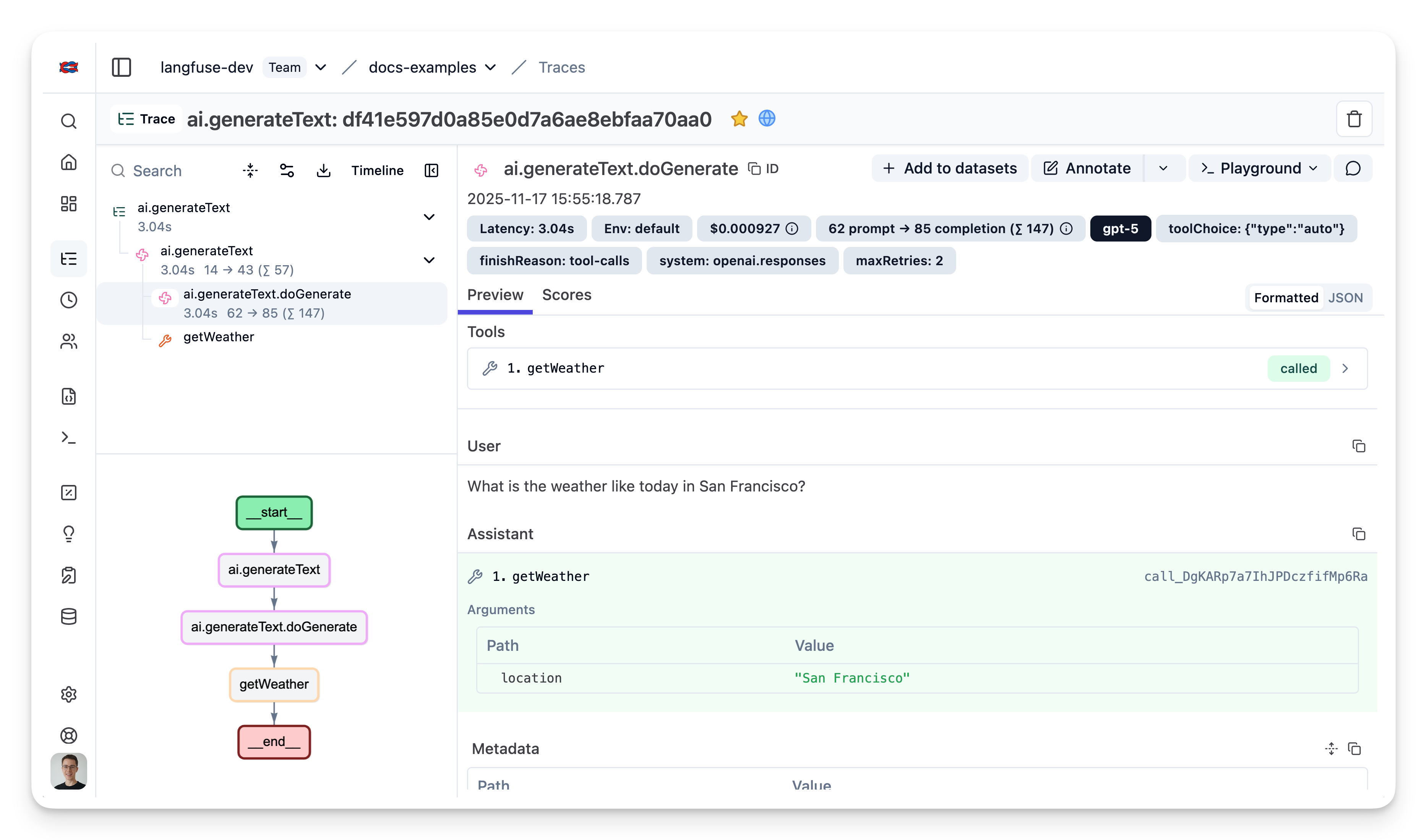
**Example Trace**: [View in Langfuse](https://cloud.langfuse.com/project/cloramnkj0002jz088vzn1ja4/traces/df41e597d0a85e0d7a6ae8ebfaa70aa0?observation=91a17a2274bfd23f×tamp=2025-11-17T14%3A55%3A18.786Z)
## Combining with Prompt Management in AI SDK v6
If you're using [Langfuse Prompt Management](/docs/prompt-management) to version and manage your prompts, it's recommended to link your prompts to traces. This allows you to see which prompt version was used for each generation, in a trace.
To link a prompt to a trace, pass the prompt metadata in the `experimental_telemetry` field:
```typescript
import { generateText } from "ai";
import { openai } from "@ai-sdk/openai";
import { LangfuseClient } from "@langfuse/client"; // Add this import
const langfuse = new LangfuseClient();
// Get current `production` version
const prompt = await langfuse.prompt.get("movie-critic");
// Insert variables into prompt template
const compiledPrompt = prompt.compile({
someVariable: "example-variable",
});
const { text } = await generateText({
model: openai("gpt-5"),
prompt: compiledPrompt,
experimental_telemetry: {
isEnabled: true,
metadata: {
langfusePrompt: prompt.toJSON() // This links the Generation to your prompt in Langfuse
},
},
});
```
Once linked, you'll see the prompt version displayed in the trace details in Langfuse.
## Setup with Next.js in AI SDK v6
For production Next.js applications, you'll need a few additional configurations to handle streaming responses properly and ensure traces are sent before serverless functions terminate.
This example shows how to:
- Set up OpenTelemetry instrumentation in Next.js (using the `instrumentation.ts` file)
- Handle streaming responses with proper span lifecycle
- Add session and user tracking to traces
- Ensure traces are flushed in serverless environments
### Setup instrumentation
Create a new file [`instrumentation.ts`](https://nextjs.org/docs/app/api-reference/file-conventions/instrumentation) in your project root. This file runs when your Next.js app starts up, initializing the OpenTelemetry setup:
```typescript
// instrumentation.ts
import { LangfuseSpanProcessor } from "@langfuse/otel";
import { NodeTracerProvider } from "@opentelemetry/sdk-trace-node";
// Default smart filter exports Langfuse + GenAI/LLM spans
export const langfuseSpanProcessor = new LangfuseSpanProcessor();
const tracerProvider = new NodeTracerProvider({
spanProcessors: [langfuseSpanProcessor],
});
tracerProvider.register();
```
If you are using Next.js, you can register the `LangfuseSpanProcessor` via
`registerOTel` from `@vercel/otel` as long as you are on `@vercel/otel` v2 or
later. [Earlier versions did not support the OpenTelemetry JS SDK
v2](https://github.com/vercel/otel/issues/154) on which the
`@langfuse/tracing` and `@langfuse/otel` packages are based; this was resolved
in `@vercel/otel` v2. The manual `NodeTracerProvider` setup shown above also
works and carries no version requirement.
### Create API route with streaming
The example below shows a chat endpoint that uses the Langfuse `observe()` wrapper to create a trace, adds session and user metadata, and properly handles streaming responses. Concretely:
- `observe()` creates a root observation around your handler
- `propagateAttributes()` adds session and user metadata for better trace organization
- `updateActiveObservation()` sets input and output on the root observation
- `forceFlush()` ensures traces are sent before the serverless function terminates
- `endOnExit: false` keeps the observation open until the streaming response completes
```typescript
// app/api/chat/route.ts
import { streamText } from "ai";
import { after } from "next/server";
import { openai } from "@ai-sdk/openai";
import {
observe,
propagateAttributes,
updateActiveObservation,
} from "@langfuse/tracing";
import { trace } from "@opentelemetry/api";
import { langfuseSpanProcessor } from "@/src/instrumentation";
const handler = async (req: Request) => {
const {
messages,
chatId,
userId,
}: { messages: UIMessage[]; chatId: string; userId: string } =
await req.json();
const inputText = messages[messages.length - 1].parts.find(
(part) => part.type === "text"
)?.text;
// Set input on the root observation
updateActiveObservation({
input: inputText,
});
// Add session and user context to the trace
await propagateAttributes(
{
traceName: "chat-message",
sessionId: chatId, // Groups related messages together
userId, // Track which user made the request
},
async () => {
const result = streamText({
model: openai("gpt-5.1"),
messages,
experimental_telemetry: {
isEnabled: true,
},
onFinish: async (result) => {
// Set final output on the root observation after stream completes
updateActiveObservation({
output: result.content,
});
// End span manually after stream has finished
trace.getActiveSpan()?.end();
},
onError: async (error) => {
updateActiveObservation({
output: error,
});
// Manually end the span since we're streaming
trace.getActiveSpan()?.end();
},
});
// Critical for serverless: flush traces before function terminates
after(async () => await langfuseSpanProcessor.forceFlush());
return result.toUIMessageStreamResponse();
}
);
};
// Wrap handler with observe() to create a Langfuse trace
export const POST = observe(handler, {
name: "handle-chat-message",
endOnExit: false, // Don't end observation until stream finishes
});
```
## Usage together with other observability tools
The Vercel AI SDK uses OpenTelemetry for tracing (instrumentation scope: `ai`). If you're also using Sentry, Datadog, or other OTEL-based tools, you may need additional configuration to avoid conflicts. See [Using Langfuse with an Existing OpenTelemetry Setup](/faq/all/existing-otel-setup).
## Interoperability with the JS/TS SDK
You can use this integration together with the Langfuse [SDKs](/docs/observability/sdk/overview) to add additional attributes or group observations into a single trace.
The [Context Manager](/docs/observability/sdk/instrumentation#context-management-with-callbacks) allows you to wrap your instrumented code using context managers (with `with` statements), which allows you to add additional attributes to the trace. Any observation created inside the callback will automatically be nested under the active observation, and the observation will be ended when the callback finishes.
```typescript
import { startActiveObservation, propagateAttributes } from "npm:@langfuse/tracing";
await startActiveObservation("context-manager", async (span) => {
span.update({
input: { query: "What is the capital of France?" },
});
// Propagate userId to all child observations
await propagateAttributes(
{
userId: "user-123",
sessionId: "session-123",
metadata: {
source: "api",
region: "us-east-1",
},
tags: ["api", "user"],
version: "1.0.0",
},
async () => {
// YOUR CODE HERE
const { text } = await generateText({
model: openai("gpt-5"),
prompt: "What is the capital of France?",
experimental_telemetry: { isEnabled: true },
});
}
);
span.update({ output: "Paris" });
});
```
Learn more about using the Context Manager in the [Langfuse SDK instrumentation docs](https://langfuse.com/docs/observability/sdk/instrumentation#context-management-with-callbacks).
The [`observe` wrapper](/docs/observability/sdk/instrumentation#observe-wrapper) is a powerful tool for tracing existing functions without modifying their internal logic. It acts as a decorator that automatically creates a span or generation around the function call. You can use the `propagateAttributes` function to add attributes to the observation from within the wrapped function.
```typescript
import { observe, propagateAttributes } from "@langfuse/tracing";
import { generateText } from "ai";
import { openai } from "@ai-sdk/openai";
// An existing function
const processUserRequest = observe(
async (userQuery: string) => {
// Propagate attributes to all child observations
return await propagateAttributes(
{
userId: "user-123",
sessionId: "session-123",
metadata: {
source: "api",
region: "us-east-1",
},
tags: ["api", "user"],
version: "1.0.0",
},
async () => {
// YOUR CODE HERE
const { text } = await generateText({
model: openai("gpt-5"),
prompt: userQuery,
experimental_telemetry: { isEnabled: true },
});
return text;
}
);
},
{ name: "process-user-request" }
);
const result = await processUserRequest("some query");
```
Learn more about using the Decorator in the [Langfuse SDK instrumentation docs](/docs/observability/sdk/instrumentation#observe-wrapper).
## Troubleshooting
No traces appearing
First, enable [debug mode](/docs/observability/sdk/advanced-features#logging--debugging) in the JS/TS SDK:
```bash
export LANGFUSE_LOG_LEVEL="DEBUG"
```
Then run your application and check the debug logs:
- **OTel spans appear in the logs:** Your application is instrumented correctly but traces are not reaching Langfuse. To resolve this:
1. Call [`forceFlush()`](/docs/observability/sdk/instrumentation#client-lifecycle--flushing) at the end of your application to ensure all traces are exported. This is especially important in short-lived environments like serverless functions.
2. Verify that you are using the correct API keys and base URL.
- **No OTel spans in the logs:** Your application is not instrumented correctly. Make sure the instrumentation runs before your application code.
Unwanted observations in Langfuse
The Langfuse SDK is based on OpenTelemetry. Other libraries in your application may emit OTel spans that are not relevant to you. These still count toward your [billable units](/docs/administration/billable-units), so you should filter them out. See [Unwanted spans in Langfuse](/faq/all/unwanted-http-database-spans) for details.
Missing attributes
Some attributes may be stored in the metadata object of the observation rather than being mapped to the Langfuse data model. If a mapping or integration does not work as expected, please [raise an issue on GitHub](/issues).
## Next Steps
Once you have instrumented your code, you can manage, evaluate and debug your application:
---
## Agent Instructions
This page is part of the [Langfuse](https://langfuse.com) documentation, published as plain Markdown for AI agents. Every page is available as Markdown by appending `.md` to its URL, or by sending an `Accept: text/markdown` header. This page: `https://langfuse.com/integrations/frameworks/vercel-ai-sdk.md`.
### Querying these docs
If the answer is not on this page, query the documentation instead of guessing:
- **Semantic search** across all Langfuse docs, returning an answer with the relevant pages and excerpts. Ask a specific, self-contained question:
```bash
curl -sG "https://langfuse.com/api/search-docs" --data-urlencode "query=How do I trace a LangGraph agent?"
```
- **Index of every page**: , with per-section indexes [llms-docs.txt](https://langfuse.com/llms-docs.txt), [llms-integrations.txt](https://langfuse.com/llms-integrations.txt), and [llms-self-hosting.txt](https://langfuse.com/llms-self-hosting.txt).
### Before writing Langfuse code
- **Install the [Langfuse Agent Skill](https://langfuse.com/docs/api-and-data-platform/features/agent-skill).** It encodes Langfuse's own best practices for instrumentation, prompt management, and evaluation, and materially improves results.
- **Read [What does a good trace look like?](https://langfuse.com/docs/observability/best-practices.md)** before instrumenting an application.
- **Verify endpoints, parameters, and response fields** against the [API reference](https://api.reference.langfuse.com) instead of inferring them from code examples.
- **Use the [Langfuse CLI](https://langfuse.com/docs/api-and-data-platform/features/cli)** (`npx langfuse-cli api `) to read or write traces, prompts, datasets, and scores from the terminal.
Found an error in these docs? Please open an issue at .