---
title: Observability for VoltAgent with Langfuse
sidebarTitle: VoltAgent
logo: /images/integrations/voltagent_icon.png
description: Learn how to integrate Langfuse with VoltAgent, a TypeScript agent framework, to monitor, debug, and analyze your AI applications.
---
# Observability for VoltAgent with Langfuse
This guide shows you how to integrate **Langfuse** with **VoltAgent** for observability and tracing. By following these steps, you'll be able to monitor and debug your VoltAgent agents in the Langfuse dashboard.
> **What is VoltAgent?** [VoltAgent](https://github.com/voltagent/voltagent) is an open-source TypeScript framework that acts as this essential toolkit. It simplifies the development of AI agent applications by providing modular building blocks, standardized patterns, and abstractions. Whether you're creating chatbots, virtual assistants, automated workflows, or complex multi-agent systems, VoltAgent handles the underlying complexity, allowing you to focus on defining your agents' capabilities and logic.
## Integration
### Create a VoltAgent project
If you don't have a VoltAgent project yet, you can create one using the VoltAgent CLI:
```bash
npm create voltagent-app@latest
```
Move into the project directory:
```bash
cd my-voltagent-app
```
You can get the full VoltAgent installation instructions [here](https://voltagent.dev/docs/quick-start/)
### Set up Langfuse project
Create a project in [Langfuse](https://cloud.langfuse.com) and get your API keys from the project settings page.
### Add environment variables
Create or update your `.env.development` file with the following variables:
```bash
# Your LLM API key
OPENAI_API_KEY=your-api-key
# Langfuse credentials
LANGFUSE_SECRET_KEY=sk-lf-...
LANGFUSE_PUBLIC_KEY=pk-lf-...
LANGFUSE_BASE_URL=https://cloud.langfuse.com # Optional. Defaults to https://cloud.langfuse.com
```
### Install the `@voltagent/langfuse-exporter` package
Add the `@voltagent/langfuse-exporter` package to your project:
```bash
npm install @voltagent/langfuse-exporter
```
### Configure Langfuse Exporter
Modify your main application file (e.g., `index.ts` where `VoltAgent` is initialized) to import `LangfuseExporter` and configure it within the `VoltAgent` options:
```typescript
import { VoltAgent, Agent } from "@voltagent/core";
import { VercelAIProvider } from "@voltagent/vercel-ai";
import { openai } from "@ai-sdk/openai";
import { LangfuseExporter } from "@voltagent/langfuse-exporter";
const langfuseExporter = new LangfuseExporter({
publicKey: process.env.LANGFUSE_PUBLIC_KEY,
secretKey: process.env.LANGFUSE_SECRET_KEY,
baseUrl: process.env.LANGFUSE_BASE_URL,
});
const agent = new Agent({
name: "my-voltagent-app",
description: "A helpful assistant that answers questions without using tools",
llm: new VercelAIProvider(),
model: openai("gpt-4o-mini"),
});
new VoltAgent({
agents: {
agent,
},
telemetryExporter: langfuseExporter,
});
```
Ensure your agent definition (`new Agent({...})`) and the `VoltAgent` instantiation (`new VoltAgent({...})`) match your project structure. The key change is adding the `LangfuseExporter` and the `telemetryExporter` option.
### Run your VoltAgent application
Start the VoltAgent development server or run your application as usual:
```bash
npm run dev
```
When you run the `dev` command, `tsx` will compile and run your code. You should see the VoltAgent server startup message in your terminal:
```bash
══════════════════════════════════════════════════
VOLTAGENT SERVER STARTED SUCCESSFULLY
══════════════════════════════════════════════════
✓ HTTP Server: http://localhost:3141
Developer Console: https://console.voltagent.dev
══════════════════════════════════════════════════
[VoltAgent] All packages are up to date
```
Your agent is now running! To interact with it:
1. **Open the Console:** Click the [`https://console.voltagent.dev`](https://console.voltagent.dev) link in your terminal output (or copy-paste it into your browser).
2. **Find Your Agent:** On the VoltAgent Console page, you should see your agent listed (e.g., "my-agent").
3. **Open Agent Details:** Click on your agent's name.
4. **Start Chatting:** On the agent detail page, click the chat icon in the bottom right corner to open the chat window.
5. **Send a Message:** Type a message like "Hello" and press Enter.
### View traces in Langfuse
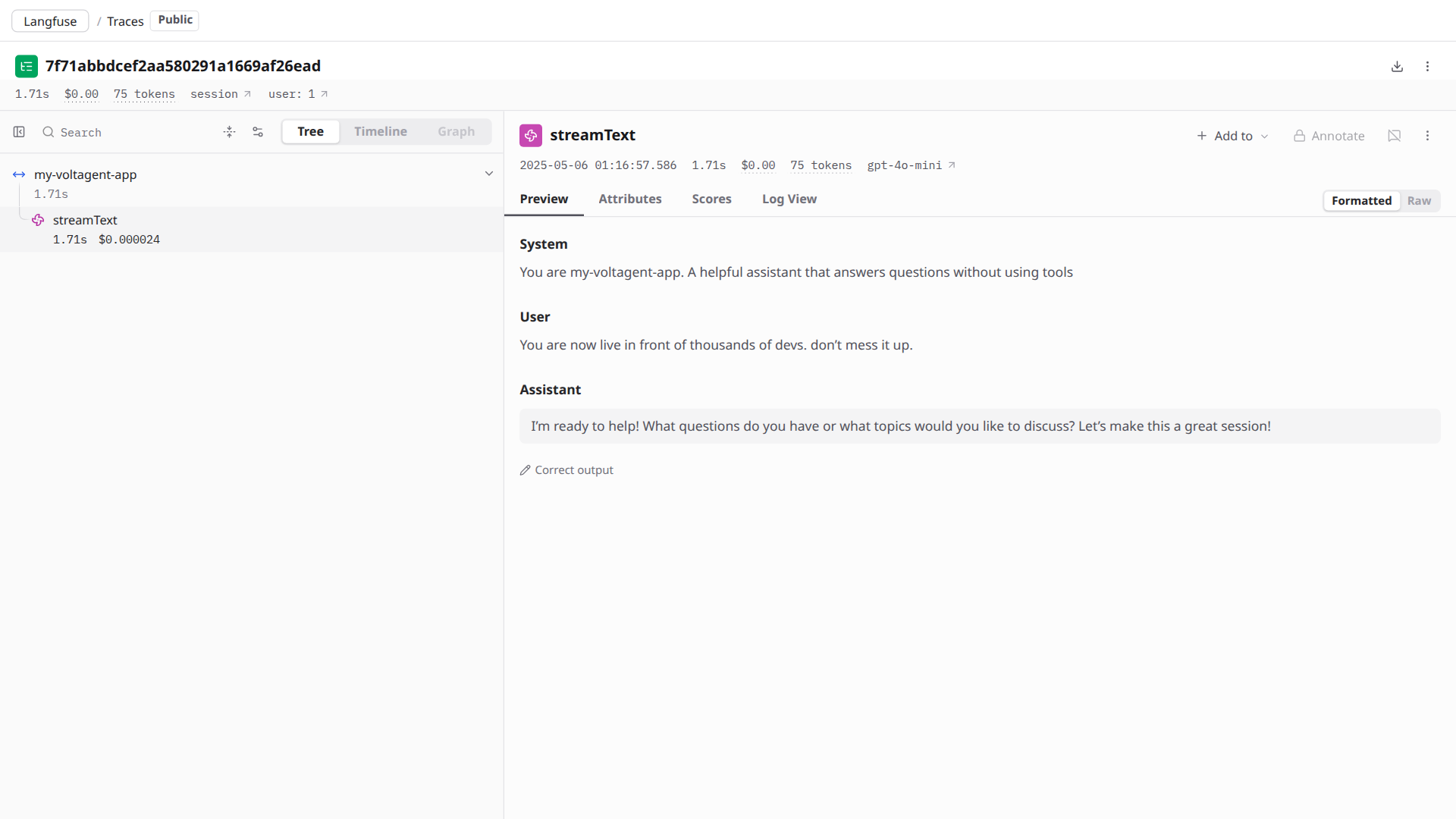
Head over to your [Langfuse dashboard](https://cloud.langfuse.com) and you'll see the traces from your agent interactions. You can analyze the prompts, completions, and other details of your AI interactions.
Here's an example of a trace:
## References
- [VoltAgent Project Repository](https://github.com/voltagent/voltagent)
- [VoltAgent Documentation](https://voltagent.dev/docs/)
- [Langfuse Documentation](https://langfuse.com/docs)
- [@voltagent/langfuse-exporter package](https://www.npmjs.com/package/@voltagent/langfuse-exporter)
---
## Agent Instructions
This page is part of the [Langfuse](https://langfuse.com) documentation, published as plain Markdown for AI agents. Every page is available as Markdown by appending `.md` to its URL, or by sending an `Accept: text/markdown` header. This page: `https://langfuse.com/integrations/frameworks/voltagent.md`.
### Querying these docs
If the answer is not on this page, query the documentation instead of guessing:
- **Semantic search** across all Langfuse docs, returning an answer with the relevant pages and excerpts. Ask a specific, self-contained question:
```bash
curl -sG "https://langfuse.com/api/search-docs" --data-urlencode "query=How do I trace a LangGraph agent?"
```
- **Index of every page**: , with per-section indexes [llms-docs.txt](https://langfuse.com/llms-docs.txt), [llms-integrations.txt](https://langfuse.com/llms-integrations.txt), and [llms-self-hosting.txt](https://langfuse.com/llms-self-hosting.txt).
### Before writing Langfuse code
- **Install the [Langfuse Agent Skill](https://langfuse.com/docs/api-and-data-platform/features/agent-skill).** It encodes Langfuse's own best practices for instrumentation, prompt management, and evaluation, and materially improves results.
- **Read [What does a good trace look like?](https://langfuse.com/docs/observability/best-practices.md)** before instrumenting an application.
- **Verify endpoints, parameters, and response fields** against the [API reference](https://api.reference.langfuse.com) instead of inferring them from code examples.
- **Use the [Langfuse CLI](https://langfuse.com/docs/api-and-data-platform/features/cli)** (`npx langfuse-cli api `) to read or write traces, prompts, datasets, and scores from the terminal.
Found an error in these docs? Please open an issue at .