---
title: "Amazon Bedrock Integration"
sidebarTitle: Amazon Bedrock
category: Integrations
seoTitle: Open Source Observability and Metrics for Amazon Bedrock
description: Open source observability for Amazon Bedrock applications and the Bedrock SDK.
logo: /images/integrations/bedrock_icon.png
---
# Amazon Bedrock Integration
[**Amazon Bedrock**](https://aws.amazon.com/bedrock/) is a fully managed AWS service that lets you use foundation models and custom models to generate text, images, and audio.
When **using Langfuse with Amazon Bedrock**, you can easily capture [detailed traces](https://langfuse.com/docs/tracing) and metrics for every request, giving you insights into the performance and behavior of your application.
All in-ui Langfuse features next to tracing (playground, llm-as-a-judge evaluation, prompt experiments) are fully compatible with Amazon Bedrock – just add your Bedrock configuration in the project settings.
## Integration Options
There are a few ways through which you can capture traces and metrics for Amazon Bedrock:
1. via an application framework that is integrated with Langfuse:
- [Langchain](https://langfuse.com/integrations/frameworks/langchain)
- [Llama Index](https://langfuse.com/integrations/frameworks/llamaindex)
- [Haystack](https://langfuse.com/integrations/frameworks/haystack)
- [Vercel AI SDK](https://langfuse.com/integrations/frameworks/vercel-ai-sdk)
2. via a Proxy such as [LiteLLM](https://langfuse.com/integrations/gateways/litellm)
3. via wrapping the Bedrock SDK with the [Langfuse Decorator](https://langfuse.com/docs/sdk/python/decorators) (_see example below_)
## How to wrap Amazon Bedrock SDK (Converse API)
```python
# install requirements
%pip install boto3 langfuse awscli --quiet
```
### Authenticate AWS Session
Sign in with your AWS Role that has access to Amazon Bedrock.
```python
AWS_ACCESS_KEY_ID="***"
AWS_SECRET_ACCESS_KEY="***"
AWS_SESSION_TOKEN="***"
import boto3
# used to access Bedrock configuration
bedrock = boto3.client(
service_name="bedrock",
region_name="eu-west-1",
aws_access_key_id=AWS_ACCESS_KEY_ID,
aws_secret_access_key=AWS_SECRET_ACCESS_KEY,
aws_session_token=AWS_SESSION_TOKEN
)
# used to invoke the Bedrock Converse API
bedrock_runtime = boto3.client(
service_name="bedrock-runtime",
region_name="eu-west-1",
aws_access_key_id=AWS_ACCESS_KEY_ID,
aws_secret_access_key=AWS_SECRET_ACCESS_KEY,
aws_session_token=AWS_SESSION_TOKEN
)
```
```python
# Check which models are available in your account
models = bedrock.list_inference_profiles()
for model in models["inferenceProfileSummaries"]:
print(model["inferenceProfileName"] + " - " + model["inferenceProfileId"])
```
EU Anthropic Claude 3 Sonnet - eu.anthropic.claude-3-sonnet-20240229-v1:0
EU Anthropic Claude 3 Haiku - eu.anthropic.claude-3-haiku-20240307-v1:0
EU Anthropic Claude 3.5 Sonnet - eu.anthropic.claude-3-5-sonnet-20240620-v1:0
EU Meta Llama 3.2 3B Instruct - eu.meta.llama3-2-3b-instruct-v1:0
EU Meta Llama 3.2 1B Instruct - eu.meta.llama3-2-1b-instruct-v1:0
### Set Langfuse Credentials
```python
import os
# Get keys for your project from the project settings page
# https://cloud.langfuse.com
os.environ.setdefault("LANGFUSE_PUBLIC_KEY", "");
os.environ.setdefault("LANGFUSE_SECRET_KEY", "");
os.environ.setdefault("LANGFUSE_BASE_URL", "https://cloud.langfuse.com"); # 🇪🇺 EU region
# Other Langfuse data regions include 🇺🇸 US: https://us.cloud.langfuse.com, 🇯🇵 Japan: https://jp.cloud.langfuse.com and ⚕️ HIPAA: https://hipaa.cloud.langfuse.com
# Your openai key
os.environ.setdefault("OPENAI_API_KEY", "");
```
With the environment variables set, we can now initialize the Langfuse client. `get_client()` initializes the Langfuse client using the credentials provided in the environment variables.
```python
from langfuse import get_client
langfuse = get_client()
# Verify connection
if langfuse.auth_check():
print("Langfuse client is authenticated and ready!")
else:
print("Authentication failed. Please check your credentials and host.")
```
### Wrap Bedrock SDK
```python
from langfuse import observe
from botocore.exceptions import ClientError
@observe(as_type="generation", name="Bedrock Converse")
def wrapped_bedrock_converse(**kwargs):
# 1. extract model metadata
kwargs_clone = kwargs.copy()
input = kwargs_clone.pop('messages', None)
modelId = kwargs_clone.pop('modelId', None)
model_parameters = {
**kwargs_clone.pop('inferenceConfig', {}),
**kwargs_clone.pop('additionalModelRequestFields', {})
}
langfuse.update_current_generation(
input=input,
model=modelId,
model_parameters=model_parameters,
metadata=kwargs_clone
)
# 2. model call with error handling
try:
response = bedrock_runtime.converse(**kwargs)
except (ClientError, Exception) as e:
error_message = f"ERROR: Can't invoke '{modelId}'. Reason: {e}"
langfuse.update_current_generation(level="ERROR", status_message=error_message)
print(error_message)
return
# 3. extract response metadata
response_text = response["output"]["message"]["content"][0]["text"]
langfuse.update_current_generation(
output=response_text,
usage_details={
"input": response["usage"]["inputTokens"],
"output": response["usage"]["outputTokens"],
"total": response["usage"]["totalTokens"]
},
metadata={
"ResponseMetadata": response["ResponseMetadata"],
}
)
return response_text
```
### Run Example
```python
# Converesation according to AWS spec including prompting + history
user_message = """You will be acting as an AI personal finance advisor named Alex, created by the company SmartFinance Advisors. Your goal is to provide financial advice and guidance to users. You will be replying to users who are on the SmartFinance Advisors site and who will be confused if you don't respond in the character of Alex.
Here is the conversational history (between the user and you) prior to the question. It could be empty if there is no history:
User: Hi Alex, I'm really looking forward to your advice!
Alex: Hello! I'm Alex, your AI personal finance advisor from SmartFinance Advisors. How can I assist you with your financial goals today?
Here are some important rules for the interaction:
- Always stay in character, as Alex, an AI from SmartFinance Advisors.
- If you are unsure how to respond, say "I'm sorry, I didn't quite catch that. Could you please rephrase your question?"
"""
conversation = [
{
"role": "user",
"content": [{"text": user_message}],
}
]
@observe()
def examples_bedrock_converse_api():
responses = {}
responses["anthropic"] = wrapped_bedrock_converse(
modelId="eu.anthropic.claude-3-5-sonnet-20240620-v1:0",
messages=conversation,
inferenceConfig={"maxTokens":500,"temperature":1},
additionalModelRequestFields={"top_k":250}
)
responses["llama3-2"] = wrapped_bedrock_converse(
modelId="eu.meta.llama3-2-3b-instruct-v1:0",
messages=conversation,
inferenceConfig={"maxTokens":500,"temperature":1},
)
return responses
res = examples_bedrock_converse_api()
for key, value in res.items():
print(f"{key.title()}\n{value}\n")
```
Anthropic
Understood. I'll continue to act as Alex, the AI personal finance advisor from SmartFinance Advisors, maintaining that character throughout our interaction. I'll provide financial advice and guidance based on the user's questions and needs. If I'm unsure about something, I'll ask for clarification as instructed. How may I assist you with your financial matters today?
Llama3-2
Hello again! I'm glad you're excited about receiving my advice. How can I assist you with your financial goals today? Are you looking to create a budget, paying off debt, saving for a specific goal, or something else entirely?
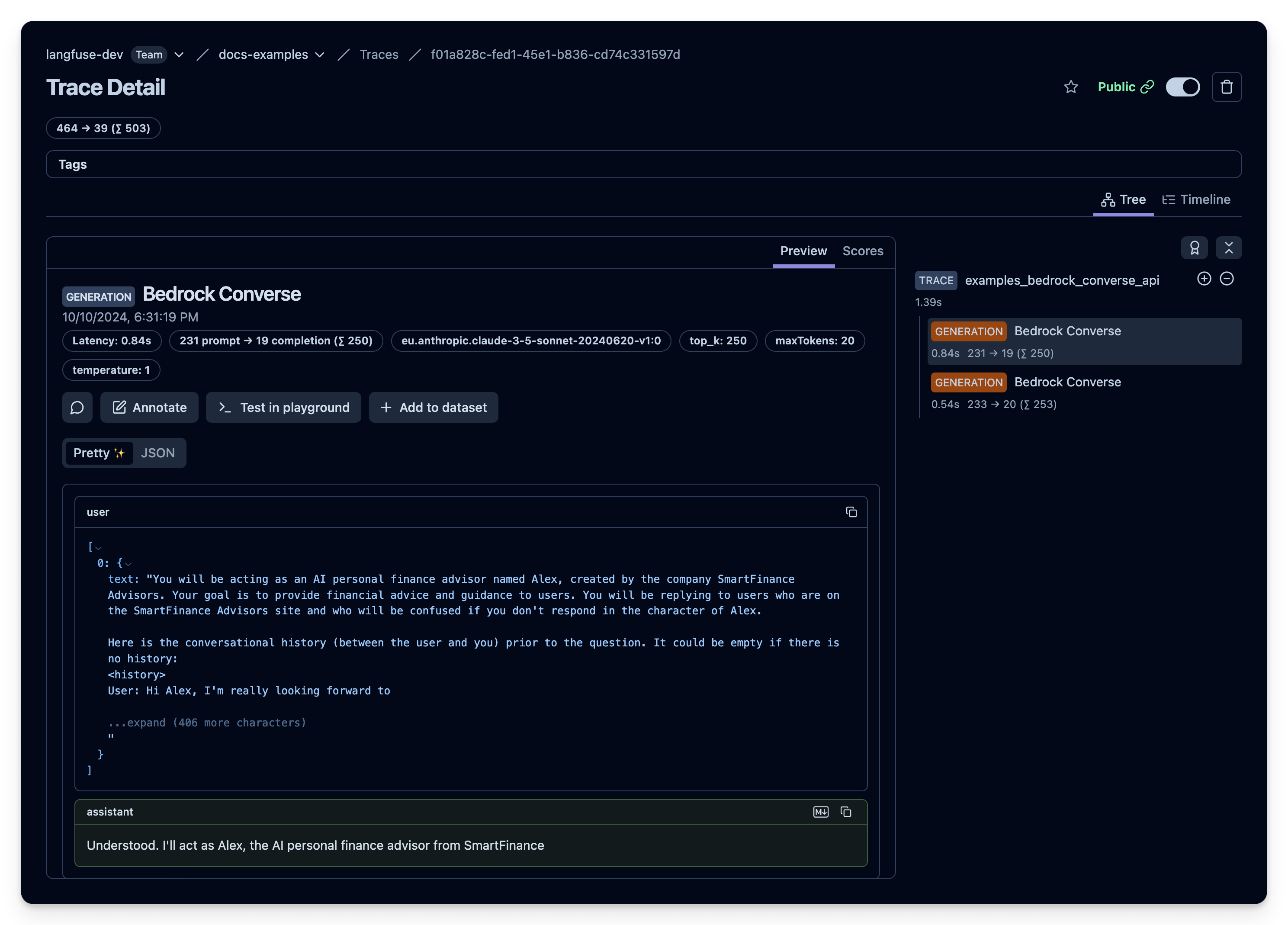
Example trace: https://cloud.langfuse.com/project/cloramnkj0002jz088vzn1ja4/traces/f01a828c-fed1-45e1-b836-cd74c331597d?observation=512a4d7f-5a6c-461e-bd8f-76f6bdcc91fd
## Can I monitor Amazon Bedrock cost and token usage in Langfuse?
Yes, you can monitor cost and token usage of your Bedrock calls in Langfuse. The native integrations with LLM application frameworks and the LiteLLM proxy will automatically report token usage to Langfuse.
If you use the [Langfuse Decorator or Context Manager](https://langfuse.com/docs/sdk/python/sdk-v3), you can [report](https://langfuse.com/docs/model-usage-and-cost) token usage and (optionally) also cost information directly. See example above for details.
You can define custom price information via the Langfuse dashboard or UI ([see docs](https://langfuse.com/docs/model-usage-and-cost)) to adjust to the exact pricing of your models on Amazon Bedrock.
## Additional Resources
- [langfuse-genaiops Notebook](https://github.com/aws-samples/genai-ml-platform-examples/blob/main/integration/langfuse/langfuse-genaiops.ipynb) maintained by the AWS team including a collection of AWS-specific examples.
- [Self-hosting guide](https://langfuse.com/self-hosting) to deploy Langfuse on AWS.
---
## Agent Instructions
This page is part of the [Langfuse](https://langfuse.com) documentation, published as plain Markdown for AI agents. Every page is available as Markdown by appending `.md` to its URL, or by sending an `Accept: text/markdown` header. This page: `https://langfuse.com/integrations/model-providers/amazon-bedrock.md`.
### Querying these docs
If the answer is not on this page, query the documentation instead of guessing:
- **Semantic search** across all Langfuse docs, returning an answer with the relevant pages and excerpts. Ask a specific, self-contained question:
```bash
curl -sG "https://langfuse.com/api/search-docs" --data-urlencode "query=How do I trace a LangGraph agent?"
```
- **Index of every page**: , with per-section indexes [llms-docs.txt](https://langfuse.com/llms-docs.txt), [llms-integrations.txt](https://langfuse.com/llms-integrations.txt), and [llms-self-hosting.txt](https://langfuse.com/llms-self-hosting.txt).
### Before writing Langfuse code
- **Install the [Langfuse Agent Skill](https://langfuse.com/docs/api-and-data-platform/features/agent-skill).** It encodes Langfuse's own best practices for instrumentation, prompt management, and evaluation, and materially improves results.
- **Read [What does a good trace look like?](https://langfuse.com/docs/observability/best-practices.md)** before instrumenting an application.
- **Verify endpoints, parameters, and response fields** against the [API reference](https://api.reference.langfuse.com) instead of inferring them from code examples.
- **Use the [Langfuse CLI](https://langfuse.com/docs/api-and-data-platform/features/cli)** (`npx langfuse-cli api `) to read or write traces, prompts, datasets, and scores from the terminal.
Found an error in these docs? Please open an issue at .