---
source: ⚠️ Jupyter Notebook
title: Observability for Anthropic JS/TS with Langfuse
sidebarTitle: Anthropic (JS/TS)
logo: /images/integrations/anthropic_icon.png
logoAppearance: dark
description: Learn how to integrate Langfuse with the Anthropic JS/TS SDK for tracing and debugging of your AI applications.
category: Integrations
---
# Trace Anthropic JS/TS with Langfuse

 Anthropic provides advanced language models like Claude, known for their safety, helpfulness, and strong reasoning capabilities. By combining Anthropic's JS/TS SDK with **Langfuse**, you can trace, monitor, and analyze your AI workloads in development and production.
This notebook demonstrates how to use the [`AnthropicInstrumentation`](https://github.com/Arize-ai/openinference/tree/main/js/packages/openinference-instrumentation-anthropic) library from [OpenInference](https://github.com/Arize-ai/openinference) to automatically instrument Anthropic SDK calls and send OpenTelemetry spans to Langfuse.
> **What is Anthropic?**\
> Anthropic is an AI safety company that develops Claude, a family of large language models designed to be helpful, harmless, and honest. Claude models excel at complex reasoning, analysis, and creative tasks.
> **What is Langfuse?**\
> [Langfuse](https://langfuse.com) is an open source platform for LLM observability and monitoring. It helps you trace and monitor your AI applications by capturing metadata, prompt details, token usage, latency, and more.
## Step 1: Install Dependencies
Install the necessary packages:
```bash
npm install @anthropic-ai/sdk @arizeai/openinference-instrumentation-anthropic @langfuse/otel @opentelemetry/sdk-node
```
> **Note**: This cookbook uses **Deno.js** for execution, which requires different syntax for importing packages and setting environment variables. For Node.js applications, the setup process is similar but uses standard `npm` packages and `process.env`.
## Step 2: Configure Environment
Set up your Langfuse and Anthropic API keys. You can get Langfuse keys by signing up for a free [Langfuse Cloud](https://langfuse.com/cloud) account or by [self-hosting Langfuse](https://langfuse.com/self-hosting). Get your Anthropic API key from the [Anthropic Console](https://console.anthropic.com/).
```typescript
// Set environment variables using Deno-specific syntax
Deno.env.set("ANTHROPIC_API_KEY", "sk-ant-...");
// Langfuse authentication keys
Deno.env.set("LANGFUSE_PUBLIC_KEY", "pk-lf-...");
Deno.env.set("LANGFUSE_SECRET_KEY", "sk-lf-...");
// Langfuse host configuration
Deno.env.set("LANGFUSE_BASE_URL", "https://cloud.langfuse.com"); // 🇪🇺 EU region
// Other Langfuse data regions include 🇺🇸 US: https://us.cloud.langfuse.com, 🇯🇵 Japan: https://jp.cloud.langfuse.com and ⚕️ HIPAA: https://hipaa.cloud.langfuse.com
```
## Step 3: Initialize OpenTelemetry with Langfuse
Set up the OpenTelemetry SDK with the `LangfuseSpanProcessor` and the [`AnthropicInstrumentation`](https://github.com/Arize-ai/openinference/tree/main/js/packages/openinference-instrumentation-anthropic) from OpenInference. The instrumentation automatically captures Anthropic SDK calls and sends them as OpenTelemetry spans to Langfuse.
```typescript
import { NodeSDK } from "npm:@opentelemetry/sdk-node";
import { LangfuseSpanProcessor } from "npm:@langfuse/otel";
import { AnthropicInstrumentation } from "npm:@arizeai/openinference-instrumentation-anthropic";
import Anthropic from "npm:@anthropic-ai/sdk";
// Configure the instrumentation for the Anthropic SDK
const instrumentation = new AnthropicInstrumentation();
instrumentation.manuallyInstrument(Anthropic);
// Initialize the OpenTelemetry SDK with Langfuse as the span processor
const sdk = new NodeSDK({
spanProcessors: [new LangfuseSpanProcessor()],
instrumentations: [instrumentation],
});
sdk.start();
```
## Step 4: Use the Anthropic SDK
Now use the Anthropic SDK as you normally would. All calls are automatically traced and sent to Langfuse.
```typescript
const anthropic = new Anthropic();
const message = await anthropic.messages.create({
model: "claude-haiku-4-5",
max_tokens: 1000,
messages: [{ role: "user", content: "Hello, Claude!" }],
});
console.log(message.content);
await sdk.shutdown();
```
### View Traces in Langfuse
After running the application, navigate to your Langfuse Trace Table. You will find detailed traces of the application's execution, providing insights into the LLM calls, inputs, outputs, and performance metrics.
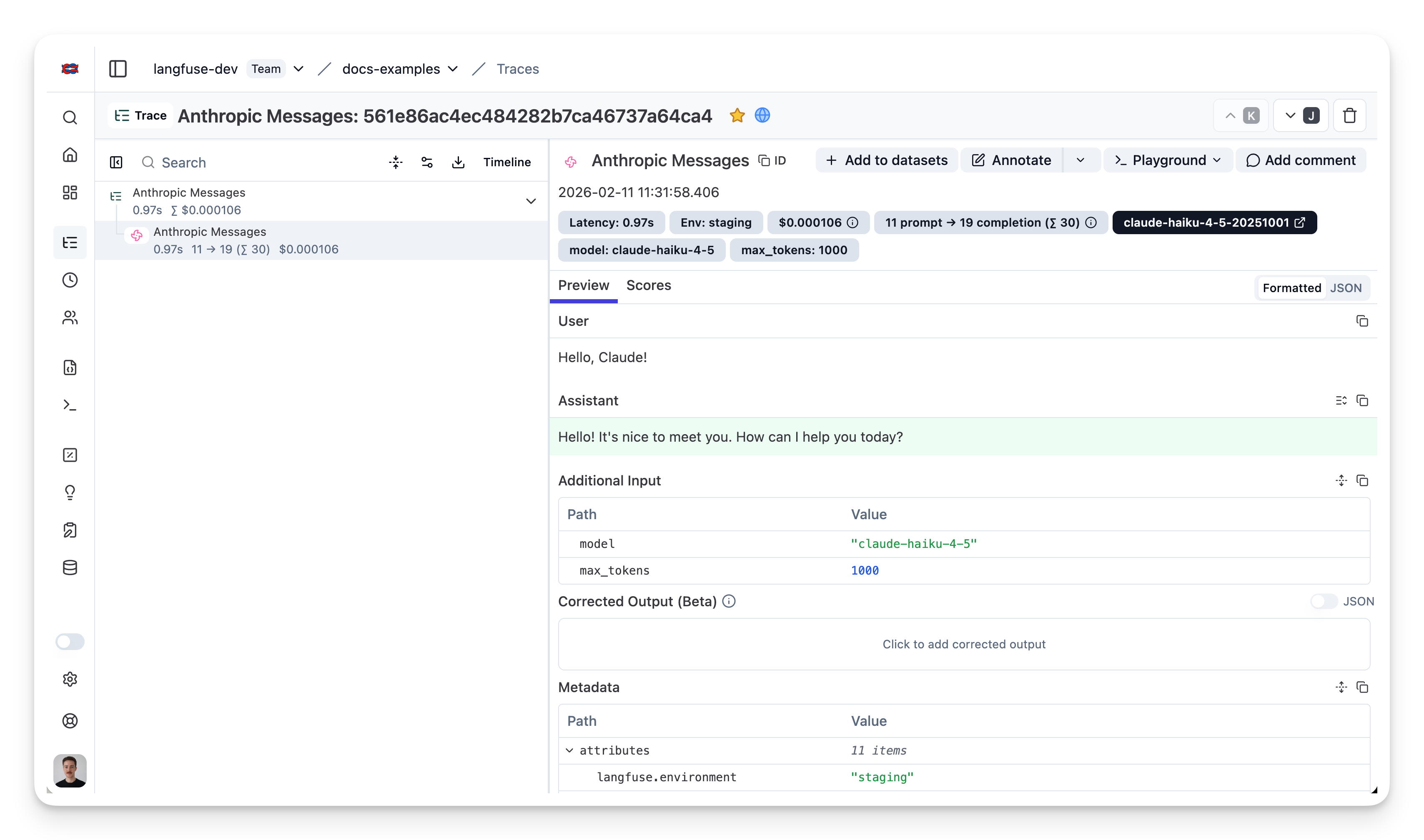
[Example trace in the Langfuse UI](https://cloud.langfuse.com/project/cloramnkj0002jz088vzn1ja4/traces/561e86ac4ec484282b7ca46737a64ca4?observation=0c936de60ccf69b9×tamp=2026-02-11T10:31:58.406Z)
## Interoperability with the JS/TS SDK
You can use this integration together with the Langfuse [SDKs](/docs/observability/sdk/overview) to add additional attributes or group observations into a single trace.
The [Context Manager](/docs/observability/sdk/instrumentation#context-management-with-callbacks) allows you to wrap your instrumented code using context managers (with `with` statements), which allows you to add additional attributes to the trace. Any observation created inside the callback will automatically be nested under the active observation, and the observation will be ended when the callback finishes.
```typescript
import { startActiveObservation, propagateAttributes } from "npm:@langfuse/tracing";
await startActiveObservation("context-manager", async (span) => {
span.update({
input: { query: "What is the capital of France?" },
});
// Propagate userId to all child observations
await propagateAttributes(
{
userId: "user-123",
sessionId: "session-123",
metadata: {
source: "api",
region: "us-east-1",
},
tags: ["api", "user"],
version: "1.0.0",
},
async () => {
// YOUR CODE HERE
const { text } = await generateText({
model: openai("gpt-5"),
prompt: "What is the capital of France?",
experimental_telemetry: { isEnabled: true },
});
}
);
span.update({ output: "Paris" });
});
```
Learn more about using the Context Manager in the [Langfuse SDK instrumentation docs](https://langfuse.com/docs/observability/sdk/instrumentation#context-management-with-callbacks).
The [`observe` wrapper](/docs/observability/sdk/instrumentation#observe-wrapper) is a powerful tool for tracing existing functions without modifying their internal logic. It acts as a decorator that automatically creates a span or generation around the function call. You can use the `propagateAttributes` function to add attributes to the observation from within the wrapped function.
```typescript
import { observe, propagateAttributes } from "@langfuse/tracing";
import { generateText } from "ai";
import { openai } from "@ai-sdk/openai";
// An existing function
const processUserRequest = observe(
async (userQuery: string) => {
// Propagate attributes to all child observations
return await propagateAttributes(
{
userId: "user-123",
sessionId: "session-123",
metadata: {
source: "api",
region: "us-east-1",
},
tags: ["api", "user"],
version: "1.0.0",
},
async () => {
// YOUR CODE HERE
const { text } = await generateText({
model: openai("gpt-5"),
prompt: userQuery,
experimental_telemetry: { isEnabled: true },
});
return text;
}
);
},
{ name: "process-user-request" }
);
const result = await processUserRequest("some query");
```
Learn more about using the Decorator in the [Langfuse SDK instrumentation docs](/docs/observability/sdk/instrumentation#observe-wrapper).
## Troubleshooting
Anthropic provides advanced language models like Claude, known for their safety, helpfulness, and strong reasoning capabilities. By combining Anthropic's JS/TS SDK with **Langfuse**, you can trace, monitor, and analyze your AI workloads in development and production.
This notebook demonstrates how to use the [`AnthropicInstrumentation`](https://github.com/Arize-ai/openinference/tree/main/js/packages/openinference-instrumentation-anthropic) library from [OpenInference](https://github.com/Arize-ai/openinference) to automatically instrument Anthropic SDK calls and send OpenTelemetry spans to Langfuse.
> **What is Anthropic?**\
> Anthropic is an AI safety company that develops Claude, a family of large language models designed to be helpful, harmless, and honest. Claude models excel at complex reasoning, analysis, and creative tasks.
> **What is Langfuse?**\
> [Langfuse](https://langfuse.com) is an open source platform for LLM observability and monitoring. It helps you trace and monitor your AI applications by capturing metadata, prompt details, token usage, latency, and more.
## Step 1: Install Dependencies
Install the necessary packages:
```bash
npm install @anthropic-ai/sdk @arizeai/openinference-instrumentation-anthropic @langfuse/otel @opentelemetry/sdk-node
```
> **Note**: This cookbook uses **Deno.js** for execution, which requires different syntax for importing packages and setting environment variables. For Node.js applications, the setup process is similar but uses standard `npm` packages and `process.env`.
## Step 2: Configure Environment
Set up your Langfuse and Anthropic API keys. You can get Langfuse keys by signing up for a free [Langfuse Cloud](https://langfuse.com/cloud) account or by [self-hosting Langfuse](https://langfuse.com/self-hosting). Get your Anthropic API key from the [Anthropic Console](https://console.anthropic.com/).
```typescript
// Set environment variables using Deno-specific syntax
Deno.env.set("ANTHROPIC_API_KEY", "sk-ant-...");
// Langfuse authentication keys
Deno.env.set("LANGFUSE_PUBLIC_KEY", "pk-lf-...");
Deno.env.set("LANGFUSE_SECRET_KEY", "sk-lf-...");
// Langfuse host configuration
Deno.env.set("LANGFUSE_BASE_URL", "https://cloud.langfuse.com"); // 🇪🇺 EU region
// Other Langfuse data regions include 🇺🇸 US: https://us.cloud.langfuse.com, 🇯🇵 Japan: https://jp.cloud.langfuse.com and ⚕️ HIPAA: https://hipaa.cloud.langfuse.com
```
## Step 3: Initialize OpenTelemetry with Langfuse
Set up the OpenTelemetry SDK with the `LangfuseSpanProcessor` and the [`AnthropicInstrumentation`](https://github.com/Arize-ai/openinference/tree/main/js/packages/openinference-instrumentation-anthropic) from OpenInference. The instrumentation automatically captures Anthropic SDK calls and sends them as OpenTelemetry spans to Langfuse.
```typescript
import { NodeSDK } from "npm:@opentelemetry/sdk-node";
import { LangfuseSpanProcessor } from "npm:@langfuse/otel";
import { AnthropicInstrumentation } from "npm:@arizeai/openinference-instrumentation-anthropic";
import Anthropic from "npm:@anthropic-ai/sdk";
// Configure the instrumentation for the Anthropic SDK
const instrumentation = new AnthropicInstrumentation();
instrumentation.manuallyInstrument(Anthropic);
// Initialize the OpenTelemetry SDK with Langfuse as the span processor
const sdk = new NodeSDK({
spanProcessors: [new LangfuseSpanProcessor()],
instrumentations: [instrumentation],
});
sdk.start();
```
## Step 4: Use the Anthropic SDK
Now use the Anthropic SDK as you normally would. All calls are automatically traced and sent to Langfuse.
```typescript
const anthropic = new Anthropic();
const message = await anthropic.messages.create({
model: "claude-haiku-4-5",
max_tokens: 1000,
messages: [{ role: "user", content: "Hello, Claude!" }],
});
console.log(message.content);
await sdk.shutdown();
```
### View Traces in Langfuse
After running the application, navigate to your Langfuse Trace Table. You will find detailed traces of the application's execution, providing insights into the LLM calls, inputs, outputs, and performance metrics.

[Example trace in the Langfuse UI](https://cloud.langfuse.com/project/cloramnkj0002jz088vzn1ja4/traces/561e86ac4ec484282b7ca46737a64ca4?observation=0c936de60ccf69b9×tamp=2026-02-11T10:31:58.406Z)
## Interoperability with the JS/TS SDK
You can use this integration together with the Langfuse [SDKs](/docs/observability/sdk/overview) to add additional attributes or group observations into a single trace.
The [Context Manager](/docs/observability/sdk/instrumentation#context-management-with-callbacks) allows you to wrap your instrumented code using context managers (with `with` statements), which allows you to add additional attributes to the trace. Any observation created inside the callback will automatically be nested under the active observation, and the observation will be ended when the callback finishes.
```typescript
import { startActiveObservation, propagateAttributes } from "npm:@langfuse/tracing";
await startActiveObservation("context-manager", async (span) => {
span.update({
input: { query: "What is the capital of France?" },
});
// Propagate userId to all child observations
await propagateAttributes(
{
userId: "user-123",
sessionId: "session-123",
metadata: {
source: "api",
region: "us-east-1",
},
tags: ["api", "user"],
version: "1.0.0",
},
async () => {
// YOUR CODE HERE
const { text } = await generateText({
model: openai("gpt-5"),
prompt: "What is the capital of France?",
experimental_telemetry: { isEnabled: true },
});
}
);
span.update({ output: "Paris" });
});
```
Learn more about using the Context Manager in the [Langfuse SDK instrumentation docs](https://langfuse.com/docs/observability/sdk/instrumentation#context-management-with-callbacks).
The [`observe` wrapper](/docs/observability/sdk/instrumentation#observe-wrapper) is a powerful tool for tracing existing functions without modifying their internal logic. It acts as a decorator that automatically creates a span or generation around the function call. You can use the `propagateAttributes` function to add attributes to the observation from within the wrapped function.
```typescript
import { observe, propagateAttributes } from "@langfuse/tracing";
import { generateText } from "ai";
import { openai } from "@ai-sdk/openai";
// An existing function
const processUserRequest = observe(
async (userQuery: string) => {
// Propagate attributes to all child observations
return await propagateAttributes(
{
userId: "user-123",
sessionId: "session-123",
metadata: {
source: "api",
region: "us-east-1",
},
tags: ["api", "user"],
version: "1.0.0",
},
async () => {
// YOUR CODE HERE
const { text } = await generateText({
model: openai("gpt-5"),
prompt: userQuery,
experimental_telemetry: { isEnabled: true },
});
return text;
}
);
},
{ name: "process-user-request" }
);
const result = await processUserRequest("some query");
```
Learn more about using the Decorator in the [Langfuse SDK instrumentation docs](/docs/observability/sdk/instrumentation#observe-wrapper).
## Troubleshooting
No traces appearing
First, enable [debug mode](/docs/observability/sdk/advanced-features#logging--debugging) in the JS/TS SDK:
```bash
export LANGFUSE_LOG_LEVEL="DEBUG"
```
Then run your application and check the debug logs:
- **OTel spans appear in the logs:** Your application is instrumented correctly but traces are not reaching Langfuse. To resolve this:
1. Call [`forceFlush()`](/docs/observability/sdk/instrumentation#client-lifecycle--flushing) at the end of your application to ensure all traces are exported. This is especially important in short-lived environments like serverless functions.
2. Verify that you are using the correct API keys and base URL.
- **No OTel spans in the logs:** Your application is not instrumented correctly. Make sure the instrumentation runs before your application code.
Unwanted observations in Langfuse
The Langfuse SDK is based on OpenTelemetry. Other libraries in your application may emit OTel spans that are not relevant to you. These still count toward your [billable units](/docs/administration/billable-units), so you should filter them out. See [Unwanted spans in Langfuse](/faq/all/unwanted-http-database-spans) for details.
Missing attributes
Some attributes may be stored in the metadata object of the observation rather than being mapped to the Langfuse data model. If a mapping or integration does not work as expected, please [raise an issue on GitHub](/issues).
## Next Steps
Once you have instrumented your code, you can manage, evaluate and debug your application:
- [Manage prompts in Langfuse](/docs/prompts/get-started)
- [Add evaluation scores](/docs/evaluation/features/evaluation-methods/custom-scores)
- [Run LLM-as-a-judge Evaluators](/docs/scores/model-based-evals)
- [Create datasets](/docs/datasets/overview)
- [Create custom dashboards](/docs/analytics/custom-dashboards)
- [Test queries in the Playground](/docs/playground)
---
## Agent Instructions
This page is part of the [Langfuse](https://langfuse.com) documentation, published as plain Markdown for AI agents. Every page is available as Markdown by appending `.md` to its URL, or by sending an `Accept: text/markdown` header. This page: `https://langfuse.com/integrations/model-providers/anthropic-js.md`.
### Querying these docs
If the answer is not on this page, query the documentation instead of guessing:
- **Semantic search** across all Langfuse docs, returning an answer with the relevant pages and excerpts. Ask a specific, self-contained question:
```bash
curl -sG "https://langfuse.com/api/search-docs" --data-urlencode "query=How do I trace a LangGraph agent?"
```
- **Index of every page**: , with per-section indexes [llms-docs.txt](https://langfuse.com/llms-docs.txt), [llms-integrations.txt](https://langfuse.com/llms-integrations.txt), and [llms-self-hosting.txt](https://langfuse.com/llms-self-hosting.txt).
### Before writing Langfuse code
- **Install the [Langfuse Agent Skill](https://langfuse.com/docs/api-and-data-platform/features/agent-skill).** It encodes Langfuse's own best practices for instrumentation, prompt management, and evaluation, and materially improves results.
- **Read [What does a good trace look like?](https://langfuse.com/docs/observability/best-practices.md)** before instrumenting an application.
- **Verify endpoints, parameters, and response fields** against the [API reference](https://api.reference.langfuse.com) instead of inferring them from code examples.
- **Use the [Langfuse CLI](https://langfuse.com/docs/api-and-data-platform/features/cli)** (`npx langfuse-cli api `) to read or write traces, prompts, datasets, and scores from the terminal.
Found an error in these docs? Please open an issue at .