---
title: OpenAI (JS/TS)
sidebarTitle: OpenAI (JS/TS)
seoTitle: Open Source Observability for OpenAI (JS/TS)
description: Simple wrapper around OpenAI SDK (JS/TS) to get full observability in Langfuse
logo: /images/integrations/openai_icon.svg
logoAppearance: dark
---
# Observability for OpenAI SDK (JS/TS)
Looking for the Python version? [Check it out
here](/integrations/model-providers/openai-py).
The Langfuse JS/TS SDK offers a wrapper function around the OpenAI SDK, enabling you to easily add observability to your OpenAI calls. This includes tracking latencies, time-to-first-token on stream responses, errors, and model usage.
```ts {2, 4}
import OpenAI from "openai";
import { observeOpenAI } from "@langfuse/openai";
const openai = observeOpenAI(new OpenAI());
const res = await openai.chat.completions.create({
messages: [{ role: "system", content: "Tell me a story about a dog." }],
});
```
Langfuse automatically tracks:
- All prompts/completions with support for streaming and function calling
- Total latencies and time-to-first-token
- OpenAI API Errors
- Model usage (tokens) and cost (USD) ([learn more](/docs/model-usage-and-cost))
## How it works
### Install Langfuse SDK
The integration is compatible with OpenAI SDK versions `>=4.0.0`.
```sh
npm install @langfuse/openai openai
```
### Register your credentials
Add your Langfuse credentials to your environment variables. Make sure that you have a `.env` file in your project root and a package like `dotenv` to load the variables.
```bash filename=".env"
LANGFUSE_SECRET_KEY = "sk-lf-..."
LANGFUSE_PUBLIC_KEY = "pk-lf-..."
LANGFUSE_BASE_URL = "https://cloud.langfuse.com" # 🇪🇺 EU region
# Other Langfuse data regions include 🇺🇸 US: https://us.cloud.langfuse.com, 🇯🇵 Japan: https://jp.cloud.langfuse.com and ⚕️ HIPAA: https://hipaa.cloud.langfuse.com
```
### Initialize OpenTelemetry
The Langfuse TypeScript SDK’s tracing is built on top of OpenTelemetry, so you need to set up the OpenTelemetry SDK. The `LangfuseSpanProcessor` is the key component that sends traces to Langfuse.
```typescript
import { NodeSDK } from "@opentelemetry/sdk-node";
import { LangfuseSpanProcessor } from "@langfuse/otel";
const sdk = new NodeSDK({
spanProcessors: [new LangfuseSpanProcessor()],
});
sdk.start();
```
### Call OpenAI methods with the wrapped client
With your environment configured, call OpenAI SDK methods as usual from the wrapped client.
```ts
import OpenAI from "openai";
import { observeOpenAI } from "@langfuse/openai";
const openai = observeOpenAI(new OpenAI());
const res = await openai.chat.completions.create({
messages: [{ role: "system", content: "Tell me a story about a dog." }],
model: "gpt-4o",
max_tokens: 300,
});
```
Done!✨ You now have full observability of your OpenAI calls in Langfuse.
## Troubleshooting
### Queuing and batching of events
The Langfuse SDKs queue and batches events in the background to reduce the number of network requests and improve overall performance. In a long-running application, this works without any additional configuration.
If you are running a short-lived application, you need to flush Langfuse to ensure that all events are flushed before the application exits.
```ts
await langfuseSpanProcessor.forceFlush();
// If you have previously initialized a Langfuse client, you can use that for the flush call
await langfuse.flush();
```
Learn more about queuing and batching of events [here](/docs/observability/features/queuing-batching).
### Assistants API
Tracing of the assistants api is not supported by this integration as OpenAI Assistants have server-side state that cannot easily be captured without additional api requests. We added some more information on how to best track usage of the assistants api in this [FAQ](/faq/all/openai-assistant-api).
## Advanced usage
### Custom trace properties
You can add the following properties to the `langfuseConfig` of the `observeOpenAI` function to use additional Langfuse features:
| Property | Description |
| -------------------- | -------------------------------------------------------------------------------------- |
| `generationName` | Set `generationName` to identify a specific type of generation. |
| `langfusePrompt` | Pass a created or fetched Langfuse prompt to link it with the generations |
| `generationMetadata` | Set `generationMetadata` with additional information that you want to see in Langfuse. |
| `sessionId` | The current [session](/docs/observability/features/sessions). |
| `userId` | The current [user_id](/docs/observability/features/users). |
| `tags` | Set [tags](/docs/observability/features/tags) to categorize and filter traces. |
Example:
```ts
const res = await observeOpenAI(new OpenAI(), {
generationName: "Traced generation",
generationMetadata: { someMetadataKey: "someValue" },
sessionId: "session-id",
userId: "user-id",
tags: ["tag1", "tag2"],
}).chat.completions.create({
messages: [{ role: "system", content: "Tell me a story about a dog." }],
model: "gpt-3.5-turbo",
max_tokens: 300,
});
```
Adding custom properties requires you to wrap the OpenAI SDK with the
`observeOpenAI` function and pass the properties as the second
`langfuseConfig` argument. Since the Langfuse client here is a singleton and
the same client is used for all calls, you do not need to worry about
mistakenly having multiple clients running.
### Group multiple generations into a single trace
Use `propagateAttributes` to apply trace attributes (name, tags, metadata) to all observations created inside its callback, and the `startActiveObservation` context manager to group multiple OpenAI generations under a single root span. Input and output are set on the root observation.
```typescript
import { startActiveObservation, propagateAttributes } from "@langfuse/tracing";
import OpenAI from "openai";
import { observeOpenAI } from "@langfuse/openai";
const country = "Germany";
// Propagate trace attributes to all observations created inside the callback
await propagateAttributes(
{
traceName: "City poem generator",
tags: ["updated"],
metadata: { env: "development" },
},
async () => {
await startActiveObservation("user-request", async (span) => {
// Generations created inside the callback are automatically nested under the active span
const capital = (
await observeOpenAI(new OpenAI(), {
generationName: "get-capital",
}).chat.completions.create({
model: "gpt-4o",
messages: [
{ role: "system", content: "What is the capital of the country?" },
{ role: "user", content: country },
],
})
).choices[0].message.content;
const poem = (
await observeOpenAI(new OpenAI(), {
generationName: "generate-poem",
}).chat.completions.create({
model: "gpt-4o",
messages: [
{
role: "system",
content: "You are a poet. Create a poem about this city.",
},
{ role: "user", content: capital },
],
})
).choices[0].message.content;
// Set input and output on the root observation
span.update({
input: country,
output: poem,
});
});
},
);
```
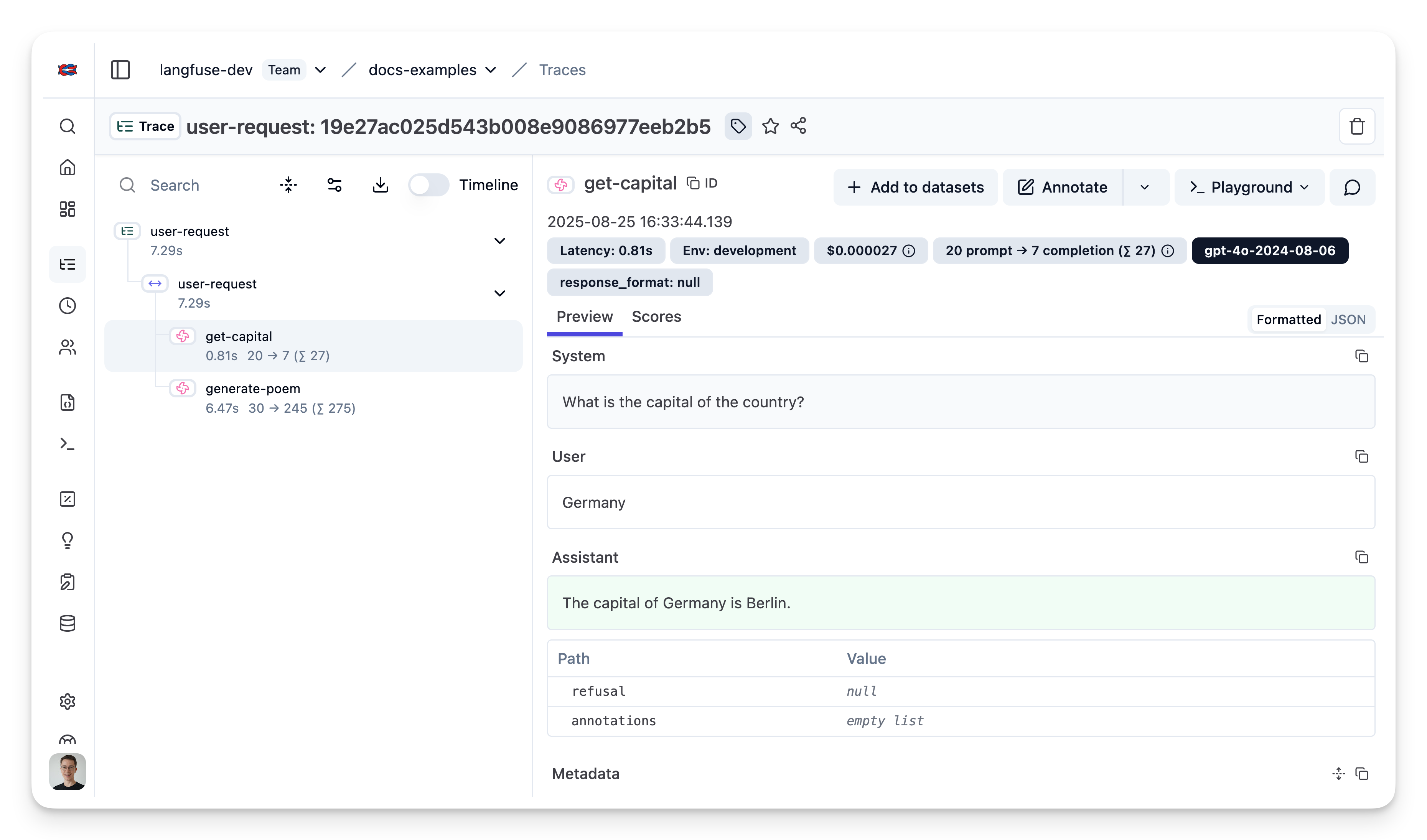
[Public trace in the Langfuse UI](https://cloud.langfuse.com/project/cloramnkj0002jz088vzn1ja4/traces/e0a2f2b374a58cf9b4548240f879fc71?timestamp=2025-08-25T14:39:41.599Z&display=details)
### Link to Langfuse prompts
With [Langfuse Prompt management](/docs/prompt-management/get-started) you can effectively manage and version your prompts. You can link your OpenAI generations to a prompt by passing the `langfusePrompt` property to the `observeOpenAI` function.
```ts
import { observeOpenAI } from "@langfuse/openai";
import OpenAI from "openai";
const langfusePrompt = await langfuse.prompt.get("my-prompt"); // Fetch a previously created prompt
const res = await observeOpenAI(new OpenAI(), {
langfusePrompt,
}).completions.create({
prompt: langfusePrompt.prompt,
model: "gpt-3.5-turbo-instruct",
max_tokens: 300,
});
```
Resulting generations are now linked to the prompt in Langfuse, allowing you to track prompt usage and performance.
When working with chat prompts, you must typecast the compiled prompt messages as `OpenAI.ChatCompletionMessageParam[]` or use a type-guard utility function as Langfuse message roles can be arbitrary strings whereas the OpenAI type definition is more restrictive.
### OpenAI token usage on streamed responses
OpenAI returns the token usage on streamed responses only when in `stream_options` the `include_usage` parameter is set to `true`. If you would like to benefit from OpenAI's directly provided token usage, you can set `{ include_usage: true }` in the `stream_options` argument.
```typescript /{"include_usage": True}/
import OpenAI from "openai";
import { observeOpenAI } from "@langfuse/openai";
const openai = observeOpenAI(new OpenAI());
const stream = await openai.chat.completions.create({
model: "gpt-4",
messages: [{ role: "user", content: "How are you?" }],
stream: true,
stream_options: { include_usage: true },
});
let result = "";
for await (const chunk of stream) {
// Check if chunk choices are not empty. OpenAI returns token usage in a final chunk with an empty choices list.
result += chunk.choices[0]?.delta?.content || "";
}
```
## FAQ
## GitHub Discussions
---
## Agent Instructions
This page is part of the [Langfuse](https://langfuse.com) documentation, published as plain Markdown for AI agents. Every page is available as Markdown by appending `.md` to its URL, or by sending an `Accept: text/markdown` header. This page: `https://langfuse.com/integrations/model-providers/openai-js.md`.
### Querying these docs
If the answer is not on this page, query the documentation instead of guessing:
- **Semantic search** across all Langfuse docs, returning an answer with the relevant pages and excerpts. Ask a specific, self-contained question:
```bash
curl -sG "https://langfuse.com/api/search-docs" --data-urlencode "query=How do I trace a LangGraph agent?"
```
- **Index of every page**: , with per-section indexes [llms-docs.txt](https://langfuse.com/llms-docs.txt), [llms-integrations.txt](https://langfuse.com/llms-integrations.txt), and [llms-self-hosting.txt](https://langfuse.com/llms-self-hosting.txt).
### Before writing Langfuse code
- **Install the [Langfuse Agent Skill](https://langfuse.com/docs/api-and-data-platform/features/agent-skill).** It encodes Langfuse's own best practices for instrumentation, prompt management, and evaluation, and materially improves results.
- **Read [What does a good trace look like?](https://langfuse.com/docs/observability/best-practices.md)** before instrumenting an application.
- **Verify endpoints, parameters, and response fields** against the [API reference](https://api.reference.langfuse.com) instead of inferring them from code examples.
- **Use the [Langfuse CLI](https://langfuse.com/docs/api-and-data-platform/features/cli)** (`npx langfuse-cli api `) to read or write traces, prompts, datasets, and scores from the terminal.
Found an error in these docs? Please open an issue at .