---
title: "Open Source Observability for Vapi (Voice AI)"
sidebarTitle: Vapi
logo: /images/integrations/vapi_icon.png
description: "Discover how to integrate Vapi with Langfuse for enhanced voice AI telemetry monitoring, enabling improved performance and reliability of your AI applications."
---
# Vapi Integration
Vapi natively integrates with Langfuse, allowing you to send traces directly to Langfuse for enhanced telemetry monitoring. This integration enables you to gain deeper insights into your voice AI applications and improve their performance and reliability.
## What is Vapi?
[Vapi](https://docs.vapi.ai/introduction) is a Voice AI platform for developers. It enables you to build, test, and deploy voice AI agents in minutes by abstracting away the complexities of:
- **Simulating Natural Human Conversation**: Handling turn-taking, interruption, backchanneling, and more.
- **Realtime/Low Latency Demands**: Ensuring responsive conversations with low latency (< 500-800ms voice-to-voice).
- **Function Calling**: Taking actions during conversations and interfacing with your services for custom actions.
- **Extracting Conversation Data**: Reviewing conversation audio, transcripts, and metadata.
## What is Langfuse?
Langfuse is an open source AI engineering platform designed to provide better **[observability](/docs/tracing)** and **[evaluations](/docs/scores/overview)** into LLM applications. It helps developers track, analyze, and visualize traces from AI interactions, enabling better performance tuning, debugging, and optimization of AI agents.
## Get Started
### Get your Langfuse Credentials
First, you'll need your Langfuse credentials:
- **Secret Key**
- **Public Key**
- **Host URL**
You can obtain these by signing up for [Langfuse Cloud](https://langfuse.com/cloud) or [self-hosting Langfuse](https://langfuse.com/docs/deployment/self-host).
### Add Langfuse Credentials
Log in to your Vapi dashboard and navigate to the [Provider Credentials page](https://dashboard.vapi.ai/keys).
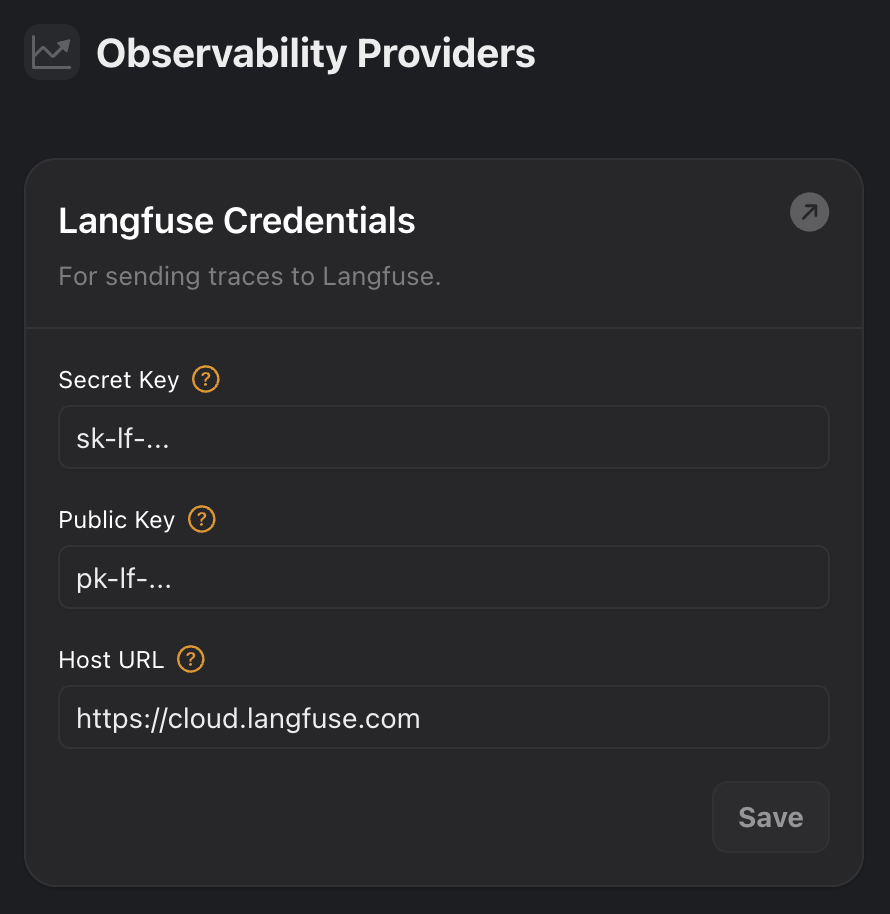
Under the **Observability Providers** section, you'll find an option for **Langfuse**. Enter your Langfuse credentials:
- **Secret Key**
- **Public Key**
- **Host URL** (EU: `https://cloud.langfuse.com`, US: `https://us.cloud.langfuse.com`, Japan: `https://jp.cloud.langfuse.com`, HIPAA: `https://hipaa.cloud.langfuse.com`)
Click **Save** to update your credentials.
### See Traces in Langfuse
Once you've added your credentials, you should start seeing traces in your Langfuse dashboard for every conversation your agents have.
The content of the `Generation` type Spans in Langfuse is the text model output directly (not the transcription of the text-to-speech model).
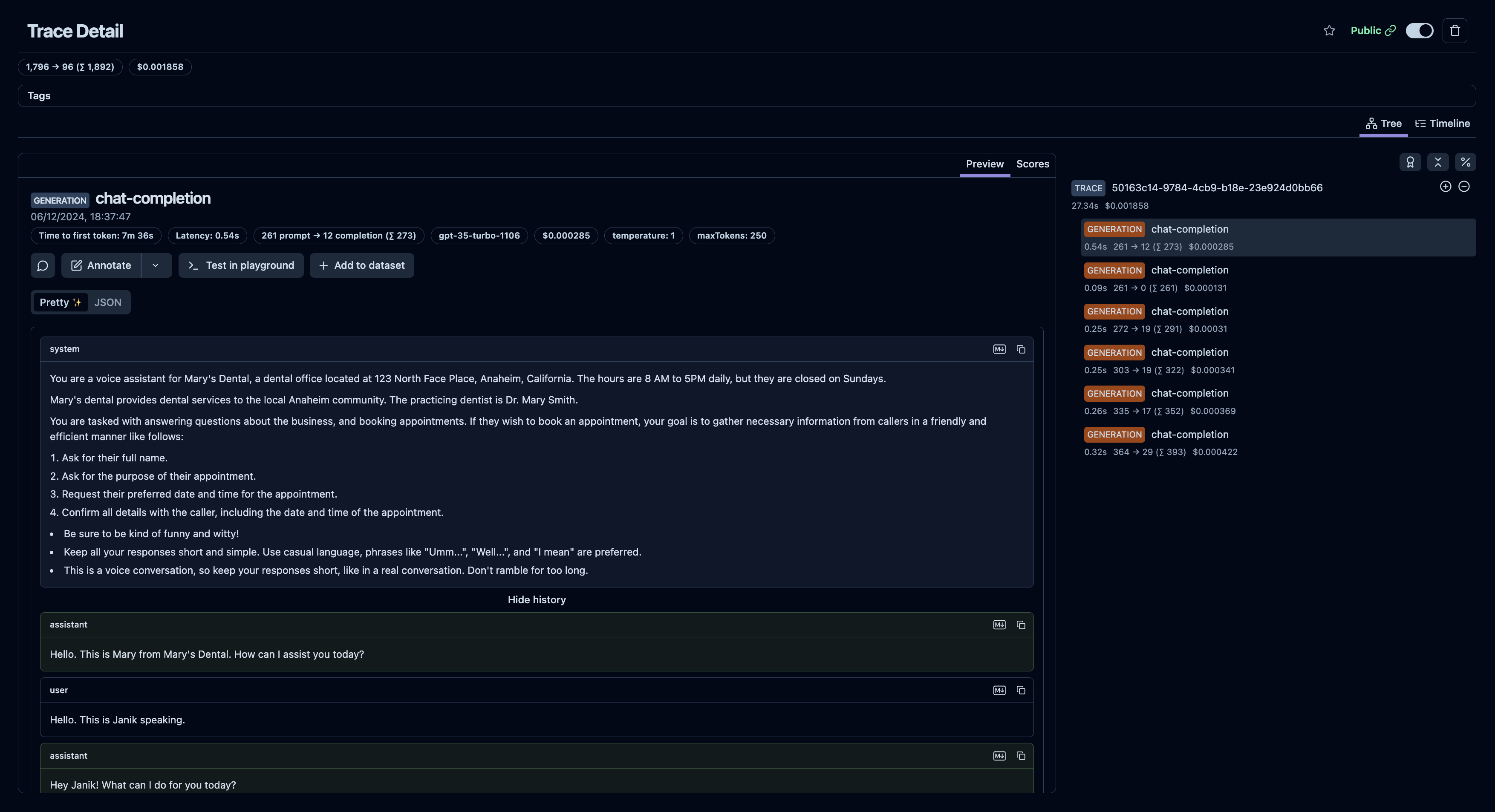
Example trace in Langfuse: https://cloud.langfuse.com/project/cloramnkj0002jz088vzn1ja4/traces/50163c14-9784-4cb9-b18e-23e924d0bb66
### Evaluate and Debug your Agent
To make the most out of this integration, you can now use Langfuse's [evaluation](/docs/scores/overview) and [debugging](/docs/analytics/overview) tools to analyze and improve the performance of your voice AI agents.
---
## Agent Instructions
This page is part of the [Langfuse](https://langfuse.com) documentation, published as plain Markdown for AI agents. Every page is available as Markdown by appending `.md` to its URL, or by sending an `Accept: text/markdown` header. This page: `https://langfuse.com/integrations/no-code/vapi.md`.
### Querying these docs
If the answer is not on this page, query the documentation instead of guessing:
- **Semantic search** across all Langfuse docs, returning an answer with the relevant pages and excerpts. Ask a specific, self-contained question:
```bash
curl -sG "https://langfuse.com/api/search-docs" --data-urlencode "query=How do I trace a LangGraph agent?"
```
- **Index of every page**: , with per-section indexes [llms-docs.txt](https://langfuse.com/llms-docs.txt), [llms-integrations.txt](https://langfuse.com/llms-integrations.txt), and [llms-self-hosting.txt](https://langfuse.com/llms-self-hosting.txt).
### Before writing Langfuse code
- **Install the [Langfuse Agent Skill](https://langfuse.com/docs/api-and-data-platform/features/agent-skill).** It encodes Langfuse's own best practices for instrumentation, prompt management, and evaluation, and materially improves results.
- **Read [What does a good trace look like?](https://langfuse.com/docs/observability/best-practices.md)** before instrumenting an application.
- **Verify endpoints, parameters, and response fields** against the [API reference](https://api.reference.langfuse.com) instead of inferring them from code examples.
- **Use the [Langfuse CLI](https://langfuse.com/docs/api-and-data-platform/features/cli)** (`npx langfuse-cli api `) to read or write traces, prompts, datasets, and scores from the terminal.
Found an error in these docs? Please open an issue at .