---
title: Open Source LLM Observability for Gradio
sidebarTitle: Gradio
logo: /images/integrations/gradio_icon.svg
description: Build an LLM Chat UI with 🤗 Gradio and trace it with 🪢 Langfuse.
category: Integrations
---
# Build an LLM Chat UI with 🤗 Gradio and trace it with 🪢 Langfuse
This is a simple end-to-end example notebook which showcases how to integrate a Gradio application with Langfuse for LLM Observability and Evaluation.
**Note:** We recommend to run this notebook in Google Colab (see link above). This notebook is also available as a Hugging Face Space template [here](https://huggingface.co/spaces/langfuse/langfuse-gradio-example-template).
Thank you to [@tkmamidi](https://github.com/tkmamidi) for the original implementation and contributions to this notebook.
## Introduction
### What is Gradio?
[Gradio](https://github.com/gradio-app/gradio) is an open-source Python library that enables quick creation of web interfaces for machine learning models, APIs, and Python functions. It allows developers to wrap any Python function with an interactive UI that can be easily shared or embedded, making it ideal for demos, prototypes, and ML model deployment. See [docs](https://www.gradio.app/docs) for more details.
### What is Langfuse?
[Langfuse](https://github.com/langfuse/langfuse) is an open-source AI engineering platform that helps build reliable LLM applications via LLM Application Observability, Evaluation, Experiments, and Prompt Management. See [docs](https://langfuse.com/docs) for more details.
### Walkthrough
We've recorded a walkthrough of the implementation below. You can follow along with the video or the notebook.
### Outline
This notebook will show you how to
1. Build a simple chat interface in Python and rendering it in a Notebook using [Gradio `Chatbot`](https://www.gradio.app/docs/gradio/chatbot)
2. Add [Langfuse Tracing](https://langfuse.com/docs/tracing) to the chatbot
3. Implement additional Langfuse tracing features used frequently in chat applications: [chat sessions](https://langfuse.com/docs/tracing-features/sessions), [user feedback](https://langfuse.com/docs/scores/user-feedback)
## Setup
Install requirements. We use OpenAI for this simple example. We could use any model here.
```python
%pip install gradio langfuse openai --upgrade
```
Set credentials and initialize Langfuse SDK Client used to add user feedback later on.
You can either create a free [Langfuse Cloud](https://cloud.langfuse.com) account or [self-host Langfuse](https://langfuse.com/self-hosting) in a couple of minutes.
```python
import os
# Get keys for your project from the project settings page
# https://cloud.langfuse.com
os.environ.setdefault("LANGFUSE_PUBLIC_KEY", "");
os.environ.setdefault("LANGFUSE_SECRET_KEY", "");
os.environ.setdefault("LANGFUSE_BASE_URL", "https://cloud.langfuse.com"); # 🇪🇺 EU region
# Other Langfuse data regions include 🇺🇸 US: https://us.cloud.langfuse.com, 🇯🇵 Japan: https://jp.cloud.langfuse.com and ⚕️ HIPAA: https://hipaa.cloud.langfuse.com
# Your openai key
# We use OpenAI for this demo, could easily change to other models
os.environ.setdefault("OPENAI_API_KEY", "");
```
```python
import gradio as gr
import json
import uuid
from langfuse import get_client
langfuse = get_client()
```
## Implementation of Chat functions
### Sessions/Threads
Each chat message belongs to a thread in the Gradio Chatbot which can be reset using `clear` ([reference](https://www.gradio.app/docs/gradio/chatbot#event-listeners)).
We implement the following method that creates a `session_id` that is used globally and can be reset via the `set_new_session_id` method. This session_id will be used for [Langfuse Sessions](https://langfuse.com/docs/tracing-features/sessions).
```python
session_id = None
def set_new_session_id():
global session_id
session_id = str(uuid.uuid4())
# Initialize
set_new_session_id()
```
### Response handler
When implementing the `respond` method, we use the Langfuse [`@observe()` decorator](https://langfuse.com/docs/observability/sdk/instrumentation#observe-wrapper) to automatically log each response to [Langfuse Tracing](https://langfuse.com/docs/tracing). The decorator creates the root observation of the trace; we set the chat input/output on it via `langfuse.update_current_span()` and group all messages of a thread into a [Langfuse Session](https://langfuse.com/docs/tracing-features/sessions) via `propagate_attributes(session_id=...)`.
In addition we use the [openai integration](https://langfuse.com/integrations/model-providers/openai-py) as it simplifies instrumenting the LLM call to capture model parameters, token counts, and other metadata. Alternatively, we could use the integrations with [LangChain](https://langfuse.com/integrations/frameworks/langchain), [LlamaIndex](https://langfuse.com/integrations/frameworks/llamaindex), [other frameworks](https://langfuse.com/integrations), or instrument the call itself with the SDK ([example](https://langfuse.com/docs/observability/sdk/instrumentation#custom)).
```python
# Langfuse decorator and attribute propagation
from langfuse import observe, propagate_attributes
# Optional: automated instrumentation via OpenAI SDK integration
# See note above regarding alternative implementations
from langfuse.openai import openai
# Global reference for the current trace_id which is used to later add user feedback
current_trace_id = None
# Add decorator here to capture overall timings, input/output, and manipulate trace metadata via `langfuse`
@observe()
async def create_response(
prompt: str,
history,
):
# Save trace id in global var to add feedback later
global current_trace_id
current_trace_id = langfuse.get_current_trace_id()
# Add session_id to all observations of this trace to enable session tracking
global session_id
with propagate_attributes(
trace_name="gradio_demo_chat",
session_id=session_id,
):
# Set input on the root observation created by the decorator
langfuse.update_current_span(input=prompt)
# Add prompt to history
if not history:
history = [{"role": "system", "content": "You are a friendly chatbot"}]
history.append({"role": "user", "content": prompt})
yield history
# Get completion via OpenAI SDK
# Auto-instrumented by Langfuse via the import, see alternative in note above
response = {"role": "assistant", "content": ""}
oai_response = openai.chat.completions.create(
messages=history,
model="gpt-4o-mini",
)
response["content"] = oai_response.choices[0].message.content or ""
# Set output on the root observation for better readability in Langfuse Sessions
langfuse.update_current_span(output=response["content"])
yield history + [response]
async def respond(prompt: str, history):
async for message in create_response(prompt, history):
yield message
```
### User feedback handler
We implement user [feedback tracking in Langfuse](https://langfuse.com/docs/scores/user-feedback) via the `like` event for the Gradio chatbot ([reference](https://www.gradio.app/docs/gradio/chatbot#event-listeners)). This methdod reuses the current trace id available in the global state of this application.
```python
def handle_like(data: gr.LikeData):
global current_trace_id
if data.liked:
langfuse.create_score(value=1, name="user-feedback", trace_id=current_trace_id)
else:
langfuse.create_score(value=0, name="user-feedback", trace_id=current_trace_id)
```
### Retries
Allow you to retry a completion via the Gradio Chatbot `retry` event ([docs](https://www.gradio.app/docs/gradio/chatbot#event-listeners)). This is not specific to the integration with Langfuse.
```python
async def handle_retry(history, retry_data: gr.RetryData):
new_history = history[: retry_data.index]
previous_prompt = history[retry_data.index]["content"]
async for message in respond(previous_prompt, new_history):
yield message
```
## Run Gradio Chatbot
After implementing all methods above, we can now put together the [Gradio Chatbot](https://www.gradio.app/docs/gradio/chatbot) and launch it. If run within Colab, you should see an embedded Chatbot interface.
```python
with gr.Blocks() as demo:
gr.Markdown("# Chatbot using 🤗 Gradio + 🪢 Langfuse")
chatbot = gr.Chatbot(
label="Chat",
type="messages",
show_copy_button=True,
avatar_images=(
None,
"https://static.langfuse.com/cookbooks/gradio/hf-logo.png",
),
)
prompt = gr.Textbox(max_lines=1, label="Chat Message")
prompt.submit(respond, [prompt, chatbot], [chatbot])
chatbot.retry(handle_retry, chatbot, [chatbot])
chatbot.like(handle_like, None, None)
chatbot.clear(set_new_session_id)
if __name__ == "__main__":
demo.launch(share=True, debug=True)
```
## Explore data in Langfuse
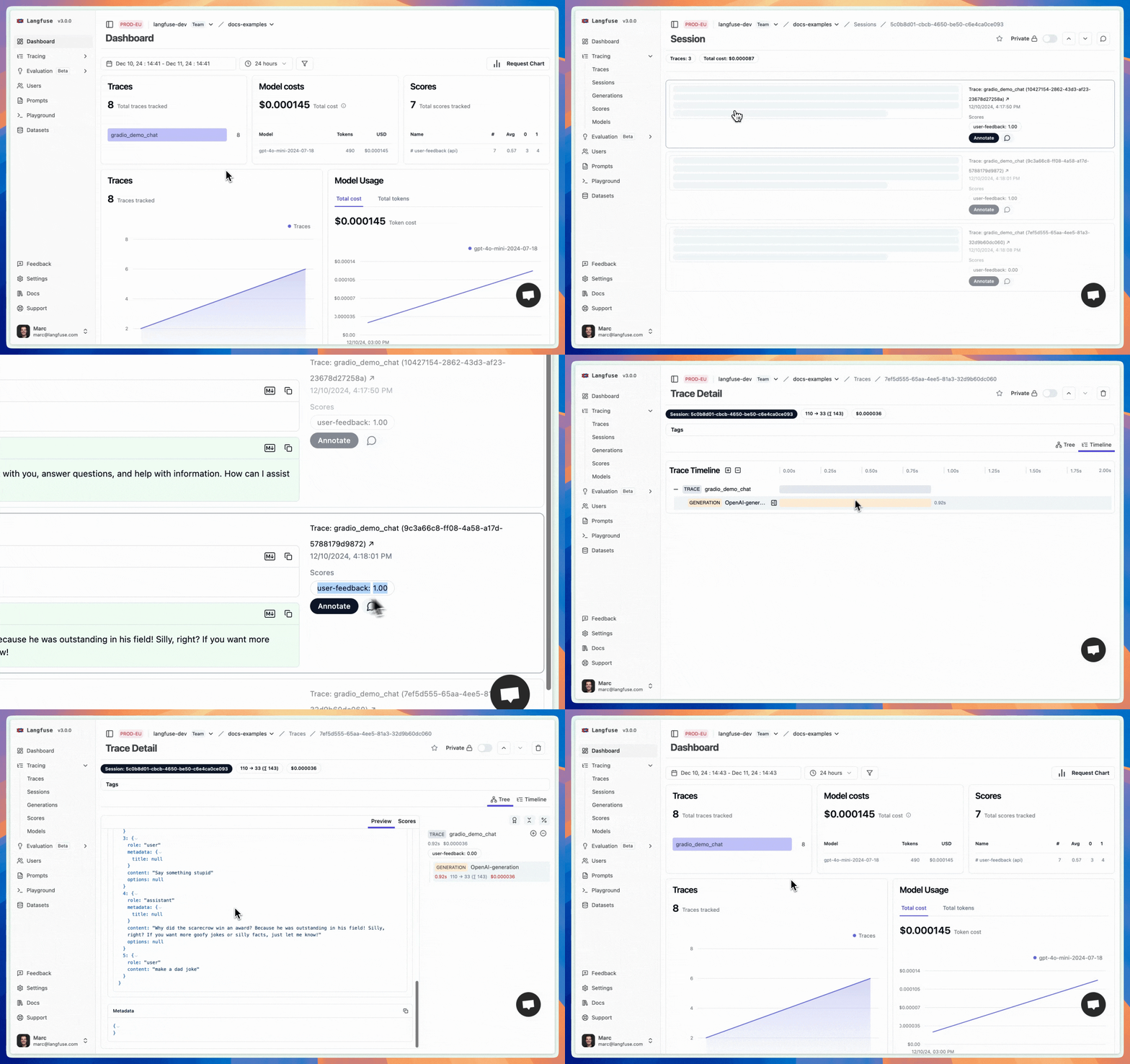
When interacting with the Chatbot, you should see traces, sessions, and feedback scores in your Langfuse project. See video above for a walkthrough.
Example trace, session, and user feedback in Langfuse ([public link](https://cloud.langfuse.com/project/cloramnkj0002jz088vzn1ja4/sessions/5c0b8d01-cbcb-4650-be50-c6e4ca0ce093)):
If you have any questions or feedback, please join the [Langfuse Discord](https://langfuse.com/discord) or create a new thread on [GitHub Discussions](https://langfuse.com/gh-support).
---
## Agent Instructions
This page is part of the [Langfuse](https://langfuse.com) documentation, published as plain Markdown for AI agents. Every page is available as Markdown by appending `.md` to its URL, or by sending an `Accept: text/markdown` header. This page: `https://langfuse.com/integrations/other/gradio.md`.
### Querying these docs
If the answer is not on this page, query the documentation instead of guessing:
- **Semantic search** across all Langfuse docs, returning an answer with the relevant pages and excerpts. Ask a specific, self-contained question:
```bash
curl -sG "https://langfuse.com/api/search-docs" --data-urlencode "query=How do I trace a LangGraph agent?"
```
- **Index of every page**: , with per-section indexes [llms-docs.txt](https://langfuse.com/llms-docs.txt), [llms-integrations.txt](https://langfuse.com/llms-integrations.txt), and [llms-self-hosting.txt](https://langfuse.com/llms-self-hosting.txt).
### Before writing Langfuse code
- **Install the [Langfuse Agent Skill](https://langfuse.com/docs/api-and-data-platform/features/agent-skill).** It encodes Langfuse's own best practices for instrumentation, prompt management, and evaluation, and materially improves results.
- **Read [What does a good trace look like?](https://langfuse.com/docs/observability/best-practices.md)** before instrumenting an application.
- **Verify endpoints, parameters, and response fields** against the [API reference](https://api.reference.langfuse.com) instead of inferring them from code examples.
- **Use the [Langfuse CLI](https://langfuse.com/docs/api-and-data-platform/features/cli)** (`npx langfuse-cli api `) to read or write traces, prompts, datasets, and scores from the terminal.
Found an error in these docs? Please open an issue at .