---
title: Observability & Tracing for Inferable (open source)
sidebarTitle: Inferable
logo: /images/integrations/inferable_icon.png
description: Open source observability for Inferable applications. Automatically capture detailed traces and metrics for every request.
---
# Langfuse Integration for Inferable
[**Inferable**](https://www.inferable.ai) ([GitHub](https://github.com/inferablehq/inferable)) is an open-source platform that helps you build reliable agentic automations at scale.
With the native integration, you can use Inferable to quickly create distributed agentic automations and then use Langfuse to monitor and improve them. No code changes required.
## Get Started
### Get Langfuse API keys
1. Create account and project on [cloud.langfuse.com](https://cloud.langfuse.com)
2. Copy API keys for your project
1. Follow [instructions](/self-hosting) for self-hosting or local setups
2. Copy API keys for your project
### Configure Inferable with Langfuse
1. Navigate to the Integrations tab of your preferred cluster in Inferable
2. Add your Langfuse credentials:
- **Secret API Key**: Your Langfuse Secret API Key
- **Public API Key**: Your Langfuse Public API Key
- **Base URL**: Your Langfuse Base URL (e.g. `https://cloud.langfuse.com`)
- **Send Message Payloads**: Whether to send inputs and outputs of LLM calls and function calls to Langfuse
If you're self-hosting Inferable in the headless mode, simply insert the Langfuse credentials into the `integrations` table.
```sql
INSERT INTO integrations (cluster_id, langfuse) VALUES
(
'',
'{"publicKey":"","secretKey":"","baseUrl":"","sendMessagePayloads":false}'
);
```
If you're self-hosting the console, you can follow the same instructions as the managed mode.
## Features
### Tracing
Once you have enabled the Langfuse integration, you will start to see [traces](/docs/tracing) in the Langfuse dashboard. Every Run in Inferable will be mapped to its own trace in Langfuse.
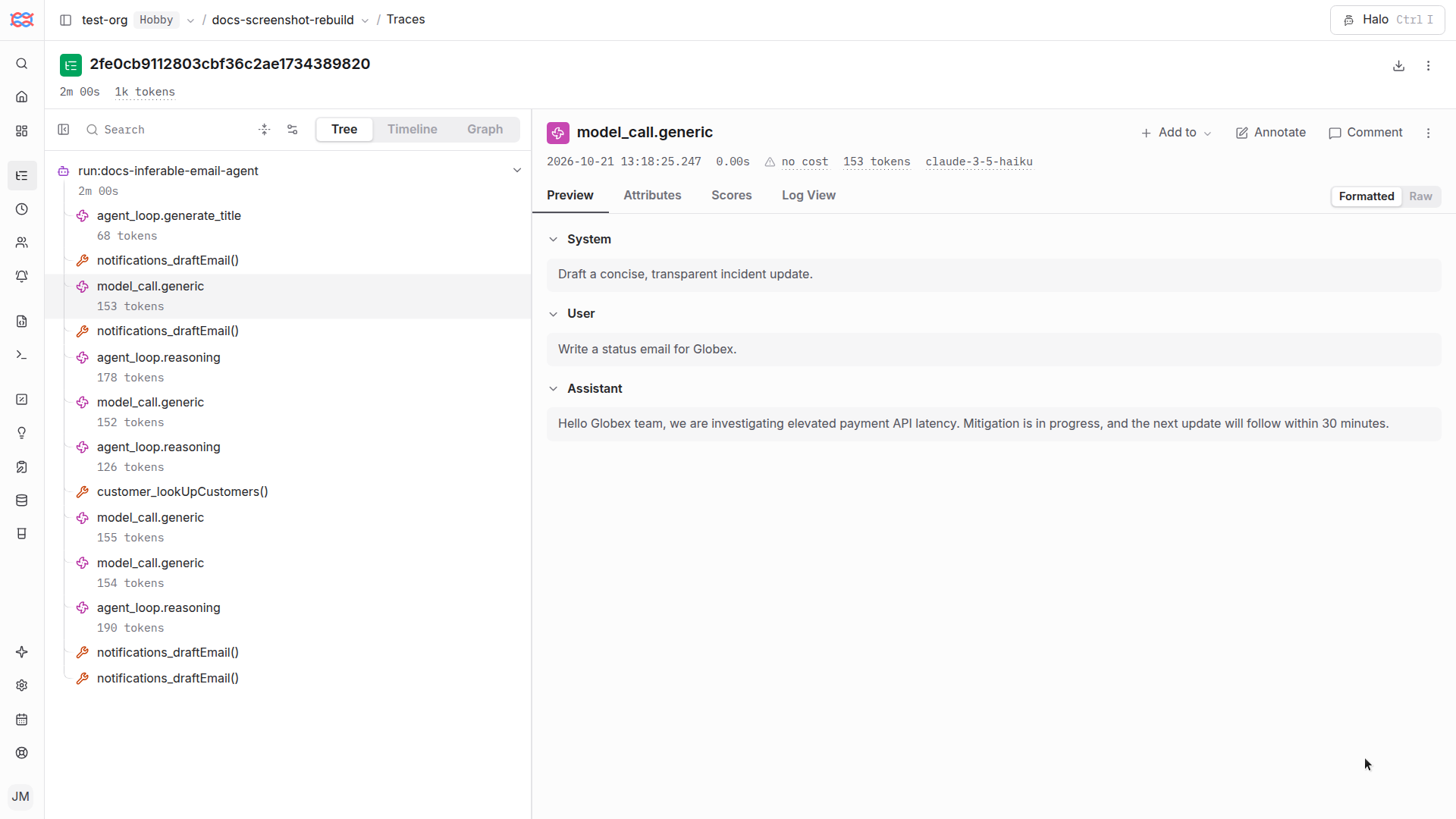
You will find two types of spans in the trace:
- **Tool Calls**: Denoted by function name. These are spans created for each tool call made in the Run by the LLM.
- **LLM Calls**: Denoted by `GENERATION`. This is the span created for the LLM call. Inferable will create a new span for each LLM call in the Run, including:
- Agent loop reasoning
- Utility calls (e.g., Summarization, Title generation)
Learn more about the Langfuse Tracing data structure [here](/docs/tracing).
### Evaluations
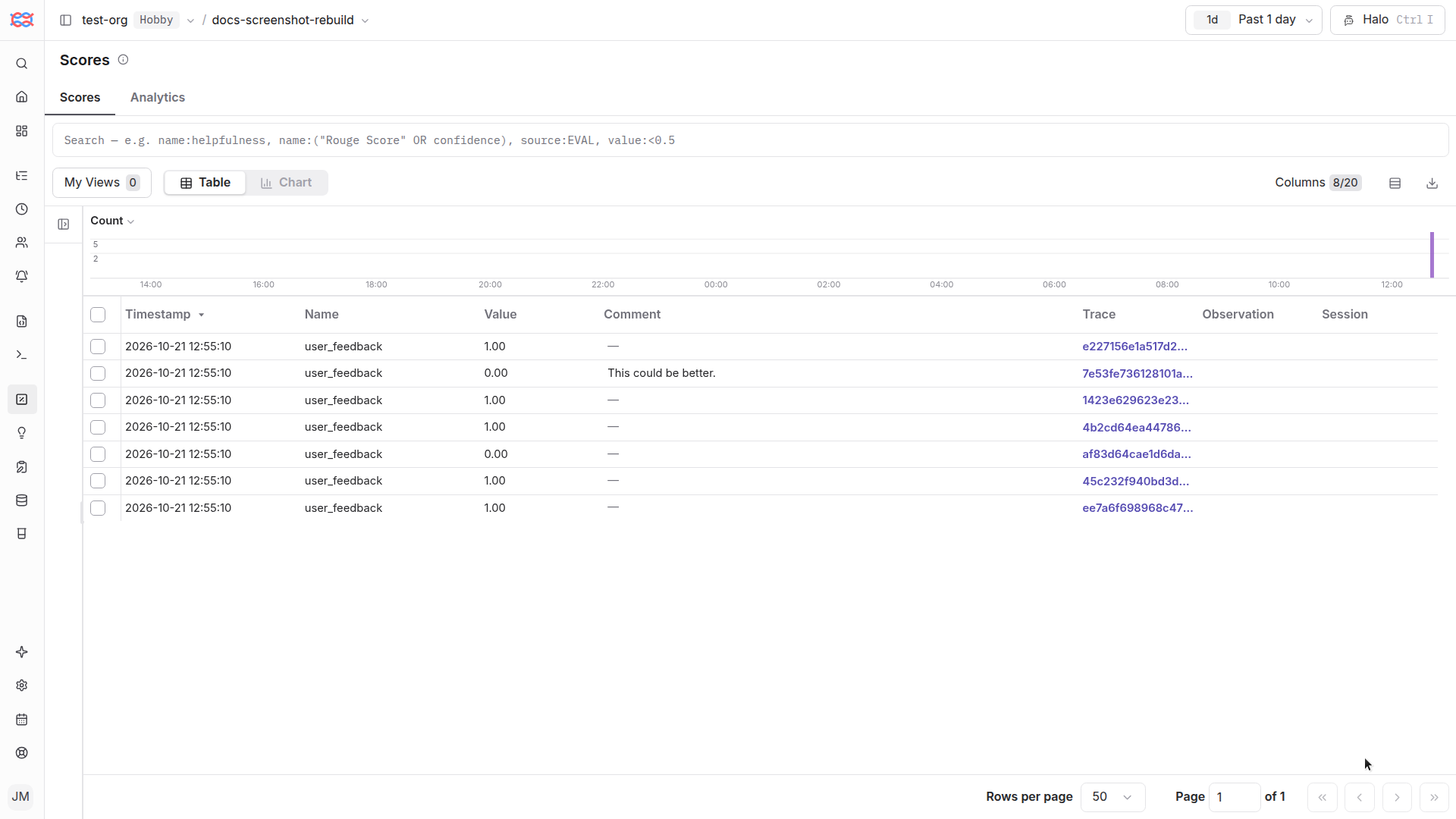
Whenever you submit an evaluation on a Run via the Playground or the API, Inferable will send a [score](/docs/scores) to Langfuse on the trace for that Run.
If you're using Langfuse for evaluation, this will help you correlate the evaluation back to the specific Trace in Langfuse.
## Message Payload Security
By default, Inferable will only send metadata about LLM calls and function calls. This includes the model, Run ID, token usage, latency etc.
If you have **Send Message Payloads** enabled, Inferable will also send the inputs and outputs of the LLM calls and function calls. This includes:
- Prompts
- Responses
- Tool calls
- Tool call arguments
- Tool call results
## Other notes
- The Langfuse traces may take up to 30 seconds to be sent to Langfuse. But usually appear in a few seconds.
- You can report an issue on [Inferable GitHub](https://github.com/inferablehq/inferable/issues) if you're having trouble with the integration.
---
## Agent Instructions
This page is part of the [Langfuse](https://langfuse.com) documentation, published as plain Markdown for AI agents. Every page is available as Markdown by appending `.md` to its URL, or by sending an `Accept: text/markdown` header. This page: `https://langfuse.com/integrations/other/inferable.md`.
### Querying these docs
If the answer is not on this page, query the documentation instead of guessing:
- **Semantic search** across all Langfuse docs, returning an answer with the relevant pages and excerpts. Ask a specific, self-contained question:
```bash
curl -sG "https://langfuse.com/api/search-docs" --data-urlencode "query=How do I trace a LangGraph agent?"
```
- **Index of every page**: , with per-section indexes [llms-docs.txt](https://langfuse.com/llms-docs.txt), [llms-integrations.txt](https://langfuse.com/llms-integrations.txt), and [llms-self-hosting.txt](https://langfuse.com/llms-self-hosting.txt).
### Before writing Langfuse code
- **Install the [Langfuse Agent Skill](https://langfuse.com/docs/api-and-data-platform/features/agent-skill).** It encodes Langfuse's own best practices for instrumentation, prompt management, and evaluation, and materially improves results.
- **Read [What does a good trace look like?](https://langfuse.com/docs/observability/best-practices.md)** before instrumenting an application.
- **Verify endpoints, parameters, and response fields** against the [API reference](https://api.reference.langfuse.com) instead of inferring them from code examples.
- **Use the [Langfuse CLI](https://langfuse.com/docs/api-and-data-platform/features/cli)** (`npx langfuse-cli api `) to read or write traces, prompts, datasets, and scores from the terminal.
Found an error in these docs? Please open an issue at .