---
source: Jupyter Notebook
title: LibreChat Observability with Langfuse Tracing
sidebarTitle: LibreChat
logo: /images/integrations/librechat_icon.png
description: Add LLM observability to LibreChat with Langfuse tracing to monitor conversations, debug issues, and analyze model performance
category: Integrations
---
# Trace LibreChat with Langfuse
This guide shows you how to integrate [Langfuse](https://langfuse.com) tracing with [LibreChat](https://www.librechat.ai/) to get full observability into your AI conversations.
> **What is LibreChat?** [LibreChat](https://github.com/danny-avila/LibreChat) is an open-source AI chat platform that brings together multiple AI providers (OpenAI, Anthropic, Google, Azure, and more) into a unified interface.
> **What is Langfuse?** [Langfuse](https://github.com/langfuse/langfuse) is an open-source LLM observability platform that helps you trace, monitor, and debug your LLM applications.
## Prerequisites
Before you begin, ensure you have:
1. A running LibreChat instance (see [LibreChat Installation Guide](https://www.librechat.ai/docs/quick_start/local_setup))
2. A Langfuse account ([sign up for free](https://cloud.langfuse.com))
3. Langfuse API keys from your project settings
## Configure LibreChat Environment Variables
LibreChat uses environment variables for configuration. Add the following Langfuse-related variables to your `.env` file in your LibreChat installation directory:
```bash
# Langfuse Configuration
LANGFUSE_PUBLIC_KEY=pk-lf-***
LANGFUSE_SECRET_KEY=sk-lf-***
# 🇪🇺 EU Data Region
LANGFUSE_BASE_URL=https://cloud.langfuse.com
# 🇺🇸 US Data Region
# Other Langfuse data regions include 🇺🇸 US: https://us.cloud.langfuse.com, 🇯🇵 Japan: https://jp.cloud.langfuse.com and ⚕️ HIPAA: https://hipaa.cloud.langfuse.com
```
> **Note**: For self-hosted Langfuse instances, set `LANGFUSE_BASE_URL` to your custom URL (e.g., `http://localhost:3000` for local development).
## Restart LibreChat
After adding the environment variables, restart your LibreChat instance to apply the changes.
## See traces in Langfuse
Once LibreChat is restarted with Langfuse configured, you can see a new trace for every chat message response in the Langfuse UI:
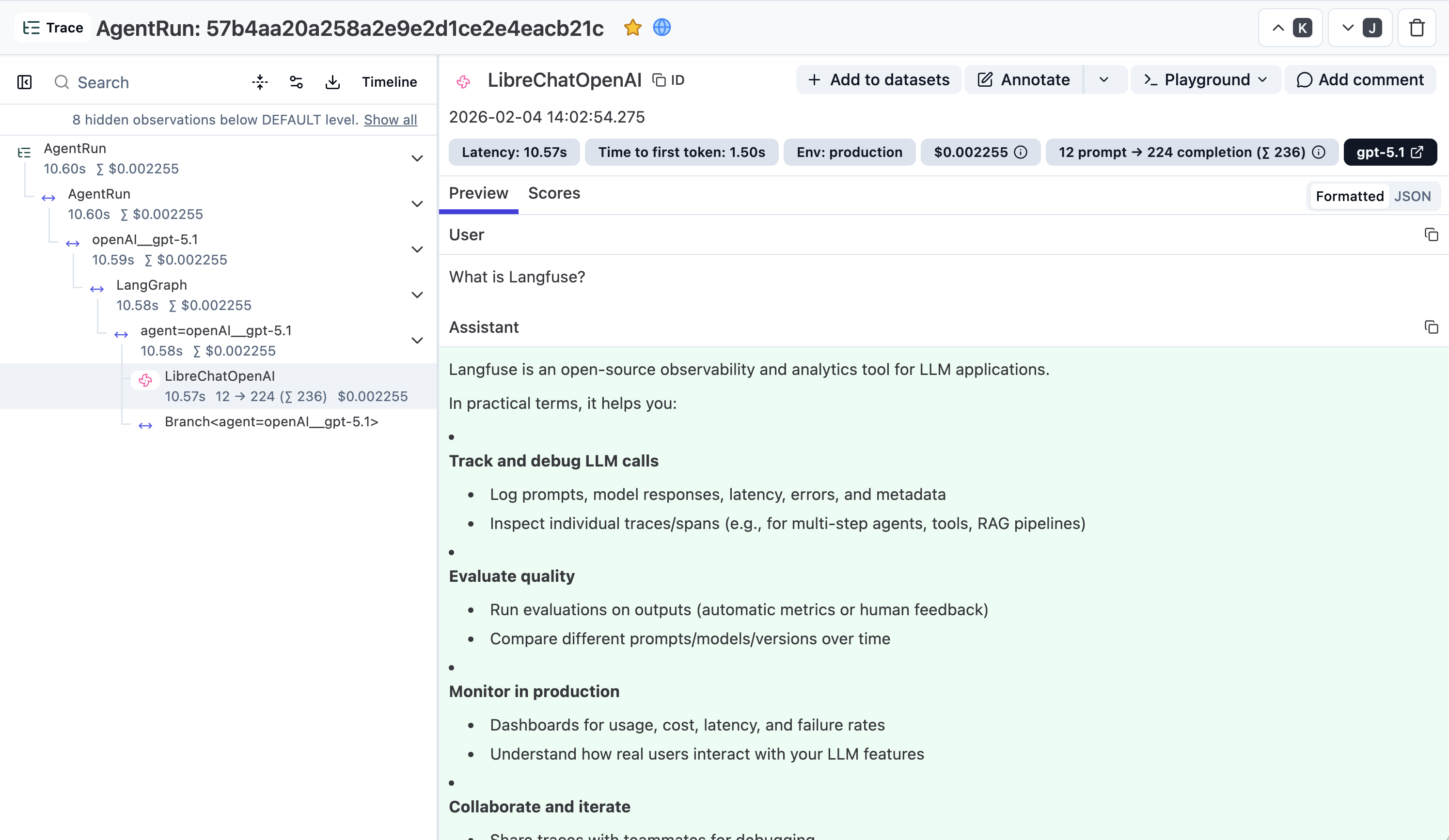
[Link to trace in the Langfuse UI](https://cloud.langfuse.com/project/cloramnkj0002jz088vzn1ja4/traces/57b4aa20a258a2e9e2d1ce2e4eacb21c?observation=06f5341a68d723b1×tamp=2026-02-04T13%3A02%3A54.248Z&traceId=57b4aa20a258a2e9e2d1ce2e4eacb21c)
---
## Agent Instructions
This page is part of the [Langfuse](https://langfuse.com) documentation, published as plain Markdown for AI agents. Every page is available as Markdown by appending `.md` to its URL, or by sending an `Accept: text/markdown` header. This page: `https://langfuse.com/integrations/other/librechat.md`.
### Querying these docs
If the answer is not on this page, query the documentation instead of guessing:
- **Semantic search** across all Langfuse docs, returning an answer with the relevant pages and excerpts. Ask a specific, self-contained question:
```bash
curl -sG "https://langfuse.com/api/search-docs" --data-urlencode "query=How do I trace a LangGraph agent?"
```
- **Index of every page**: , with per-section indexes [llms-docs.txt](https://langfuse.com/llms-docs.txt), [llms-integrations.txt](https://langfuse.com/llms-integrations.txt), and [llms-self-hosting.txt](https://langfuse.com/llms-self-hosting.txt).
### Before writing Langfuse code
- **Install the [Langfuse Agent Skill](https://langfuse.com/docs/api-and-data-platform/features/agent-skill).** It encodes Langfuse's own best practices for instrumentation, prompt management, and evaluation, and materially improves results.
- **Read [What does a good trace look like?](https://langfuse.com/docs/observability/best-practices.md)** before instrumenting an application.
- **Verify endpoints, parameters, and response fields** against the [API reference](https://api.reference.langfuse.com) instead of inferring them from code examples.
- **Use the [Langfuse CLI](https://langfuse.com/docs/api-and-data-platform/features/cli)** (`npx langfuse-cli api `) to read or write traces, prompts, datasets, and scores from the terminal.
Found an error in these docs? Please open an issue at .