---
title: "Langfuse Integration with Milvus"
sidebarTitle: Milvus
logo: /images/integrations/milvus_icon.svg
description: "Integrate Langfuse with Milvus for efficient AI monitoring and vector storage using the LlamaIndex integration."
---
# Use Milvus with Langfuse
Thanks to the team at Milvus for developing this guide. These docs are adapted from their write up, which you can read [here](https://milvus.io/docs/integrate_with_langfuse.md).
## What is Milvus?
[Milvus](https://milvus.io/) is an open-source vector database that powers AI applications with vector embeddings and similarity search. It offers tools for efficient storage and retrieval of high-dimensional vectors, making it ideal for AI and machine learning applications.
## Trace your queries with the Langfuse LlamaIndex integration
In this quickstart, we'll show you how to set up a LlamaIndex application using [Milvus Lite](https://milvus.io/docs/milvus_lite.md) as the vector store. We'll also show you how to use the [Langfuse LlamaIndex integration](/integrations/frameworks/llamaindex) to trace your application.
## Quick Start Guide
### Step 1: Create a Langfuse Account
1. Visit [Langfuse](https://cloud.langfuse.com) and create an account.
2. Create a new project and copy your Langfuse API keys.
### Step 2: Install Required Packages
Make sure you have both `llama-index` and `langfuse` installed.
```bash
$ pip install llama-index langfuse openinference-instrumentation-llama-index llama-index-vector-stores-milvus --upgrade
```
### Step 3: Initialize Langfuse
Visit [Langfuse](https://cloud.langfuse.com) to create an account. Create a new project and copy your Langfuse API keys. This example uses OpenAI for embeddings and chat completions, so you also need to specify your [OpenAI key](https://platform.openai.com/) in the environment variable.
```python
import os
# Get keys for your project from the project settings page
os.environ.setdefault("LANGFUSE_SECRET_KEY", "sk-...");
os.environ.setdefault("LANGFUSE_PUBLIC_KEY", "pk-...");
os.environ.setdefault("LANGFUSE_BASE_URL", "https://cloud.langfuse.com"); # 🇪🇺 EU region
# Other Langfuse data regions include 🇺🇸 US: https://us.cloud.langfuse.com, 🇯🇵 Japan: https://jp.cloud.langfuse.com and ⚕️ HIPAA: https://hipaa.cloud.langfuse.com
# Your OpenAI key
os.environ.setdefault("OPENAI_API_KEY", "sk-...");
```
### Step 4: Set Up LlamaIndex Instrumentation
Langfuse traces LlamaIndex via the [OpenInference instrumentation](/integrations/frameworks/llamaindex), which exports OpenTelemetry spans to Langfuse.
```python
from langfuse import get_client
from openinference.instrumentation.llama_index import LlamaIndexInstrumentor
langfuse = get_client()
# Instrument LlamaIndex — all subsequent index and query operations are traced
LlamaIndexInstrumentor().instrument()
```
### Step 5: Index Using Milvus Lite
```python
from llama_index.core import Document
from llama_index.core import VectorStoreIndex
from llama_index.core import StorageContext
from llama_index.vector_stores.milvus import MilvusVectorStore
# Create documents
doc1 = Document(text="Your document text here.")
doc2 = Document(text="Another document text here.")
# Set up Milvus vector store
vector_store = MilvusVectorStore(
uri="tmp/milvus_demo.db", dim=1536, overwrite=False
)
storage_context = StorageContext.from_defaults(vector_store=vector_store)
# Create index
index = VectorStoreIndex.from_documents(
[doc1, doc2], storage_context=storage_context
)
```
### Step 6: Query and Chat
```python
# Query
response = index.as_query_engine().query("Your query here")
print(response)
# Chat
response = index.as_chat_engine().chat("Your chat message here")
print(response)
```
### Step 7: Explore Traces in Langfuse
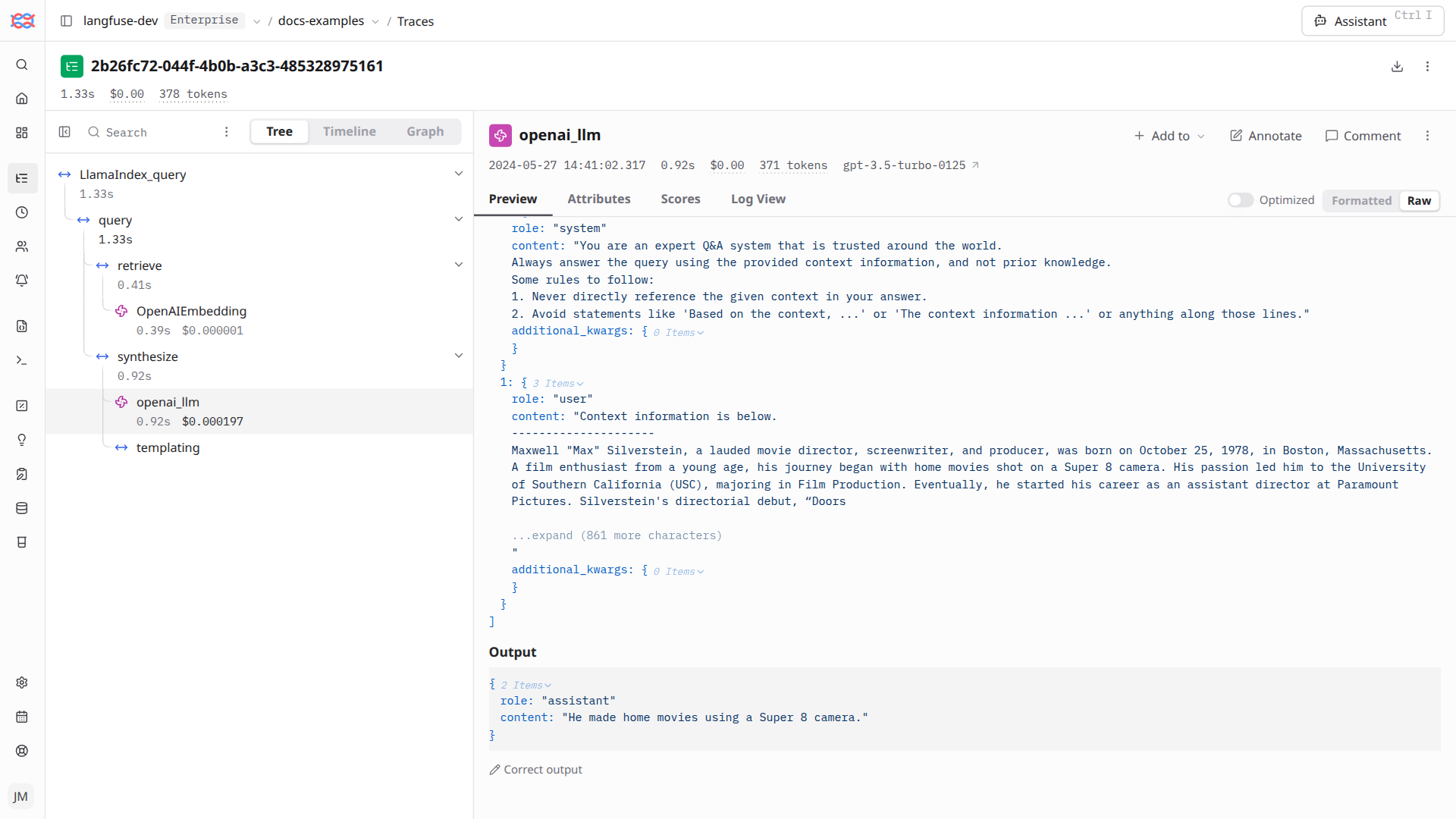
You can now see traces of your index and query in your Langfuse project.
Example traces in Langfuse (public links):
- [Query](https://cloud.langfuse.com/project/cloramnkj0002jz088vzn1ja4/traces/2b26fc72-044f-4b0b-a3c3-485328975161)
- [Query (chat)](https://cloud.langfuse.com/project/cloramnkj0002jz088vzn1ja4/traces/72503163-2b25-4693-9cc9-56190b8e32b9)
---
## Agent Instructions
This page is part of the [Langfuse](https://langfuse.com) documentation, published as plain Markdown for AI agents. Every page is available as Markdown by appending `.md` to its URL, or by sending an `Accept: text/markdown` header. This page: `https://langfuse.com/integrations/other/milvus.md`.
### Querying these docs
If the answer is not on this page, query the documentation instead of guessing:
- **Semantic search** across all Langfuse docs, returning an answer with the relevant pages and excerpts. Ask a specific, self-contained question:
```bash
curl -sG "https://langfuse.com/api/search-docs" --data-urlencode "query=How do I trace a LangGraph agent?"
```
- **Index of every page**: , with per-section indexes [llms-docs.txt](https://langfuse.com/llms-docs.txt), [llms-integrations.txt](https://langfuse.com/llms-integrations.txt), and [llms-self-hosting.txt](https://langfuse.com/llms-self-hosting.txt).
### Before writing Langfuse code
- **Install the [Langfuse Agent Skill](https://langfuse.com/docs/api-and-data-platform/features/agent-skill).** It encodes Langfuse's own best practices for instrumentation, prompt management, and evaluation, and materially improves results.
- **Read [What does a good trace look like?](https://langfuse.com/docs/observability/best-practices.md)** before instrumenting an application.
- **Verify endpoints, parameters, and response fields** against the [API reference](https://api.reference.langfuse.com) instead of inferring them from code examples.
- **Use the [Langfuse CLI](https://langfuse.com/docs/api-and-data-platform/features/cli)** (`npx langfuse-cli api `) to read or write traces, prompts, datasets, and scores from the terminal.
Found an error in these docs? Please open an issue at .