Filter Observations by Tool Calls and add Tool Calls to Dashboard Widgets
 Nimar Blume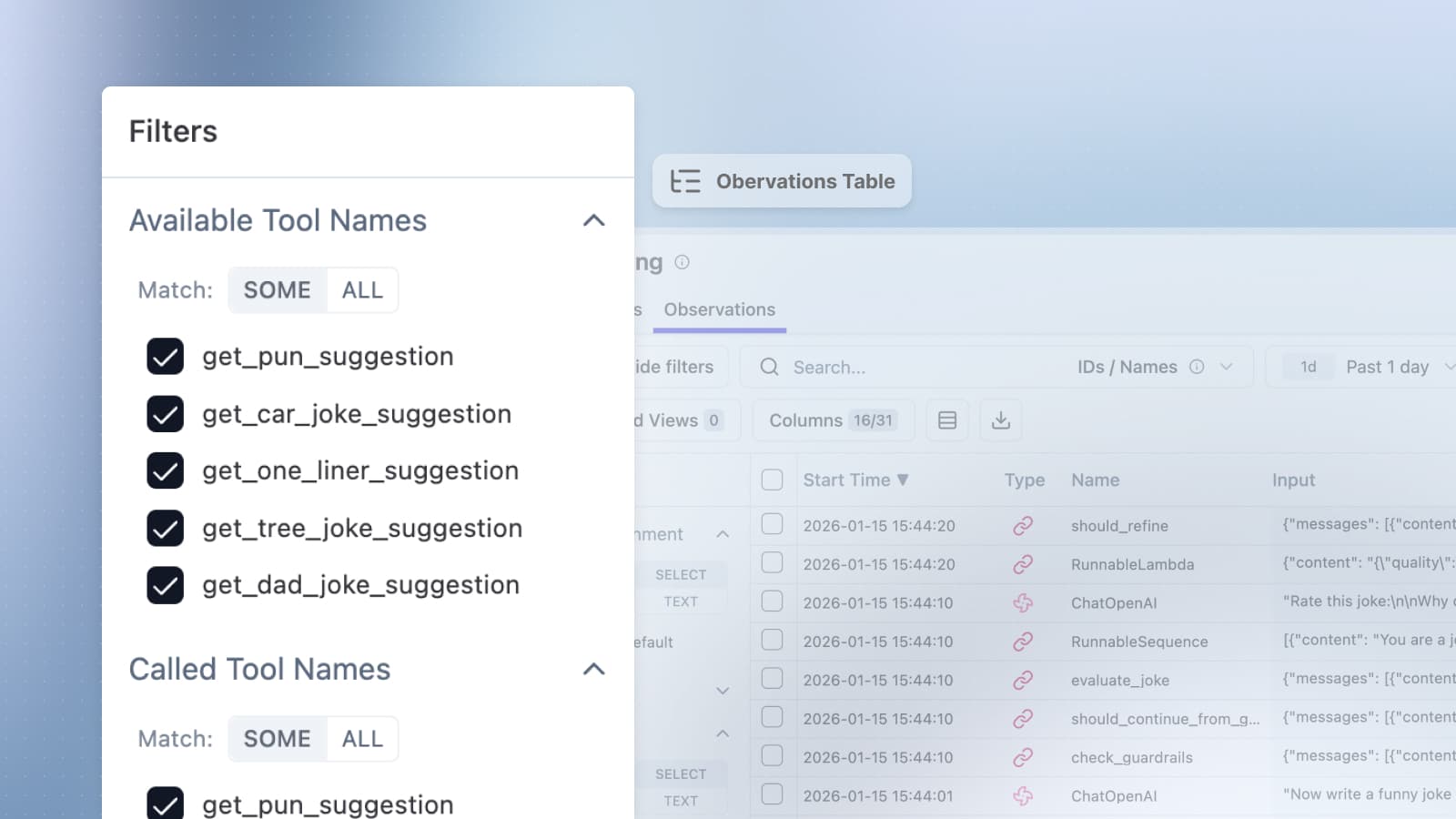
Add filtering, table columns, and dashboard widgets for analyzing tool usage in your LLM applications.
You can now filter observations by available and called tools and build dashboards for tool calls over time. Tool calls are core to AI agents. To know if your agents work as expected, you often want to know if certain tools were called and find the observations in which specific tools were used. Therefore, tool calls are now a distinct data structure in Langfuse.
We distinguish between available tools (tools available to an LLM) and tool calls (tools invoked by the LLM with specific arguments).
Tool Call Filters on the Observations Table
You can filter the observations table by the following new properties:
- Available Tools: the count of tools available to an LLM
- Tool Calls: the count of tools invoked by an LLM
- Available Tools Names: list of tool names which were available to all your LLM calls. You can filter to only show generations to which tools like
get_weatherorsearchwere available - Tool Calls Names: list of tool names which were invoked by all your LLM calls. You can filter to only show generations in which tools like
get_weatherorsearchwere used
Hint: click on the "Columns" to add the columns "Available Tools" and "Tool Calls" to your table view if they are not visible.
Visualize Tool Calls Over Time with Dashboard Widgets
- New Metrics:
toolDefinitionsandtoolCallswith user-selectable aggregation (SUM, AVG, MAX, MIN, percentiles) - New Filters:
toolNamesto break down metrics by tool name and to filter for specific tools
Example Use Cases
- Find looping agents: show observations with 30+ tool calls but only 1 tool available
- Find misbehaving agents: show observations which had the tool
get_weatheravailable but0tool invocations - Create a time series widget showing tool calls over time
Supported Frameworks
Currently, we support parsing tool calls originating from the following frameworks:
- OpenAI
- Langchain / LangGraph
- Vercel AI SDK
- Google ADK / Vertex AI
- Microsoft Agent Framework
Pydantic AI as well as further framework support will land in subsequent releases, please let us know which frameworks you'd like to see supported.
Note: this feature only works with traces ingested from now on and does not apply to historical data.