Launching the Langfuse AI Gateway
 Hassieb Pakzad
The Langfuse AI Gateway is in public beta. Point your apps and coding agents at Langfuse instead of OpenAI or Anthropic, hand out gateway keys instead of provider keys, and see cost per user, key, and model, with every call traced automatically.
The Langfuse AI Gateway is now in public beta. Your application or coding agent sends its OpenAI or Anthropic requests to Langfuse instead of the provider. The gateway forwards the native request with a provider credential your organization stores in Langfuse, and records the call as a generation. You only change the base URL and the API key: no SDK, no code changes.
- Give your team Claude Code or Codex without sharing provider keys. Everyone gets their own gateway key, and the provider key never leaves Langfuse.
- See what your coding agents cost. Break spend down by teammate, key, and model, and open the full trace of any session.
- Trace an app you can't instrument. Swap the base URL and every model call shows up in Langfuse with input, output, tokens, cost, and latency.
Set up once, then hand out keys
An admin adds OpenAI and Anthropic provider credentials under Organization settings → AI Gateway, chooses which models gateway keys can call, picks the project that receives gateway traces, and invites the team. Teammates then issue their own gateway key and copy setup instructions for their tool straight from the key dialog.
The gateway serves the native OpenAI Responses, OpenAI Chat Completions, and Anthropic Messages APIs, including streaming. It doesn't translate between them, so keep the format your client already uses.
Control who can call which models
- User and service account keys: a user key belongs to the person who created it and stops working when they lose gateway access or leave the organization. Owners and admins can issue service account keys for CI and shared services that should keep working when people leave.
- Expiry and revocation: set an optional expiry on any key. Revoking a key takes effect immediately, and creating or revoking keys is recorded in the audit log.
- Model allowlist: enable or disable individual models per provider credential. Gateway keys can only call enabled models.
- Key metadata: attach key-value pairs like
team: platformorcost_center: 4711when you create a key. The gateway adds them to every generation recorded with that key, and the client can't change them. - Gateway-only access: a gateway key can only call the gateway. It can't read or write other Langfuse data.
Track spend per user, key, and model
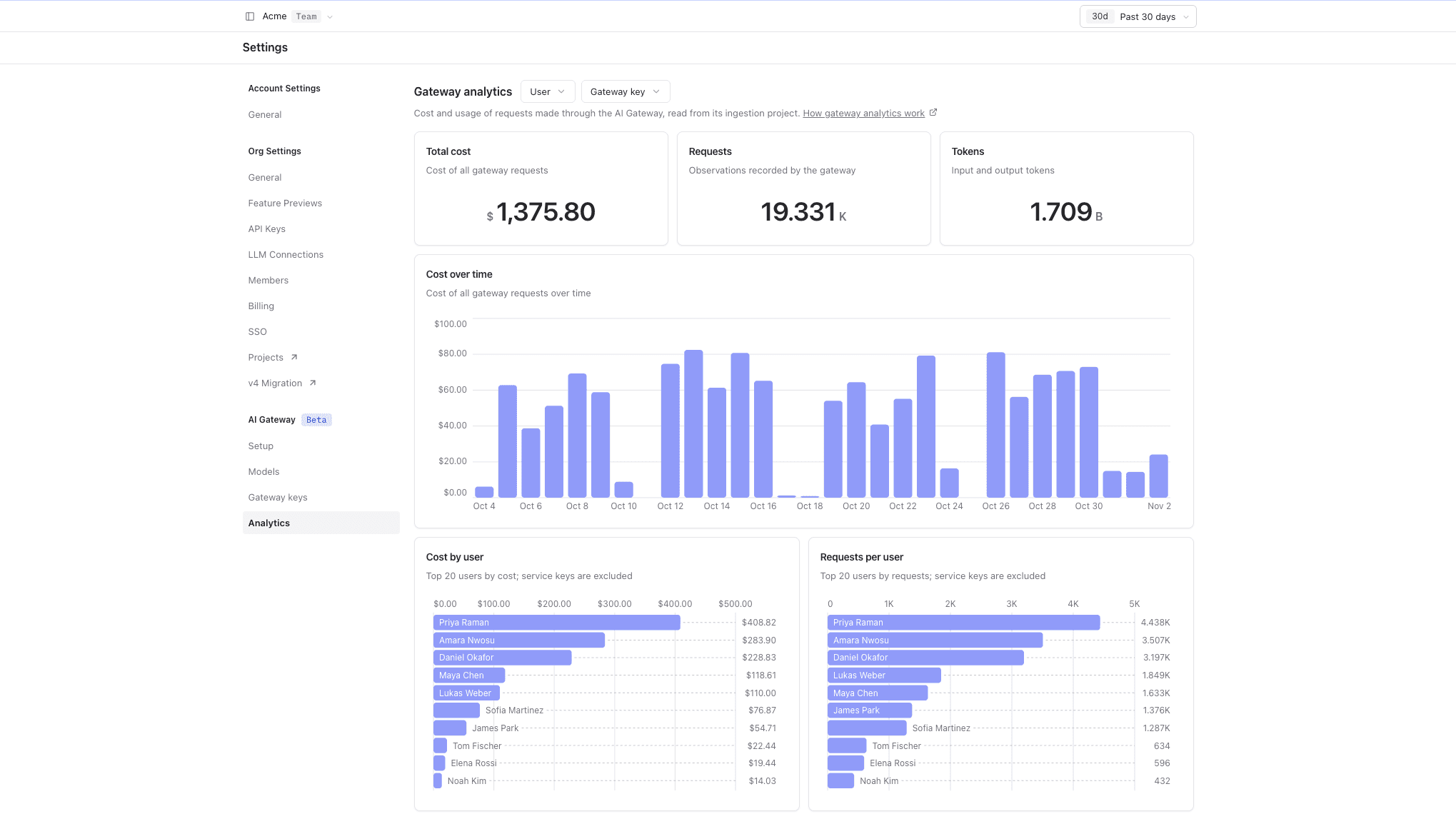
Owners and admins can open the Analytics tab in the AI Gateway settings. It shows total cost, requests, and tokens, cost over time, and the top users, API keys, and models by cost. Filter by user or API key to find where a spike came from. People with the AI Gateway role see their own cost, requests, and tokens, without the user filter and per-user charts. If some calls use models without a Langfuse price, an alert says so and links to custom model prices. Gateway traces are regular Langfuse traces, so you can also build custom dashboards on key metadata, for example cost per team or cost center.
Every request is a trace
On Langfuse Cloud, the gateway records every request as a generation, so you always have an audit trail of which key called which model. Choose what is captured for your organization:
- Full: input, output, model parameters, usage, and cost.
- Usage: usage, cost, and model parameters, without prompts or outputs.
Each generation carries the model, token usage including cached and reasoning tokens, cost, latency, time to first token, the trace user, and the gateway key. Coding agent sessions are grouped automatically, and you can add tags, an environment, or a session with optional request headers. See tracing for details.
Connect your coding agent
Point your agent at the gateway by changing its base URL and API key. No plugin or hook required:
Availability
The AI Gateway is available on Langfuse Cloud in the EU, US, JP, and HIPAA regions. Each region has its own gateway host. Gateway traces are stored in your organization's Langfuse region; requests are forwarded to OpenAI or Anthropic and processed under your agreement with them. On the HIPAA region, make sure you have a BAA with Langfuse and with your model provider before you send PHI. Self-hosted deployments can run the open source gateway next to Langfuse.
Each recorded generation counts as a billable unit, like any other observation. Your provider bills model usage to your own provider account.
During the beta, the gateway supports OpenAI and Anthropic. Behavior, routes, and headers can still change. We'd love to hear how it works for you: share feedback via the chat or in our GitHub Discussion.