How to calibrate your LLM-as-a-judge with the Langfuse skill
LLM-as-a-judge is convenient: write a prompt, point it at your traces, get a score. But the judge is a prompt like any other, and you wrote it. How do you know it labels cases the way you would?
The answer is judge calibration. You can do this manually, but the Langfuse skill has a dedicated workflow for it. This guide walks through that workflow end-to-end.
Prerequisites
A coding agent with the Langfuse skill installed. You can use any agent (Claude Code, Cursor, Codex, etc.) as long as the Langfuse skill is available to it. Make sure your version of the skill includes references/judge-calibration.md.
Langfuse credentials in your environment. The skill uses the Langfuse CLI under the hood, which reads LANGFUSE_PUBLIC_KEY, LANGFUSE_SECRET_KEY, and LANGFUSE_BASE_URL from your shell.
The setup at a high level
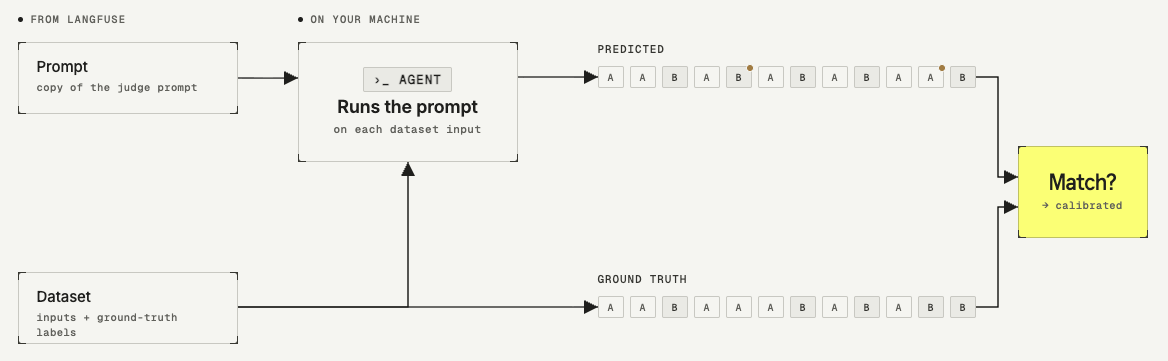
You create a dataset of scenarios for your LLM-as-a-judge to evaluate, your ground truth labels. The judge prompt you want to test sits in Langfuse Prompt Management.
The calibration run is a Langfuse experiment that executes the judge prompt against every dataset item. For each item, you end up with two labels: the score the judge produced and the expected output you defined. The agent compares the two and reports how often they agree. The higher the agreement rate, the more closely the judge is aligned with your judgment.
The workflow
We will walk through an example where we want to calibrate an LLM-as-a-judge that runs on customer support conversations. The judge needs to determine whether the conversation was escalated to a human or not.
Create the ground-truth dataset
Create a Langfuse dataset. As an example for this walkthrough, we create a dataset called escalated-not-escalated-scenarios. Each item holds the customer support conversation and the label you would expect your LLM-as-a-judge to assign to it.
Two example items from the dataset:
| Inputs | Expected outputs |
|---|---|
| User: My subscription was charged twice this month. Agent: I can see the duplicate charge. I've issued a refund for the duplicate — it should appear in 3-5 business days. User: Perfect, thanks! | not_escalated |
| User: I can't log in. Agent: Can you try resetting your password at the link I just sent? User: This is the third time I'm trying. Just get me a human, please. | escalated |
Add the judge prompt to Prompt Management
Copy the prompt from your LLM-as-a-judge and add it as a new prompt in Langfuse Prompt Management. This is the prompt the calibration run will execute against each dataset item.
If you want to keep evaluator prompts separate from the prompts you use in
production, organize them under an evaluator-prompts/ folder, or put them
in a dedicated project.
Run calibration via the Langfuse skill
With the dataset and the prompt in place, open your AI assistant and ask it to run the calibration.
I have a Langfuse dataset called <escalated-not-escalated-scenarios> and a judge prompt called <evaluator-prompts/escalation-judge> in Langfuse Prompt Management. Use the Langfuse skill's judge calibration workflow to test whether this judge agrees with the ground-truth labels in the dataset.
The skill takes over from there and walks you through a short back-and-forth before it runs anything. Here is what to expect:
The agent asks if you want simple or advanced mode
Before running anything, the agent asks whether you want a simple or advanced calibration.
- Simple mode reports a single accuracy score: the percentage of dataset items the judge labeled the same way you did. Use this for a quick answer to "does this judge agree with me often enough?"
- Advanced mode reports a full confusion matrix with precision, recall, F1, TPR, and TNR. Use this when one class is much rarer than the other, or before you trust the judge for high-stakes automation.
If you are not sure, start with simple mode.
The agent runs the experiment
The agent creates a script using the Langfuse Experiments SDK and runs the experiment for you. The run appears as a dataset run in the Experiments UI, with one trace per dataset item containing the judge's output.
The agent returns a calibration report
The agent compares the experiment outputs with the expected outputs from the dataset and returns a report. The level of detail depends on the mode you picked.
Example calibration report (advanced mode)
Setup
- Dataset:
escalated-not-escalated-scenarios— 35 items, 0 invalid labels - Judge prompt:
evaluator-prompts/escalation-judgev1 · modelgpt-4o-mini· temp 0 - Positive =
escalated, Negative =not_escalated
Confusion matrix
| Pred: escalated | Pred: not_escalated | |
|---|---|---|
| Actual: escalated | TP = 13 | FN = 1 |
| Actual: not_escalated | FP = 0 | TN = 21 |
Metrics
| Metric | Value |
|---|---|
| Accuracy | 0.971 |
| Precision | 1.000 |
| Recall / TPR | 0.929 |
| TNR | 1.000 |
| F1 | 0.963 |
Failure direction: one false negative — the judge missed an escalation, never falsely flagged one. Both TPR (0.929) and TNR (1.000) clear the 0.90 threshold from the skill's advanced quality gates.
The single disagreement (item 73cb3a52):
User: "Forget it. I'll just email your CEO directly."
Agent: "I understand you're frustrated. Before you do that, would you like me to escalate this internally so we can resolve it today?"
User: "No, I'll handle it."
- Ground truth:
escalated(user announced they'd contact a human channel — CEO email — directly) - Judge:
not_escalated(user declined the agent's offer to transfer)
This one is genuinely borderline: the user declined the in-app escalation but stated they'd contact a human externally. Your prompt says both "saying they'll contact a human channel directly (email a specific team…)" → escalated AND "declining the agent's offer to transfer" → not_escalated, and this row triggers both rules. Worth deciding which signal dominates and tightening the prompt if you want the judge to handle this consistently.
Recommendation: Ship. Metrics are strong and skewed in the right direction (no over-flagging). Resolve the rule conflict above before relying on the judge for any decision that depends on catching every escalation. Re-run after the prompt edit to confirm the FN drops.
Iterate on the prompt
If the report shows the judge agrees with your labels often enough to trust it, you can ship. If you want to improve the results further, edit the judge prompt to address the disagreements and re-run the calibration. You have two options:
- Manually open the prompt in Langfuse Prompt Management, edit it, and re-run the calibration steps above.
- Ask your AI assistant to change the prompt based on the results. The skill uses the Langfuse CLI under the hood already, so the agent can update the prompt for you directly.
Once the judge runs on production observations, keep checking agreement: have reviewers score a sample of those same observations in an annotation queue, then compare their scores with the judge's in Score Analytics.
Last updated on


