Observability for TypeSafe Jev with Langfuse


This notebook shows how to trace TypeSafe Jev System One calls with Langfuse. The OpenInference instrumentor patches TypeSafeClient.system_one in place, so you keep a plain client and still get OpenTelemetry spans for skill routers, model routers, tool-call hooks, and eval verdicts.
What is TypeSafe Jev? Jev is TypeSafe's System One model. You send state plus typed Choice, Score, and Noul questions; it returns structured answers with probabilities. It does not generate text. Official Python and JavaScript SDKs wrap
POST /v1/systemone. Those SDKs do not emit OpenTelemetry spans themselves.
What is Langfuse? Langfuse is an open-source LLM engineering platform that helps teams trace, debug, and evaluate LLM applications. Use Langfuse Cloud or self-host it.
Step 1: Install Dependencies
%pip install langfuse typesafe-sdk openinference-instrumentation-typesafe -UStep 2: Set Up Environment Variables
Get your Langfuse keys from the project settings in Langfuse Cloud or set up self-hosting.
import os

# Get keys for your project from the project settings page: https://langfuse.com/cloud
os.environ.setdefault("LANGFUSE_PUBLIC_KEY", "pk-lf-...");
os.environ.setdefault("LANGFUSE_SECRET_KEY", "sk-lf-...");
os.environ.setdefault("LANGFUSE_BASE_URL", "https://cloud.langfuse.com"); # 🇪🇺 EU region (API host)
# Other Langfuse data regions include 🇺🇸 US: https://us.cloud.langfuse.com, 🇯🇵 Japan: https://jp.cloud.langfuse.com and ⚕️ HIPAA: https://hipaa.cloud.langfuse.com

os.environ.setdefault("TYPESAFE_API_KEY", "sk-...");  # https://console.typesafe.ai/settings/keys
With the environment variables set, initialize the Langfuse client. get_client() picks up the env vars above and returns a client bound to your project.
from langfuse import get_client

langfuse = get_client()

# Verify connection
if langfuse.auth_check():
    print("Langfuse client is authenticated and ready!")
else:
    print("Authentication failed. Please check your credentials and host.")
Step 3: OpenTelemetry instrumentation
Official TypeSafe docs do not mention OpenTelemetry. OpenInference already ships TypeSafeAIInstrumentor for typesafe-sdk >= 0.6.0. Call instrument() once. It wraps TypeSafeClient.system_one and AsyncTypeSafeClient.system_one internally, so application code keeps client = TypeSafeClient() — no observeTypeSafe() helper and no Langfuse-specific client wrapper.
Langfuse's Python SDK is OpenTelemetry-native, so the instrumentor attaches to the same tracer provider that get_client() registered. The same package can export to any OTLP collector, including Phoenix or Langfuse.
Each System One call becomes an OpenInference LLM span with:
input.value: the request body (state,model,questions) as JSONoutput.value: the response body (model,answers,usage) as JSONllm.request.model_name/llm.response.model_name(for examplejev-latest→jev-1.13.0)llm.token_count.prompt,llm.token_count.completion, andllm.token_count.total
A System One call is not a chat exchange, so spans do not set llm.input_messages / llm.output_messages.
from openinference.instrumentation.typesafe import TypeSafeAIInstrumentor

TypeSafeAIInstrumentor().instrument()
Step 4: Run a System One call
Ask Jev three questions about one ticket: a yes/no (Noul), a label (Choice), and a rubric (Score). The same shape covers tool routers, compaction gates, and eval verdicts. Pin jev-1.13.0 when a threshold depends on a specific model version; jev-latest moves when TypeSafe ships a new release.
from typesafe_sdk import Choice, Noul, Score, TypeSafeClient

with TypeSafeClient(model="jev-1.13.0") as client:
    response = client.system_one(
        state={"document": "I was charged twice. Please fix this ASAP."},
        questions={
            "billing": Noul(instructions="Is this ticket about billing?"),
            "tone": Choice(
                instructions="What is the customer's tone?",
                criteria={"calm": None, "frustrated": None, "angry": None},
            ),
            "urgency": Score(
                instructions="How urgent is this ticket?",
                criteria=["can wait", "this week", "today"],
            ),
        },
    )

print(response.model)
print(response.nouls["billing"].noul)
print(response.choices["tone"].choice, response.choices["tone"].confidence)
print(response.scores["urgency"].score, response.scores["urgency"].confidence)
To write Jev verdicts back onto Langfuse traces as scores, see Using TypeSafe's Jev for evals.
Step 5: View Traces in Langfuse
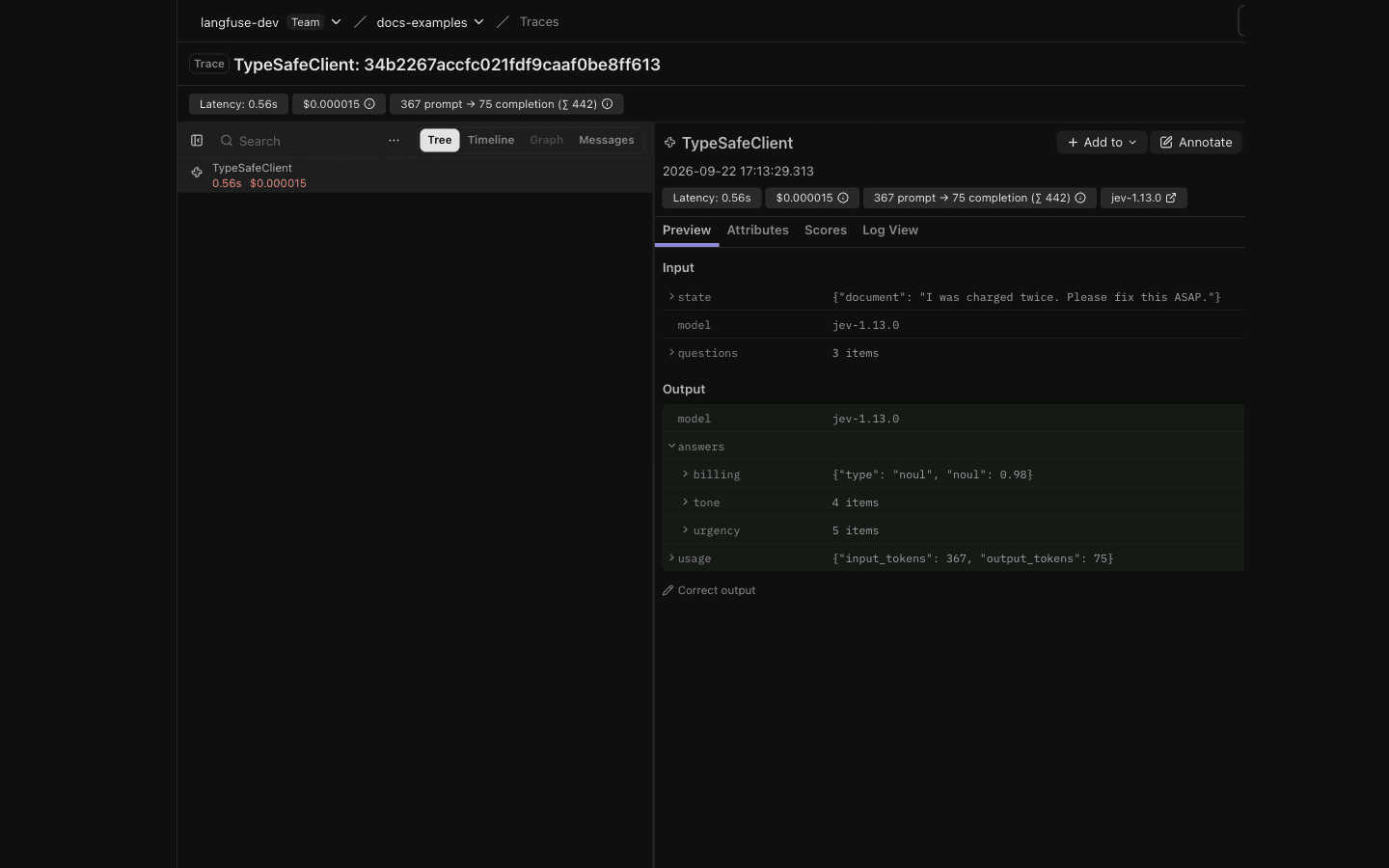
After running the example, open Langfuse Cloud to see the System One span: request state and questions, typed answers with probabilities, token usage, and latency.
Interoperability with the Python SDK
You can use this integration together with the Langfuse SDKs to add additional attributes to the observation.
The @observe() decorator provides a convenient way to automatically wrap your instrumented code and add additional attributes to the observation.
from langfuse import observe, propagate_attributes, get_client

langfuse = get_client()

@observe()
def my_llm_pipeline(input):
    # Add additional attributes (user_id, session_id, metadata, version, tags) to all spans created within this execution scope
    with propagate_attributes(
        user_id="user_123",
        session_id="session_abc",
        tags=["agent", "my-observation"],
        metadata={"email": "user@langfuse.com"},
        version="1.0.0"
    ):

        # YOUR APPLICATION CODE HERE
        result = call_llm(input)

        return result

# Run the function
my_llm_pipeline("Hi")
Learn more about using the Decorator in the Langfuse SDK instrumentation docs.
The Context Manager allows you to wrap your instrumented code using context managers (with with statements), which allows you to add additional attributes to the observation.
from langfuse import get_client, propagate_attributes

langfuse = get_client()

with langfuse.start_as_current_observation(
    as_type="span",
    name="my-observation",
    trace_context={"trace_id": "abcdef1234567890abcdef1234567890"},  # Must be 32 hex chars
) as observation:

    # Add additional attributes (user_id, session_id, metadata, version, tags)
    # to all observations created within this execution scope
    with propagate_attributes(
        user_id="user_123",
        session_id="session_abc",
        metadata={"experiment": "variant_a", "env": "prod"},
        version="1.0",
    ):
        # YOUR APPLICATION CODE HERE
        result = call_llm("some input")

# Flush events in short-lived applications
langfuse.flush()
Learn more about using the Context Manager in the Langfuse SDK instrumentation docs.
Troubleshooting
No observations appearing
First, enable debug mode in the Python SDK:
export LANGFUSE_DEBUG="True"Then run your application and check the debug logs:
- OTel observations appear in the logs: Your application is instrumented correctly but observations are not reaching Langfuse. To resolve this:
- Call
langfuse.flush()at the end of your application to ensure all observations are exported. - Verify that you are using the correct API keys and base URL.
- Call
- No OTel spans in the logs: Your application is not instrumented correctly. Make sure the instrumentation runs before your application code.
Unwanted observations in Langfuse
The Langfuse SDK is based on OpenTelemetry. Other libraries in your application may emit OTel spans that are not relevant to you. These still count toward your billable units, so you should filter them out. See Unwanted spans in Langfuse for details.
Missing attributes
Some attributes may be stored in the metadata object of the observation rather than being mapped to the Langfuse data model. If a mapping or integration does not work as expected, please raise an issue on GitHub.
Next Steps
Once you have instrumented your code, you can manage, evaluate and debug your application:
Manage prompts in Langfuse
Add evaluation scores
Run LLM-as-a-judge Evaluators
Create datasets
Create custom dashboards
Test queries in the Playground
Last updated on

