Trace Flue agents with Langfuse
This notebook shows how to integrate Langfuse with Flue to trace, debug, and evaluate your agents and workflows via OpenTelemetry.
What is Flue?
Flue is an open-source TypeScript framework for building durable AI agents and workflows. It gives any model a harness-style runtime — sessions, tools, skills, sandboxed filesystem and shell access, and durable execution — so you can write agents once and run them anywhere (Node.js, Cloudflare, CI).
What is Langfuse?
Langfuse is an open-source LLM engineering platform that helps teams trace, debug, and evaluate their LLM applications. Use Langfuse Cloud (hosted by Langfuse, free tier, no infrastructure to run) or self-host it.
Step 1: Install dependencies
Flue ships a dedicated @flue/opentelemetry adapter that turns its public observe(...) event stream into OpenTelemetry spans. Pair it with the Langfuse OpenTelemetry SDK (@langfuse/otel) to export those spans to Langfuse.
npm install @flue/runtime @flue/opentelemetry @langfuse/otel @opentelemetry/sdk-node @opentelemetry/api hono valibot
npm install --save-dev @flue/cli
If you don't have a Flue project yet, scaffold one first with
npx flue init --target nodeand follow the Flue quickstart.
Step 2: Configure environment
Get your Langfuse API keys from your project settings in Langfuse Cloud or your self-hosted instance, and add them to a .env file in your project root together with your model provider key.
# .env
# Get keys from your project settings: https://langfuse.com/cloud
LANGFUSE_PUBLIC_KEY="pk-lf-..."
LANGFUSE_SECRET_KEY="sk-lf-..."
LANGFUSE_BASE_URL="https://cloud.langfuse.com" # 🇪🇺 EU region
# LANGFUSE_BASE_URL="https://us.cloud.langfuse.com" # 🇺🇸 US region

# Model provider used by your Flue agents
OPENAI_API_KEY="sk-proj-..."
Step 3: Register the Langfuse OpenTelemetry observer
@flue/opentelemetry only converts Flue events into spans — your application owns the OpenTelemetry SDK and exporter. Configure the SDK with the Langfuse LangfuseSpanProcessor and register the observer in your Flue app's entrypoint (src/app.ts).
Flue's model-turn spans follow the OpenTelemetry GenAI semantic conventions, so Langfuse maps them to generations with model, token usage, and cost automatically. The other Flue spans (workflow, operation, tool, task) are emitted under the @flue/opentelemetry instrumentation scope, so we extend the default Langfuse span filter to include that scope.
// src/app.ts
import { NodeSDK } from "@opentelemetry/sdk-node";
import { LangfuseSpanProcessor, isDefaultExportSpan } from "@langfuse/otel";
import { createOpenTelemetryObserver } from "@flue/opentelemetry";
import { observe } from "@flue/runtime";
import { flue } from "@flue/runtime/routing";
import { Hono } from "hono";

const sdk = new NodeSDK({
  spanProcessors: [
    new LangfuseSpanProcessor({
      // Export Langfuse's default LLM spans plus the full Flue span tree
      // (workflow / operation / tool / task) emitted by @flue/opentelemetry.
      shouldExportSpan: ({ otelSpan }) =>
        isDefaultExportSpan(otelSpan) ||
        otelSpan.instrumentationScope.name === "@flue/opentelemetry",
    }),
  ],
});

sdk.start();

// Flush buffered spans on exit: the one-shot `flue run` path (the event
// loop drains) and Ctrl+C on the long-running `flue dev` server (signals).
for (const signal of ["beforeExit", "SIGINT", "SIGTERM"] as const) {
  process.once(signal, async () => {
    await sdk.shutdown();
    if (signal !== "beforeExit") process.exit(0);
  });
}

// Register the observer after sdk.start() so it uses the configured tracer.
// exportContent forwards prompts/responses/tool payloads so they appear in
// each observation's Input/Output; return a sanitized event in production.
observe(createOpenTelemetryObserver({ exportContent: (event) => event }));

const app = new Hono();
app.route("/", flue());

export default app;
Capturing prompts and responses: the
exportContentcallback in the snippet above forwards full content — prompts, completions, and tool payloads — which Langfuse maps to the corresponding observation's Input and Output (model turns become Generation observations, tool calls become Tool observations, and delegated tasks become Agent observations). Omit the callback to export only metadata (identifiers, durations, model, token usage, and cost); in production, return a sanitized event fromexportContentto redact sensitive data before it leaves your app.
Step 4: Add an example workflow
Flue discovers workflows from src/workflows/. This one runs an agent that uses a tool — each model turn and tool call becomes a span in the trace.
// src/workflows/weather.ts
import {
  createAgent,
  defineTool,
  type FlueContext,
  type WorkflowRouteHandler,
} from "@flue/runtime";
import * as v from "valibot";

export const route: WorkflowRouteHandler = async (_c, next) => next();

const agent = createAgent(() => ({ model: "openai/gpt-4o-mini" }));

const lookupWeather = defineTool({
  name: "lookup_weather",
  description: "Look up current weather for a city.",
  parameters: v.object({ city: v.string() }),
  execute: async ({ city }) => `${city}: sunny, 72 F`,
});

export async function run({ init, payload }: FlueContext<{ city?: string }>) {
  const harness = await init(agent);
  const session = await harness.session();
  const city = typeof payload.city === "string" ? payload.city : "San Francisco";
  const response = await session.prompt(
    `Use the weather tool to report current weather in ${city}.`,
    { tools: [lookupWeather] },
  );
  return { message: response.text };
}
Step 5: Run your agent
Start the Flue dev server:
npx flue dev --target nodeIn another terminal, invoke the workflow and wait for the result:
curl -X POST "http://localhost:3583/workflows/weather?wait=result" \
  -H "content-type: application/json" \
  -d '{"city":"Berlin"}'
You can also run a workflow once without the server with npx flue run weather --target node --payload '{"city":"Berlin"}'.
Step 6: View traces in Langfuse
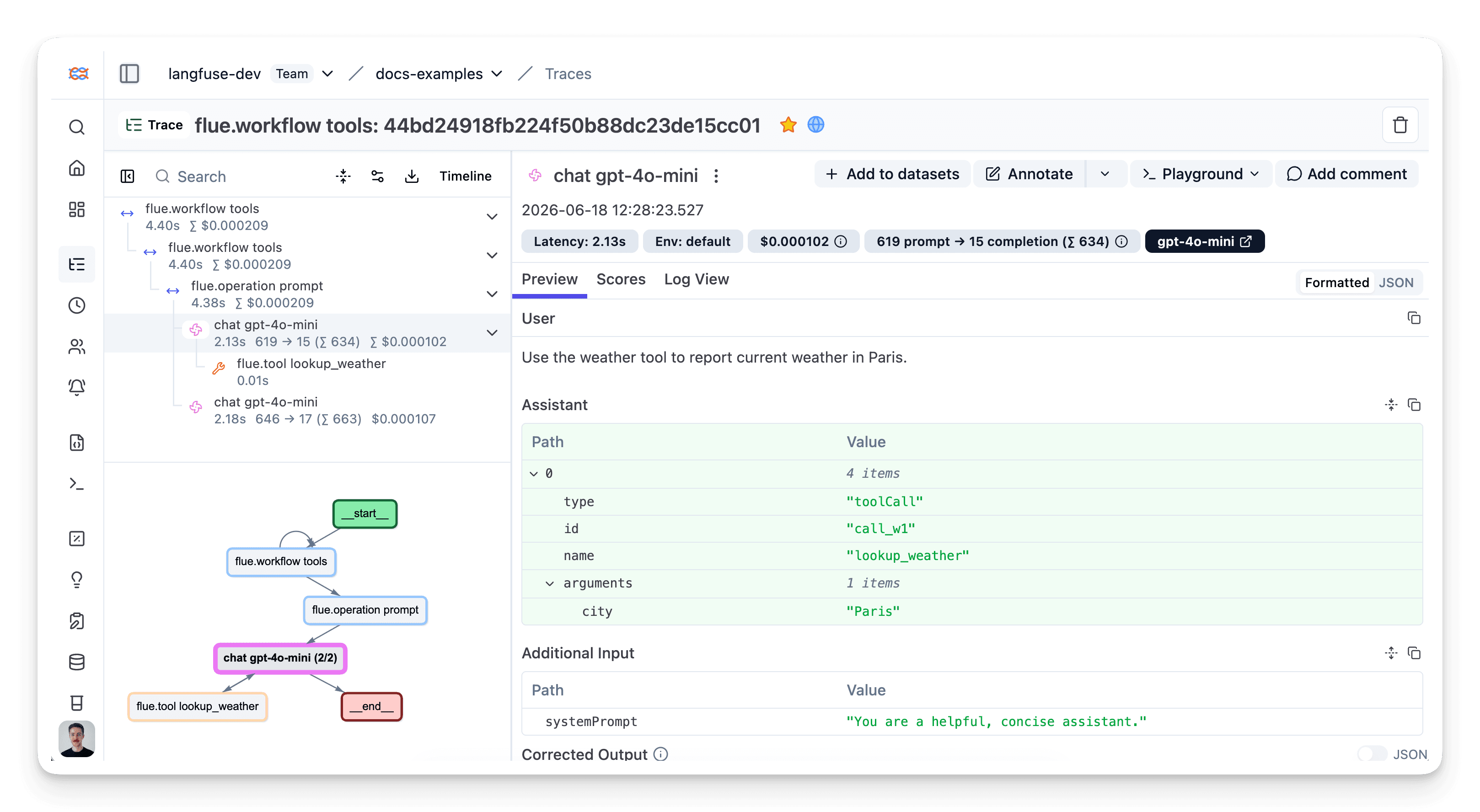
After running the workflow, open your Langfuse dashboard to see the full trace: the workflow span, each model turn mapped to a generation (with model, token usage, and cost), and tool calls captured as nested Tool observations with their inputs and outputs.
Interoperability with the JS/TS SDK
You can use this integration together with the Langfuse SDKs to add additional attributes or group observations into a single trace.
The Context Manager allows you to wrap your instrumented code using context managers (with with statements), which allows you to add additional attributes to the trace. Any observation created inside the callback will automatically be nested under the active observation, and the observation will be ended when the callback finishes.
import { startActiveObservation, propagateAttributes } from "npm:@langfuse/tracing";

await startActiveObservation("context-manager", async (span) => {
  span.update({
    input: { query: "What is the capital of France?" },
  });

  // Propagate userId to all child observations
  await propagateAttributes(
    {
      userId: "user-123",
      sessionId: "session-123",
      metadata: {
        source: "api",
        region: "us-east-1",
      },
      tags: ["api", "user"],
      version: "1.0.0",
    },
    async () => {

      // YOUR CODE HERE
      const { text } = await generateText({
        model: openai("gpt-5"),
        prompt: "What is the capital of France?",
        experimental_telemetry: { isEnabled: true },
      });
    }
  );
  span.update({ output: "Paris" });
});
Learn more about using the Context Manager in the Langfuse SDK instrumentation docs.
The observe wrapper is a powerful tool for tracing existing functions without modifying their internal logic. It acts as a decorator that automatically creates a span or generation around the function call. You can use the propagateAttributes function to add attributes to the observation from within the wrapped function.
import { observe, propagateAttributes } from "@langfuse/tracing";
import { generateText } from "ai";
import { openai } from "@ai-sdk/openai";

// An existing function
const processUserRequest = observe(
  async (userQuery: string) => {

    // Propagate attributes to all child observations
    return await propagateAttributes(
      {
        userId: "user-123",
        sessionId: "session-123",
        metadata: {
          source: "api",
          region: "us-east-1",
        },
        tags: ["api", "user"],
        version: "1.0.0",
      },
      async () => {

        // YOUR CODE HERE
        const { text } = await generateText({
          model: openai("gpt-5"),
          prompt: userQuery,
          experimental_telemetry: { isEnabled: true },
        });

        return text;
      }
    );
  },
  { name: "process-user-request" }
);

const result = await processUserRequest("some query");
Learn more about using the Decorator in the Langfuse SDK instrumentation docs.
Troubleshooting
No traces appearing
First, enable debug mode in the JS/TS SDK:
export LANGFUSE_LOG_LEVEL="DEBUG"Then run your application and check the debug logs:
- OTel spans appear in the logs: Your application is instrumented correctly but traces are not reaching Langfuse. To resolve this:
- Call
forceFlush()at the end of your application to ensure all traces are exported. This is especially important in short-lived environments like serverless functions. - Verify that you are using the correct API keys and base URL.
- Call
- No OTel spans in the logs: Your application is not instrumented correctly. Make sure the instrumentation runs before your application code.
Unwanted observations in Langfuse
The Langfuse SDK is based on OpenTelemetry. Other libraries in your application may emit OTel spans that are not relevant to you. These still count toward your billable units, so you should filter them out. See Unwanted spans in Langfuse for details.
Missing attributes
Some attributes may be stored in the metadata object of the observation rather than being mapped to the Langfuse data model. If a mapping or integration does not work as expected, please raise an issue on GitHub.
Next Steps
Once you have instrumented your code, you can manage, evaluate and debug your application:
Manage prompts in Langfuse
Add evaluation scores
Run LLM-as-a-judge Evaluators
Create datasets
Create custom dashboards
Test queries in the Playground
Last updated on
