Cursor tracing with Langfuse
What is Cursor? Cursor is an AI code editor. Its agent plans changes, edits files, runs shell commands, calls MCP tools, and can spawn subagents. It also runs in the Cursor CLI and as Cloud Agents.
What is Langfuse? Langfuse is the open-source AI engineering platform. It helps teams collaboratively trace agentic applications, manage prompts, debug issues, evaluate quality, and monitor costs in production. Use Langfuse Cloud (hosted by Langfuse, free tier, no infrastructure to run) or self-host it.
Install via the Cursor Marketplace
The easiest way to set this up is the Langfuse Observability Plugin for Cursor. Install Langfuse Observability from the Cursor Marketplace, then save your project keys and region host (steps below). Requires Node.js 22 or newer, and Langfuse Cloud or self-hosted Langfuse v4. Already using the community hooks?
What can this integration trace?
The plugin reads Cursor hooks and Cursor's transcript, then sends one trace per turn.
- Agent turns: one
Cursor Turnper prompt, from your message to the final answer. Aborted turns areWARNING. Failed turns areERROR. - Model generations: one
LLMobservation per assistant message. Input is the conversation history. Output is the assistant text, thinking, and requested tool calls, plus the model parameters (thinking, context, effort). - Token usage and cost: Cursor reports input, output, cache-read, and cache-write tokens once per turn, on the last
LLMobservation. Read the trace total. Langfuse prices it with its model definitions. A model without a definition shows tokens and no cost. - Tool calls: every tool Cursor runs (
Shell,Read,Write,StrReplace,Grep,Glob, MCP tools, and more) with input, output, duration, and working directory. Failed, timed-out, and denied calls are flagged, and file edits carry the diff hunks Cursor reports. - Subagents:
Tasksubagents are nested under the tool call that spawned them, including their own generations when Cursor provides the transcript. - Context compaction: an event with the context size before Cursor compacted it.
- Skills: a
skill:<name>tag on every trace where the agent read aSKILL.mdor ran a script from a skill. - Sessions and users: all turns from one Cursor conversation are grouped into a session, and the user defaults to the signed-in Cursor account.
Quick start
Set up Langfuse
- Sign up at Langfuse Cloud and select the region, or self-host Langfuse v4.
- Create a project. Open Settings → API Keys, create a key pair, and copy the public key, secret key, and base URL for that host.
Install the plugin
Node.js 22 or newer must be on the PATH of the process that launches Cursor. In Cursor, open Customize and install Langfuse Observability.
The plugin ships its own hook definitions, so there is nothing else to register. For Cloud Agents, the Cursor CLI, or a shared repository, see Install with npm.
Set your Langfuse credentials
publicKey, secretKey, and baseUrl are required. Tracing stays off until all three are set.
Start a new agent chat. If ~/.cursor/langfuse.json is missing, the plugin creates it (mode 600, readable only by you) with empty strings. The first reply links that file. Your prompt still runs. In a chat that is already open, run /langfuse-setup. It creates the same file. Existing keys stay.
Paste the public key, secret key, and host into that file. Keep the secret key out of the chat.
| Account | baseUrl |
|---|---|
| Europe | https://cloud.langfuse.com |
| US | https://us.cloud.langfuse.com |
| US HIPAA | https://hipaa.cloud.langfuse.com |
| Japan | https://jp.cloud.langfuse.com |
| Self-hosted | Your Langfuse v4 instance URL |
The file the plugin creates looks like this. Replace each empty string. A public key starts with pk-lf-, a secret key starts with sk-lf-, and baseUrl is a host from the table. Leave a field empty until the value is real. pk-lf-... counts as a key, so saving that placeholder turns tracing on and the setup message stops.
{
  "publicKey": "",
  "secretKey": "",
  "baseUrl": ""
}
Cloud Agents, and Cursor started from a terminal, can take the same values from the environment. Cursor started from the Dock or Finder does not read your shell profile, so use the file in that case.
export LANGFUSE_PUBLIC_KEY="pk-lf-..."
export LANGFUSE_SECRET_KEY="sk-lf-..."
export LANGFUSE_BASE_URL="https://cloud.langfuse.com" # EU. Other hosts are in the table above.
Configuration is resolved as defaults, then ~/.cursor/langfuse.json, then <project>/.cursor/langfuse.json, then environment variables. LANGFUSE_CURSOR_* overrides the matching LANGFUSE_* variable. A project baseUrl is used only when that file also supplies both keys and the environment does not override either key.
Restart Cursor and verify
Restart Cursor, or run Developer: Reload Window. Send one prompt. ~/.cursor/langfuse/hook.log should contain Exported turn 1 ... as trace <id>.
View traces in Langfuse
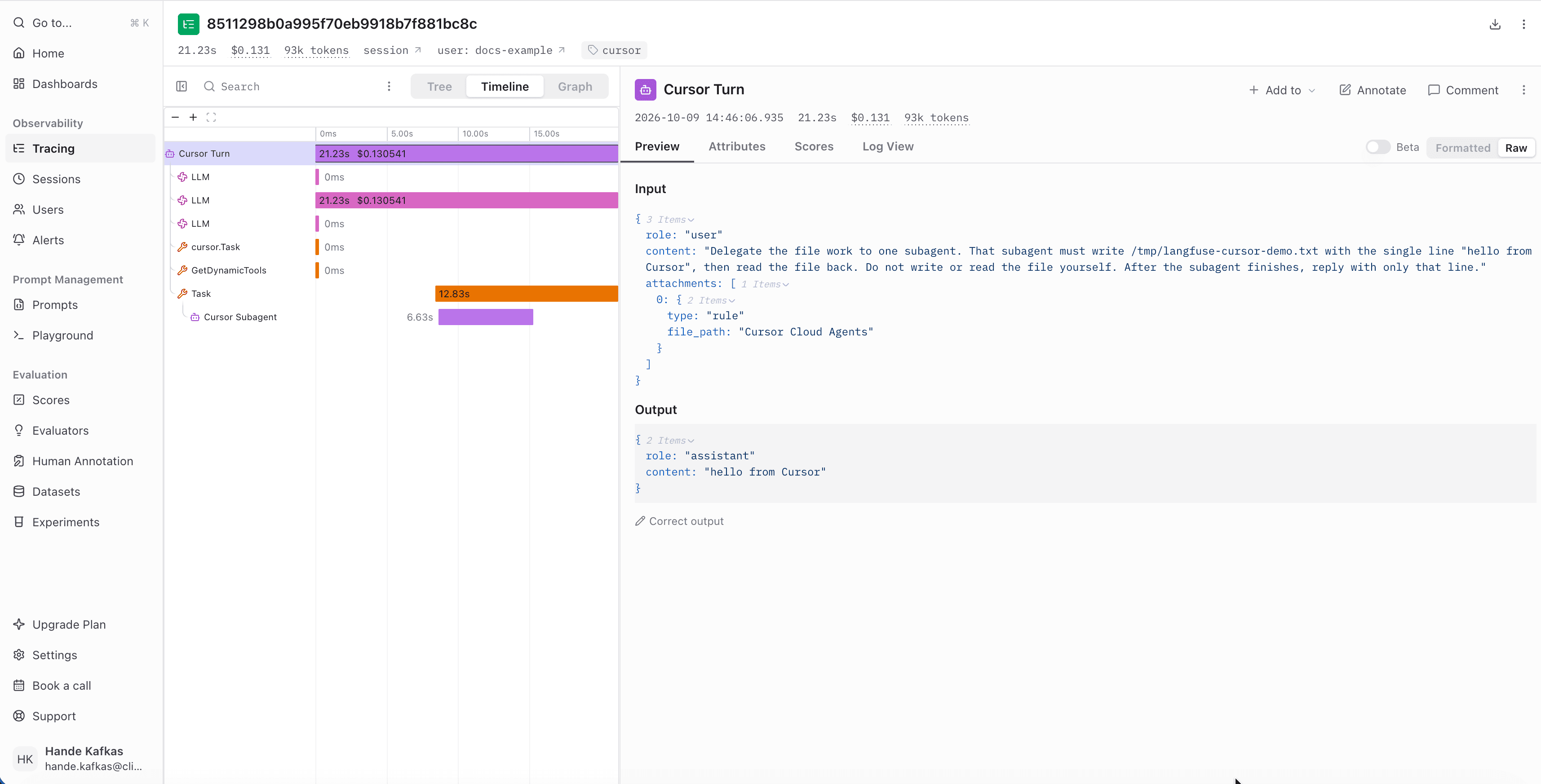
Open your Langfuse project and search for Cursor Turn. Each trace is an agent observation with LLM generations and tool calls. A Task subagent is nested under the tool call that spawned it. Turns from the same conversation share a session_id. Widen the time range if the trace is not there yet.
Install with npm
The npm package installs the same hooks without the marketplace. Use it for Cloud Agents, the Cursor CLI, or a repository whose teammates should all be traced:
npm install -g @langfuse/cursor-observability-plugin
langfuse-cursor-hook setup --public-key pk-lf-... --secret-key sk-lf-... \
  --base-url https://cloud.langfuse.com --hooks
--base-url is required. Pass the host from the region table. For a self-hosted instance, pass your Langfuse v4 URL. Use one install path per machine, so the hooks do not fire twice.
setup checks the keys with the Langfuse API and names the project. It writes ~/.cursor/langfuse.json (mode 600) only after the keys and host verify. --hooks registers the 18 agent hooks in ~/.cursor/hooks.json and keeps hooks from other tools. --project . writes the repo's .cursor/hooks.json instead. Cloud Agents and the CLI read that file. With no keys or host, setup prints the region hosts and writes nothing.
langfuse-cursor-hook status prints the resolved config, whether the connection works, how many hooks are registered, and the last exported traces. From a Marketplace install, run node dist/index.mjs status in ~/.cursor/plugins/cache/cursor-public/langfuse-observability/. /langfuse-setup runs that check once the three values are set and reports the project name.
Configuration options
Every option is a key in langfuse.json and has an environment variable. Each variable also accepts a LANGFUSE_CURSOR_ prefix (for example LANGFUSE_CURSOR_PUBLIC_KEY), which takes precedence over the standard variable.
| Variable | Config key | Description | Required |
|---|---|---|---|
LANGFUSE_PUBLIC_KEY | publicKey | Your Langfuse public key (pk-lf-...) | Yes |
LANGFUSE_SECRET_KEY | secretKey | Your Langfuse secret key (sk-lf-...) | Yes |
LANGFUSE_BASE_URL | baseUrl | Langfuse host. EU: https://cloud.langfuse.com, US: https://us.cloud.langfuse.com, HIPAA: https://hipaa.cloud.langfuse.com, Japan: https://jp.cloud.langfuse.com. Self-hosted: your Langfuse v4 URL. | Yes |
LANGFUSE_TRACING_ENABLED | enabled | Set to false to stop tracing without removing the keys | No |
LANGFUSE_TRACING_ENVIRONMENT | environment | Environment label, for example development. | No |
LANGFUSE_RELEASE | release | Release label for the traces | No |
LANGFUSE_USER_ID | userId | User attached to every trace. Defaults to the email of the signed-in Cursor account. | No |
LANGFUSE_TAGS | tags | Extra tags for all traces (JSON array or comma-separated). The cursor tag is always added. | No |
LANGFUSE_CURSOR_METADATA | metadata | JSON object of metadata to attach to all traces | No |
LANGFUSE_CURSOR_SKILL_TAGS | skillTags | Tag traces with skill:<name> for every skill loaded in the turn (default true) | No |
LANGFUSE_CURSOR_TRACE_SEED | traceSeed | Seed that makes trace IDs predictable, so a caller can derive a run's trace ID before the trace exists. Use a unique seed per conversation, otherwise conversations collide. | No |
LANGFUSE_CURSOR_TRACEPARENT | traceparent | W3C traceparent of an existing trace, to attach Cursor's turns under a span of your own workflow | No |
LANGFUSE_CURSOR_MAX_CHARS | maxChars | Truncate captured strings to this many characters (default 20000) | No |
LANGFUSE_CURSOR_CAPTURE_TOOL_OUTPUT | captureToolOutput | Store shell output, MCP results, and other tool outputs (default true) | No |
LANGFUSE_CURSOR_CAPTURE_FILE_CONTENT | captureFileContent | Store the file contents Cursor reads, instead of only their length (default false) | No |
LANGFUSE_CURSOR_DEBUG | debug | Set to true for verbose logging to hook.log | No |
LANGFUSE_CURSOR_FAIL_ON_ERROR | failOnError | Set to true to report upload errors as hook failures instead of failing open. Useful while testing. | No |
Config keys in langfuse.json also accept snake_case (for example public_key).
Turn tracing off
- One project: create
<project>/.cursor/langfuse.jsonwith{ "enabled": false }. - Everywhere, keeping the keys: add
"enabled": falseto~/.cursor/langfuse.json. - The current shell:
export LANGFUSE_TRACING_ENABLED=false. - Remove the plugin: uninstall Langfuse Observability from Customize. For an npm install, remove its entries from
.cursor/hooks.json.
Cursor CLI and Cloud Agents
Tracing covers the Cursor IDE agent, the Cursor CLI, and Cloud Agents, but Cursor runs fewer hooks outside the IDE:
| Surface | What you get |
|---|---|
| Cursor IDE agent | Everything described above. The transcript path arrives in every hook payload. |
Cursor CLI (agent) | Interactive mode runs the full lifecycle. Headless agent -p runs only session and tool hooks, so the run is exported as one turn when the session ends, without the prompt or token usage. |
| Cloud Agents | Project hooks from .cursor/hooks.json only. ~/.cursor is not available, the session and MCP hooks do not run, and hooks start only once the agent has a writable environment. |
| Self-hosted Cursor machines | Same as Cloud Agents, plus sessionStart and sessionEnd. |
To trace Cloud Agents:
-
Install the hook binary in the agent environment, for example in
.cursor/environment.json:{ "install": "npm install -g @langfuse/cursor-observability-plugin" } -
Register the project hooks and commit them. The keys file stays local, so do not commit it:
langfuse-cursor-hook setup --project . --hooks \ --public-key pk-lf-... --secret-key sk-lf-... \ --base-url https://cloud.langfuse.com git add .cursor/hooks.json -
Add
LANGFUSE_PUBLIC_KEY,LANGFUSE_SECRET_KEY, andLANGFUSE_BASE_URLas Secrets in the Cursor Cloud Agents dashboard. They are injected as environment variables when an agent starts.
How it works
Cursor starts a process per hook and pipes it a JSON payload.
- Each hook appends its event to a per-conversation log and answers immediately. Hooks that can block an action always answer
allow. - The
stophook runs when the turn ends. It merges the event log with Cursor's transcript. The transcript supplies message boundaries and history. The hooks supply timing, tool outputs, failures, subagents, and token usage. - The turn becomes a Langfuse trace through the TypeScript SDK. Turns in one conversation share a
session_id. - Trace IDs come from the conversation, so exporting a turn twice updates the same trace.
Tracing starts when publicKey, secretKey, and baseUrl are set. If an upload fails, the plugin logs the cause and leaves the Cursor session running.
Troubleshooting
No traces appearing in Langfuse
Send one message, then read the newest lines in ~/.cursor/langfuse/hook.log.
- No log file at all: the hooks never ran. Check the Hooks tab in Cursor's Customize view. A common cause is
nodemissing from thePATHof the process that launched Cursor. Install Node.js system-wide, or start Cursor from a shell that has it (cursor .). If you installed with npm and switched Node versions, runsetup --hooksagain. Tracing off: Langfuse config incomplete: a key or the host did not reach the hook. The log names the missing value (LANGFUSE_PUBLIC_KEY,LANGFUSE_SECRET_KEY, orLANGFUSE_BASE_URL). Cursor launched from the Dock or Finder does not read your shell profile, so put all three in~/.cursor/langfuse.json.Tracing off: kill switch:LANGFUSE_TRACING_ENABLED=falseis set somewhere in the environment Cursor inherited.Export of turn N failed: delivery failed after the turn was assembled. Check thatbaseUrlmatches the region of your keys, that the keys are valid, and that your network or proxy can reach Langfuse. SetLANGFUSE_CURSOR_DEBUG=truefor the full error, andLANGFUSE_CURSOR_FAIL_ON_ERROR=trueto make failures visible while testing.Exported turn N ... as trace <id>but nothing in Langfuse: ingestion is asynchronous, so wait a few seconds, then confirm the keys belong to the project you are viewing.transcript not readable: Cursor did not hand over a transcript (CLI mode, or transcripts disabled). The turn is still traced from the hook events, but conversation history and exact message boundaries are missing.
Authentication errors
The base URL has to match the region the keys belong to. Hosts are in the region table.
langfuse-cursor-hook setup checks the keys before it writes the file. A rejected key or a missing host stops setup before anything is written.
Data privacy
When tracing is on, the plugin uploads prompts, assistant messages, thinking text, tool inputs and outputs (shell output, MCP results, file edits), subagent tasks and summaries, model names and parameters, token usage, workspace paths, and the Cursor account email. Contents of files Cursor reads are stored only when both captureFileContent and captureToolOutput are on. Other tool outputs stay out when captureToolOutput is off. Langfuse keys are masked before upload. Turn tracing off for work you do not want stored in Langfuse.
Switch from the community hooks
This page used to describe naoufalelh/cursor-langfuse, a community project. Replace it with this plugin instead of running both. Cursor runs every registered hook, so with both installed each action is traced twice. To switch:
- In each project that uses it, remove the entries that run
node .cursor/hooks/hook-handler.jsfrom.cursor/hooks.json, and delete the copied.cursor/hooks/handler folder. Keep any other hooks you have there. - Copy the keys from that project's
.env. When every project uses the same Langfuse project, putpublicKey,secretKey, andbaseUrlin~/.cursor/langfuse.json. When they differ, put all three in<project>/.cursor/langfuse.jsoninstead. That file overrides the global one for that project, and itsbaseUrlis used only with that file's own keys. Set the host from Set your Langfuse credentials. Do not commit<project>/.cursor/langfuse.json. This plugin does not read.envfiles. - Install this plugin and restart Cursor.
Your existing traces stay in Langfuse. New traces have a different shape: one Cursor Turn trace per prompt, with the session set to the Cursor conversation instead of the workspace folder. Update saved filters and dashboards that relied on the old names, tags, or cursor-<folder> sessions.
Resources
- Langfuse Cursor Plugin (GitHub)
- Cursor hooks documentation
- Langfuse Sessions
- Langfuse TypeScript SDK
- Tracing coding agents with Langfuse
Last updated on


